1. Киришүү
SPYPOINT S-SB-T болоттон жасалган коопсуздук кутусу SPYPOINT оюн камераларыңызды бекем коргоо үчүн иштелип чыккан. Бул брондолгон кабык камераңызды айлана-чөйрөнүн зыянынан, жапайы жаратылыштын кийлигишүүсүнөн жана уурулуктан коргойт. Анын бекем болоттон жасалган конструкциясы ар кандай сырткы шарттарда бышыктыгын камсыз кылат.
Бул колдонмо S-SB-T коопсуздук кутучаңызды туура орнотуу, иштетүү жана техникалык тейлөө боюнча маанилүү маалыматтарды берет.
Негизги өзгөчөлүктөрү:
- Бышыктыкты жогорулатуу үчүн кара болоттон жасалган конструкция.
- Камерага ыңгайлуу жетүү үчүн алынуучу алдыңкы панель.
- Асма кулпу жана кабелдик кулпу коопсуздук параметрлери үчүн орнотулган тешиктер.
- Бардык 38 LED SPYPOINT камераларына туура келүү үчүн иштелип чыккан.
2. Пакеттин мазмуну
SPYPOINT S-SB-T болоттон жасалган коопсуздук кутучасынын топтому адатта төмөнкүлөрдү камтыйт:
- 1 x SPYPOINT S-SB-T болоттон жасалган коопсуздук кутучасы
- (Эскертүү: Оюн камерасы, кулпу жана кабель кулпусу өзүнчө сатылат.)
3. Орнотуу
3.1 Камераны орнотуу
- Коопсуздук кутучасын ачыңыз: S-SB-T коопсуздук кутучасынын алдыңкы панелин алып салууга болот. Кутучаны ачуу үчүн алдыңкы панелди акырын жылдырыңыз же кулпусун ачыңыз.
- Камераны салыңыз: Шайкеш келген 38 LED SPYPOINT оюн камераңызды коопсуздук кутучасынын ичине кылдаттык менен салыңыз. Ал бекем туура келип, линза, сенсорлор жана жаркылдагыч алдыңкы панелдеги тиешелүү тешиктерге туура келгенин текшериңиз.
- Коопсуздук кутучасын жабыңыз: Алдыңкы панелди кайра орнотуп, анын бекем бекитилгенин текшериңиз.

1-сүрөт: Оюн камерасы орнотулган SPYPOINT S-SB-T болоттон жасалган коопсуздук кутучасы. Бул сүрөттө камера болот кутучанын ичинде бекем жайгашканы, линзасы жана сенсорлору алдыңкы тешиктер аркылуу көрүнүп турганы көрсөтүлгөн.
3.2 Кутунун бекитилиши
S-SB-T камераңызды жана кутучанын өзүн бекитүү үчүн бир нече варианттарды сунуштайт:
- Кулпу: Кутунун алдыңкы бетинде стандарттуу кулпуну (кошулмага кирбейт) орнотуу үчүн атайын тешик бар. Бул камераны кутучанын ичинде бекитип, камеранын өзүнө уруксатсыз кирүүнүн алдын алат.
- Кабель кулпусу: Коопсуздук кутучасынын эки тарабында тең тешиктер бар, бул кабель кулпусун (кошулмага кирбейт) колдонууга мүмкүндүк берет. Бул сизге бүтүндөй кутучаны даракка, мамыга же башка кыймылсыз нерсеге бекитүүгө мүмкүндүк берет, анын алынышына жол бербейт.
- Анкерлөө: Коопсуздук кутучасынын арткы панелинде кутучаны түз эле даракка же дубалга бурамалар же болттор (кошулмага кирбейт) менен бекитүү үчүн колдонула турган тешиктер бар, бул аны туруктуураак орнотууга мүмкүндүк берет.
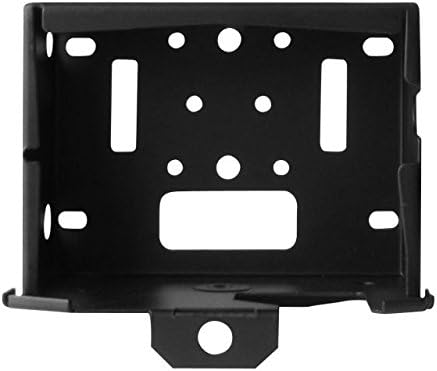
Сүрөт 2: Алдыңкы view S-SB-T коопсуздук кутучасынын. Бул сүрөттө кулпу үчүн борбордук тешик жана кабель кулпусу үчүн иштелип чыккан каптал тешиктери даана көрсөтүлгөн, бул ар кандай коопсуздук чекиттерин көрсөтөт.
4. Операция
S-SB-T коопсуздук кутучасы коопсуздукту сактоо менен бирге камераңызга оңой жетүү үчүн иштелип чыккан. Батареяны алмаштыруу, SD картаны алуу же жөндөөлөрдү тууралоо үчүн камераңызга кирүү үчүн:
- Кулпуну ачуу: Эгерде кулпу же кабель кулпу колдонулуп жатса, аны ачып, коопсуздук кутучасынан чыгарыңыз.
- Алдыңкы панелди алып салуу: Коопсуздук кутучасынын алдыңкы панелин этияттык менен алып салыңыз. Бул камерага толугу менен кирүү мүмкүнчүлүгүн камсыз кылат, ал орнотулган жерден кутучаны толугу менен алып салуунун кажети жок.
- Камера менен иштөө боюнча тапшырмаларды аткарыңыз: Алдыңкы панелди алып салгандан кийин, сүрөттөрдү оңой эле алып чыгып, батарейкаларды алмаштырып же камеранын жөндөөлөрүн тууралай аласыз.
- Кайрадан бекитүү: Тапшырмаларыңызды аткаргандан кийин, камеранын корголгонун камсыз кылуу үчүн алдыңкы панелди кайра бекитип, коопсуздук кулпуларын кайра орнотуңуз.
5. Техникалык тейлөө
- Тазалоо: Коопсуздук кутучасынын сыртын мезгил-мезгили менен жарнама менен сүртүп туруңузamp Кирди, чаңды же таштандыларды кетирүү үчүн чүпүрөк колдонуңуз. Каптамага зыян келтириши мүмкүн болгон абразивдүү тазалоочу каражаттардан алыс болуңуз.
- Текшерүү: Коопсуздук кутучасын эскирүүнүн, бузулуунун же дат басуунун белгилерин, айрыкча катаал аба ырайынын шарттарына дуушар болсоңуз, үзгүлтүксүз текшерип туруңуз. Бардык кулпулоо механизмдеринин туура иштеп жатканын текшериңиз.
- Даттын алдын алуу: Болоттон жасалганы менен, нымдуулукта узак убакытка калуу дат басууга алып келиши мүмкүн. Эгерде куту өзгөчө нымдуу чөйрөдө болсо, сыртына дат басууга каршы спрей сүйкөп, камеранын тешиктерине чачпаганга аракет кылыңыз.
6. Кыйынчылыктарды
6.1 Алдыңкы панелди ачуу/жабуудагы кыйынчылык
- Тоскоолдуктарды текшерүү: Панелдин туура жылмышып же бекитилишине эч кандай таштандылар же бөтөн нерселер тоскоол болбой турганын текшериңиз.
- Камеранын жайгашкан жерин текшерүү: Оюн камерасы кутучанын ичинде туура жайгашканын жана панелдин кыймылына тоскоол болбогонун текшериңиз.
- Зыянды текшерүү: Панелдин же кутучанын алкагынын майышып же бузулуп калганын текшериңиз, бул үзгүлтүксүз иштөөгө тоскоол болушу мүмкүн.
6.2 Коопсуздук кулпулары иштебей жатат
- Кулпу: Кулпунун илгичи алдыңкы панелдеги тешикке туура тегизделгенин текшериңиз. Тиешелүү диаметрдеги илгичти колдонуңуз.
- Кабель кулпусу: Кабель кулпусу эки капталдагы тешиктерден өтүп, тосулуп калбаганын текшериңиз.
6.3 Даттын пайда болушу
- Тазалоо жана дарылоо: Эгерде бир аз дат чыкса, жабыркаган жерди тазалап, дат басуучу праймер же боёк сүйкөңүз.
- Көчүрүү: Мүмкүн болсо, коопсуздук кутучасын кургакыраак жерге көчүрүүнү же түз жамгырдан жана нымдуулуктан кошумча баш калкалоочу жай менен камсыз кылууну карап көрүңүз.
7. Техникалык шарттар
| Өзгөчөлүк | Деталь |
|---|---|
| Модель номери | S-SB-T |
| Бренд | SPYPOINT |
| Материал | Оор жүк ташуучу болот |
| Түс | Кара |
| Шайкештик | Бардык 38 LED SPYPOINT камералары |
| Коопсуздук өзгөчөлүктөрү | Асма кулпу тешиги, Кабелдик кулпу тешиктер, Арткы бекиткич тешиктер |
| Мүмкүнчүлүк | Алынуучу алдыңкы панел |
| Пакеттин болжолдуу салмагы | 2 фунт |
8. Кепилдик маалыматы
SPYPOINT өнүмдөрү жогорку сапаттагы стандарттарга ылайык өндүрүлөт. S-SB-T болоттон жасалган коопсуздук кутучаңызга кепилдик жөнүндө толук маалымат алуу үчүн, расмий SPYPOINT сайтына кайрылыңыз. webсайтына кириңиз же алардын кардарларды колдоо кызматына түз кайрылыңыз. Кепилдик шарттары жана эрежелери аймакка жана продуктка жараша өзгөрүшү мүмкүн.
9. Колдоо
Эгер сизге кошумча жардам керек болсо, SPYPOINT S-SB-T болоттон жасалган коопсуздук кутучасы боюнча суроолоруңуз болсо же техникалык колдоо керек болсо, расмий SPYPOINT сайтына кириңиз. webсайт:
Расмий SPYPOINT Webсайт: SPYPOINT дүкөнү
Ошондой эле, алардын колдоо баракчаларынан пайдалуу ресурстарды, көп берилүүчү суроолорду жана байланыш маалыматын таба аласыз.


