Introduction
This manual provides instructions for the installation, operation, and maintenance of your CyberPower EC750G Ecologic Battery Backup & Surge Protector UPS System. The EC750G is designed to provide reliable power protection and battery backup for desktop computers, workstations, networking devices, and home entertainment systems during power interruptions. It features a compact design and includes an ECO Mode for energy efficiency.
Маанилүү коопсуздук нускамалары
Please read and follow all instructions carefully before installing or operating the EC750G UPS.
- UPSти өз өндүрүшүнө туташтырбаңыз.
- UPSке электр линиясын же электр чыңалуусун өчүргүчтү бекитпеңиз.
- Do not use the UPS for medical equipment, life support equipment, microwave ovens, or vacuum cleaners.
- Бул шайман үйдүн ичинде гана иштөөгө ылайыкталган.
- Avoid installing the UPS in areas with excessive moisture, heat, or dust.
- UPSти туруктуу жерге коюңуз.
- The UPS battery is user-replaceable. Refer to the maintenance section for instructions.
- UPS жерге туташтырылган AC розеткага туташып турганын текшериңиз.
Пакеттин мазмуну
Сиздин пакетиңизде төмөнкү заттар бар экенин текшериңиз:
- CyberPower EC750G UPS System
- USB байланыш кабели
- Колдонуучунун Колдонмосу (бул документ)
- Кепилдик каттоо картасы
Продукт өзгөчөлүктөрү

Сүрөттүн сүрөттөлүшү: Бурчтуу фронт view of the CyberPower EC750G UPS, showcasing its compact black design, the power and ECO mode buttons with LED indicators, and the arrangement of its 12 outlets on the sides. The 750VA rating is visible at the bottom.
The CyberPower EC750G UPS System offers the following key features:
- 750VA/450W Capacity: Provides sufficient power for typical workstations and home entertainment setups.
- 12 NEMA 5-15R Outlets:
- Six battery backup & surge protected outlets.
- Six surge protected outlets (three of which are ECO controlled).
- ЭКО режими: Automatically turns off power to connected peripherals when the computer is off or in sleep mode, reducing energy consumption. Requires USB connection.
- LED абал жарыктары: Indicate Power-On and ECO Mode On/Off status.
- Компакт дизайн: Allows for flexible placement in various environments.
- Simulated Sine Wave Output: Suitable for most electronic devices.
- USB байланыш порту: For connecting to a computer and utilizing PowerPanel Personal Edition Management Software.
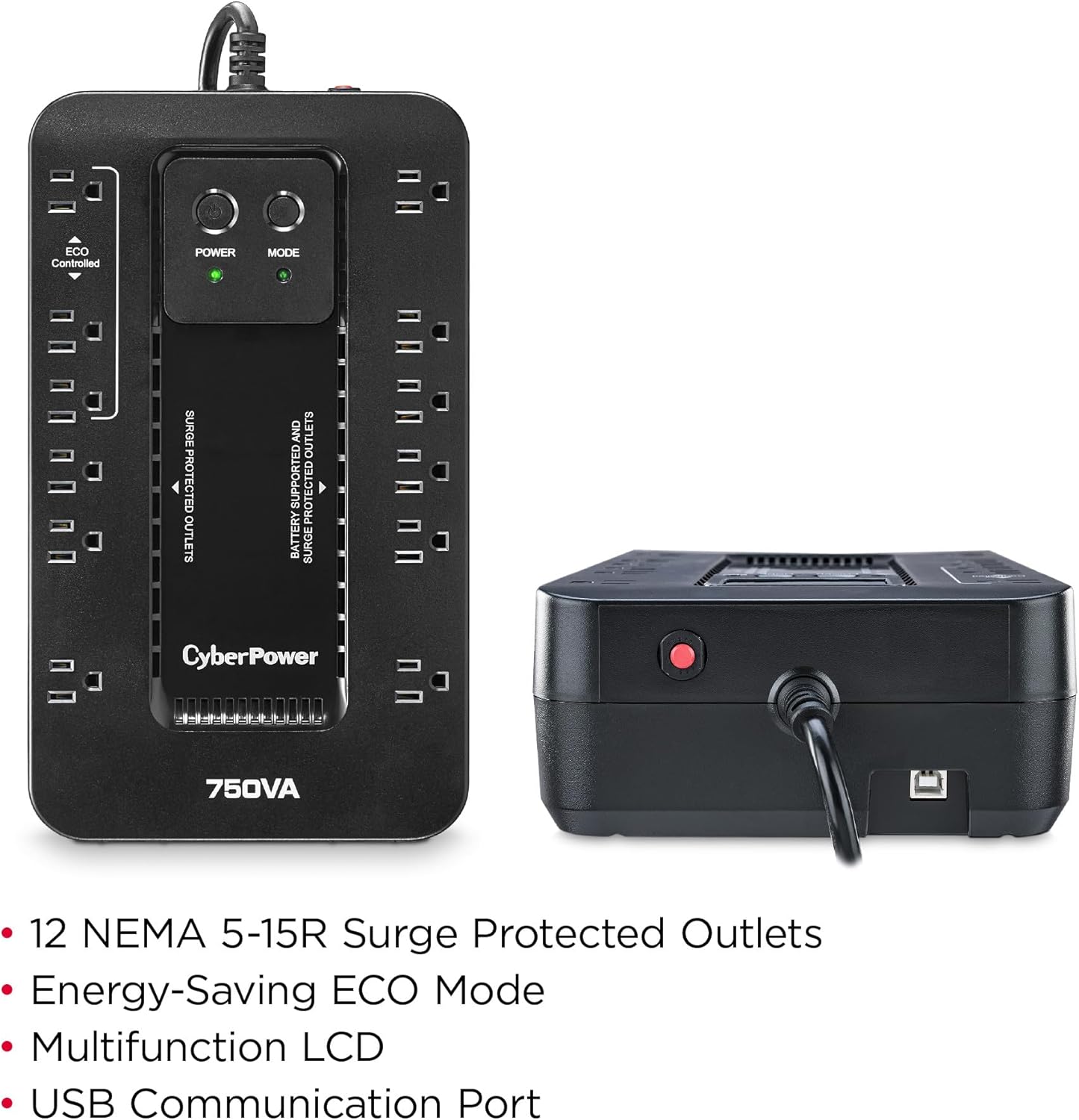
Сүрөттүн сүрөттөлүшү: Жогортон ылдый view of the CyberPower EC750G UPS, highlighting its 12 NEMA 5-15R outlets. The image clearly labels the six battery backup and surge protected outlets, the six surge-only protected outlets (with three marked as ECO Controlled), and the power and ECO mode buttons with their respective LED indicators. The 750VA rating is also visible.
Жайгашуу
- Алгачкы заряддоо: Upon receiving the UPS, plug it into a standard AC outlet for at least 8 hours to ensure the battery is fully charged before connecting any equipment.
- Жайгашкан жери: Position the UPS in a cool, dry, and well-ventilated indoor area. Avoid direct sunlight or proximity to heat sources. Ensure adequate space around the unit for proper airflow.

Сүрөттүн сүрөттөлүшү: The CyberPower EC750G UPS is shown standing vertically on a desk next to a desktop computer tower and monitor, illustrating a typical setup scenario.

Сүрөттүн сүрөттөлүшү: The CyberPower EC750G UPS is shown mounted horizontally behind a wall-mounted television, demonstrating its compact design and versatility for discreet placement in home entertainment setups.
- Туташтыруучу жабдуулар:
- Battery Backup & Surge Protected Outlets: Connect your critical equipment such as computers, monitors, and external hard drives to these outlets. These devices will receive power from the battery during outages.
- Surge Protected Outlets (Non-ECO): Connect non-critical peripherals like printers, scanners, or speakers that only require surge protection.
- ECO Controlled Surge Protected Outlets: Connect peripherals that you want to automatically power off when your computer enters sleep mode or shuts down. A USB connection to your computer is required for this feature to function.
- USB Connection (Optional but Recommended): Connect the provided USB cable from the UPS to your computer's USB port. This enables the ECO Mode functionality and allows you to use the PowerPanel Personal Edition Management Software for advanced monitoring and control.

Сүрөттүн сүрөттөлүшү: Жакын план view of the rear of the CyberPower EC750G UPS, showing the NEMA 5-15P right-angle power cord and the USB communication port. This illustrates where the USB cable connects for computer communication.
- Күйгүзүү: Press the Power button on the front of the UPS. The Power LED will illuminate, indicating the UPS is operational.
Операция
Кубат баскычы
- Press and hold for 2 seconds to turn the UPS ON or OFF.
ЭКО режиминин баскычы
- Press to toggle ECO Mode ON or OFF. When ECO Mode is ON, the ECO LED will illuminate.
- When ECO Mode is active and the connected computer is off or in sleep mode, the three ECO Controlled surge protected outlets will automatically power down.
PowerPanel Personal Edition Software
For enhanced management and monitoring, download and install the CyberPower PowerPanel Personal Edition software from the official CyberPower webсайт. Бул программа сизге мүмкүнчүлүк берет:
- Monitor UPS status, battery capacity, and estimated runtime.
- Configure automatic shutdown settings for your computer during extended power outages.
- View power event logs and diagnostic information.

Сүрөттүн сүрөттөлүшү: A screenshot of the CyberPower PowerPanel Personal Edition software interface, displaying a "Power Problem Summary" with tabs for "Current Status" and "Summary". It shows power condition details, battery capacity (100%), and estimated runtime (93 min), indicating the UPS is working normally.
Техникалык тейлөө
Батареяны алмаштыруу
The EC750G uses a user-replaceable sealed lead-acid battery. The typical battery life is 3-5 years, depending on usage and environmental conditions.
- Turn off the UPS and disconnect it from the AC power outlet.
- Disconnect all connected equipment from the UPS.
- Locate the battery compartment cover (usually on the bottom or side).
- Remove the cover and carefully disconnect the battery terminals.
- Remove the old battery and insert the new battery, ensuring correct polarity.
- Reconnect the battery terminals, replace the cover, and plug the UPS back into the AC outlet for recharging.
For specific battery model information, refer to the specifications section or contact CyberPower support.
Тазалоо
Periodically clean the exterior of the UPS with a soft, dry cloth. Do not use liquid or aerosol cleaners. Ensure ventilation openings are free from dust and debris.
Проблемаларды чечүү
| Көйгөй | Мүмкүн себеп | Чечим |
|---|---|---|
| UPS күйбөйт. | Battery is low or discharged; UPS is not connected to AC power. | Ensure UPS is plugged into a live AC outlet and allow it to charge for 8 hours. Press the power button firmly. |
| UPS is on but provides no power to connected equipment. | Equipment is plugged into surge-only outlets; UPS is overloaded. | Move critical equipment to battery backup outlets. Reduce the load by unplugging non-essential devices. |
| UPS emits a continuous beeping sound. | UPS is operating on battery power during an outage or low battery condition. | Save your work and safely shut down your computer. The beeping will stop when AC power returns or the UPS shuts down. |
| ECO Mode outlets do not turn off. | USB cable not connected; ECO Mode is disabled; computer not in sleep/off state. | Ensure USB cable is connected between UPS and computer. Press ECO button to enable. Verify computer is in sleep or off state. |
| UPS frequently switches to battery mode. | Unstable incoming AC power. | This indicates the UPS is performing its function. If frequent, consider checking your building's electrical wiring or contacting your utility provider. |
Техникалык шарттар
| Өзгөчөлүк | Деталь |
|---|---|
| Модел | EC750G |
| Кубаттуулугу (VA/Watts) | 750VA / 450W |
| Киргизүү көлөмүtage | 120 вольт |
| Output Waveform | Симуляцияланган синус толкуну |
| Соода түйүндөрү | 12 NEMA 5-15R (6 Battery Backup & Surge, 6 Surge Only - 3 ECO Controlled) |
| Батарея түрү | Sealed Lead Acid (User Replaceable) |
| Өлчөмдөр (D x W x H) | 7" x 12.2" x 3.1" (17.8 см x 31 см x 7.9 см) |
| Элемент Салмагы | 7.7 фунт (3.5 кг) |
| Өндүрүүчү | CyberPower системалары |
| Биринчи жеткиликтүү күн | 10-июнь, 2013-жыл |

Сүрөттүн сүрөттөлүшү: The CyberPower EC750G UPS is shown with its physical dimensions (length, width, height) clearly marked as 12.2", 7.0", and 3.1" respectively, providing a visual reference for its compact size.
Кепилдик жана колдоо
The CyberPower EC750G comes with a үч жылдык кепилдик, which includes coverage for the batteries. Additionally, it is backed by a $100,000 Connected Equipment Guarantee, туташкан түзмөктөрүңүзгө тынчтыкты камсыз кылуу.
For technical support, warranty claims, or further assistance, please visit the official CyberPower webсайтка же кардарларды тейлөө бөлүмүнө кайрылыңыз.
- Онлайн колдоо: www.cyberpowersystems.com/support/
- Продукцияны каттоо: Register your product to ensure full warranty benefits.


