Продукт бүттүview
The Sagemcom Sixty Cordless Telephone and Answer Machine combines modern technology with a classic design. Its unique aesthetic, smooth finish, and touchscreen functionality make it a distinctive addition to any environment. Designed for user comfort, the Sixty offers a range of features including hands-free mode, extended battery life, and an intuitive interface for easy communication.
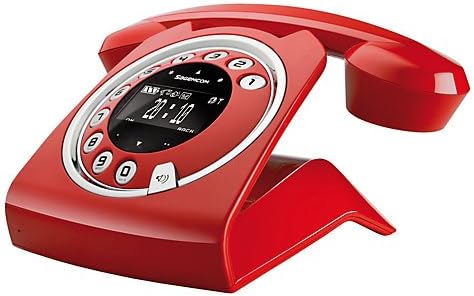
Image: The Sagemcom Sixty Cordless Telephone and Answer Machine in red, showcasing its unique retro-modern design with a circular dial and digital display.

Сүрөт: каптал view of the Sagemcom Sixty Cordless Telephone, highlighting its sleek profile and the cradle design.
Орнотуу колдонмосу
1. таңгактан чыгаруу
Carefully remove all components from the packaging. Ensure you have the base unit, handset, power adapter, and telephone line cord.
2. Негизги блокту туташтыруу
- Connect the power adapter to the 'DC IN' port on the back of the base unit and plug the other end into a wall outlet.
- Connect one end of the telephone line cord to the 'LINE' port on the base unit and the other end to your telephone wall jack.
3. Батареяны орнотуу жана заряддоо
- Телефондогу батарея отсегин ачыңыз.
- Берилген кайра заряддоого болгон батарейкаларды туура полярдуулукка (+ жана -) сактоо менен салыңыз.
- Батарея отсегин жабыңыз.
- Place the handset on the base unit. The display will indicate charging. Allow the handset to charge for at least 16 hours before first use to ensure optimal battery performance.
Иштөө нускамалары
Чалууларды кабыл алуу жана кабыл алуу
- Чалуу үчүн: Телефонду көтөрүңүз же басыңыз Чалуу button. Dial the number using the touchscreen keypad.
- Чакырууну кабыл алуу үчүн: Телефонду көтөрүңүз же басыңыз Чалуу телефон шыңгырганда баскычын басыңыз.
- Чалууну аяктоо үчүн: Трубканы кайра негизги блокко коюңуз же баскычын басыңыз Чакырууну аяктоо баскычы.
Сенсордук экранды колдонуу
The Sixty features a responsive touchscreen for navigation and input. Tap icons or numbers to select functions or dial. Swipe to scroll through lists or menus.
Hands-Free режими
Чалуу учурунда, басыңыз Баяндамачы button to activate hands-free mode. Press it again to return to handset mode.
Телефон китепчесин башкаруу
- Байланыш кошуу: Navigate to the Phonebook menu, select 'Add New Contact', enter the name and number using the touchscreen, and save. The phonebook can store up to 150 names.
- Байланыш издөө: Access the Phonebook and use the search function or scroll through the list.
- Байланышты оңдоо/жок кылуу: Select the desired contact from the Phonebook and choose the 'Edit' or 'Delete' option.
Answering Machine Functions
The integrated answering machine has a recording capacity of 10 minutes.
- Жандыруу/өчүрүү: Access the Answering Machine menu to turn it on or off.
- Ойнотулган билдирүүлөр: Select 'Play Messages' from the Answering Machine menu.
- Чыгуучу билдирүүнү жаздыруу: Follow the prompts in the Answering Machine menu to record a personalized outgoing message.
Техникалык тейлөө
Телефонуңузду тазалоо
To clean the phone, wipe it with a soft, damp cloth. Do not use abrasive cleaners or solvents, as these can damage the surface. Ensure the phone is disconnected from power before cleaning.
Батареяга кам көрүү
- Ар дайым берилген кайра заряддалуучу батарейкаларды колдонуңуз.
- Эгер телефон узак убакыт бою колдонулбаса, агып кетпеш үчүн батарейкаларды алып салыңыз.
- Эски батареяларды жергиликтүү эрежелерге ылайык таштаңыз.
Проблемаларды чечүү
| Көйгөй | Мүмкүн чечим |
|---|---|
| Терүү үнү жок | Телефон линиясынын шнуру негизги блокко да, дубалдагы уячага да бекем туташтырылганын текшериңиз. Кубат адаптери сайылганын текшериңиз. |
| Телефон заряддалбай жатат | Ensure the handset is correctly placed on the base unit. Clean the charging contacts on both the handset and base unit with a dry cloth. Verify the power adapter is working. |
| Үн сапаты начар | Негизги блокко жакыныраак жылыңыз. Башка электрондук түзүлүштөрдөн келген тоскоолдуктарды текшериңиз. Телефон линиясынын шнуру бузулбагандыгын текшериңиз. |
| Дисплей бош | Check if the handset battery is charged. If not, place it on the base unit to charge. Ensure the power adapter is connected to the base unit. |
| Чалууларды кабыл алуу же жасоо мүмкүн эмес | Verify that the telephone line is active. Check all cable connections. Restart the base unit by unplugging and replugging the power adapter. |
Техникалык мүнөздөмөлөр
| Өзгөчөлүк | Спецификация |
|---|---|
| Бренд | Sagemcom |
| Модел | Алтымыш |
| Түс | Кызыл |
| Телефон түрү | Зымсыз |
| Телефон менен сүйлөшүү убактысы | 10 саатка чейин |
| Күтүү убактысы | 120 саатка чейин |
| Recording Capacity (Answering Machine) | 10 мүнөт |
| Телефон китепчесинин сыйымдуулугу | 150 Аты-жөнү |
| ASIN | B00DX64LPI |
| Биринчи жеткиликтүү күн | 15-апрель, 2014-жыл |
Кепилдик жана колдоо
For warranty information and customer support, please refer to the documentation included with your purchase or visit the official Sagemcom webсайт. Ар кандай кепилдик дооматтары үчүн сатып алганыңыздын далилин сактаңыз.


