1. Киришүү
This manual provides comprehensive instructions for the installation, operation, and maintenance of the Juniper J2320 Services Router. The J2320 is a high-performance, modular router designed for secure, reliable network connectivity. It features Junos OS, 1GB DRAM, 1GB Flash, and three PIM (Physical Interface Module) slots, suitable for 19-inch rack mounting.
2. Коопсуздук маалыматы
Always observe the following safety precautions when handling or operating the Juniper J2320 Services Router:
- Ensure the device is properly grounded before connecting power.
- Do not block ventilation openings. Adequate airflow is crucial for cooling.
- Use only the power supply provided or specified by Juniper Networks.
- Аппаратты нымдуулуктун же экстремалдык температуранын таасиринен сактаңыз.
- Монтаждоо жана тейлөөнү квалификациялуу кызматкерлер гана аткарышы керек.
3. Пакеттин мазмуну
Пакетте бардык буюмдар бар экенин текшериңиз:
- Juniper J2320 Services Router
- Base Memory (256 MB)
- SW Encryption
- AC Power Supply
- Rack-mounting hardware (screws, brackets)
- Документтер (бул колдонмо)
4. Продукт бүтүп калдыview
The Juniper J2320 Services Router is a compact, rack-mountable device. Familiarize yourself with its components:

4.1-сүрөт: Фронт view of the Juniper J2320 Services Router, showcasing the main unit with its front panel ports and indicators, along with the included power cable and a small bag of mounting screws.

4.2-сүрөт: Жогорудан төмөн view of the Juniper J2320 Services Router, showing the router unit, a coiled power cable, and a light blue network cable in a plastic bag, all laid out on a white surface.
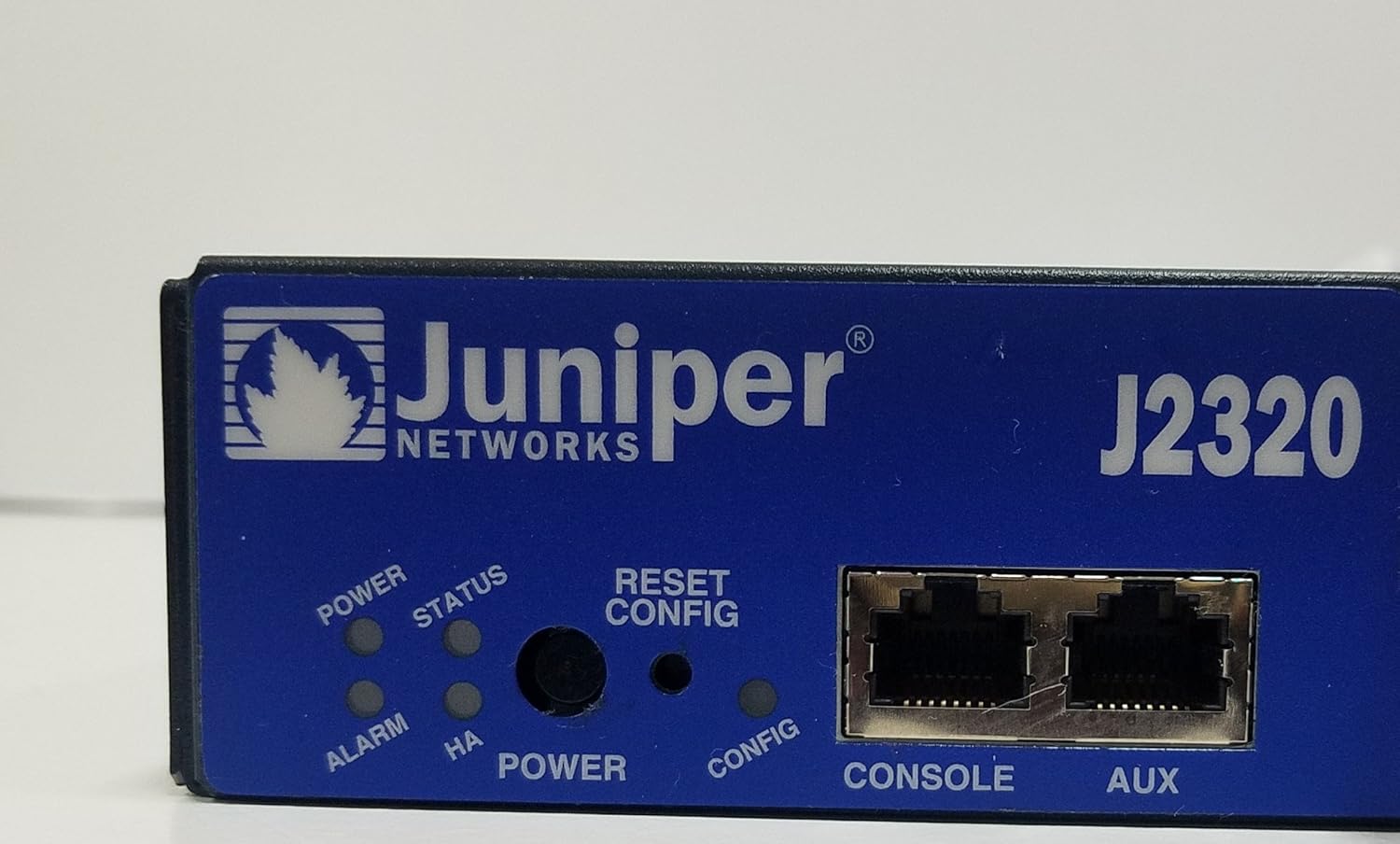
4.3-сүрөт: A detailed close-up of the Juniper J2320 router's front panel. Visible elements include the Juniper Networks logo, model number J2320, LED indicators for Power, Status, Alarm, and HA (High Availability), a Reset/Config button, and Console and Aux RJ-45 ports.

4.4-сүрөт: Side profile of the Juniper J2320 Services Router, highlighting the extensive ventilation grilles along the side and rear, essential for heat dissipation during operation.
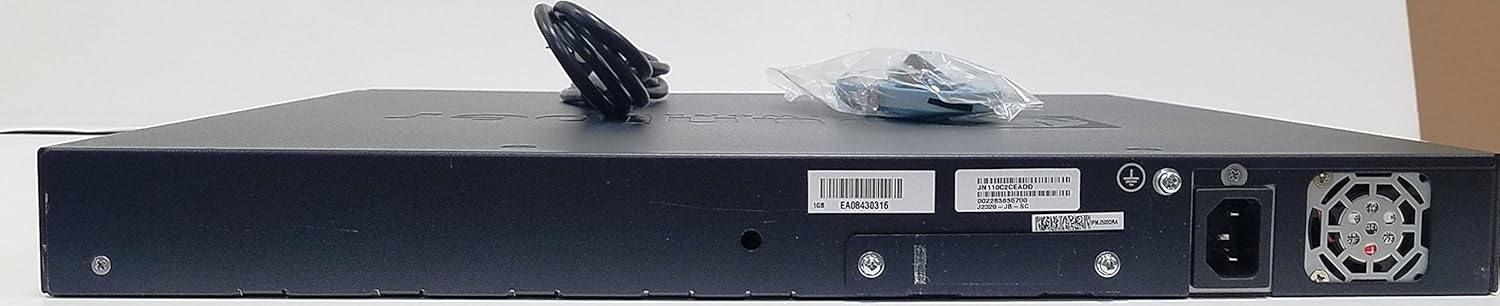
4.5-сүрөт: Арткы view of the Juniper J2320 Services Router, displaying the AC power input socket, grounding screw, and various product labels including serial numbers and model information.
Алдыңкы панелдин компоненттери:
- Power LED: Кубаттын абалын көрсөтөт.
- Статус LED: Системанын иштөө абалын көрсөтөт.
- Ойготкуч LED: Indicates system alarms or errors.
- Reset/Config Button: Used for system reset or configuration mode.
- Консол порту: RJ-45 port for local management access.
- Aux порт: Auxiliary port for dial-up or other connections.
- Network (RJ-45) Ports: Four 10/100/1000Base-T Gigabit Ethernet ports.
- PIM Slots: Three expansion slots for Physical Interface Modules.
- USB порттору: Two USB 2.0 ports (USB 0, USB 1).
5. Орнотуу
5.1 Стойкага орнотуу
The J2320 router is designed for 19-inch rack mounting (1U height).
- Attach the provided rack-mounting brackets to the sides of the router using the supplied screws.
- Align the router with the rack posts and secure it using appropriate rack screws.
- Ensure there is adequate space for airflow around the unit.
5.2 Кубат туташтыруу
- Connect the AC power cord to the power input on the rear of the router.
- Электр шнурунун экинчи учун жерге туташтырылган электр розеткасына сайыңыз.
- The Power LED on the front panel should illuminate.
5.3 Баштапкы конфигурация
For initial configuration, connect a console cable from your management workstation to the Console port on the router's front panel. Refer to the Junos OS documentation for detailed configuration steps.
6. Маршрутизаторду иштетүү
6.1 Күйгүзүү/өчүрүү
- Күйгүзүү: Connect the AC power cord. The router will automatically power on and begin its boot sequence.
- Өчүрүү: Disconnect the AC power cord from the electrical outlet. For graceful shutdown, use the appropriate Junos OS command line interface (CLI) commands before disconnecting power.
6.2 LED көрсөткүчтөрү
Алдыңкы панелдеги LED индикаторлорунун иштөө абалын көзөмөлдөңүз:
- Power LED (жашыл): Solid green indicates power is on.
- Status LED (Green/Amber): Solid green indicates normal operation. Amber may indicate a warning or degraded state.
- Alarm LED (Red/Amber): Red indicates a critical alarm. Amber indicates a minor alarm.
6.3 Тармакка туташуу
Connect network devices to the RJ-45 network ports. The ports support 10/100/1000Base-T Ethernet. Ensure proper cabling (straight-through or crossover as required by your network setup).
7. Техникалык тейлөө
7.1 Тазалоо
- Periodically clean the exterior of the router with a soft, dry cloth.
- Ensure ventilation openings are free from dust and debris. Use compressed air if necessary, but do not spray directly into ports.
- Суюктук же аэрозолдук тазалоочу каражаттарды колдонбоңуз.
7.2 Микропрограмма жаңыртуулары
Juniper Networks колдоо кызматын үзгүлтүксүз текшерип туруңуз website for the latest Junos OS firmware updates. Keeping the firmware updated ensures optimal performance, security, and access to new features. Follow the instructions provided by Juniper Networks for firmware update procedures.
8. Кыйынчылыктарды
| Көйгөй | Мүмкүн себеп | Чечим |
|---|---|---|
| Router does not power on. | No power to the unit; faulty power cord or outlet. | Электр шнурунун туташуусун текшериңиз. Розетка иштеп турганын текшериңиз. |
| Alarm LED is red. | Critical system error or hardware failure. | Check system logs via console. Contact Juniper support if unresolved. |
| Cannot access router via network. | Incorrect IP configuration; network cable issue. | Verify IP settings. Check network cable connections and status LEDs on ports. |
9. Техникалык шарттар
| Өзгөчөлүк | Деталь |
|---|---|
| Продукт модели | J2320 |
| Өндүрүүчү бөлүгүнүн номери | J2320-JB-SC |
| Продукт түрү | Маршрутизатор |
| Порттордун жалпы саны | 4 (RJ-45 Network) + Console/Aux + USB |
| Network Technology | 10/100/1000Base-T Gigabit Ethernet |
| Стандарттык Эс тутум | 1 ГБ DRAM |
| Flash Memory | 1 ГБ Flash |
| Кеңейтүү уячалары | 7 total, 3 PIM slots |
| Compatible Rack Unit | 1U |
| Форма фактору | Стойкага орнотулат |
| Өлчөмдөрү (H x W x D) | 1.8" x 17.5" x 15.1" |
| Салмагы (болжол менен) | 15.00 фунт |
| Дата биринчи жеткиликтүү | 21-июль, 2013-жыл |
Note: Memory and Flash values are based on the product title for this specific model variant.
10. Кепилдик жана колдоо
10.1 Өндүрүүчүнүн кепилдиги
The Juniper J2320 Services Router typically comes with a 1 жылдык Чектелген Кепилдик from Juniper Networks. Please refer to the official Juniper Networks warranty documentation for full terms and conditions.
10.2 Кеңейтилген коргоо пландары
Extended protection plans may be available for purchase separately to provide additional coverage beyond the standard manufacturer's warranty. These plans can offer extended service and support for your device.
- 4 жылдык коргоо планы: Provides extended coverage for four years.
- Толук коргоо: Ай сайын жазылуу планы, мурунку жана келечектеги сатып алууларды камтыйт.
Сатып алуу боюнча чоо-жайы үчүнasing or activating these plans, consult your retailer or the plan provider.
10.3 Техникалык колдоо
For technical assistance, software updates, or further documentation, please visit the official Juniper Networks support website or contact their customer service. Ensure you have your product model and serial number ready when seeking support.
Өндүрүүчү Webсайттын дареги: http://www.juniper.net


