1. Киришүү
This manual provides detailed instructions for the Gembird KB-BT-001-W-DE Slimline Bluetooth Keyboard. Please read this manual thoroughly before using the product to ensure proper operation and to maximize its lifespan. This keyboard is designed for seamless wireless connectivity with various Bluetooth-enabled devices.
2. Пакеттин мазмуну
- Gembird KB-BT-001-W-DE Bluetooth Keyboard (German QWERTZ Layout, White)
- USB кабели
- User Manual
3. Негизги өзгөчөлүктөрү
- Slimline Bluetooth V 3.0 Wireless Keyboard (German QWERTZ Layout)
- Ultra-flat and ergonomic design
- Supports common Bluetooth-enabled devices: smartphones, tablets, PCs, and laptops
- Soft-touch keys for comfortable typing
- Convenient multimedia keys
- Compact size (28.7 x 2 x 13.7 cm) ideal for travel
- Compatible with Windows (XP, Vista, 7, 8) and Apple (iPad, iPhone, iPod Touch, MAC OS)
- Иштөө диапазону: 10 метрге чейин
4. Системалык талаптар
- Device with Bluetooth connectivity (e.g., PC, laptop, tablet, smartphone)
- Supported Operating Systems: Windows XP/Vista/7/8, Apple iOS (iPad, iPhone, iPod Touch), Mac OS
5. Орнотуу жана жупташтыруу
5.1. Баскычтопту күйгүзүү
Locate the power switch on the keyboard, usually on the side or back. Slide it to the "ON" position. The keyboard's indicator light (often blue or green) should illuminate briefly, indicating it is powered on and ready for pairing.
5.2. Түзмөгүңүз менен жупташтыруу
- Түзмөгүңүздө Bluetooth иштетүү: Go to your device's settings and ensure Bluetooth is turned on.
- Жупташтыруу режимине кирүү: On the Gembird keyboard, press the Туташуу or Жупташуу button (if available, typically a small button on the back or bottom, or a key combination like Fn + C). The indicator light should start blinking rapidly, signifying it is in pairing mode.
- Издөө Түзмөктөр: On your device, search for available Bluetooth devices. The keyboard should appear as "Gembird KB-BT-001-W-DE" or similar.
- Тандоо жана туташуу: Select the keyboard from the list. Your device may prompt you to enter a pairing code displayed on the screen. Type this code using the Gembird keyboard and press Кириңиз.
- Ырастоо: Once successfully paired, the indicator light on the keyboard will stop blinking and remain solid or turn off, and your device will show the keyboard as "Connected."
Note: The exact pairing process may vary slightly depending on your device's operating system. Refer to your device's manual for specific Bluetooth pairing instructions.
6. Иштөө нускамалары
6.1. Негизги колдонуу
Once paired, the keyboard functions like a standard QWERTZ keyboard. Simply begin typing. Ensure the keyboard is within the 10-meter operating range of your device for optimal performance.
6.2. Мультимедиа жана функция баскычтары
The Gembird KB-BT-001-W-DE keyboard includes dedicated function keys (F1-F12) and multimedia shortcuts. To activate the secondary functions (blue icons) on the F-keys, press and hold the Fn key (located near the left Ctrl key) and then press the desired F-key.
| Ачкыч айкалышы | Функция | Description |
|---|---|---|
| Fn + F1 | F11 | Standard F11 key function. |
| Fn + F2 | F12 | Standard F12 key function. |
| Fn + F3 | Opens default email client. | |
| Fn + F4 | Browser/Home | Opens default web browser or navigates to home page. |
| Fn + F5 | Медиа ойноткуч | Launches default media player. |
| Fn + F6 | Мурунку трек | Skips to the previous track in media playback. |
| Fn + F7 | Ойнотуу/Тыныгуу | Медиа файлды ойнотуу үчүн ойнотууну/тындырууну өчүрөт. |
| Fn + F8 | Кийинки трек | Skips to the next track in media playback. |
| Fn + F9 | Үнсүз | Аудионун үнүн басуу/ачуу. |
| Fn + F10 | Үндү төмөндөтүү | Системанын үнүн азайтат. |
| Fn + F11 | Үндү көтөрүү | Системанын көлөмүн көбөйтөт. |
| Fn + F12 | Кулпуланган экран | Компьютердин экранын кулпулайт. |
| Fn + Num Lock | Numeric Keypad Toggle | Activates/deactivates the embedded numeric keypad (U, I, O, J, K, L, M keys). |
6.3. Keyboard Layout (German QWERTZ)
This keyboard features a German QWERTZ layout. Key positions for special characters and symbols may differ from standard QWERTY layouts. Refer to the keycaps for specific character placements.
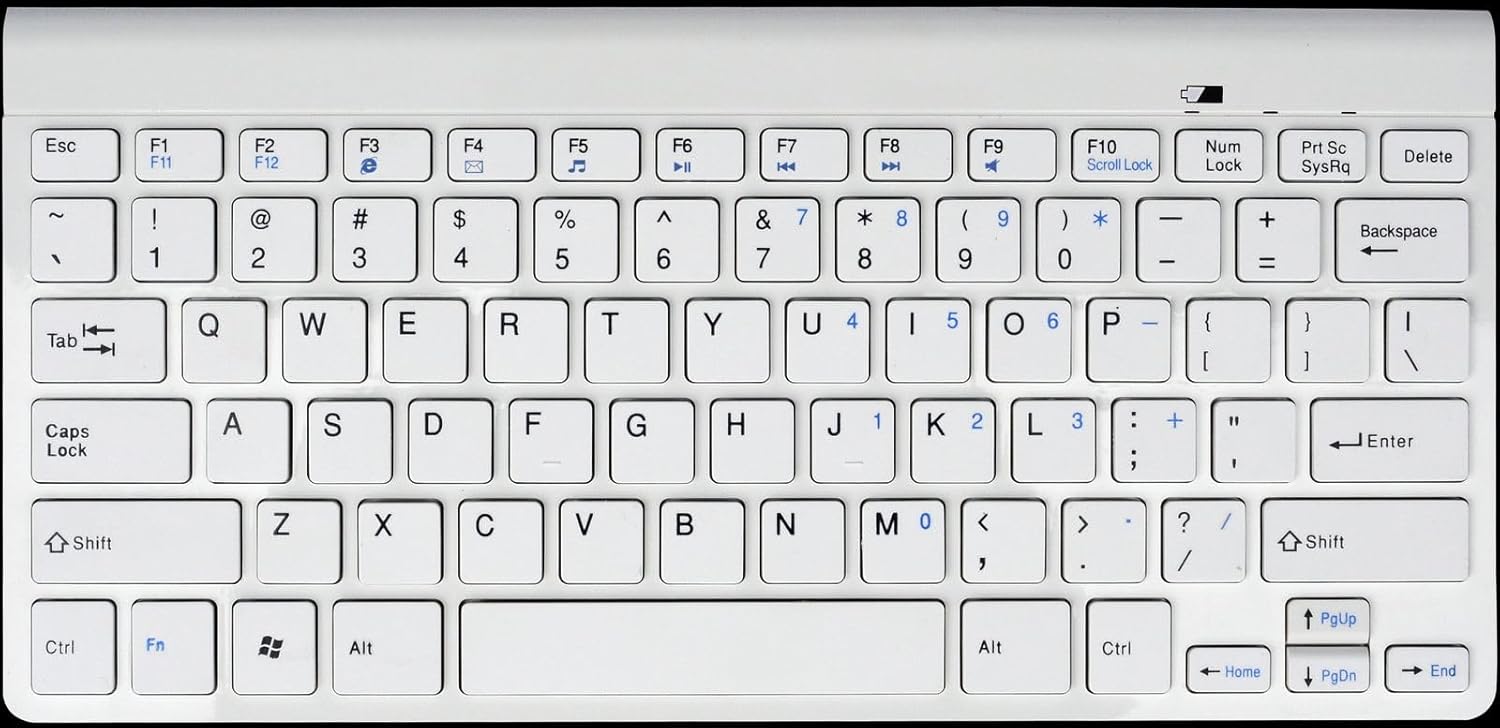
1-сүрөт: Gembird KB-BT-001-W-DE Slimline Bluetooth Keyboard. This image displays the full keyboard, highlighting its compact design and German QWERTZ key layout, including function keys with multimedia shortcuts and the embedded numeric keypad on the right side.
7. Техникалык тейлөө
7.1. Тазалоо
- Disconnect the keyboard from power and turn it off before cleaning.
- Бир аз жумшак, түксүз кездемени колдонуңуз dampсуу же жумшак тазалоо эритмеси менен.
- Ашыкча нымдуулуктан сактаныңыз жана тазалагычтарды түздөн-түз клавиатурага чачпаңыз.
- Ачкычтардын ортосундагы чаң жана таштанды үчүн кысылган абаны колдонуңуз.
7.2. Батареяга кам көрүү
- If the keyboard uses rechargeable batteries, charge it regularly using the provided USB cable.
- If it uses disposable batteries, replace them when the low battery indicator (if present) illuminates or performance degrades.
- Turn off the keyboard when not in use for extended periods to conserve battery life.
8. Кыйынчылыктарды
| Көйгөй | Мүмкүн себеп | Чечим |
|---|---|---|
| Клавиатура туташпай/жупташпай жатат. | Bluetooth is off on device; keyboard not in pairing mode; low battery; too far from device. | Ensure Bluetooth is enabled. Put keyboard in pairing mode. Charge/replace batteries. Move keyboard closer to device (within 10m). Try re-pairing. |
| Keys not responding or delayed input. | Low battery; interference; out of range. | Charge/replace batteries. Move away from other wireless devices. Ensure keyboard is within range. |
| Incorrect characters typed (e.g., Y and Z swapped). | Device's keyboard layout is set to QWERTY instead of QWERTZ. | Change your device's keyboard input language/layout to German (QWERTZ). |
| Multimedia keys not working. | Fn key not pressed; software incompatibility. | кармап турганыңызды текшериңиз Fn key while pressing the F-key. Update device drivers if applicable. |
9. Техникалык шарттар
| Өзгөчөлүк | Деталь |
|---|---|
| Бренд | Gembird |
| Модель номери | KB-BT-001-W-DE |
| Байланыш технологиясы | Bluetooth v3.0 |
| Шайкеш түзмөктөр | ЖК, смартфон, планшет |
| Keyboard Description | Мультимедиа |
| Ачкычтардын саны | 78 |
| Баскычтоптун жайгашуусу | QWERTZ (немисче) |
| Камтылган компоненттер | USB кабели |
| Иштөө диапазону | 10 метрге чейин |
| Өлчөмдөрү (болжол менен) | 28.7 x 13.7 x 2 см (11.3 x 5.4 x 0.8 дюйм) |
10. Кепилдик жана колдоо
For warranty information and technical support, please refer to the documentation included with your purchase or visit the official Gembird website. Contact details for support are typically provided in the product packaging or on the manufacturer's webсайт.
- Өндүрүүчү: Gembird
- Колдоо: Telephone support and email support are mentioned in the product features. Please check the included manual or Gembird's official webучурдагы байланыш маалыматы үчүн сайт.


