1. Киришүү
Thank you for choosing the WMF LONO 900W Toaster. This manual provides essential information for the safe and efficient operation, maintenance, and care of your appliance. Please read these instructions thoroughly before first use and keep them for future reference.
2. Коопсуздук нускамалары
- Тостер дайыма күйүүчү материалдардан алыс, туруктуу, ысыкка чыдамдуу бетке коюлганын текшериңиз.
- Do not operate the toaster near water or other liquids.
- Тостер уячаларына эч качан металл нерселерди салбаңыз.
- Тостерди колдонбогондо, тазалоодон мурун же бузулуу пайда болгондо электр розеткасынан сууруп алыңыз.
- ысык беттерге тийбеңиз. Туткаларды же туткаларды колдонуңуз.
- Бул шайман физикалык, сезүү же акыл-эс жөндөмү начар же тажрыйбасы жана билими жок адамдар (анын ичинде балдар) үчүн, эгерде алардын коопсуздугуна жооптуу адам тарабынан көзөмөлсүз же шайманды колдонуу боюнча көрсөтмө болбосо, колдонууга арналбайт.
- Балдар шайман менен ойнобошу үчүн аларды көзөмөлгө алуу керек.
- Иштеп жатканда тостерди жаппаңыз.
- Bread may burn, therefore toasters must not be used near or below curtains and other combustible materials. They must be supervised when in use.
3. Продукт бүтүп калдыview
The WMF LONO Toaster is designed for efficient and even toasting of bread slices. It features two wide slots, adjustable browning control, and various functions for optimal results.

Image 1: The WMF LONO 900W Toaster, showcasing its sleek stainless steel and black design with two toasting slots.
Негизги компоненттер:
- Тост уячалары: Two wide slots for various bread types.
- Ташуу рычагы: Lowers bread into the toaster and initiates the toasting cycle.
- Браунинг башкаруу терүү: Adjusts the desired level of toast browning (settings 1-7).
- Башкаруу баскычтары: Defrost, Reheat, and Cancel functions.
- Алынуучу күкүм лоток: Оңой тазалоо үчүн күкүмдөрдү чогултат.
- Integrated Warming Rack: For warming rolls and pastries.

Сүрөт 2: Жакын пландан view of the toaster's control panel, showing the browning control dial and the defrost, reheat, and cancel buttons.

Image 3: The removable crumb tray of the WMF LONO Toaster, shown partially pulled out for cleaning.
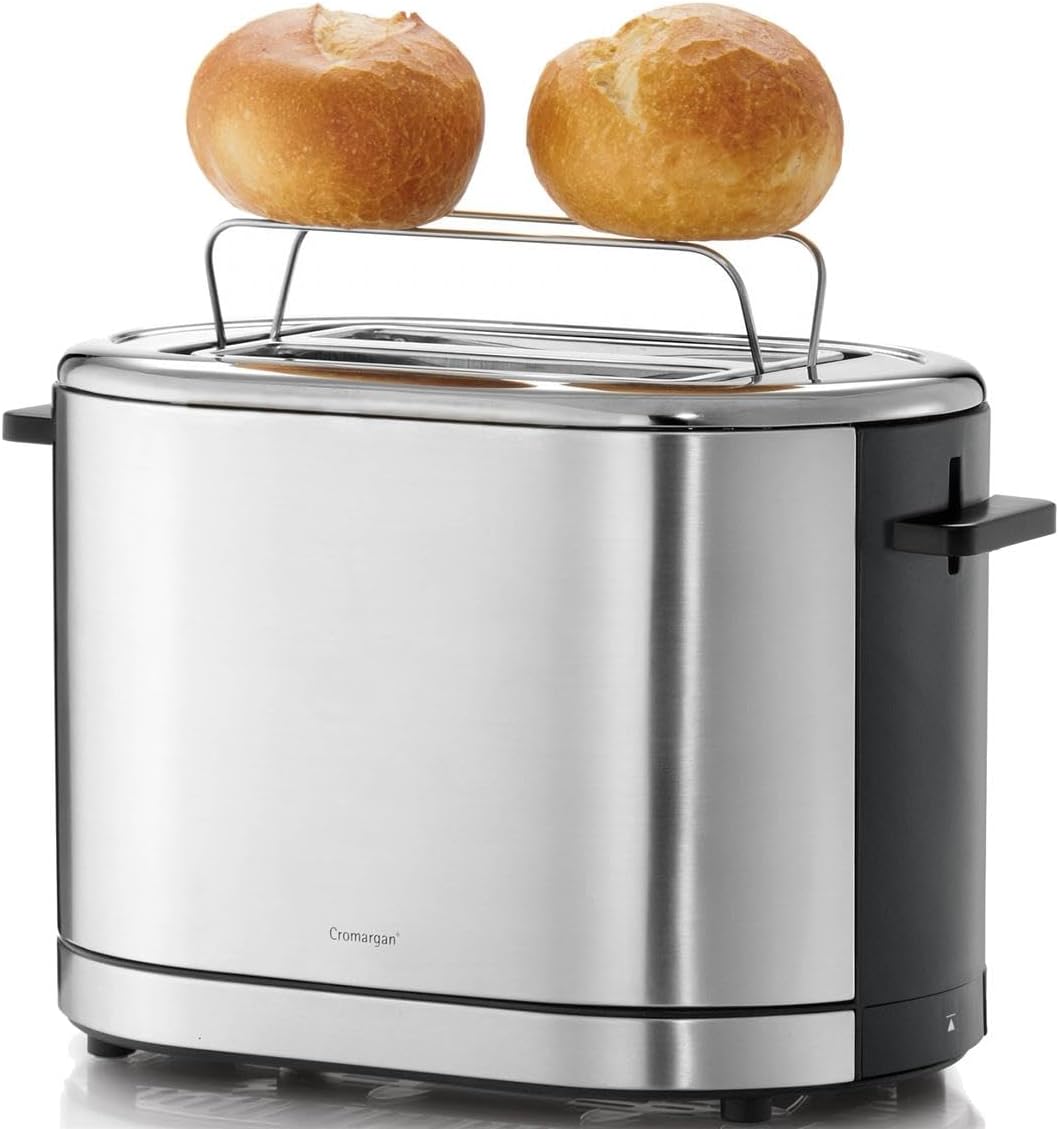
Image 4: The WMF LONO Toaster with its integrated warming rack extended, holding two bread rolls for warming.
4. Орнотуу
- Тостерди таңгактан чыгарып, бардык таңгактоочу материалдарды алып салыңыз.
- Place the toaster on a clean, dry, stable, and heat-resistant surface. Ensure there is adequate ventilation around the appliance.
- Before first use, operate the toaster without bread for a few cycles at the highest browning setting to burn off any manufacturing residues. This may produce a slight odor, which is normal. Ensure the area is well-ventilated.
- Allow the toaster to cool down completely after the initial burn-off cycles.
5. Иштөө нускамалары
5.1. Toasting Bread
- Plug the toaster into a suitable power outlet (220-240V, 50/60Hz).
- Place up to two slices of bread into the toasting slots.
- Select your desired browning level using the browning control dial (1 for light, 7 for dark).
- Каретка рычагын ал ордуна бекитиле турганча басыңыз. Тост цикли башталат жана индикатор күйөт.
- Once the selected browning level is reached, the toast will automatically pop up, and the toaster will switch off.

Image 5: Two slices of bread placed inside the toasting slots of the WMF LONO Toaster, ready for operation.
5.2. Эритүү функциясы
Тоңдурулган нанды тосттоо үчүн бул функцияны колдонуңуз.
- Place frozen bread into the slots.
- Каалаган кызартуу деңгээлин тандаңыз.
- Press the carriage lever down, then press the Эритүү button (snowflake icon). The defrost indicator light will illuminate.
- The toaster will automatically adjust the toasting time to account for defrosting.
5.3. Кайра жылытуу функциясы
Буга чейин куурулган нанды андан ары кызартпай жылытуу үчүн бул функцияны колдонуңуз.
- Place cold, toasted bread into the slots.
- Press the carriage lever down, then press the Кайра жылытуу button (wavy lines icon). The reheat indicator light will illuminate.
- The toaster will briefly warm the bread and then automatically pop it up.
5.4. Функцияны жокко чыгаруу
Тост циклин каалаган убакта токтотуу үчүн басыңыз Жокко чыгаруу button (circle with diagonal line icon). The toast will pop up immediately.
5.5. Using the Warming Rack
The integrated warming rack is ideal for warming rolls, croissants, or pastries.
- Gently push the warming rack lever upwards until the rack is fully extended.
- Жылыта турган нерселерди стойкага коюңуз.
- Кызартуу башкаруусун төмөнкү жөндөөгө коюңуз (мисалы, 1 же 2).
- Press the carriage lever down to start the warming cycle.
- Monitor the items closely to prevent burning. Press the Cancel button when warmed to your preference.
- After use, push the warming rack lever downwards to retract the rack.
6. Техникалык тейлөө жана тазалоо
Үзгүлтүксүз тазалоо оптималдуу иштешин камсыз кылат жана тостериңиздин иштөө мөөнөтүн узартат.
- Тазалоодон мурун ар дайым тостерди розеткадан сууруп, аны толугу менен муздатыңыз.
- Чакан табак: Pull out the removable crumb tray from the bottom of the toaster. Empty the crumbs and wipe the tray clean with a damp кездеме. Кайра салуудан мурун анын кургак экенин текшериңиз.
- Сырткы: Сырткы беттерин жумшак менен сүртүңүз, гamp кездеме. Абразивдүү тазалагычтарды же жуугучтарды колдонбоңуз, анткени алар дат баспас болоттон жасалган жабууну бузушу мүмкүн.
- Тостерди эч качан сууга же башка суюктукка салбаңыз.
- Do not attempt to clean the inside of the toasting slots with any tools or your fingers.
7. Кыйынчылыктарды
- Тостер күйбөйт: Ensure the power cord is securely plugged into a working outlet. Check if the carriage lever is fully pressed down and locked.
- Bread is unevenly toasted: This can sometimes occur due to variations in bread type or thickness. Try adjusting the browning level.
- Тостерден чыгып жаткан түтүн: Unplug immediately. This usually indicates crumbs or food particles are burning inside. Allow to cool, then clean the crumb tray thoroughly. If food is stuck in the slots, unplug and carefully remove it with non-metallic tongs.
- Carriage lever does not stay down: Ensure the toaster is plugged in. The lever will not latch if the toaster is not receiving power. If it still doesn't latch, there might be a mechanical issue; contact customer support.
8. Техникалык шарттар
| Бренд | WMF |
| Модель номери | 0414090011 |
| Продукт түрү | Тостер |
| Энергияны керектөө | 900 Вт |
| Тtage | 220 - 240 V / 50/60 Hz |
| Кесимдердин саны | 2 |
| Браунинг деңгээли | 7 |
| Түс | Silver/Black |
| Материал | Cromargan дат баспас болот |
| Өлчөмдөрү (L x W x Y) | 12.6 x 9.06 x 7.68 дюйм (болжол менен 32 x 23 x 19.5 см) |
| Элемент Салмагы | 3.49 фунт (1.59 кг) |

Image 6: Diagram showing the dimensions of the WMF LONO Toaster: approximately 19 cm height, 29.5 cm length, and 16.5 cm width.
9. Кепилдик жана колдоо
WMF products are manufactured with high-quality materials and undergo strict quality control. For information regarding warranty terms and conditions, or for technical support, please refer to the warranty card included with your purchase or visit the official WMF webсайт. Сураныч, кепилдик дооматтар үчүн сатып алуу далилиңизди сактап коюңуз.


