Сайылуучу UD-3900 универсалдуу ноутбук док станциясы
Колдонуучунун инструкциясы
Introduction
Бул колдонмодо Plugable UD-3900 универсалдуу ноутбук док станциясын орнотуу, иштетүү жана мүчүлүштүктөрдү оңдоо боюнча кеңири нускамалар берилген. Бул док станциясы ноутбугуңуздун туташуусун кеңейтүү үчүн иштелип чыккан, ал кош HDMI дисплей чыгыштарын, бир нече USB портторун, гигабиттик Ethernetти жана аудио уячаларды хост компьютериңизге бир туташуу аркылуу сунуштайт.
Продукт бүттүview
Plugable UD-3900 – Windows жана Mac ноутбуктары үчүн ар тараптуу док чечими. Ал кеңири шайкештик үчүн гибриддик 2-бирде USB 3.0 жана USB-C кабелдерине ээ.

1-сүрөт: Алдыңкы жана арткы View сайылуучу UD-3900 док станциясынын
Кутуда эмне бар:
- Сайылуучу UD-3900 USB док станциясы
- Кубат адаптери (UL 62368-1 сертификаты бар)
- Гибриддик 2-бирде USB 3.0 жана USB-C кабели

2-сүрөт: Пакеттин мазмуну
Функциялар жана порттор
UD-3900 док-станциясы ноутбугуңуздун мүмкүнчүлүктөрүн кеңейтүү үчүн порттордун кеңири топтомун камсыз кылат:

3-сүрөт: Порттун жайгашуусу жана функциялары
- Кош HDMI видео чыгыштары: Эки дисплей үчүн 60Гц жыштыгында 1920x1200 чейин чечилиштерди колдойт. Бир HDMI дисплей 50Гц жыштыгында 2560x1440 чечилишке жете алат. Эскертүү: 4K чечилиши колдоого алынбайт.
- Гигабит Ethernet: Туруктуу жана тез зымдуу тармак байланышын камсыз кылат.
- Аудио уячалары: Кулакчын жана микрофон үчүн өзүнчө 3.5 мм уячалар.
- USB 3.0 порттору: Жогорку ылдамдыктагы маалыматтарды берүү үчүн эки (2) USB 3.0 порту.
- USB 2.0 порттору: Баскычтоптор, чычкандар жана принтерлер сыяктуу ар кандай перифериялык түзүлүштөрдү туташтыруу үчүн төрт (4) USB 2.0 порту.
- Гибриддик USB 3.0 / USB-C кабели: Бир гана кабель докту хост ноутбугуңузга туташтырып, USB-A жана USB-C портторун колдойт.
Шайкештик
Plugable UD-3900 док станциясы ар кандай операциялык системалар жана түзмөктөр менен универсалдуу шайкештик үчүн иштелип чыккан:

4-сүрөт: Операциялык системанын жана түзмөктүн шайкештиги
- Windows: Windows 11, 10, 8.x жана 7 менен шайкеш келет. Драйверди орнотуу, адатта, Windows Update аркылуу "plug and play" режиминде жүргүзүлөт.
- MacOS: macOS 10.14 же андан кийинки версиялары менен шайкеш келет. DisplayLink драйверин кол менен орнотуу талап кылынат. Нускамалар продукт менен кошо берилет.
- ChromeOS: ChromeOS 100 же андан кийинки версиялары менен шайкеш келет, кошумча орнотууну талап кылбайт.
- Шайкеш келбеген системалар: Linux/Unix системалары менен шайкеш келбейт. DisplayLink эмес адаптерлердин айрымдарын, DisplayPort туташууларын же HDCP менен корголгон мазмунду колдобойт.
Орнотуу колдонмосу
Plugable UD-3900 док станцияңызды орнотуу үчүн төмөнкү кадамдарды аткарыңыз:
- Туташуу кубаты: Кошумча кубат адаптерин док станциясынын арткы жагындагы DC 5V/4A киргизүү портуна туташтырыңыз, андан кийин адаптерди розеткага сайыңыз.
- Хост ноутбугуна туташуу: Док станциясын ноутбугуңуздагы жеткиликтүү USB 3.0 (USB-A) же USB-C портуна туташтыруу үчүн берилген гибриддик 2-бирде USB 3.0 жана USB-C кабелин колдонуңуз.
- Драйверлерди орнотуу (зарыл болсо):
- Windows үчүн: Драйверлер, адатта, биринчи туташууда Windows Update аркылуу автоматтык түрдө орнотулат.
- macOS үчүн: DisplayLink драйверин кол менен орнотуу талап кылынат. Сураныч, тиркелген көрсөтмөлөрдү же Plugable колдоосун караңыз. webакыркы драйвер жана орнотуу боюнча колдонмо үчүн сайт.
- ChromeOS үчүн: Кошумча драйвер орнотуунун кажети жок.
- Мониторлорду туташтыруу: HDMI мониторлоруңузду HDMI кабелдерин колдонуп, док станциясынын артындагы эки HDMI чыгаруу портуна туташтырыңыз.
- Перифериялык түзүлүштөрдү туташтыруу: USB түзмөктөрүңүздү (клавиатура, чычкан, тышкы дисктер), Ethernet кабелин жана аудио түзмөктөрүңүздү док станциясындагы тиешелүү портторго сайыңыз.
Иштөө нускамалары
Дисплей Конфигурациясы:
Туташкандан кийин, операциялык тутумуңуз тышкы мониторлорду аныкташы керек. Дисплей жөндөөлөрүңүздү (кеңейтүү, көчүрмөлөө же негизги дисплей) компьютериңиздин дисплей жөндөөлөрү аркылуу конфигурациялай аласыз. Оптималдуу иштеши үчүн, дисплей драйверлериңиздин жаңыртылганын текшериңиз.
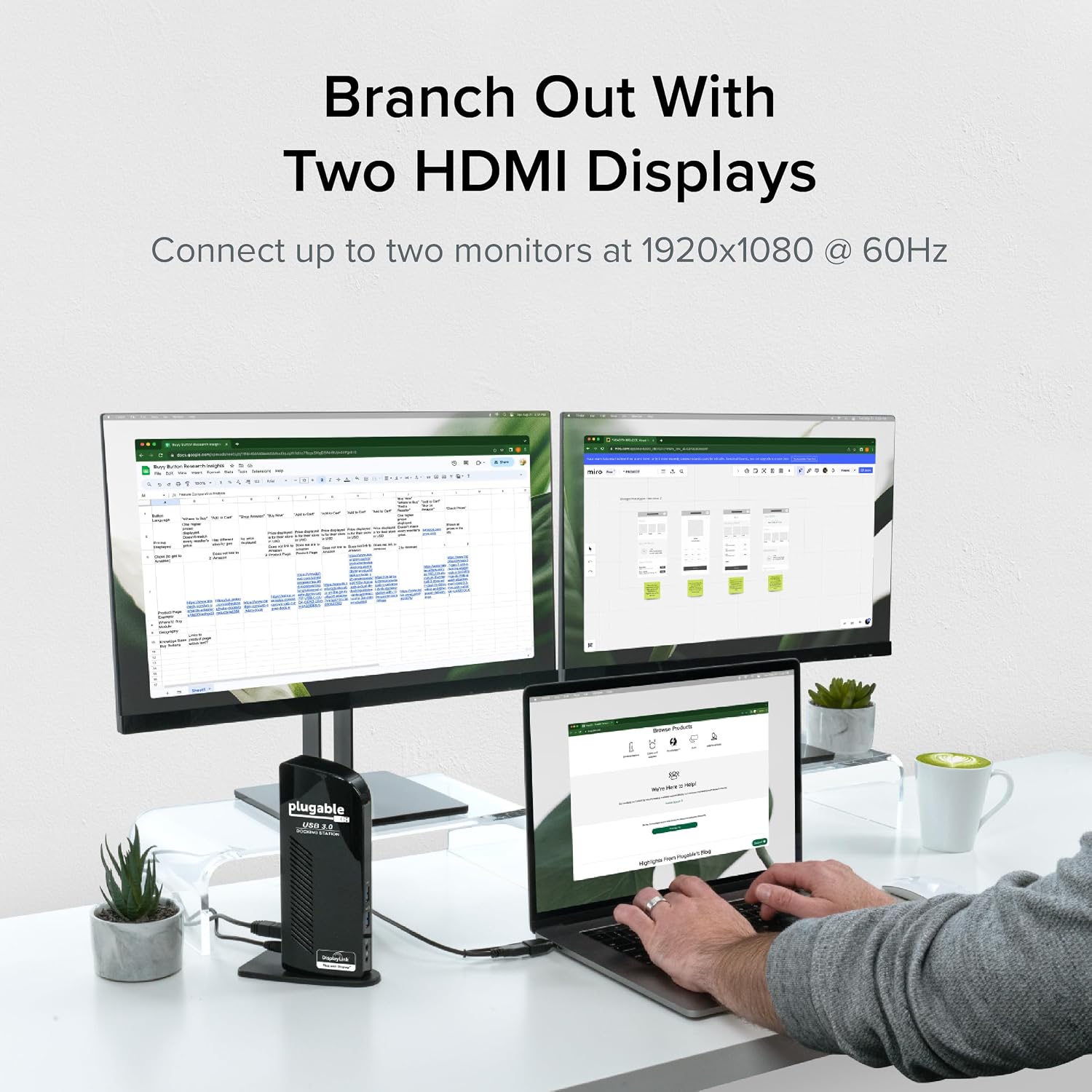
5-сүрөт: Кош мониторду орнотуу.ample
Ноутбук заряддоо:
Маанилүү эскертүү: Бул USB док станциясы хост ноутбугун кубаттабайт.
Хост системаңызды кубаттоо үчүн тышкы кубат булагы керек. Док-станция өзүнүн ички компоненттерине жана туташкан USB перифериялык түзүлүштөрүнө кубат берет, бирок ноутбуктун өзүнө эмес.

6-сүрөт: Док-станция ноутбукту кубаттабай жатат
Колдонуу боюнча сунуштар:
UD-3900 идеалдуу web браузер, өндүрүмдүүлүктү жогорулатуучу программалык камсыздоо жана жалпы кеңсе тапшырмалары. DisplayLink технологиясынын мүнөзүнө байланыштуу, ал оюндар же жогорку өндүрүмдүүлүктөгү графиканы талап кылган тиркемелер үчүн сунушталбайт.
Техникалык тейлөө
Док-станцияңыздын узак мөөнөттүү иштешин жана оптималдуу иштешин камсыз кылуу үчүн:
- Түзмөктү таза, кургак чөйрөдө сактаңыз.
- Аппаратты экстремалдык температурага же тике күн нуруна кабылуудан сактаңыз.
- Док станциясынын капталдарындагы желдетүү тешиктерин жаппаңыз.
- Сыртын жумшак, кургак чүпүрөк менен тазалаңыз. Суюк тазалоочу каражаттарды же аэрозольдорду колдонбоңуз.
- Түзмөк көпкө чейин колдонулбай турганда, кубат адаптерин ажыратыңыз.
Проблемаларды чечүү
Эгерде сиз Plugable UD-3900 док станцияңыз менен көйгөйлөргө туш болсоңуз, төмөнкү кеңири таралган чечимдерди караңыз же расмий көйгөйлөрдү чечүү боюнча колдонмону караңыз:
- Дисплей чыгышы жок: Бардык кабелдердин (электр, хост, HDMI) бекем туташтырылганын текшериңиз. Туура DisplayLink драйверлери орнотулганын жана операциялык системаңыз үчүн жаңыртылганын текшериңиз. Компьютериңизди өчүрүп-күйгүзүп көрүңүз.
- USB түзмөктөрү иштебейт: Док станциясы күйгүзүлгөнүн жана хостуңузга туташтырылганын текшериңиз. Көйгөйдү чечүү үчүн USB түзмөгүн док станциясындагы башка портко же түз эле компьютериңизге туташтырып көрүңүз.
- Тармакка туташуу маселелери: Док станциясына жана роутерге/модемге Ethernet кабелинин туташуусун текшериңиз. Компьютериңиздеги тармак жөндөөлөрүн текшериңиз.
- Аудио көйгөйлөрү: Динамиктердин/кулакчындардын аудио чыгаруу уячасына туура туташканын текшериңиз. Док станциясынын аудио чыгаруусу демейки түзмөк катары тандалганын ырастоо үчүн компьютериңиздин үн жөндөөлөрүн текшериңиз.
- Айдоочу маселелери: Эгерде дисплейлер туура иштебей жатса, DisplayLink драйверлерин кайра орнотуңуз. macOS үчүн кол менен орнотуу ар дайым талап кылынат.
Көбүрөөк маалымат алуу үчүн, сиз көйгөйдү чечүү кадамдары үчүн расмий веб-сайтка кайрылсаңыз болот Көйгөйлөрдү чечүү боюнча колдонмо (PDF).
Коопсуздук маалыматы:
Док станциясындагы стандарттуу USB порттору негизинен USB түзмөктөрүн кубаттоо үчүн иштелип чыккан эмес. Айрым түзмөктөр белгилүү бир жагдайларда кубатталышы мүмкүн, бирок USB түзмөгүнүн кубаттоо жүрүм-туруму ар кандай болушу мүмкүн. Түзмөккө тиешелүү кубаттоо жүрүм-туруму жөнүндө кененирээк маалымат алуу үчүн, Plugable сайтындагы өнүмдөрдүн тизмеси барагын караңыз. webсайт.
Техникалык шарттар
| Өзгөчөлүк | Спецификация |
|---|---|
| Модель номери | УД-3900 |
| Хостко туташуу | Гибриддик USB 3.0 (USB-A) жана USB-C |
| Video Outputs | 2x HDMI |
| Максималдуу чечилиш (кош дисплей) | 1920x1200 @ 60Гц |
| Максималдуу чечилиш (бир дисплей) | 2560x1440 @ 50Гц |
| USB порттору | 2x USB 3.0, 4x USB 2.0 (Жалпысынан 6 USB порту) |
| Ethernet | Гигабит Ethernet |
| Аудио | 3.5 мм кулакчын чыгаруу, 3.5 мм микрофон киргизүү |
| Power Source | Туруктуу ток адаптери (20 ватт) |
| Өлчөмдөрү (LxWxH) | 6.45 x 3.22 x 4.02 дюйм |
| Элемент Салмагы | 13 унция |
| Аппараттык платформа | PC |
Кепилдик жана колдоо
UD-3900 док станциясын кошо алганда, ар бир Plugable продуктусу кемчиликтерден корголгон. 2 жыл сатып алынган күндөн тартып. Plugable ошондой эле камсыз кылат өмүр бою техникалык колдоо анын продукциялары үчүн.
Эгерде сизде кандайдыр бир суроолор болсо же жардам керек болсо, Plugable Түндүк Америкада жайгашкан колдоо тобуна кайрылуудан тартынбаңыз. Байланыш маалыматын жана кошумча ресурстарды расмий Plugable сайтынан таба аласыз. webсайтка же баш багып Amazon'догу сайылуучу дүкөн.


