Introduction
This manual provides detailed instructions for the installation and operation of your AGPtek HDMI to HDMI + SPDIF + RCA L/R Audio Extractor Converter. This device is designed to extract audio from an HDMI source and output it to SPDIF (optical) and RCA L/R analog audio, while simultaneously passing the HDMI video signal to a display. It is ideal for integrating modern HDMI sources with older audio systems that lack HDMI input.
Өзгөчөлүктөрү
- Converts one HDMI input to one HDMI output plus SPDIF and RCA L/R audio outputs.
- Supports audio output via SPDIF (optical) and RCA L/R analog.
- Compatible with input resolutions up to 1080P (50/60Hz), 720P, 576P, 576i, 480P, and 480i.
- Features an LED indicator for power and active source/sink status.
- Supports 24-bit, deep color 30-bit, and 36-bit video color formats.
- Maximum bandwidth of 225MHz and maximum baud rate of 6.75Gbps.
- Equipped with a 3-mode audio switch: Pass, 2CH, and 5.1CH.
- Suitable for various applications including home theater setups, conference rooms, and training environments.
Пакеттин мазмуну
Төмөндө тизмеленген нерселердин баары пакетиңизге камтылганын текшериңиз:
- 1 x AGPtek HDMI to HDMI + Audio (SPDIF + L/R) Converter
- 1 x DC5V Power Adapter
- 1 x User Manual
Продукт бүттүview
Familiarize yourself with the ports and controls on your AGPtek HDMI Audio Extractor Converter:
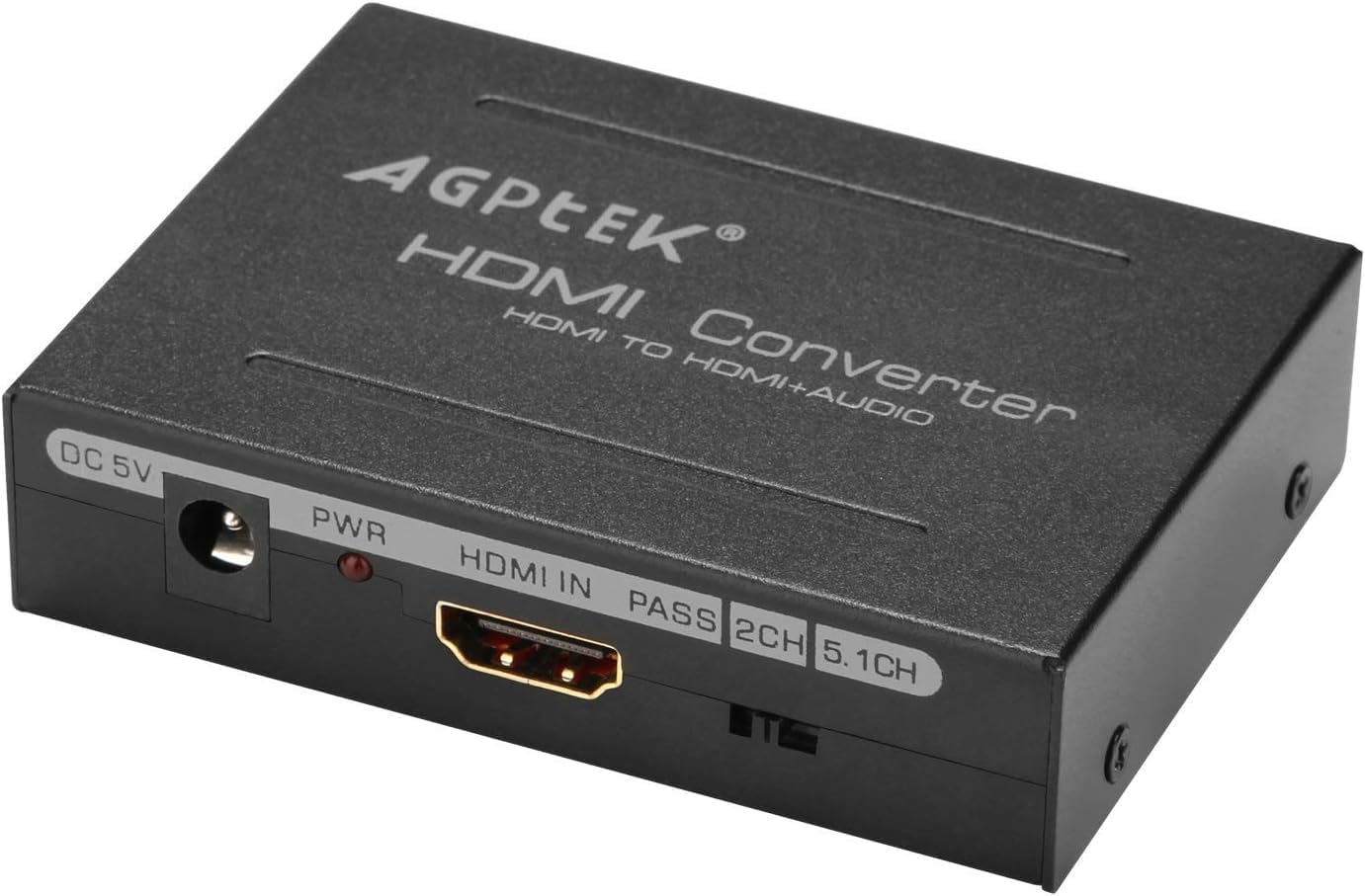
Сүрөт 1: Алдыңкы View of the AGPtek HDMI Audio Extractor Converter. This image displays the front panel of the converter, showing the DC 5V power input, the PWR indicator light, the HDMI IN port, and the audio mode selection switch with options for PASS, 2CH, and 5.1CH.
- DC 5V: Power input port for the included DC5V/1A power adapter.
- PWR: Power indicator LED. Illuminates red when the device is powered on.
- HDMI IN: Connect your HDMI source device (e.g., Blu-ray player, gaming console, computer).
- Audio Mode Switch (PASS, 2CH, 5.1CH): Selects the desired audio output mode.
- HDMI OUT: (Located on the rear) Connect to your HDMI display (e.g., TV, monitor).
- SPDIF: (Located on the rear) Optical audio output for connecting to compatible audio receivers or soundbars.
- L/R (RCA): (Located on the rear) Analog stereo audio output for connecting to stereo ampкөтөргүчтөр же спикерлер.
Жайгашуу
Follow these steps to connect your HDMI Audio Extractor Converter:
- Connect an HDMI cable from your HD source device (e.g., Blu-ray player, gaming console, computer) to the HDMI-IN конвертердеги порт.
- HDMI кабелин түзмөктөн туташтырыңыз HDMI OUT port on the converter to your HD display (e.g., TV, monitor).
- For analog audio output, connect RCA L/R audio cables from the L/R ports on the converter to your audio equipment (e.g., stereo amplifier, speakers). Ensure correct color matching (red to red, white to white).
- For digital audio output, connect an optical cable (SPDIF) from the SPDIF port on the converter to your audio equipment (e.g., AV receiver, soundbar).
- Connect the included DC5V power adapter to the DC 5V port on the converter, then plug the adapter into a power outlet. The PWR LED will illuminate.
Video 1: AGPtek HDMI Audio Extractor Setup Guide. This video demonstrates the physical connections for the AGPtek HDMI Audio Extractor, including power, HDMI input, and audio outputs (RCA L/R and SPDIF optical). It also briefly explains the audio mode switch functionality.
Иштөө нускамалары
Once all connections are made, select the appropriate audio mode using the switch on the converter:
- PASS Mode: In this mode, the audio and video signals are passed directly from the HDMI input to the HDMI output. There will be no audio output from the SPDIF or RCA L/R ports. Use this mode if your display device can handle the audio directly.
- 2CH режими: This mode outputs 2-channel stereo audio. Sound will be sent to the HDMI output, the SPDIF output, and the RCA L/R analog outputs. This is suitable for stereo audio systems.
- 5.1CH режими: This mode outputs 5.1 channel audio. Sound will be sent to the HDMI output and the SPDIF output. The RCA L/R outputs will not produce sound in this mode. This is for multi-channel audio systems that support 5.1 audio via HDMI or optical.
Техникалык тейлөө
To ensure optimal performance and longevity of your converter:
- Түзмөктү салкын, кургак жана жакшы желдетилген жерде сактаңыз.
- Avoid exposing the device to moisture, direct sunlight, or extreme temperatures.
- Түзмөктү жумшак, кургак чүпүрөк менен тазалаңыз. Суюк же аэрозоль тазалагычтарды колдонбоңуз.
- Do not attempt to open or service the device yourself. Refer to qualified personnel for repairs.
Проблемаларды чечүү
Эгер көйгөйлөргө туш болсоңуз, төмөнкү жалпы чечимдерди караңыз:
- Үн чыгышы жок: Check the position of the audio mode switch (PASS, 2CH, 5.1CH) on the converter. Ensure it is set correctly for your audio equipment and desired output. Verify all audio cables are securely connected.
- Видео чыгаруу жок: Ensure all HDMI cables are securely connected. Check that your display is powered on and set to the correct HDMI input. Try a different HDMI cable if possible.
- Үзүлгүс сигнал: Verify that the power adapter is securely connected and providing stable power. Check all cable connections for looseness or damage.
- Бурмаланган аудио: Ensure the audio mode (2CH or 5.1CH) matches the capabilities of your audio receiver. Check audio settings on your source device.
Техникалык шарттар
| HDMI Resolution | 1080P/1080i/720p/576p/576i/480p/480i |
| Видеонун түс форматы | 24bit/deep color 30bit 36bit |
| Аудио чыгаруу | L/R + SPDIF |
| Max Bandwidth | 225 МГц |
| Max Boud Rate | 6.75Gbps |
| Киргизүү/чыгаруу TMDS сигналы | 0.5 ~ 1.5 Volts p-p (TTL) |
| Киргизүү/чыгыш DDC сигналы | 5 Вольт pp (TTL) |
| Киргизүү кабелинин аралыгы | ≤15m AWG26 HDMI стандарттык кабели |
| Output Cable Distance | ≤20m AWG26 HDMI стандарттык кабели |
| Max жумушчу ток | 500мА |
| Power Adapter Input | AC (50HZ, 60HZ) 100V-240V |
| Power адаптеринин чыгышы | DC5V/1A |
| Иштөө температурасы диапазону | -15дон +55 градуска чейин суук |
| Иштеп жаткан нымдуулук диапазону | 5-90% RH (конденсация жок) |
| Өлчөмдөрү (L x W x Y) | 84.5 x 61.8 x 21 мм (3.33 x 2.43 x 0.83 дюйм) |
| Салмагы | 132г (4.7 унция) |
Кепилдик жана колдоо
This product comes with a standard manufacturer's warranty. For specific warranty details, technical support, or customer service inquiries, please refer to the contact information provided with your purchase documentation or visit the official AGPtek webсайт.


