1. Киришүү
The BAOFENG BF-888S is a reliable and easy-to-use two-way radio designed for various communication needs. It is suitable for environments such as security operations, supermarket coordination, construction site communication, and outdoor activities like field survival, biking, and hiking. This manual provides essential information for setting up, operating, and maintaining your BF-888S radio.
2. Коопсуздук маалыматы
- Радиону жарылуучу чөйрөдө (мисалы, күйүүчү газдар, чаң бөлүкчөлөрү, металл порошоктору) иштетпеңиз.
- Do not charge the battery in wet environments.
- Use only BAOFENG-approved batteries and chargers to prevent damage and ensure safety.
- Радиону узак убакыт бою түз күн нурунун таасирине же өтө жогорку температурага дуушар кылбаңыз.
- Тоскоолдук болбош үчүн радиону медициналык аппараттардан алыс кармаңыз.
- Do not disassemble or modify the radio. Repairs should only be performed by qualified technicians.
3. Продукциянын өзгөчөлүктөрү
- Жыштык диапазону: UHF 400-470MHz
- 16 каналдын сыйымдуулугу
- 1500mAh Li-ion Battery for extended use
- 50 CTCSS/105 CDCSS for enhanced privacy
- VOX Function for hands-free operation
- Voice Prompt for channel announcements
- PC Programming capability
- Шашылыш сигнал функциясы
- Intelligent Charging system
- Battery Save mode to prolong battery life
- Low Voltage Alert
- Тайм-таймер (TOT)
- Камтылган кол чырак
- Communication Range: Up to 3 miles (5 km) depending on environment and terrain
4. Пакеттин мазмуну
Each BAOFENG BF-888S radio package typically includes the following items:
- Portable Two-Way Radio (BF-888S)
- Антенна
- Кулакчын
- Li-ion батарейка пакети
- Desktop Charger (with EU plug)
- Belt Clip
- Билек боо
- Колдонуучунун колдонмосу
- USB Programming Cable (1PC per pack of 10 radios)
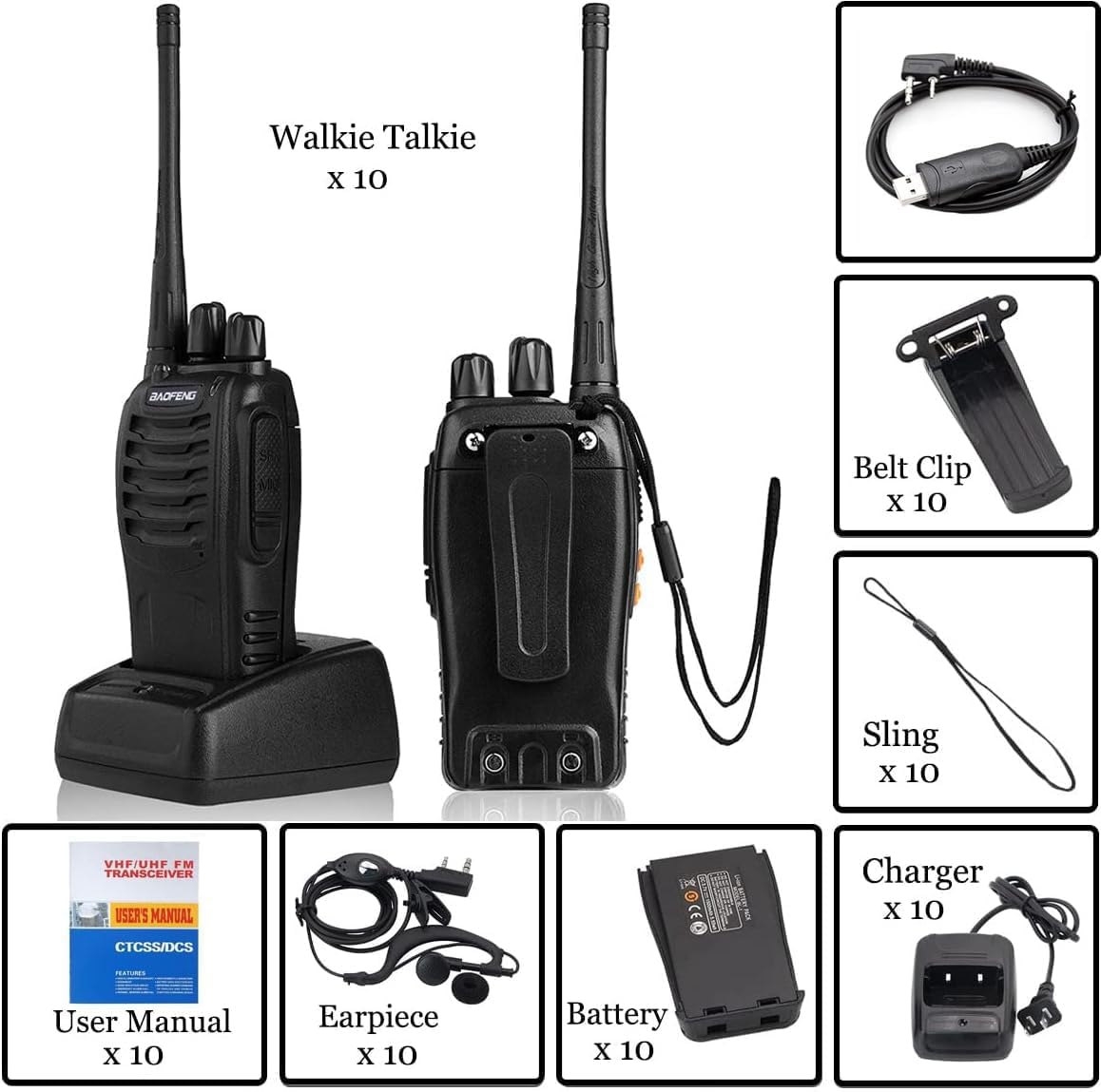
Figure 1: Complete package contents of the BAOFENG BF-888S Two-Way Radio.
5. Компонентти идентификациялоо
Familiarize yourself with the various parts of your BF-888S radio:

Figure 2: Labeled diagram of the BAOFENG BF-888S Two-Way Radio components.
- Антенна: Сигналдарды берүү жана кабыл алуу үчүн.
- Каналды которуштуруу: Rotary knob to select one of the 16 available channels.
- Кубатты которгуч/Үнү башкаруу: Rotary knob to turn the radio on/off and adjust the volume.
- LED көрсөткүчү: Illuminates red during transmission and green during reception.
- SP/MIC Jacks: Ports for connecting the earpiece/microphone accessory or programming cable.
- Кол чырак: Built-in LED light for illumination.
- PTT (баскыч менен сүйлөшүү) баскычы: Өтүү үчүн басып туруңуз, кабыл алуу үчүн коё бериңиз.
- Moni (Monitor) Button: Press to temporarily disable squelch and listen to weak signals.
- Функция баскычы: Can be programmed for various functions (e.g., Emergency Alarm, VOX).
- MIC (Microphone): For speaking during transmission.
6. Орнотуу
6.1 Батареяны орнотуу
- Align the battery pack with the grooves on the back of the radio.
- Slide the battery pack upwards until it clicks into place.
- To remove, push the battery release latch (if present) and slide the battery downwards.
6.2 Антеннаны бекитүү
- Screw the antenna clockwise into the connector on the top of the radio until it is firmly seated.
- Ашыкча катуулабагыла.
6.3 Батареяны заряддоо
Before initial use, fully charge the battery pack. The radio can be charged by placing it in the desktop charger.
- Connect the AC adapter to the desktop charger and plug it into a power outlet.
- Place the radio (with battery attached) into the charging slot.
- The LED indicator on the charger will typically show red while charging and turn green when fully charged.
- Charging usually takes 3-4 hours for a full charge.
Video 1: Demonstrates charging the BAOFENG BF-888S radio, along with basic operation like power on/off, channel selection, PTT, and flashlight activation.
6.4 PC Programming
The BF-888S supports PC programming for advanced customization of channels, CTCSS/CDCSS codes, VOX settings, and other features. A USB programming cable is included for this purpose. Refer to the specific programming software manual for detailed instructions.
7. Иштөө нускамалары
7.1 Күйгүзүү/өчүрүү жана үндү башкаруу
- To turn the radio ON, rotate the Power Switch/Volume Control knob clockwise. You will hear a voice prompt indicating the current channel.
- To turn the radio OFF, rotate the Power Switch/Volume Control knob counter-clockwise until it clicks.
- Ошол эле баскычты айлантуу менен үндү тууралаңыз.
7.2 Канал тандоо
- Rotate the Channel Switch knob to select the desired channel (1-16).
- A voice prompt will announce the selected channel number.
- Байланыш үчүн арналган бардык радиолор бир каналга коюлганын текшериңиз.
7.3 Берүү жана кабыл алуу (PTT)
- To transmit, press and hold the PTT (Push-to-Talk) button on the side of the radio. The LED indicator will glow red.
- Микрофонго так сүйлө.
- Release the PTT button to stop transmitting and return to receive mode. The LED indicator will turn green when receiving a signal.
7.4 Фонардын иштеши
The built-in flashlight can be activated via the programmable Function Button. Consult your radio's specific programming or user manual for the exact button assignment.
7.5 VOX Function (Voice Operated Transmit)
When VOX is enabled (via PC programming), you can transmit by speaking into the microphone without pressing the PTT button. This feature is useful for hands-free operation. Adjust VOX sensitivity via programming software.
7.6 Шашылыш сигнал
The Emergency Alarm function can be activated via the programmable Function Button. When activated, the radio will emit a loud alarm sound to alert others. Consult your radio's specific programming or user manual for the exact button assignment.
7.7 Мониторинг функциясы
Press the Moni button to temporarily disable the squelch function. This allows you to listen to very weak signals that might otherwise be filtered out, or to listen to activity on a channel without a matching CTCSS/CDCSS tone.
Video 2: Ашыкча камсыз кылатview of the BAOFENG BF-888S radio's appearance and introduces its key functions, including charging and basic controls.
8. Техникалык тейлөө
- Тазалоо: Радионун бетин жумшак, гamp кездеме. Катуу химиялык заттарды же абразивдүү тазалагычтарды колдонбоңуз.
- Батареяга кам көрүү: Store batteries in a cool, dry place when not in use. Avoid overcharging or completely draining the battery frequently to prolong its lifespan.
- Антенна: Ensure the antenna is securely attached. Do not bend or force the antenna, as this can damage the radio's performance.
- Сактагыч: If storing the radio for an extended period, remove the battery and store it separately.
9. Кыйынчылыктарды
If you encounter issues with your BAOFENG BF-888S radio, try the following basic troubleshooting steps:
- Кубат жок: Ensure the battery is fully charged and correctly installed. Check if the power/volume knob is turned ON.
- Берүү же кабыл алуу мүмкүн эмес: Verify that all radios are on the same channel and within range. Check if the antenna is securely attached. Ensure the battery has sufficient charge.
- Начар аудио сапаты: Check the volume level. Ensure the microphone and speaker are not obstructed. Move closer to the other radio if range is an issue.
- Интерференция: Try switching to a different channel. If using CTCSS/CDCSS, ensure it is correctly configured on all radios.
- Radio is Locked: Some radios have a key lock feature. Refer to the full user manual or programming guide to disable it if accidentally activated.
For more complex issues, consult the detailed user manual provided with your product or contact BAOFENG customer support.
10. Техникалык шарттар
| Категория | Спецификация |
|---|---|
| Жыштык диапазону | UHF 400-470MHz |
| RF Rated Power | ≤ 5 Вт |
| Канал сыйымдуулугу | 16 |
| Канал аралыгы | 25KHz |
| Operated Voltage | 3.7V |
| Батарея | 1500MAh Li-ion |
| Батареянын иштөө мөөнөтү | 8 саатка жакын |
| Жыштыктын туруктуулугу | ±2.5ppm |
| Иштетилген температура | -30 ° Cден + 60 ° Cге чейин |
| Антенна импедансы | 50Ω |
| Байланыш диапазону | 2-4km (up to 3 miles/5 km in optimal conditions) |
| Transmitter RF Power Output | 3W |
| Модуляция | F3E |
| Жалган эмиссия | ≤65дБ |
| FM Noise | ≤-45dB(W) ≤-40dB (N) |
| Аудио бурмалоо | ≤5% |
| жиберүү Current | .1.3A |
| Receiver Sensitivity (12dB SINAD) | ≤0.20 uV |
| Тандоочулук | 55dB / 50dB |
| Intermodulation | ≥65дБ |
| Кошуна канал тандоо | ≥60дБ |
| Жалган жооп | ≥60дБ |
| Аудио Power Output | 1000мВт |
| Dimensions (L×W×H, radio only) | 10×50×32 мм |
| Weight (with battery/antenna) | 198г |
11. Кепилдик жана колдоо
For warranty information, please refer to the documentation included with your purchase or contact your retailer. For technical support or further assistance, please visit the official BAOFENG webсайтка же кардарларды тейлөө бөлүмүнө кайрылыңыз.


