Introduction
This manual provides comprehensive instructions for the setup, operation, and maintenance of your VTech CS6829-2 2-Handset Cordless Phone with Answering System. This system is designed for home use, offering features such as caller ID, a digital answering machine, backlit keypad, and a full duplex speakerphone for enhanced communication.
Кутуда эмне бар
Баардык буюмдар пакетиңизге камтылганын текшериңиз:
- Негизги бирдик
- 2 зымсыз телефон
- Заряддагыч
- 2 адаптер
- 2 батарея топтому
- Телефон линиясы
- Дубалга орнотуу кронштейн
- Тез баштоо колдонмосу
Жайгашуу
Follow these steps to set up your VTech CS6829-2 phone system:
- Негизги блокту туташтыруу:
Plug one end of the telephone line cord into the TEL LINE jack on the back of the base unit. Plug the other end into a telephone wall jack. Plug the small end of the power adapter into the POWER jack on the back of the base unit. Plug the large end of the power adapter into a wall outlet not controlled by a wall switch.
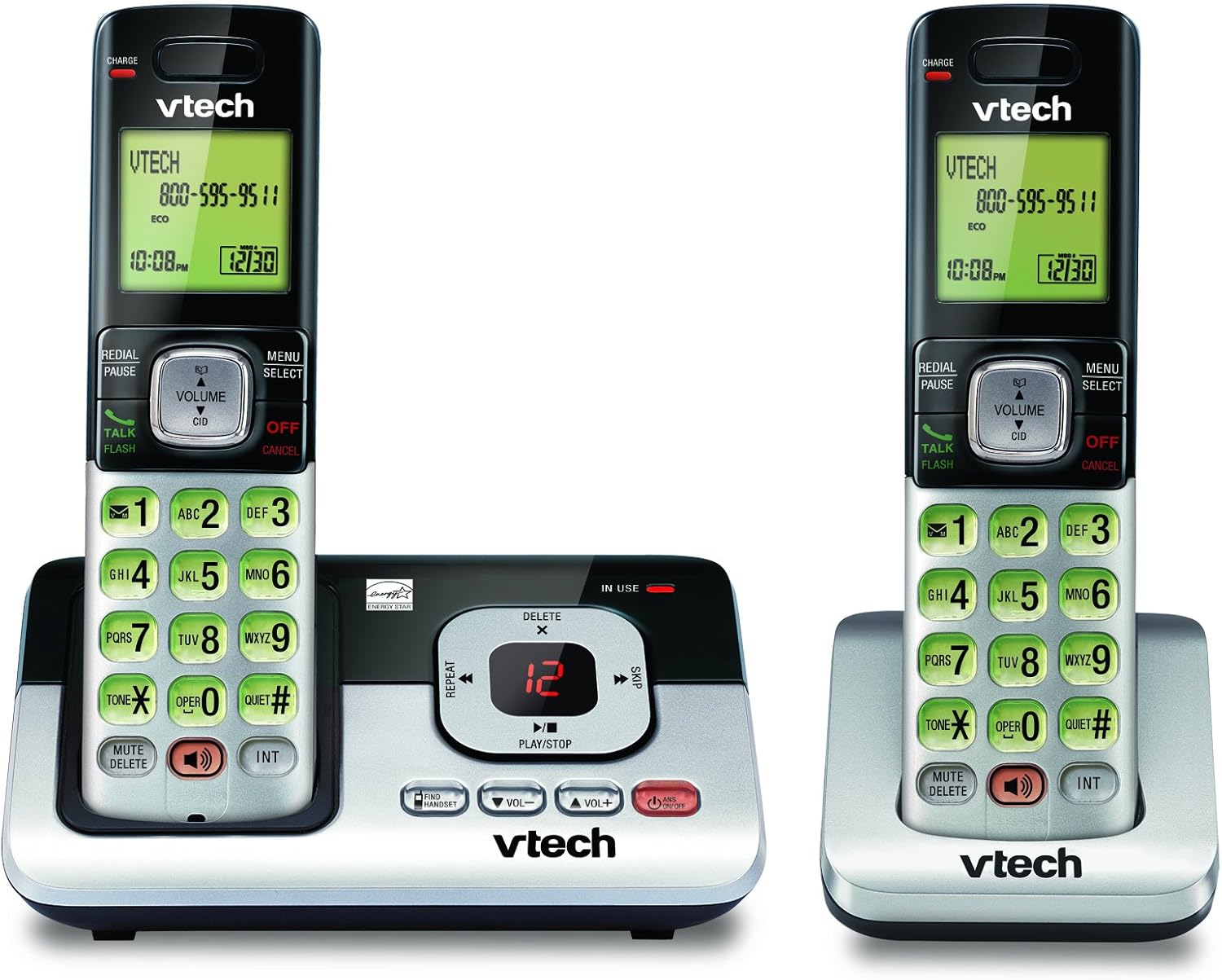
Image: The VTech CS6829-2 base unit with one handset docked, and a second handset with its charging cradle. This illustrates the main components of the phone system.
- Телефондун батареяларын орнотуу:
Open the battery compartment cover on the back of each handset. Connect the battery pack connector securely into the jack inside the compartment. Place the battery pack with the label facing up and tuck the wires inside the compartment. Close the battery compartment cover.
- Заряддоо аппараттары:
Place each handset in the base unit or charger with the display facing up. The CHARGE light on the handset will illuminate, indicating proper charging. Allow the handsets to charge for at least 16 hours before initial use for optimal battery performance.

Сүрөт: бурчтуу view of the VTech CS6829-2 base unit with one handset docked, and the second handset in its separate charging cradle. This shows how the handsets are placed for charging.
- Дата менен убакытты коюу:
After the handsets are charged, follow the on-screen prompts or refer to the quick start guide to set the date and time. This is important for accurate caller ID and answering system timestamps.
Иштөө нускамалары
Чакыруу жана жооп берүү
- Чалуу үчүн: Басыңыз TALK / FLASH or any dialing key to get a dial tone, then dial the phone number.
- Чалууга жооп берүү үчүн: Телефон шыңгыраганда, басыңыз TALK / FLASH же каалаган терүү баскычы.
- Чалууну аяктоо үчүн: Басыңыз ӨЧҮРҮҮ/ЖОК КЫЛУУ or place the handset back in the base unit/charger.
Санариптик жооп берүү тутуму
- Ойнотулган билдирүүлөр: Негизги бирдикте басыңыз ОЙНОО/ТОКТОТУУ. On a handset, press МЕНЮ/ТАНДОО, scroll to "Answering System", then select "Play Messages".
- Чыгуучу жарыяны жаздыруу: On the base unit or handset, navigate to the answering system menu and select "Record OGM" (Outgoing Message).
- Кабарларды жок кылуу: While a message is playing, press ЖОК on the base unit or handset.
Спикерфон функциясы
- To Use Speakerphone: Чалуу учурунда, басыңыз СПИКЕР button on the handset. Press it again to switch back to the handset earpiece.
Негизги өзгөчөлүктөрү
- Digital Answering System with LED Indicator and Volume Control: This system records up to 14 minutes of messages, announcements, and memos. An LED indicator notifies you of new messages. Volume control keys on the base allow easy adjustment of message playback volume.
- Caller ID / Call Waiting — Stores up to 50 Calls: Displays the name, number, time, and date of incoming calls, helping you identify callers before answering.
- Толук дуплекстүү динамик: The handset features a full duplex speakerphone, enabling natural two-way conversations where both parties can speak and be heard simultaneously.
- Арткы жарык баскычтоп жана дисплей: The entire keypad and LCD screen on the handset illuminate, ensuring clear visibility and easy dialing even in low-light conditions.
- ECO Mode Power-Conserving Technology: This technology optimizes power consumption for extended battery performance and energy efficiency.
- Тынч режим: Allows you to silence the ringer on both the handset and base unit immediately or for a set period, providing peace and quiet when needed.
Техникалык тейлөө
- Тазалоо: Телефонду жана анын негизги бөлүгүн жумшак, d менен тазалаңызamp кездеме. Тазалоочу спрейлерди же суюк тазалоочу каражаттарды колдонбоңуз.
- Батареяга кам көрүү: Replace batteries when they no longer hold a charge. Use only the specified battery type. Dispose of old batteries responsibly according to local regulations.
- Экологиялык шарттар: Телефонду күн нуру түз тийген жерге, жылуулук булактарынын жанына же ашыкча нымдуулук бар жерлерге койбоңуз.
Проблемаларды чечүү
Телефонуңузда көйгөйлөр пайда болсо, төмөнкү чечимдерди колдонуп көрүңүз:
| Көйгөй | Чечим |
|---|---|
| Терүү үнү жок. | Ensure the telephone line cord is securely plugged into both the base unit and the wall jack. Check that the power adapter is plugged into a working electrical outlet. |
| Телефон заряддалбай жатат. | Ensure the handset is properly seated in the base unit or charger. Clean the charging contacts on both the handset and base/charger with a dry cloth. Verify the power adapter is connected. |
| Үн сапаты начар / Статикалык. | Move the handset closer to the base unit. Avoid placing the phone near other electronic devices (e.g., microwaves, computers) that may cause interference. Check the telephone line cord for damage. |
| Answering system not recording messages. | Автожооп бергичтин күйүк экенин текшериңиз. Эстутум толуп калганын текшериңиз; зарыл болсо, эски билдирүүлөрдү өчүрүңүз. |
Техникалык шарттар
| Өзгөчөлүк | Деталь |
|---|---|
| Модель номери | CS6829-2 |
| Продукциянын өлчөмдөрү | 5.77 x 3.41 x 6.77 дюйм |
| Элемент Салмагы | 1.41 фунт |
| Батареялар | 2 Продукт үчүн атайын батарейкалар талап кылынат (кошулган) |
| Жооп берүү системасынын түрү | Санарип |
| Чалуучунун ID эстутуму | 50 чалууга чейин |
| Автожооп берүүчү системанын жаздыруу убактысы | 14 мүнөткө чейин |
| Түс | Кара/Күмүш |
| Телефон түрү | Зымсыз |
Кепилдик жана колдоо
Кепилдик жөнүндө маалымат жана техникалык колдоо алуу үчүн, өнүмүңүз менен кошо берилген кепилдик картасын караңыз же расмий VTech компаниясына кайрылыңыз webсайт. Сатып алуу квитанциясын кепилдик дооматтары үчүн сатып алуунун далили катары сактаңыз.
Сиз да зыярат кылсаңыз болот Amazon'догу VTech дүкөнү кошумча продукт маалымат жана колдоо ресурстар үчүн.


