1. Киришүү
This manual provides essential instructions for the safe and efficient use of your Kyocera EBVK-2650 Engine Blower Vacuum. Please read this manual thoroughly before operating the machine and keep it for future reference. The EBVK-2650 is designed for blowing and vacuuming leaves and light debris in outdoor environments.
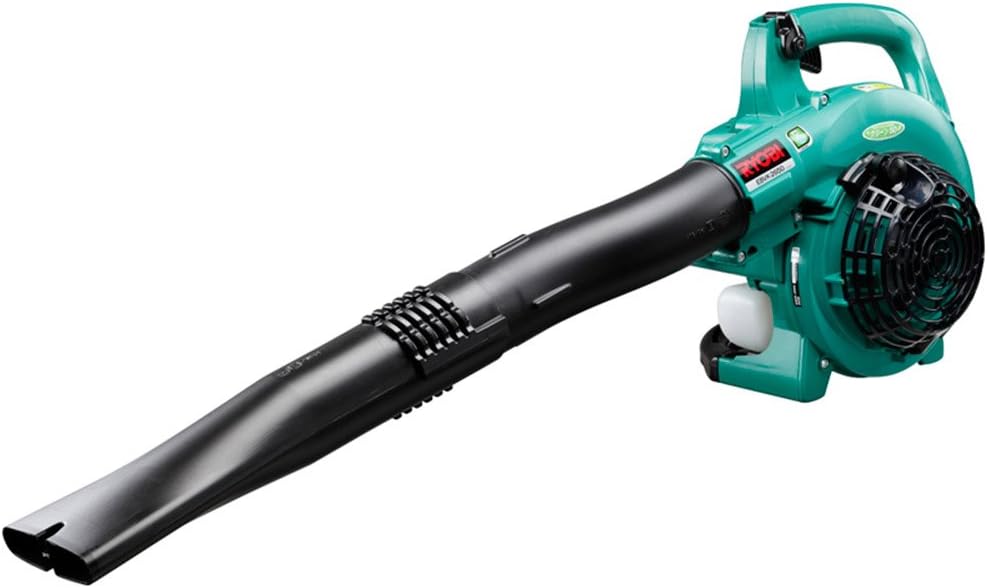
Image 1.1: The Kyocera EBVK-2650 Engine Blower Vacuum in its primary blower configuration. This image shows the main unit with the straight nozzle attached, ready for blowing leaves and debris.
2. Коопсуздук маалыматы
Электр шаймандарын иштетүүдө ар дайым коопсуздукка артыкчылык бериңиз. Бул нускамаларды аткарбоо олуттуу жаракатка же мүлккө зыян келтириши мүмкүн.
2.1 Жалпы коопсуздук эрежелери
- Машинаны иштетүүдөн мурун бардык нускамаларды окуп, түшүнүңүз.
- Көздү коргоо, угууну коргоо, кол кап жана бышык бут кийим сыяктуу тиешелүү жеке коргонуу каражаттарын (ЖКК) кийиңиз.
- Do not operate the machine in wet conditions or in the presence of flammable liquids or gases.
- Keep children, bystanders, and pets at a safe distance (at least 15 meters / 50 feet) from the operating area.
- Inspect the machine for loose parts, damage, or wear before each use. Do not operate a damaged machine.
- Ensure proper ventilation when operating the engine, as exhaust fumes contain carbon monoxide.
- Эч качан желдеткичтин учтарын адамдарга же жаныбарларга багыттабаңыз.
- Turn off the engine and allow it to cool before refueling, cleaning, or performing maintenance.
- Store the machine in a dry, secure location, out of reach of children.
2.2 Күйүүчү майдын коопсуздугу
- Use only the recommended fuel mixture: unleaded gasoline and 2-cycle engine oil at a 50:1 ratio.
- Mix fuel in a well-ventilated area, away from sparks or open flames.
- Do not smoke while mixing or refueling.
- Төгүлгөн күйүүчү майдын баарын дароо сүртүңүз.
- Күйүүчү майды уруксат берилген идиште салкын, кургак жерде сактаңыз.
3. Пакеттин мазмуну жана компоненттери
Таңгактан чыгарганда бардык компоненттердин бар экенин жана бузулбаганын текшериңиз.
3.1 Кошумча жабдуулар
- Main Unit (Engine Blower Vacuum)
- Түз сопло
- Curved Nozzle
- Соргуч түтүк
- Желдетүүчү саптама
- Чаң баштык
- Socket Wrench (13x19mm)
- Instruction Manual
3.2 Key Components Overview
Familiarize yourself with the main parts of the EBVK-2650.

Image 3.1: The Kyocera EBVK-2650 configured for vacuuming. This view shows the suction pipe and the dust bag attached, ready to collect leaves and debris.
- Кыймылдаткыч блогу: The core power source.
- Күйүүчү май багы: For mixed fuel.
- Баштоочу тутка: For manual engine start.
- Дроссель рычагы: Мотор ылдамдыгын көзөмөлдөйт.
- Которуштурууну токтотуу: To turn off the engine.
- Air Filter Cover: Аба чыпкасын коргойт.
- Свеча: For ignition.
- Blower/Vacuum Port: Where nozzles or suction pipe attach.
- Dust Bag Connection: For attaching the collection bag in vacuum mode.
4. Орнотуу жана чогултуу
4.1 Assembling for Blower Mode
- Мотор өчүрүлгөн жана муздатылганын текшериңиз.
- Attach the desired nozzle (straight or curved) to the blower port. Twist until securely locked.
- Confirm all connections are tight before use.

Сүрөт 4.1: Жакын план view of the Kyocera EBVK-2650 in operation, demonstrating the blower function. The user is holding the unit, directing the airflow.
4.2 Assembling for Vacuum/Mulching Mode
- Мотор өчүрүлгөн жана муздатылганын текшериңиз.
- Remove any blower nozzles from the blower port.
- Attach the suction pipe to the intake port. Secure it firmly.
- Connect the dust bag to the exhaust port. Ensure the bag is properly sealed to prevent debris leakage.
- Confirm all connections are tight before use.

Image 4.2: The Kyocera EBVK-2650 being used in vacuum mode. The suction pipe is directed towards leaves, and the dust bag is visible, collecting the mulched debris.
4.3 Fuel Preparation and Filling
The EBVK-2650 uses a 2-cycle engine. It requires a specific mixture of unleaded gasoline and 2-cycle engine oil.
- Fuel Ratio: Unleaded Gasoline : 2-Cycle Engine Oil = 50:1
- Аба менен муздатылган кыймылдаткычтар үчүн атайын иштелип чыккан жогорку сапаттагы 2 циклдүү мотор майын колдонуңуз.
- Mix the fuel in a separate, approved fuel container. Shake well before filling.
- Open the fuel tank cap slowly to release pressure.
- Fill the fuel tank (capacity 0.47 L) carefully, avoiding overfilling.
- Күйүүчү май багынын капкагын бекем жабыңыз.
5. Иштөө нускамалары
5.1 Моторду ишке киргизүү
- Машинаны тегиз, туруктуу бетке коюңуз.
- Ensure the stop switch is in the "ON" position.
- Муунткучтун рычагын (эгер муздак башталса).
- Күйүүчү май көрүнгөнгө чейин праймер лампасын бир нече жолу басыңыз.
- Pull the starter handle firmly and smoothly until the engine starts. Do not pull the rope to its full extension.
- Мотор ишке киргенден кийин, .Муунткучту акырындык менен өчүрүңүз.
- Толук газды колдонуудан мурун кыймылдаткычты бир нече мүнөткө жылытууга уруксат бериңиз.

Image 5.1: A user demonstrating the engine starting procedure for the Kyocera EBVK-2650. The starter handle is being pulled to ignite the engine.
5.2 Үлтүргүчтүн иштеши
- Hold the machine firmly with both hands.
- Direct the nozzle towards the debris you wish to move.
- Gradually increase the throttle to achieve the desired airflow.
- Жалбырактарды жана таштандыларды үймөккө чогултуу үчүн шыпырып салуу кыймылын колдонуңуз.

Image 5.2: A user operating the Kyocera EBVK-2650 in blower mode, clearing leaves from a path. The machine is held comfortably, directing the airflow.
5.3 Vacuum/Mulching Operation
- Ensure the machine is correctly assembled for vacuum mode with the dust bag attached.
- Hold the machine firmly, guiding the suction pipe over the leaves.
- Move slowly and steadily to allow the machine to pick up and mulch debris.
- Monitor the dust bag and empty it when it becomes full to maintain optimal performance.
- Note: Mulching performance varies based on leaf type, size, and moisture content. Avoid vacuuming wet leaves or large, hard objects.

Image 5.3: A user operating the Kyocera EBVK-2650 in vacuum mode, actively collecting leaves from a paved area. The dust bag is visible, indicating collection.
5.4 Моторду токтотуу
- Release the throttle lever to allow the engine to idle.
- Move the stop switch to the "OFF" position.
- Allow the machine to cool down before storage or maintenance.
6. Техникалык тейлөө
Regular maintenance ensures optimal performance and extends the lifespan of your EBVK-2650. Always ensure the engine is off and cool before performing any maintenance.
6.1 Аба чыпкасын тазалоо
- Аба чыпкасы капкагын алып салыңыз.
- Carefully remove the air filter element.
- Clean the filter by tapping it gently or using compressed air. If heavily soiled, wash with warm, soapy water, rinse thoroughly, and allow to dry completely before reinstallation.
- Аба чыпкасы капкагын алмаштырыңыз.
6.2 Spark Plug Inspection and Replacement
- Шамдын капкагын алып салыңыз.
- Use the provided socket wrench to remove the spark plug (NGK BPM8Y).
- Inspect the spark plug for wear, carbon buildup, or damage. Clean if necessary.
- Check the electrode gap and adjust if needed.
- Replace with a new spark plug of the recommended type if worn or damaged.
- Reinstall the spark plug and cap securely.
6.3 Күйүүчү май чыпкасы
The fuel filter is located inside the fuel tank. Inspect it periodically for debris. If clogged, replace it. This procedure may require professional assistance.
6.4 Карбюраторду тууралоо
Carburetor adjustments should ideally be performed by a qualified service technician. Incorrect adjustments can lead to engine damage or poor performance.
6.5 Сактоо
- For long-term storage, drain all fuel from the tank and run the engine until it stops to clear the carburetor.
- Машинанын сыртын тазалаңыз.
- Store in a dry, dust-free location, away from direct sunlight and extreme temperatures.
7. Кыйынчылыктарды
Бул бөлүм сиз кабылышы мүмкүн болгон жалпы көйгөйлөрдү карайт. Бул жерде көрсөтүлбөгөн көйгөйлөр үчүн кардарларды колдоо бөлүмүнө кайрылыңыз.
| Көйгөй | Мүмкүн себеп | Чечим |
|---|---|---|
| Мотор иштебейт |
|
|
| Engine runs, but lacks power |
|
|
| Ашыкча термелүү |
|
|
8. Техникалык шарттар
| Өзгөчөлүк | Деталь |
|---|---|
| Бренд | Kyocera |
| Модель номери | EBVK-2650 |
| Мотор түрү | Air-cooled 2-cycle single cylinder gasoline engine |
| Көчүрүү | 25.4 мл |
| Average Air Volume | 8.7 м³/мин |
| Абанын максималдуу көлөмү | 67.5 м³/мин |
| От алдыруу методу | Electronic ignition (Flywheel magnet) |
| Spark Plug | NGK BPM8Y |
| Карбюратор түрү | Диафрагма түрү |
| Күйүүчү май | Mixed fuel (Unleaded gasoline: 2-cycle engine oil = 50:1) |
| Күйүүчү май багынын сыйымдуулугу | 0.47 Л |
| Dimensions (L x W x H, excluding nozzle) | 330 x 270 x 345 мм |
| Weight (excluding nozzle, fuel) | 4.2 кг |
| Аксессуарлар камтылган | Straight nozzle, Curved nozzle, Suction pipe, Fan nozzle, Dust bag, Socket wrench (13x19mm) |
| Сунушталган колдонуу | Dust cleaning, Leaf cleaning |
Note: Product specifications are subject to change without notice for improvement. The listed weight of 8.1 kg in some product descriptions likely includes packaging and all accessories, while 4.2 kg refers to the bare unit.
9. Кепилдик жана колдоо
For warranty information, service, or technical support, please refer to the warranty card included with your product or visit the official Kyocera webсайт. Кепилдик дооматтар үчүн сатып алганыңыздын далилин сактаңыз.
Kyocera Customer Support: Please visit the official Kyocera website or contact your local dealer for assistance.


