1. Киришүү
This manual provides instructions for the installation, programming, and operation of the Galcon 7101D 1-Station Battery Operated Irrigation Controller with a 3/4-inch waterproof valve. The 7101D controller is designed for automated operation of drip and sprinkler systems. It is completely waterproof and can be installed above or below ground, including in valve boxes or areas where it may be submerged up to 3 feet. The controller operates on a single 9V alkaline battery.
2. Коопсуздук маалыматы
- Орнотуудан жана иштетүүдөн мурун бардык нускамаларды кылдат окуп чыгыңыз.
- Use only a 9V alkaline battery. Do not use rechargeable batteries.
- Ensure proper sealing of the battery compartment to maintain waterproofing.
- This product is designed for use only in the USA and Canada.
- Агрегатты өз алдынча бөлүүгө же оңдоого аракет кылбаңыз. Жардам алуу үчүн кардарларды колдоо бөлүмүнө кайрылыңыз.
3. Пакеттин мазмуну
Пакетте бардык компоненттер бар экенин текшериңиз:
- Galcon 7101D 1-Station Battery Operated Controller
- 3/4-inch Inline Irrigation Valve
- Колдонуучунун Колдонмосу (бул документ)
4. Продукциянын өзгөчөлүктөрү
- Controller, solenoid, and 3/4" valve integrated into one unit.
- Easy programming with 6 large buttons.
- Manual operation and rain delay functions.
- Weekly or Cyclic programming options.
- Completely waterproof and UV resistant construction.
- Designed for use in the USA and Canada.
5. Орнотуу жана орнотуу
5.1 Батареяны орнотуу
- Locate the battery compartment on the controller.
- Батарея уясынын капкагын ачыңыз.
- Insert one new 9V alkaline battery, ensuring correct polarity.
- Securely close the battery compartment cover to maintain the waterproof seal.
5.2 Controller and Valve Installation
The Galcon 7101D integrates the controller and valve into a single unit.
- Identify the water flow direction. The valve has an arrow indicating the correct flow.
- Connect the inlet side of the valve to your main water supply line.
- Connect the outlet side of the valve to your irrigation system (drip or sprinkler lines).
- Суу агып кетпеши үчүн бардык туташуулардын бекем болушун текшериңиз.
- The unit can be installed above ground or submerged in a valve box up to 3 feet deep.

1-сүрөт: Galcon 7101D Controller and Valve Assembly. This image shows the integrated controller and valve unit, highlighting its compact design.
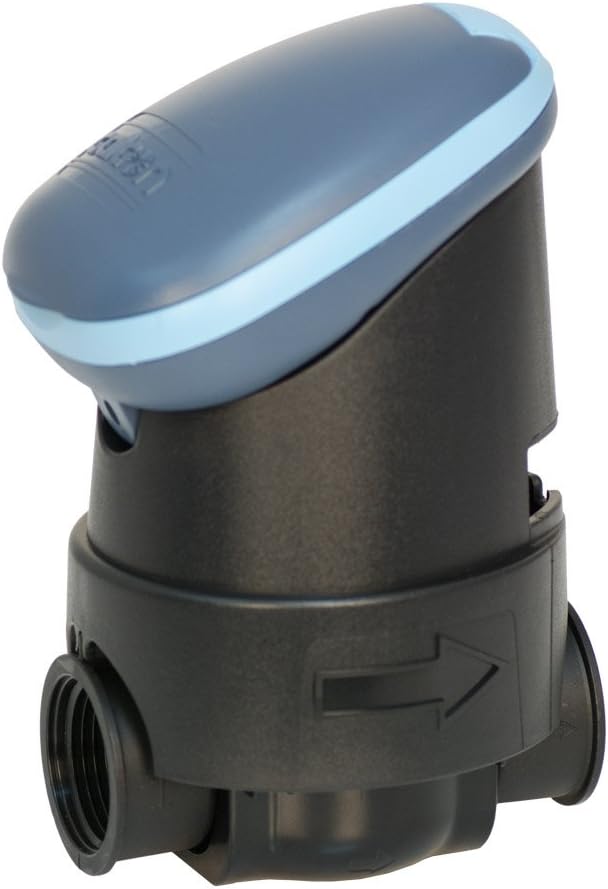
2-сүрөт: Galcon 7101D Valve with Flow Direction Arrow. This image illustrates the valve component, showing the arrow indicating the correct water flow direction for installation.
6. Иштөө нускамалары
The Galcon 7101D features 6 large buttons for programming and operation. Refer to the on-screen prompts for specific settings.
6.1 Учурдагы убакытты жана күндү орнотуу
Follow the on-screen instructions to set the current time and day of the week. This is crucial for accurate scheduling.
6.2 Сугаруу графигин программалоо
The controller supports two main programming modes:
- Апталык программалоо: Set specific days of the week for irrigation.
- Cyclic Programming: Set an irrigation cycle (e.g., every 2 days) regardless of the day of the week.
Use the programming buttons to navigate through the menu and set:
- Start Time(s)
- Duration of watering (in minutes)
- Frequency (specific days or cycle interval)
6.3 Кол менен иштетүү
To manually turn the water on or off, use the dedicated manual operation button. This allows for immediate watering outside of the programmed schedule.
6.4 Жамгырдын кечиктирүү функциясы
Activate the rain delay function to temporarily suspend irrigation for a set period (e.g., 24, 48, 72 hours) after rainfall. This conserves water and prevents overwatering.
7. Техникалык тейлөө
- Батареяны алмаштыруу: Replace the 9V alkaline battery annually, or when the low battery indicator appears on the display.
- Тазалоо: Clean the exterior of the controller with a damp кездеме. Абразивдүү тазалагычтарды же эриткичтерди колдонбоңуз.
- Кыштоо: In freezing climates, remove the controller and valve from the irrigation system and store indoors to prevent freeze damage.
8. Кыйынчылыктарды
| Көйгөй | Мүмкүн себеп | Чечим |
|---|---|---|
| Контроллердин дисплейи бош. | Өлүк же туура эмес орнотулган батарея. | Туура полярдуулукту камсыз кылып, 9V щелочтуу батареяны алмаштырыңыз. |
| Valve does not open/close. | Low battery, incorrect programming, or debris in valve. | Check battery, verify programming, or inspect valve for obstructions. |
| Байланыштардан суу агып кетет. | Бошоң байланыштар же бузулган пломбалар. | Tighten connections. If leaks persist, check for damaged O-rings or seals. |
| Irrigation does not start at scheduled time. | Incorrect time/day setting, rain delay active, or programming error. | Verify current time and day, check if rain delay is active, review irrigation program. |
9. Техникалык шарттар
- Модел: 7101D
- Бөлүмдүн номери: GAR6S2312P0
- Клапан Көлөм: 3/4 дюйм
- Кубат булагы: 1 x 9V Alkaline Battery (required)
- Суу өткөрбөйт рейтинги: IP-68 (submersible up to 3 feet)
- Программалоо параметрлери: Weekly or Cyclic
- Өлчөмдөрү: 4.4 x 3.9 x 7.4 дюйм (Продукт)
- Салмагы: 3.2 унция
- Өндүрүүчү: Galcon USA, LTD
- Operating Region: АКШ жана Канада
10. Кепилдик жана колдоо
For warranty information or technical support, please contact Galcon customer service. Refer to the product packaging or the official Galcon webучурдагы байланыш маалыматтары үчүн сайт.
Эскертүү: Буюмду уруксатсыз ажыратуу же өзгөртүү кепилдикти жокко чыгарышы мүмкүн.


