1. Киришүү
This manual provides essential information for the safe and efficient use of your Samsung BD-F5700 Wi-Fi Blu-Ray Player. Please read these instructions thoroughly before operating the device and retain them for future reference.
2. Орнотуу
2.1 Кутудан чыгаруу жана компоненттерди текшерүү
Бардык компоненттерди таңгактан кылдаттык менен алып салыңыз. Төмөнкү нерселердин бар экенин текшериңиз:
- Samsung BD-F5700 Blu-Ray Player
- Алыстан башкаруу (2 AAA батарейкасы менен)
- Электр кабели
- HDMI кабели
- Колдонуучунун Колдонмосу (бул документ)
2.2 Ойноткучту туташтыруу
- Жайгашкан жери: Place the Blu-Ray player on a stable, flat surface with adequate ventilation. Avoid placing it near heat sources or in direct sunlight.
- HDMI туташуу: HDMI кабелинин бир учун туташтырыңыз HDMI OUT port on the rear of the Blu-Ray player and the other end to an available HDMI-IN телевизоруңуздун портуна коюңуз.
- Кубат туташуу: кубат кабелин туташтырыңыз КҮЧ input on the rear of the Blu-Ray player, then plug the other end into a wall outlet.
- Тармакка туташуу (милдеттүү эмес): This player features built-in Wi-Fi. For a wired connection, connect an Ethernet cable from your router to the LAN ойноткучтун артындагы порт.
2.3 Initial Power-On and Wi-Fi Setup
- Телевизоруңузду күйгүзүп, туура HDMI киргизүү булагын тандаңыз.
- басыңыз КҮЧ button on the Blu-Ray player or its remote control.
- Алгачкы орнотуу, анын ичинде тил тандоо жана тармак конфигурациясы үчүн экрандагы нускамаларды аткарыңыз.
- For Wi-Fi setup, select your wireless network from the list, enter the password, and confirm the connection.
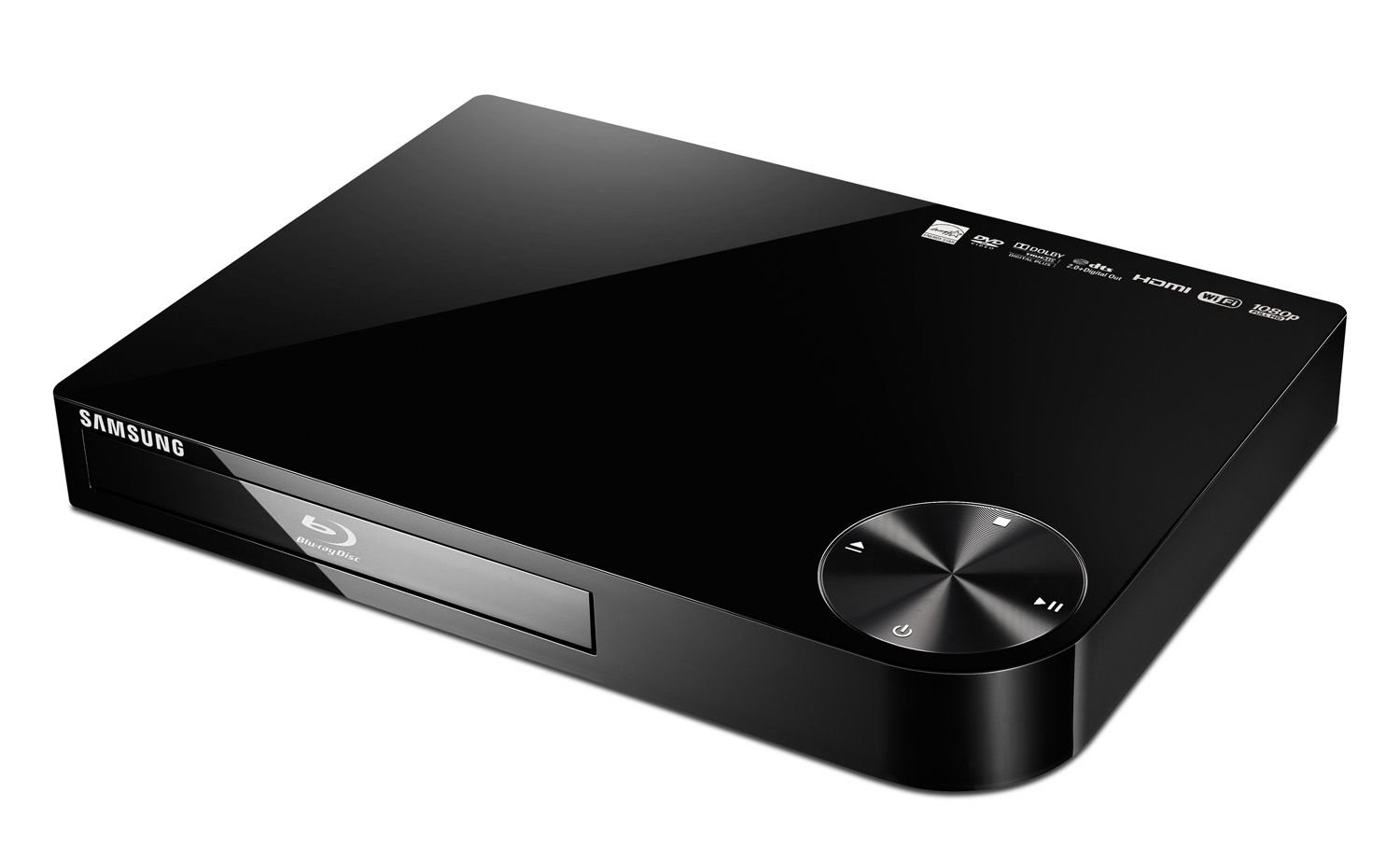
Сүрөт 1: Алдыңкы view of the Samsung BD-F5700 Blu-Ray Player. This image shows the sleek black design of the player, with the disc tray and control buttons visible on the front panel.
3. Иштөө нускамалары
3.1 Дискти ойнотуу
- басыңыз ЧЫГАРУУ button (triangle with line) on the player or remote to open the disc tray.
- Place a Blu-Ray disc or DVD onto the disc tray with the label side facing up.
- басыңыз ЧЫГАРУУ Лотокту жабуу үчүн баскычты кайра басыңыз. Ойноткуч дискти автоматтык түрдө окуй баштайт.
- Use the remote control's navigation buttons (Up, Down, Left, Right, OK) to select menu options and the ОЙНОО/ТЫНЫТТЫРУ, ТОКТОТ, ТЕЗ АЛГА, жана КАЙРА АЙРУУ ойнотууну башкаруу үчүн баскычтар.
3.2 Using Smart Hub (Wi-Fi Features)
Your BD-F5700 player includes Wi-Fi connectivity, allowing access to Samsung's Smart Hub for various applications.
- Ensure the player is connected to your home Wi-Fi network (refer to Section 2.3).
- басыңыз SMART HUB пультуңуздагы баскыч.
- Navigate through the available applications such as Netflix, YouTube, Facebook, Pandora, Vudu, and more.
- Select an application and follow its on-screen prompts to log in or access content.
3.3 AllShare Feature
The AllShare feature allows you to wirelessly share content from compatible devices (e.g., smartphones, tablets) to your TV via the Blu-Ray player.
- Ensure both your mobile device and the Blu-Ray player are connected to the same Wi-Fi network.
- On your mobile device, open the AllShare (or Smart View/Screen Mirroring) application.
- Select your Samsung BD-F5700 player from the list of available devices.
- You can now stream photos, videos, and music from your mobile device to your television.
4. Техникалык тейлөө
4.1 Ойноткучту тазалоо
- Always unplug the player before cleaning.
- Use a soft, dry cloth to wipe the exterior of the player. Do not use liquid cleaners or aerosol sprays.
- For the disc tray, use a soft, lint-free cloth. Avoid touching the lens inside the disc tray.
4.2 Дискке кам көрүү
- Манжа издерин болтурбоо үчүн дисктерди четинен кармаңыз.
- Дисктерди ортосунан сыртка карай сүртүп, жумшак, түксүз чүпүрөк менен тазалаңыз.
- Дисктерди чийилип калбашы жана чаңдын топтолушуна жол бербөө үчүн өз корпустарында сактаңыз.
5. Кыйынчылыктарды
| Көйгөй | Мүмкүн себеп | Чечим |
|---|---|---|
| Күч жок | Power cable disconnected or outlet issue. | Электр кабелинин байланыштарын текшериңиз. Башка электр розеткасын колдонуп көрүңүз. |
| Сүрөт/үн жок | Incorrect HDMI input selected on TV or faulty HDMI cable. | Сыналгыңыздан туура HDMI киргизүүсүн тандаңыз. Башка HDMI кабелин колдонуп көрүңүз. |
| Диск ойнобойт | Диск кир, чийилген же форматы шайкеш келбейт. | Clean the disc. Try a different disc. Ensure it's a compatible Blu-Ray or DVD. |
| Wi-Fi туташуу маселелери | Туура эмес сырсөз, алсыз сигнал же роутер көйгөйү. | Re-enter Wi-Fi password. Move player closer to router. Restart router. |
| Player is noisy | Normal disc spinning noise or player placed on an uneven surface. | Ensure player is on a stable, level surface. Some disc noise is normal during loading/playback. |
6. Техникалык шарттар
- Модел: BD-F5700
- Бренд: Samsung
- Байланыш: Wi-Fi, HDMI
- Колдоого алынган медиа: Blu-Ray диск, DVD
- Чечим: 1920x1080 (Full HD 1080p)
- Аудио чыгаруу режими: Стерео
- Өзгөчөлүктөр: Multi-Format Playback, All Share, Smart Hub (Netflix, YouTube, etc.)
- Өлчөмдөрү: 7.6 x 10.6 x 1.5 дюйм
- Салмагы: 2.2 фунт
- Батареялар: 2 AAA batteries (for remote control, included)
7. Кепилдик жана колдоо
Кепилдик маалыматы үчүн продуктуңузга кошулган кепилдик картасын караңыз же расмий Samsung колдоо бөлүмүнө кайрылыңыз website. For technical assistance, product registration, or service inquiries, please contact Samsung Customer Service.
Samsung кардарларды тейлөө: www.samsung.com/us/support/


