1. Киришүү
This user manual provides essential information for the proper setup, operation, and maintenance of your AOC i2269vw 22-Inch Class IPS Frameless/Extra Slim LED Monitor. Please read this manual thoroughly before using the product to ensure optimal performance and safety.

This image shows the front of the AOC i2269vw monitor, highlighting its slim bezel design and the AOC logo at the bottom center. The screen displays a vibrant green leaf.
2. Коопсуздук маалыматы
To prevent damage and ensure safe operation, observe the following precautions:
- Мониторду жамгырга же нымдуулукка дуушар кылбаңыз.
- Мониторду ачпаңыз casing; ичинде колдонуучу тейлей турган тетиктер жок. Бардык тейлөө иштерин квалификациялуу тейлөө кызматкерлерине тапшырыңыз.
- Монитор кулап калбаш үчүн аны туруктуу, тегиз бетке коюңуз.
- Монитордун айланасында туура желдетүүнү камсыз кылыңыз. Вентиляция тешиктерин жаап албаңыз.
- Монитор менен кошо берилген кубат шнурын жана адаптерди гана колдонуңуз.
- Монитор узак убакыт бою колдонулбай турган болсо, электр сайгычын розеткадан ажыратыңыз.
3. Пакеттин мазмуну
Пакетте бардык буюмдар бар экенин текшериңиз:
- AOC i2269vw 22-Inch Class IPS Frameless/Extra Slim LED Monitor
- Монитордун негизи
- Монитор Stand Neck
- Электр кабели
- VGA кабели
- DVI-D кабели
- Колдонуучунун Колдонмосу (бул документ)
4. Орнотуу
4.1 Стендди чогултуу
- Чийилбеш үчүн мониторду кылдаттык менен жумшак, таза кездемеге ылдый каратып коюңуз.
- Attach the stand neck to the back of the monitor, aligning the mounting points.
- Берилген бурамалар менен монитордун мойнуна бекитиңиз.
- Attach the stand base to the bottom of the stand neck and tighten the thumb screw or screw from the bottom.
4.2 Мониторду туташтыруу
The AOC i2269vw monitor supports VGA and DVI-D connections.

The back of the AOC i2269vw monitor is shown, detailing the power input, DVI-D port, and VGA port. The monitor stand is also visible.

А деталдуу view of the monitor's rear connectivity, specifically highlighting the DVI-D and VGA input ports, essential for connecting the monitor to a computer.
- Connect one end of the VGA or DVI-D cable to the corresponding port on your computer's graphics card.
- Connect the other end of the cable to the VGA or DVI-D input port on the back of the AOC i2269vw monitor.
- Кубат шнурунун монитордун кубат киресине туташтырыңыз, андан кийин экинчи учун жерге туташтырылган электр розеткасына сайыңыз.
4.3 VESA Wall Mounting
The AOC i2269vw monitor is VESA 75mm compliant, allowing for wall mounting or use with compatible monitor arms. Ensure you use a VESA-compatible mounting bracket (not included) and follow its installation instructions.

This diagram provides a visual representation of the AOC i2269vw monitor's dimensions (21.0 inches or 53 cm wide) in context, showing it on a table next to a seated person for scale.
5. Мониторду иштетүү
5.1 Күйгүзүү/өчүрүү
Press the power button located on the front bottom bezel of the monitor to turn it on or off.

This image focuses on the control buttons situated on the lower right bezel of the monitor, including the power button and navigation controls for accessing the On-Screen Display (OSD) menu.
5.2 Экрандагы дисплей (OSD) менюсу
Use the control buttons on the front bezel to navigate and adjust settings within the OSD menu. Common adjustments include:
- Жарыктык/Контраст: Жарык жана караңгы аймактардын жалпы жарыктыгын жана айырмасын тууралаңыз.
- Киргизүүнү тандоо: Manually switch between VGA and DVI-D input sources.
- Түс жөндөөлөрү: Түс температурасын, гамманы жана жеке RGB деңгээлдерин тактоо.
- Сүрөттү орнотуу: Auto-adjust for analog (VGA) input, or manually adjust clock, phase, and H/V position.
- OSD орнотуу: OSD тилин, абалын жана тайм-аутту өзгөртүңүз.
5.3 IPS Panel Benefits
The AOC i2269vw features an IPS (In-Plane Switching) panel, which provides consistent image appearance and accurate colors from all viewing positions. This is particularly beneficial for tasks requiring color accuracy or when multiple people are viewэкранда.
6. Техникалык тейлөө
6.1 Мониторду тазалоо
- Тазалоодон мурун ар дайым мониторду сууруп коюңуз.
- For the screen, use a soft, lint-free cloth lightly dampened with a non-abrasive, ammonia-free, and alcohol-free glass cleaner. Spray the cleaner onto the cloth, not directly onto the screen.
- в үчүнasing, use a soft, dry cloth. Avoid using harsh chemicals or abrasive materials.
6.2 Сактоо
When storing the monitor, keep it in a cool, dry place away from direct sunlight and extreme temperatures. If possible, use the original packaging for protection.
7. Кыйынчылыктарды
Мониторуңузда көйгөйлөргө туш болсоңуз, төмөнкү жалпы көйгөйлөрдү жана чечимдерди караңыз:
| Көйгөй | Мүмкүн себеп | Чечим |
|---|---|---|
| Экранда сүрөт жок | Монитор күйгөн эмес; Туура эмес киргизүү тандалды; Видео кабель бошоп калган. | Press the power button; Check OSD for correct input; Ensure video cable is securely connected. |
| Сүрөт бүдөмүк же бурмаланган | Incorrect resolution; Analog signal interference (VGA). | Set display resolution to 1920x1080; Use OSD to auto-adjust or manually adjust clock/phase for VGA. |
| Үн жок (тышкы динамиктер туташкан болсо) | No audio output from monitor; Speakers not connected or powered. | This monitor does not have built-in speakers. Ensure external speakers are properly connected to your computer and powered on. |
| Кубаттын диоду өчүк | Электр энергиясы жок. | Check if the power cord is securely connected to the monitor and the electrical outlet. Try a different outlet. |
Эгерде бул чечимдерди колдонуп көргөндөн кийин да көйгөй чечилбесе, AOC кардарларды колдоо кызматына кайрылыңыз.
8. Техникалык шарттар
Detailed technical specifications for the AOC i2269vw monitor:
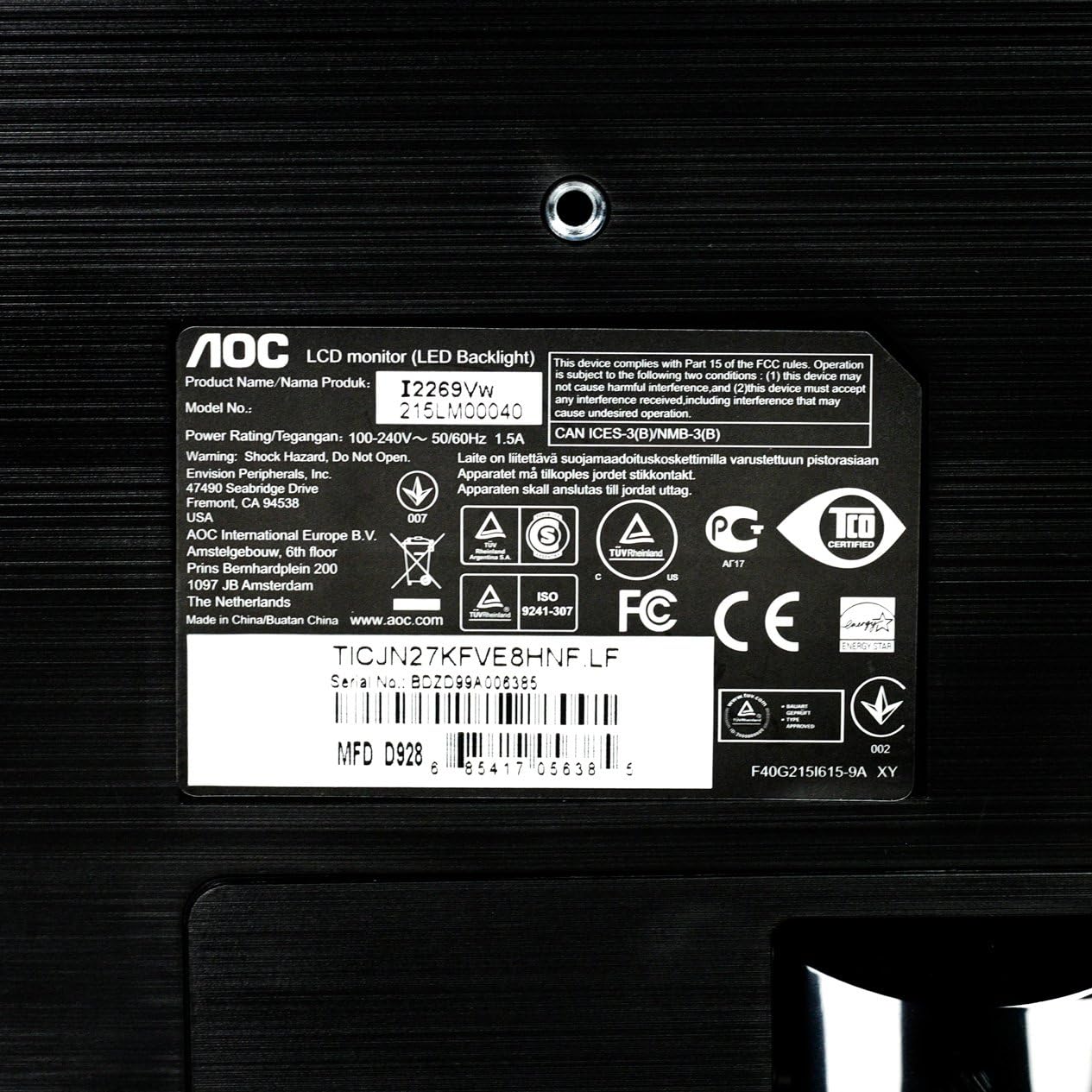
Чоңойтулган view of the product label on the monitor's back, displaying important details such as the model number (i2269Vw), power rating, serial number, and various regulatory compliance logos.
| Өзгөчөлүк | Деталь |
|---|---|
| Модель аты | i2269Vw |
| Screen Size | 22 дюйм (21.5" viewжөндөмдүү) |
| Панел түрү | IPS |
| Резолюция | 1920 x 1080 (Full HD) |
| Аспект катышы | 16:9 |
| Жарыктык | 250 кд/м² |
| Жооп убактысы | 5ms |
| Динамикалык контраст катышы | 50,000,000 1 XNUMX:XNUMX (DCR) |
| Киргизүү порттору | VGA, DVI-D with HDCP |
| VESA тоосунун шайкештиги | 75мм |
| Түс | Кара |
| Элемент Салмагы | 7.7 фунт |
| Продукциянын өлчөмдөрү (LxWxH) | 19.6 x 7.4 x 14.9 дюйм |
9. Кепилдик жана колдоо
For warranty information and technical support, please refer to the warranty card included with your product or visit the official AOC website. You can also contact AOC customer service for assistance with product inquiries, troubleshooting, or service requests.


