1. Киришүү
This manual provides essential information for the proper installation, operation, and maintenance of your Icom OPC-1000 Standard Cable. Please read this manual thoroughly before using the product to ensure safe and efficient operation.
The Icom OPC-1000 is a 20-foot (approximately 6.1 meters) microphone extension cable designed for marine communication systems. It is primarily used with the Icom Command Mic II and can also extend the factory microphone on compatible Icom radios, such as the M604.
2. Продукт бүтүп калдыview
The OPC-1000 cable features a robust design suitable for marine environments, including a waterproof bulkhead socket for secure connections.
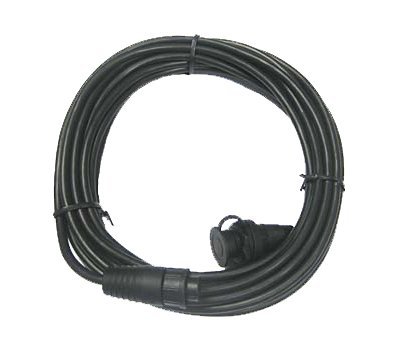
Figure 1: Icom OPC-1000 Standard Cable. This image shows the cable with its male and female connectors, highlighting the waterproof bulkhead socket.
2.1 Компоненттер
- OPC-1000 Cable: 20-foot (6.1m) extension cable.
- Male Connector: Connects to the radio or existing microphone cable.
- Waterproof Bulkhead Socket: Female connector designed for panel mounting, ensuring a watertight seal.
3. Орнотуу жана орнотуу
Proper installation is crucial for the waterproof integrity and reliable operation of the OPC-1000 cable.
3.1 Керектүү куралдар
- Drill with appropriate bit size for bulkhead mounting.
- Screwdriver.
- Mounting plate (if not already present or included with your Command Mic).
- Marine sealant (recommended for bulkhead installation).
3.2 Орнотуу кадамдары
- Монтаждоо ордун тандоо: Choose a suitable, flat surface for mounting the bulkhead socket. Ensure there is enough space behind the panel for the cable and connections.
- Монтаждоо тешиктерин даярдоо: Drill a hole of the appropriate diameter for the bulkhead socket. Refer to the dimensions provided with your Command Mic or radio for precise sizing.
- Install Bulkhead Socket: Insert the waterproof bulkhead socket into the drilled hole. Secure it using the provided mounting hardware (e.g., nut and washer) from the rear of the panel. Apply marine sealant around the flange for an extra watertight seal.
- Радиого туташуу: Connect the male end of the OPC-1000 cable to the microphone input port on your Icom marine radio. Ensure the connection is secure.
- Connect Command Mic II: Connect your Command Mic II to the newly installed bulkhead socket. Ensure the connection is fully seated and the locking collar (if present) is tightened to maintain waterproof integrity.
- Кабель багыттоо: Route the cable away from heat sources, sharp edges, and areas where it might be pinched or damaged. Use cable ties to secure it.
Important: Ensure all connections are tight and properly sealed to prevent water ingress, which can damage the equipment.
4. Операция
Once the OPC-1000 cable is correctly installed, its operation is seamless with your Icom marine radio and Command Mic II.
- The cable extends the reach of your Command Mic II, allowing you to operate your radio from a remote location.
- Ensure the Command Mic II is properly connected to the bulkhead socket before use.
- Refer to your Icom marine radio and Command Mic II manuals for specific operating instructions related to their functions.
5. Техникалык тейлөө
The OPC-1000 cable is designed for durability in marine environments. Minimal maintenance is required to ensure its longevity.
- Үзгүлтүксүз текшерүү: Periodically inspect the cable for any signs of wear, cuts, or damage to the outer jacket. Check connectors for corrosion or loose fittings.
- Тазалоо: If exposed to saltwater, rinse the cable and connectors with fresh water and allow them to dry thoroughly. Do not use harsh chemicals or abrasive cleaners.
- Туташуу бүтүндүгү: Ensure all connections remain tight and free from debris.
Caution: Do not attempt to repair damaged cables. Replace them with genuine Icom parts to maintain performance and safety.
6. Кыйынчылыктарды
If you experience issues with your Command Mic II or radio after installing the OPC-1000 cable, consider the following troubleshooting steps:
- Аудио жок/Үзгүлтүктүү аудио:
- Check all cable connections at both the radio and the Command Mic II. Ensure they are fully seated and secure.
- Inspect the cable for visible damage (kinks, cuts).
- Temporarily bypass the OPC-1000 cable and connect the Command Mic II directly to the radio (if possible) to determine if the issue lies with the cable or other components.
- Суу кириши:
- If water is found near the bulkhead socket, check the mounting and sealant. Reapply sealant if necessary.
- Ensure the Command Mic II connector is properly tightened to the bulkhead socket.
If problems persist after performing these checks, contact your authorized Icom dealer or Icom customer support for assistance.
7. Техникалык шарттар
| Өзгөчөлүк | Спецификация |
|---|---|
| Модель номери | OPC 1000 |
| Кабелдин узундугу | 20 фут (болжол менен 6.1 метр) |
| Туташтыргыч түрү | Male-to-Female (Waterproof Bulkhead Socket) |
| Шайкештик | Icom Command Mic II, Icom M604 (and other compatible Icom radios) |
| Өзгөчөлүктөр | Waterproof bulkhead socket |
| Түс | Кара |
| Салмагы | Approximately 1 Pound (0.45 kg) |
8. Кепилдик жана колдоо
Icom products are manufactured to high standards of quality and performance. For specific warranty information, please refer to the warranty card included with your original product purchase or visit the official Icom webсайт.
For technical support, service, or inquiries regarding genuine replacement parts, please contact your authorized Icom dealer or Icom customer service directly. Contact information can typically be found on the Icom official website or in your radio's main instruction manual.
Always use genuine Icom accessories to ensure optimal performance and to maintain warranty validity.


