1. Киришүү
This manual provides essential instructions for the proper use and care of your Transcend 32GB microSDHC Memory Card with SD Adapter. This product is designed to expand the storage capacity of compatible electronic devices such as smartphones, tablets, and digital cameras, allowing you to store more photos, videos, music, and other data.
2. Продукт бүтүп калдыview
Your Transcend memory card package includes:
- Transcend 32GB microSDHC Memory Card: A small, high-capacity flash memory card.
- SD Adapter: An adapter that allows the microSDHC card to be used in devices with a standard SD card slot.
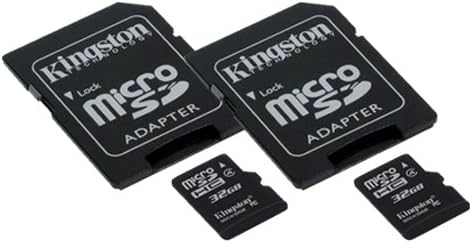
Сүрөт 1: A Transcend 32GB microSDHC memory card shown next to its larger SD adapter. The microSDHC card is small and black, with "microSDHC" and "32GB" printed on it. The SD adapter is also black, designed to house the microSDHC card, and features a lock switch on the side.
3. Орнотуу жана орнотуу
Follow these steps to properly install your memory card:
- Identify Card Slot: Locate the memory card slot on your device (e.g., smartphone, camera). This is typically a small slot, sometimes covered by a flap.
- microSDHC картасын салыңыз: For devices with a microSDHC slot, gently insert the 32GB microSDHC card into the slot with the gold contacts facing down (or as indicated by your device's manual) until it clicks into place. Do not force the card.
- Using the SD Adapter: If your device uses a standard SD card slot, first insert the 32GB microSDHC card into the SD adapter. Ensure it is fully seated. Then, insert the SD adapter (with the microSDHC card inside) into your device's SD card slot.
- Түзмөктү таануу: Power on your device. The device should automatically detect the new memory card. You may receive a notification or be prompted to format the card.
- Форматтоо (милдеттүү эмес, бирок сунушталат): For optimal performance and compatibility, it is often recommended to format the memory card using your device's built-in formatting function. Эскертүү: Форматтоо картадагы бардык маалыматтарды өчүрөт. Форматтоодон мурун маанилүү маалыматтардын камдык көчүрмөсүн сактап коюңуз.
4. Иштөө нускамалары
Once installed, your Transcend 32GB microSDHC card functions as additional storage for your device.
- Маалыматтарды сактоо: Photos, videos, documents, and applications can be saved directly to the memory card, depending on your device's settings. Consult your device's manual for specific instructions on how to manage storage locations.
- Маалыматтарды өткөрүү:
- To/From Device: Use your device's file manager or gallery application to move files between internal storage and the memory card.
- To/From Computer: Connect your device to a computer via USB, or remove the microSDHC card (using the SD adapter if necessary) and insert it into a computer's card reader. The card will appear as a removable drive, allowing you to drag and drop files.
- Write Protection (SD Adapter): The SD adapter has a small lock switch on its side. Sliding this switch to the "Lock" position will prevent new data from being written to the card and existing data from being deleted. Slide it to the "Unlock" position to enable writing. The microSDHC card itself does not have a lock switch.
5. Техникалык тейлөө жана кам көрүү
Proper care ensures the longevity and reliability of your memory card:
- Этияттык менен мамиле кылуу: Avoid bending, dropping, or applying excessive force to the memory card or adapter.
- Байланыштарды таза кармаңыз: Do not touch the gold contacts on the card. If necessary, gently clean them with a soft, dry, lint-free cloth.
- Экологиялык шарттар: Store the card in a cool, dry place, away from extreme temperatures, direct sunlight, moisture, and strong magnetic fields.
- Коопсуз алып салуу: Always safely eject the memory card from your device or computer before physically removing it to prevent data corruption.
- Маалыматтын камдык көчүрмөсү: Regularly back up important data from your memory card to another storage device (e.g., computer hard drive, cloud storage) to prevent data loss.
6. Кыйынчылыктарды
If you encounter issues with your memory card, try the following solutions:
- Карта табылган жок:
- Картанын уячага толугу менен жана туура салынганын текшериңиз.
- If using the SD adapter, check that the microSDHC card is properly seated within the adapter.
- Түзмөгүңүздү өчүрүп күйгүзүңүз.
- Try the card in another compatible device to determine if the issue is with the card or the device.
- Жазуу/өчүрүү мүмкүн эмес Files:
- If using the SD adapter, check if the lock switch is in the "Lock" position. Slide it to "Unlock".
- Ensure the card is not full. Delete unnecessary fileже аларды башка сактагычка өткөрүп бериңиз.
- Check your device's permissions for writing to external storage.
- Жай аткаруу:
- Түзмөгүңүз картанын ылдамдык классын колдой турганын текшериңиз.
- Avoid filling the card to its absolute maximum capacity.
- Consider formatting the card (after backing up data) to refresh its file системасы.
- Маалыматтын бузулушу: If files are corrupted or inaccessible, stop using the card immediately to prevent further damage. Data recovery services may be an option, but success is not guaranteed. Regular backups are crucial.
7. Техникалык шарттар
| Өзгөчөлүк | Деталь |
|---|---|
| Бренд | Transcend |
| Flash эс тутум түрү | Микро SDHC |
| Эстутум сактоо сыйымдуулугу | 32 ГБ |
| Шайкеш түзмөктөр | Smartphone (and other devices supporting microSDHC/SD) |
| Өзгөчө өзгөчөлүк | Жеңил |
| Элемент Салмагы | 0.03 фунт (болжол менен 0.48 унция) |
| UPC | 021859500275 |
| ASIN | B00F9HC9A8 |
| Дата биринчи жеткиликтүү | 1-декабрь, 2009-жыл |
8. Кепилдик жана колдоо
For information regarding the product warranty, technical support, or service, please refer to the official Transcend website or contact Transcend customer service directly. Keep your proof of purchase for warranty claims.
кире аласыз Transcend Store on Amazon көбүрөөк продукт маалымат жана колдоо ресурстар үчүн.


