Introduction
Welcome to your T'nB K-Blue Bluetooth 3.0 Wireless Keyboard. This manual provides detailed instructions for setting up, operating, and maintaining your device to ensure optimal performance and longevity.
Пакеттин мазмуну
- T'nB K-Blue Bluetooth Keyboard
- 2 x AAA Батареялар (кошулган)
- Колдонуучунун Колдонмосу (бул документ)
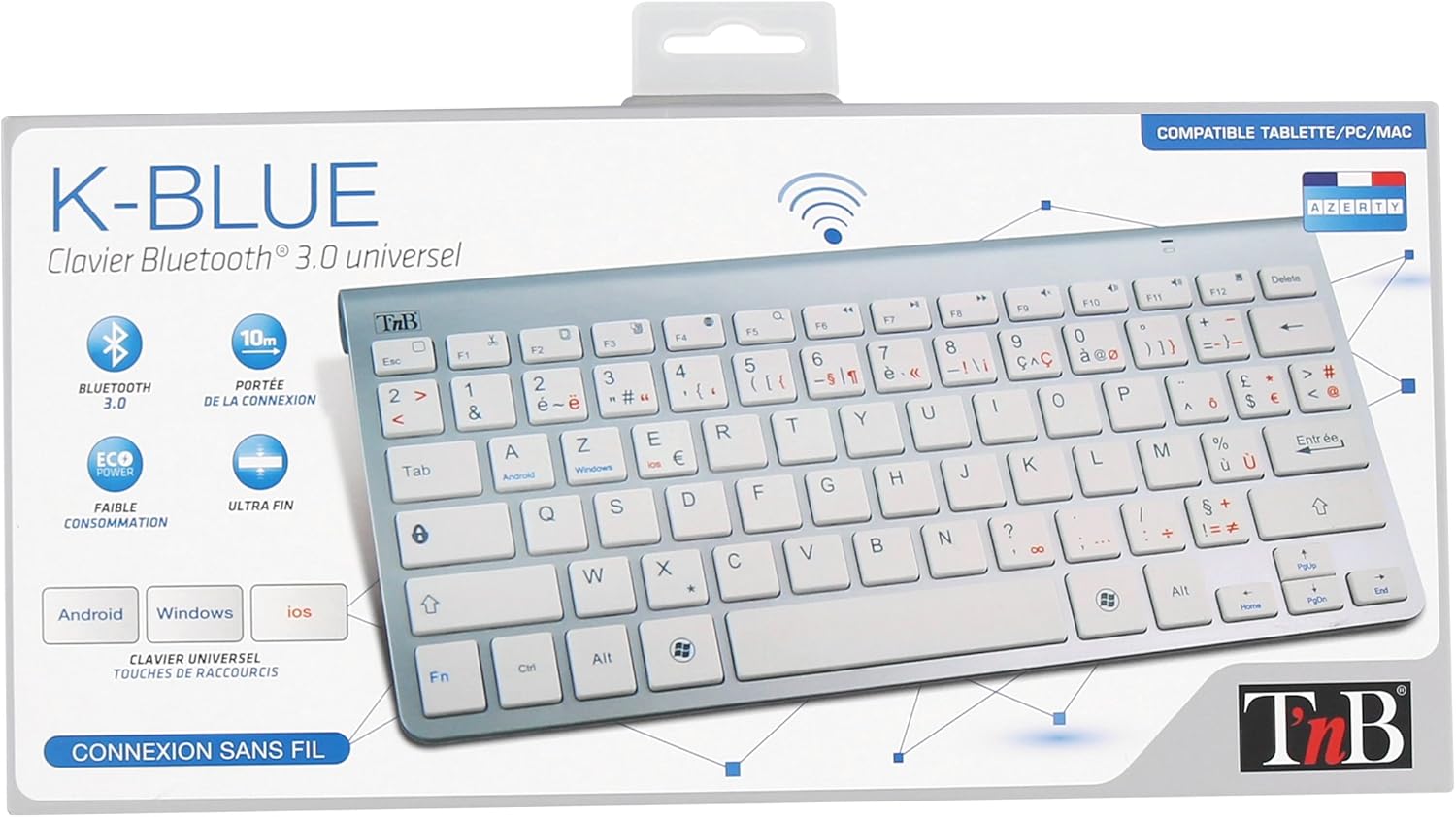
Image: The retail packaging for the T'nB K-Blue Bluetooth Keyboard, showing the keyboard inside a clear plastic tray within a cardboard box. The box highlights features like Bluetooth 3.0, 10m range, eco power, and ultra-thin design, along with compatibility for Android, Windows, and iOS.
Продукт өзгөчөлүктөрү
- Bluetooth 3.0 туташуусу: Туруктуу жана натыйжалуу зымсыз байланышты камсыз кылат.
- Жалпы шайкештик: Works with Android, Windows, and iOS devices, including smartphones, tablets, and computers.
- Мультимедиа ачкычтары: Dedicated keys for quick access to media controls and system functions.
- Ультра жука дизайн: Portable and lightweight for on-the-go use.
- Төмөн энергия керектөө: Узак мөөнөттүү пайдалануу үчүн батареянын иштөө мөөнөтүн узартуу.
- 10 метрлик атуу аралыгы: Reliable connection up to 10 meters (33 feet) from your device.

Сүрөт: жогорудан ылдыйга view of the T'nB K-Blue Bluetooth Keyboard, showcasing its full QWERTY layout with function keys, multimedia shortcuts, and operating system specific keys (Android, Windows, iOS) highlighted in blue and red text.

Сүрөт: бурчтуу view of the T'nB K-Blue Bluetooth Keyboard, highlighting its silver finish and white keys. The slim profile and full key layout are visible, along with the T'nB logo in the upper left corner.
Жайгашуу
Батарея орнотуу
- Баскычтоптун астыңкы жагындагы батарея бөлүкчөсүн табыңыз.
- Батарея уясынын капкагын ачыңыз.
- Бөлүмдүн ичинде көрсөтүлгөндөй, туура полярдуулукту (+/-) текшерип, эки AAA батарейкасын салыңыз.
- Батарея уясынын капкагын бекем жабыңыз.
Bluetooth Жупташтыруу
- Turn on the keyboard using the power switch, typically located on the side or back. A blue indicator light may flash, indicating it is in pairing mode.
- On your device (smartphone, tablet, computer), enable Bluetooth from its settings menu.
- Издөө available Bluetooth devices. The keyboard should appear in the list as "T'nB K-Blue" or a similar identifier.
- Жупташтыруу процессин баштоо үчүн тизмеден клавиатураны тандаңыз.
- If prompted, enter the pairing code displayed on your device's screen using the T'nB K-Blue keyboard, then press the Кириңиз ачкыч.
- Once successfully paired, the indicator light on the keyboard will stop flashing or turn solid, confirming the connection.
Иштөө нускамалары
Switching Operating Systems
The T'nB K-Blue keyboard supports multiple operating systems. Use the following key combinations to switch modes for optimal functionality with your specific device:
- Fn + Android Key: Android түзмөктөрү үчүн.
- Fn + Windows ачкычы: Windows түзмөктөрү үчүн.
- Fn + iOS Key: For iOS (Apple) devices.
Мультимедиа жана Функция баскычтары
The top row of keys (F1-F12) on the keyboard often doubles as multimedia or special function keys. To activate these secondary functions, press the Fn каалаган функция баскычы менен бир убакта басыңыз.
Examples of common multimedia functions:
- Fn+F1: Үй
- Fn+F2: издөө
- Fn+F3: Баарын тандаңыз
- Fn+F4: Көчүрүү
- Fn+F5: Паста
- Fn+F6: Кесүү
- Fn+F7: Мурунку трек
- Fn+F8: Ойнотуу/Тыныгуу
- Fn+F9: Кийинки трек
- Fn+F10: Үнсүз
- Fn+F11: Үндү төмөндөтүү
- Fn+F12: Үндү көтөрүү
Техникалык тейлөө
Тазалоо
Баскычтопту тазалоо үчүн, бетти жумшак, кургак же бир аз сүртүңүз damp cloth. Avoid using harsh chemicals, abrasive materials, or excessive moisture, which can damage the electronics.
Сактагыч
Store the keyboard in a cool, dry place away from direct sunlight and extreme temperatures. If storing for extended periods, it is recommended to remove the AAA batteries to prevent potential leakage and damage to the device.
Проблемаларды чечүү
Баскычтоп туташпай жатат
- Ensure the keyboard is turned on and batteries are correctly installed and charged.
- Make sure Bluetooth is enabled on your device and it is discoverable.
- Түзмөгүңүздүн Bluetooth жөндөөлөрүнөн клавиатураны ажыратып, кайра жупташтырып көрүңүз.
- Ensure the keyboard is within the 10-meter operating range of your device.
- Check if the correct operating system mode (Fn + Android/Windows/iOS) is selected on the keyboard.
Ачкычтар жооп бербейт
- Батареянын деңгээлин текшериңиз жана керек болсо алмаштырыңыз.
- Re-establish the Bluetooth connection by turning the keyboard off and on, or by re-pairing.
- Баскычтопту да, туташкан түзмөгүңүздү да өчүрүп күйгүзүңүз.
Үзгүлтүксүз туташуу
- Move closer to your device to ensure you are within the optimal range.
- Avoid sources of strong electromagnetic interference (e.g., microwaves, Wi-Fi routers, other Bluetooth devices).
Техникалык шарттар
| Өзгөчөлүк | Деталь |
|---|---|
| Модел | K-Blue Bluetooth Keyboard |
| Бренд | T'nB |
| Байланыш | Bluetooth 3.0 |
| Иштөө диапазону | 10 метрге чейин (33 фут) |
| Power Source | 2 x AAA батареялары |
| Шайкеш OS | Android, Windows, iOS |
| Өзгөчөлүктөр | Multimedia Keys, Ultra-Thin Design |
| Материал | Пластик |
| Түс | Silver/White |

Сүрөт: бир тарап view of the T'nB K-Blue Bluetooth Keyboard, emphasizing its ultra-thin profile and sleek design. This view highlights the portability of the device.
Колдоо
For further assistance, technical support, or warranty information, please refer to the official T'nB website or contact their customer service directly. Contact details can typically be found on the product packaging or the manufacturer's webсайт.


