Introduction
This manual provides essential information for the proper use and care of your Beats Studio Wireless Over-Ear Headphones. Please read these instructions carefully before using your headphones to ensure optimal performance and longevity. The Beats Studio Wireless headphones offer a premium audio experience with wireless connectivity and Adaptive Noise Canceling technology.
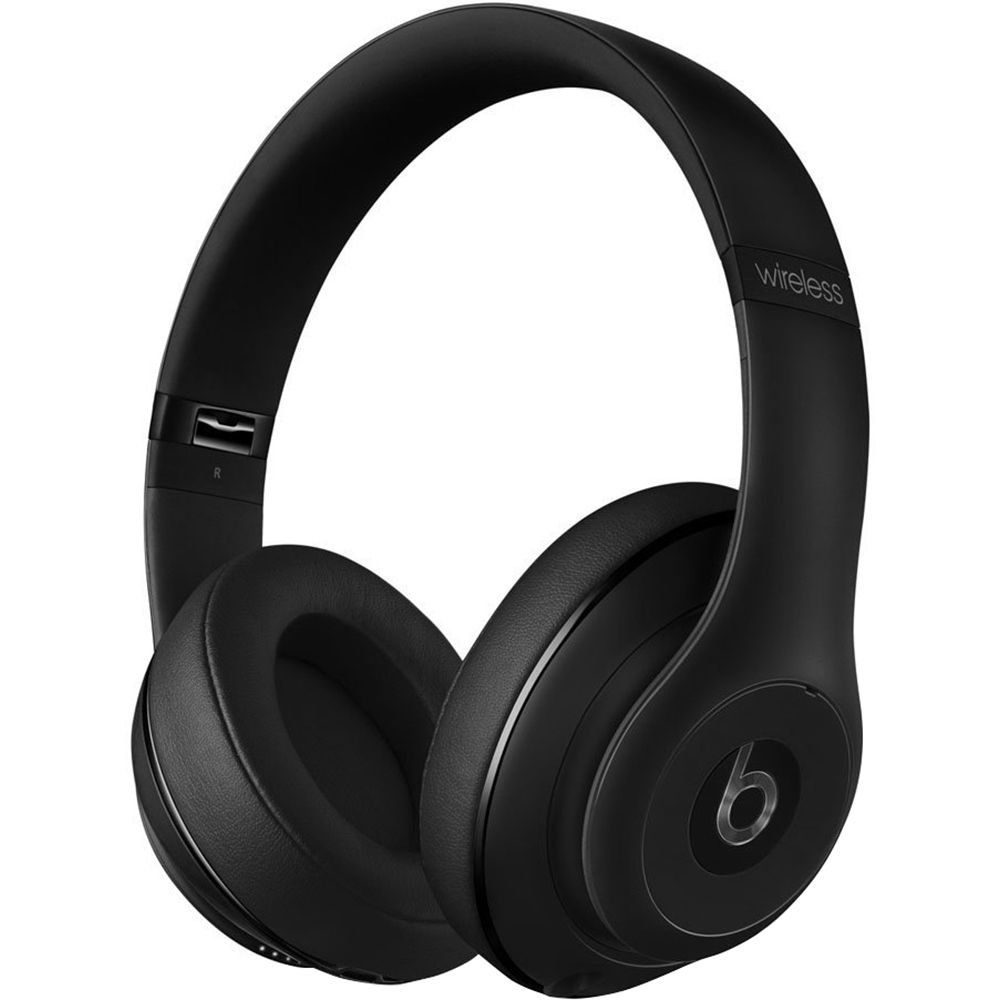
Image: Beats Studio Wireless Over-Ear Headphones in Matte Black, showcasing жарашыктуу дизайн.
Кутуда эмне бар
Пакетиңизде бардык буюмдар бар экенин текшериңиз:
- Beats Studio Wireless over-ear headphones
- 3.5mm audio cable with RemoteTalk (for wired connection and controls)
- Standard 3.5 mm audio cable (for wired connection without RemoteTalk features)
- USB 2.0 cable (USB-A to USB Micro-B) for charging
- Hard-shell carrying case with carabiner clip

Image: The Beats Studio Wireless headphones, hard-shell carrying case, and various cables laid out from the packaging.
Жайгашуу
1. Наушниктерди заряддоо
Before first use, fully charge your Beats Studio Wireless headphones. A full charge provides approximately 12 hours of wireless playback or 20 hours of wired playback with Adaptive Noise Canceling enabled.
- Connect the small end of the USB 2.0 cable (USB-A to USB Micro-B) to the Micro-USB port on the right earcup of the headphones.
- Connect the larger end of the USB cable to a USB power adapter (not included) or a powered USB port on a computer.
- The Fuel Gauge LEDs on the right earcup will indicate charging status. When all five LEDs are solid white, the headphones are fully charged.
Эскертүү: The headphones cannot be used while charging.
2. Bluetooth Жупташтыруу
Зымсыз аудио үчүн гарнитураңызды Bluetooth иштетилген түзмөгүңүз менен жупташтырыңыз.
- Гарнитураңыз кубатталып, өчүрүлгөнүн текшериңиз.
- Press and hold the power button on the right earcup for 3-5 seconds until the Fuel Gauge LEDs begin to pulse. This indicates pairing mode.
- Түзмөгүңүздө Bluetooth жөндөөлөрүнө өтүп, Bluetooth'ду иштетиңиз.
- Select "Beats Studio Wireless" from the list of available devices.
- Once paired, the Fuel Gauge LEDs will turn solid white.
The headphones have a Bluetooth range of up to 30 feet (9 meters).
3. Зымдуу туташуу
For a wired connection, use the provided 3.5mm audio cables.
- Plug one end of the 3.5mm audio cable into the audio input port on the left earcup.
- Экинчи учун түзмөгүңүздүн 3.5 мм аудио чыгаруу уячасына сайыңыз.
The RemoteTalk cable allows for inline control of music and calls when connected to compatible devices.
Иштөө нускамалары
1. Күйгүзүү/өчүрүү
- Күйгүзүү үчүн: Press and hold the power button on the right earcup until the Fuel Gauge LEDs illuminate.
- Өчүрүү үчүн: Press and hold the power button until the Fuel Gauge LEDs turn off.
2. Controls (Wireless Mode)
The "b" button on the left earcup and the volume buttons control playback and calls.
- Ойнотуу/тындыруу: Press the "b" button once.
- Кийинки трек: Press the "b" button twice quickly.
- Мурунку трек: Press the "b" button three times quickly.
- Көлөмү: Press the top volume button.
- Үнүн азайтуу: Press the bottom volume button.
- Чалууга жооп берүү/аяктоо: Press the "b" button once during an incoming call or active call.
- Чакырууну четке кагуу: Press and hold the "b" button for 2 seconds during an incoming call.
- Үн Жардамчысын жандыруу: Press and hold the "b" button for 2 seconds (functionality depends on device).
3. Adaptive Noise Canceling (ANC)
The Beats Studio Wireless headphones feature Dual-Mode Adaptive Noise Canceling. ANC is automatically active when the headphones are powered on. There are two modes:
- Full ANC: Engaged when listening to music or media, providing maximum noise reduction.
- ANC Only: When the audio cable is unplugged and the headphones are powered on, ANC will automatically switch to a more aggressive mode to reduce external noise without playing audio.
Техникалык тейлөө
1. Тазалоо
Гарнитураңыздын сырткы көрүнүшүн жана иштешин сактоо үчүн:
- Кулакчындарды жана баш боону жумшак, кургак, мамыксыз чүпүрөк менен сүртүңүз.
- Абразивдүү тазалагычтарды, спиртти же химиялык эриткичтерди колдонбоңуз.
- Ар кандай тешиктерге ным кирүүдөн сактаңыз.
2. Сактоо
When not in use, store your headphones in the provided hard-shell carrying case to protect them from damage.
- Fold the headphones carefully to fit into the case.
- Keep headphones away from extreme temperatures and humidity.
3. Батареяга кам көрүү
Батареянын иштөө мөөнөтүн узартуу үчүн:
- Батареяны бат-баттан толук кубаттап калуудан алыс болуңуз.
- Charge the headphones regularly, even if not used for extended periods.
- Салкын, кургак жерде сактаңыз.
Проблемаларды чечүү
If you encounter issues with your Beats Studio Wireless headphones, try the following solutions:
Кубат жок / күйбөйт
- Кулакчындар толук заряддалганын текшериңиз. Аларды USB кабели аркылуу кубат булагына туташтырыңыз.
- USB кабелин жана кубаттоо портун кандайдыр бир бузулууларды текшериңиз.
Үн жок / Үзгүлтүктүү аудио
- Зымсыз:
- Ensure headphones are paired and connected to your device.
- Наушниктеги жана түзмөгүңүздүн үнүнүн деңгээлин текшериңиз.
- Move closer to your device to avoid interference or exceeding Bluetooth range.
- Гарнитураны түзмөгүңүз менен ажыратып, кайра жупташып көрүңүз.
- текст:
- Ensure the 3.5mm audio cable is securely plugged into both the headphones and your audio source.
- Try a different 3.5mm audio cable if available.
Жупташтыруу маселелери
- Ensure the headphones are in pairing mode (pulsing Fuel Gauge LEDs).
- Түзмөгүңүздүн Bluetooth'ун өчүрүп, андан кийин күйгүзүңүз.
- Forget "Beats Studio Wireless" from your device's Bluetooth list and attempt to pair again.
- Башка Bluetooth түзмөктөрү жупташтыруу процессине жолтоо кылбасын текшериңиз.
Adaptive Noise Canceling (ANC) Not Working
- Ensure the headphones are powered on. ANC requires power.
- Check for any obstructions around the external microphones on the earcups.
Техникалык шарттар
Key technical specifications for the Beats Studio Wireless Over-Ear Headphones:
- Модель аты: Студия
- Байланыш технологиясы: Bluetooth (Wireless), 3.5 mm Jack (Wired)
- Зымсыз байланыш технологиясы: Bluetooth
- Bluetooth диапазону: 30 фут (9 метр) чейин
- Ызы-чууну көзөмөлдөө: Active Noise Cancellation (Dual-Mode Adaptive Noise Canceling)
- Батареянын иштөө мөөнөтү: Approximately 12 hours (wireless), 20 hours (wired with ANC)
- Батарея түрү: 1 литий-иондук батарея (кайра заряддалуучу)
- Башкаруу түрү: Media Control (on-earcup "b" button, volume buttons)
- Микрофон: Handsfree чалуулар үчүн орнотулган
- Форма фактору: Кулак үстүндө
- Кулак жайгаштыруу: Кулак үстүндө
- Материал: Пластик
- Элемент Салмагы: Болжол менен 9.2 унция (0.26 Kilogram)
- Продукциянын өлчөмдөрү: 9.6 x 7.3 x 4.5 дюйм
- Өндүрүүчү: Beats Electronics, ООО
- Биринчи жеткиликтүү болгон күнү: 1-декабрь, 2013-жыл

Сүрөт: жакын план view of the headphone's inner band, displaying the model number B0501.
Кепилдик жана колдоо
For warranty information and customer support, please refer to the official Beats webсайтка же түздөн-түз кардарларды тейлөөгө кайрылыңыз. Кепилдик дооматтар үчүн сатып алганыңыздын далилин сактаңыз.
Эскертүү: This product is an older model. Specific warranty terms may vary based on purchase date and region. Please consult the manufacturer's official resources for the most accurate and up-to-date information.
Кошумча жардам алуу үчүн төмөнкүгө кириңиз: Beats Support


