1. Киришүү
This manual provides essential instructions for the safe operation and maintenance of your VTech VM333 Safe & Sound Video Baby Monitor. Please read this manual thoroughly before using the product to ensure proper setup and functionality. The VTech VM333 is designed to help you monitor your baby with a high-resolution color LCD screen, automatic night vision, and two-way audio communication.
2. Продукт бүтүп калдыview
The VTech VM333 system includes a Parent Unit (monitor) and a Baby Unit (camera). Familiarize yourself with the components and controls of each unit.
2.1. Parent Unit
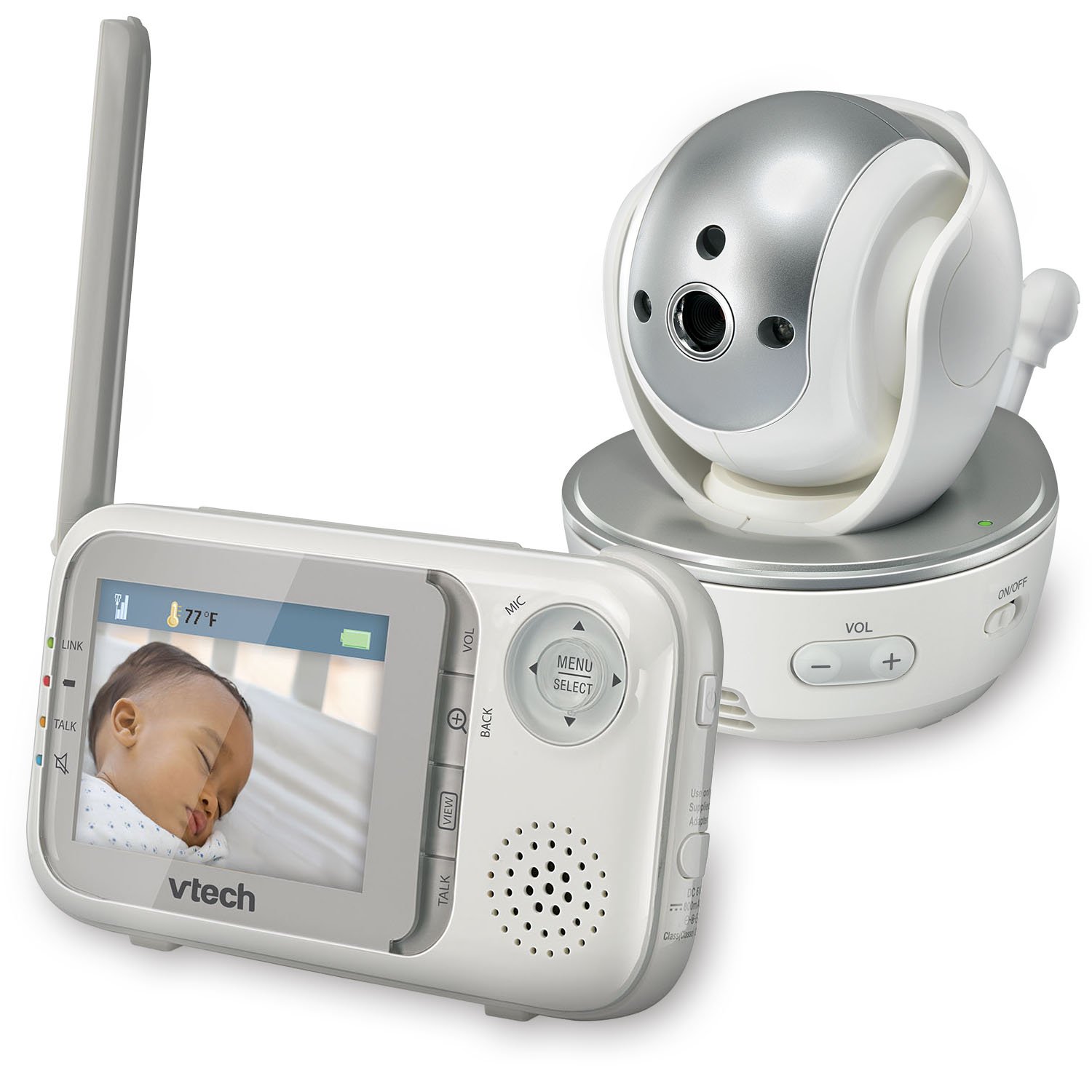
Сүрөт: алдыңкы view of the VTech VM333 Parent Unit.
- 2.8 дюймдук түстүү LCD экран: Displays live video feed from the Baby Unit.
- МЕНЮ/ТАНДОО баскычы: Меню параметрлерине кирип, тандоолорду ырастайт.
- Багыттоочу жебелер (Өйдө/Төмөн/Сол/Оң): Navigates menus and controls camera pan/tilt.
- ZOOM Button (+/-): Magnifies the video image.
- TALK баскычы: Activates two-way audio communication.
- VOLUME Buttons (+/-): Adjusts the Parent Unit speaker volume.
- LINK көрсөткүчү: Shows connection status between units.
- Батарея көрсөткүчү: Учурдагы батареянын деңгээлин көрсөтөт.
- Температура дисплейи: Shows the temperature detected by the Baby Unit.
2.2. Baby Unit (Camera)

Сүрөт: алдыңкы view of the VTech VM333 Baby Unit camera.
- Камера линзасы: Видеону тартып алат.
- Инфракызыл диоддор: Provide night vision in low light conditions.
- Микрофон: Detects sound from the baby's room.
- Баяндамачы: эки тараптуу аудио байланыш үчүн.
- Температура сенсору: Бөлмөнүн температурасын көзөмөлдөйт.
- Кубатты күйгүзүү / өчүрүү Turns the Baby Unit on or off.
- Power Jack: Кубат адаптерине туташат.

Сүрөт: каптал view of the VTech VM333 Baby Unit, illustrating the wall-mount bracket.
3. Орнотуу
3.1. Түзмөктөрдү күйгүзүү
- Бала блогун туташтыруу: Plug the small end of the power adapter into the power jack on the back of the Baby Unit. Plug the large end into a wall outlet.
- Connect the Parent Unit: Plug the small end of the power adapter into the power jack on the side of the Parent Unit. Plug the large end into a wall outlet. The Parent Unit battery will begin charging.
- Күйгүзүү: Slide the ON/OFF switch on the Baby Unit to the ON position. Press and hold the POWER button on the Parent Unit until the screen turns on.
The units are pre-linked. If they do not link automatically, refer to the "Troubleshooting" section for re-pairing instructions.
3.2. Ымыркай бөлүгүн (камера) жайгаштыруу
Place the Baby Unit at least 3 feet (1 meter) away from your baby to avoid potential hazards. Ensure the camera is positioned to capture the desired viewing area. Avoid placing the Baby Unit where it can be easily reached by children.
- For optimal performance, place the Baby Unit on a flat surface or mount it to a wall using the included wall-mount bracket.
- Keep the Baby Unit and Parent Unit within range (up to 1,000 feet / 300 meters in open space). Obstacles like walls and furniture can reduce the range.
Image: Proper placement of the Baby Unit near a crib.
4. Операция
4.1. Basic Monitoring
Once both units are powered on and linked, the Parent Unit will display live video from the Baby Unit. Adjust the volume using the VOL+ жана VOL - buttons on the Parent Unit.
4.2. Панорамалоо, эңкейтүү жана масштабдоо
The Baby Unit camera can be remotely controlled from the Parent Unit to adjust its viewмасштабдоо бурчу жана масштабдоо деңгээли.
- Панорама/Тилт: колдонуу Багыттуу жебелер (Up, Down, Left, Right) on the Parent Unit to move the camera lens horizontally (up to 270 degrees) and vertically (up to 124 degrees).
- Чоңойтуу: басыңыз ZOOM + button to zoom in (2x magnification) and ZOOM - кичирейтүү үчүн.
Video: Demonstration of the VTech VM333's pan, tilt, and zoom features, showing remote camera control from the Parent Unit.
4.3. Эки тараптуу сүйлөшүү
You can speak to your baby through the Baby Unit's speaker.
- басып, кармап туруңуз СҮЙЛӨШҮҮ Ата-эне бөлүмүндөгү баскыч.
- Ата-эне бөлүмүндөгү микрофонго так сүйлөңүз.
- бошотуңуз СҮЙЛӨШҮҮ button to stop speaking and hear your baby again.

Image: Using the two-way talk feature on the Parent Unit.
4.4. Automatic IR Night Vision
The Baby Unit is equipped with infrared LEDs that automatically activate in low light conditions, providing a clear black and white video image of your baby in the dark.
Image: The Baby Unit operating in night vision mode.
4.5. Sound Activation Mode
This mode allows the Parent Unit screen to turn off automatically to save power and reduce light disturbance, and then turn back on when sounds are detected from the Baby Unit.
- басыңыз МЕНЮ/ТАНДОО Ата-эне бөлүмүндөгү баскыч.
- дегенге өтүңүз VOX сезгичтиги or Үндү активдештирүү орнотуу.
- Select your desired sound sensitivity level. A higher sensitivity will activate the screen with softer sounds.
Image: Parent Unit displaying the sound activation icon.
4.6. Temperature Monitoring and Alerts
The Baby Unit monitors the room temperature and displays it on the Parent Unit screen. You can set alerts for temperature deviations.
- басыңыз МЕНЮ/ТАНДОО баскычы.
- дегенге өтүңүз Температура эскертүүсү орнотуулар.
- Set your desired minimum and maximum temperature thresholds. The Parent Unit will beep if the temperature goes outside this range.
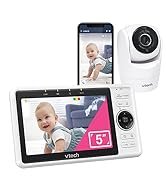
Image: Parent Unit displaying room temperature.
4.7. Multiple Camera Monitoring (Expandable System)
The VM333 system supports up to four cameras (additional cameras sold separately). You can view multiple cameras in different modes.
- Бойдок View: Displays video from one camera at a time. Use the VIEW button to cycle through connected cameras.
- Бөлүнүү View: Displays video from multiple cameras simultaneously on a split screen.
- Патруль режими: Automatically cycles through all connected cameras, displaying each for a few seconds.
Video: Demonstration of multi-camera viewing modes, including single view, бөлүү view, and patrol mode.
5. Техникалык тейлөө
- Тазалоо: Clean the surfaces of the Parent Unit and Baby Unit with a soft, damp кездеме. Тазалоочу спрейлерди же суюк тазалоочу каражаттарды колдонбоңуз.
- Батареяга кам көрүү: The Parent Unit uses a rechargeable Lithium-Ion battery. For optimal battery life, fully charge the unit before first use. Avoid extreme temperatures. If storing the unit for an extended period, remove the battery.
- Линзага кам көрүү: Keep the camera lens clean to ensure clear video quality. Use a soft, lint-free cloth to gently wipe the lens if needed.
6. Кыйынчылыктарды
| Көйгөй | Чечим |
|---|---|
| No video/audio on Parent Unit. |
|
| Видеонун сапаты начар. |
|
| Parent Unit beeps (low battery, out of range, temperature). |
|
| Башка түзмөктөргө кийлигишүү. |
|
7. Техникалык шарттар
| Өзгөчөлүк | Деталь |
|---|---|
| Модель номери | VM333 |
| Screen Size | 2.8 дюйм (LCD) |
| Зымсыз технология | 2.4 GHz FHSS digital transmission |
| Диапазон | Up to 1,000 feet (300 meters) in open space |
| Пан бурчу | Up to 270 degrees horizontal |
| Тит бурч | Up to 124 degrees vertical |
| Чоңойтуу | 2x санариптик масштаб |
| Түнкү көрүнүш | Automatic infrared (IR) |
| Эки тараптуу аудио | Ооба |
| Үндү активдештирүү | Ооба (VOX) |
| Температура сенсору | Ооба, эскертмелер менен |
| Кеңейтүүчү | Up to 4 cameras (additional cameras sold separately) |
| Ата-эне блогунун батареясынын иштөө мөөнөтү | 3.5 саатка чейин (видео агым) |
| Power Source | Rechargeable Lithium-Ion battery (Parent Unit), AC power (Baby Unit) |
| Түс | Ак/Күмүш |
| Элемент Салмагы | 2 фунт |
8. Кепилдик жана колдоо
For warranty information and technical support, please contact VTech customer service.
- Кардарларды колдоо номери: (800) 595-9511
- Webсайт: www.vtechbabycare.com
- Электрондук почта: support@vtechbabycare.com
Кепилдик максатында сатып алуунун далили катары сатып алуу дүмүрчөгүңүздү сактап коюңуз.


