1. Киришүү
Thank you for choosing the SCHWAIGER DCR600HD Full HD Cable TV Receiver. This manual provides essential information for the safe and efficient use of your device. Please read these instructions carefully before installation and operation, and keep them for future reference.
2. Коопсуздук нускамалары
- Электр камсыздоо: Түзмөк менен кошо берилген кубат адаптерин гана колдонуңуз. Үндүн канчалык күчтүү экенин текшериңиз.tage сиздин жергиликтүү электр камсыздооңузга дал келет.
- Вентиляция: Do not block ventilation openings. Ensure adequate space around the receiver for proper airflow to prevent overheating.
- Нымдуулук: Keep the device away from water, moisture, and high humidity. Do not expose it to rain or splashes.
- Тазалоо: Тазалоодон мурун электр кубатынан ажыратыңыз. Жумшак, кургак чүпүрөктү колдонуңуз. Суюк же аэрозоль тазалагычтарды колдонбоңуз.
- Жайгашкан жери: Place the receiver on a stable, flat surface. Avoid direct sunlight, heat sources, and strong magnetic fields.
- Тейлөө: Аппаратты өзүңүз ачууга же оңдоого аракет кылбаңыз. Бардык тейлөөлөрдү квалификациялуу кызматкерлерге тапшырыңыз.
3. Пакеттин мазмуну
Сураныч, пакетте төмөнкү нерселерди текшериңиз:
- SCHWAIGER DCR600HD Cable TV Receiver
- Алыстан башкаруу
- Power Cable (integrated or separate adapter)
- Колдонуучунун Колдонмосу (бул документ)
4. Продукт бүтүп калдыview
4.1 алдыңкы панели
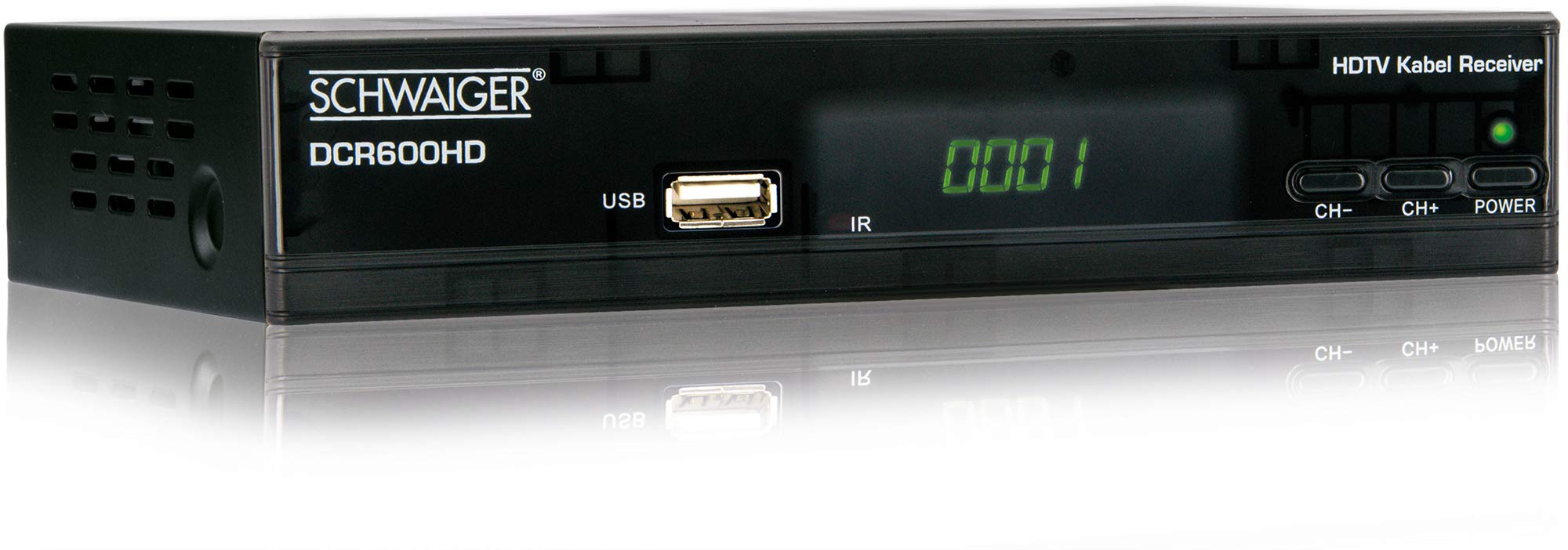
Сүрөт: Фронт view of the SCHWAIGER DCR600HD receiver, showing the display, USB port, IR receiver, and control buttons.
- Дисплей: Канал номерин же убакытты көрсөтөт.
- USB порт: Медиа ойнотуу үчүн USB сактагыч түзүлүштөрдү туташтыруу үчүн.
- IR: Алыстан башкаруу үчүн инфракызыл кабылдагыч.
- CH- / CH+: Buttons for changing channels.
- КҮЧ: Button to turn the receiver on or off (standby).
4.2 Арткы панель

Сүрөт: Арткы view of the SCHWAIGER DCR600HD receiver, displaying various input and output ports.
- RF IN: Input for connecting to your cable TV network.
- ETHERNET / LAN: For network connection (if supported for updates or specific services).
- HDMI: High-Definition Multimedia Interface output for connecting to an HD TV.
- TV SCART (CVBS): SCART output for connecting to older TVs or other devices.
- ~220-240V 50/60Hz: Power input for the receiver.
4.3 Алыстан башкаруу

Сүрөт: Layout of the SCHWAIGER DCR600HD remote control, showing various function buttons.
The remote control allows you to operate all functions of your receiver. Familiarize yourself with the button layout for easy navigation.
5. Орнотуу
5.1 Кабыл алгычты туташтыруу
- Connect to Cable Network: Connect your cable TV antenna cable to the RF IN port on the rear panel of the receiver.
- Сыналгыга туташуу:
- For High Definition (HD) picture quality, connect an HDMI cable from the HDMI кабыл алгычтагы портту телевизоруңуздун HDMI киргизүү уячасына туташтырыңыз.
- For standard definition (SD) or older TVs, connect a SCART cable from the TV SCART (CVBS) port on the receiver to the SCART input on your TV.
- Туташуу кубаты: Plug the power cable into the receiver's power input and then into a wall outlet.
- Turn on TV: Switch on your television and select the correct input source (HDMI or SCART) corresponding to your connection.
5.2 Биринчи жолу орнотуу
Upon first power-on, the receiver will typically guide you through an initial setup process:
- Тил тандоо: Use the remote control to select your preferred language for the on-screen menus.
- Өлкө тандоо: Select your country. This helps configure regional settings and channel frequencies.
- Каналды сканерлөө: The receiver will prompt you to perform an automatic channel scan. Confirm to start scanning for available cable TV channels. This process may take several minutes.
- Жөндөөлөрдү сактоо: Once the scan is complete, save the found channels. Your receiver is now ready for use.
6. Иштөө нускамалары
6.1 Негизги операция
- Күйгүзүү/өчүрүү: басыңыз КҮЧ button on the remote control or front panel to switch the receiver on or to standby mode.
- Канал тандоо: колдонуу CH+ / CH- buttons on the remote or front panel to change channels sequentially. Alternatively, use the number buttons to directly enter a channel number.
- Үндү тууралоо: колдонуу VOL+ / VOL- buttons on the remote control to adjust the audio volume.
- Үнсүз: басыңыз БАСУУ button to temporarily turn off the sound. Press again to restore.
6.2 Электрондук программалык колдонмо (EPG)
The EPG provides a schedule of current and upcoming TV programs.
- басыңыз EPG button on the remote control to access the Electronic Program Guide.
- Navigate through channels and program times using the arrow buttons.
- Басыңыз OK чейин view тандалган программа тууралуу толук маалымат.
6.3 USB аркылуу медиа ойнотуу
You can play multimedia files (AVI, MKV, MP3) from a USB storage device.
- Insert a USB flash drive or external hard drive into the USB алдыңкы панелдеги порт.
- The receiver should detect the USB device and prompt you to open the media player, or you can access it via the main menu.
- Сиздин аркылуу чабыттоо files and folders using the arrow buttons and press OK to select and play a file.
- Use the media control buttons (Play, Pause, Stop, Fast Forward, Rewind) on the remote control for playback.
6.4 Телетекст
Access teletext services provided by broadcasters.
- басыңыз TTX button on the remote control to activate teletext.
- Use the number buttons to enter page numbers or the arrow buttons to navigate.
- Басыңыз TTX again to exit teletext.
7. Техникалык тейлөө
- Тазалоо: Regularly wipe the receiver with a soft, dry, lint-free cloth. Do not use abrasive cleaners, waxes, or solvents.
- Вентиляция: Ensure that the ventilation slots are not obstructed by dust or other objects.
- Программалык камсыздоо жаңыртуулары: Мезгил-мезгили менен өндүрүүчүнүн текшерүү website for any available software updates for your model. Follow the instructions provided with the update carefully.
8. Кыйынчылыктарды
If you encounter problems with your receiver, refer to the following common issues and solutions:
| Көйгөй | Мүмкүн болгон себеп / Чечим |
|---|---|
| Сүрөт же үн жок |
|
| Пульт иштебей жатат |
|
| Скандоо учурунда эч кандай канал табылган жок |
|
| USB медиа ойнобой жатат |
|
9. Техникалык шарттар
| Өзгөчөлүк | Description |
|---|---|
| Модель аты | DCR600HD |
| Продукт түрү | Digital DVB TV Tuner / Digital Player |
| Түс | Кара |
| Өлчөмдөрү (W x D x H) | 17 см х 4.5 см х 10 см |
| Салмагы | 380 г |
| Байланыш технологиясы | HDMI, USB, SCART, RF |
| Шайкеш түзмөктөр | Телевидение |
| Видеону коддоо | H.264 |
| Колдоого алынган токтомдор | 576i, 576p, 720p, 1080i, 1080p |
| Аспект катыштары | 4:3, 16:9 |
| Аудио чыгаруу режими | Стерео |
| Колдоого алынган аудио форматтары | MP3 |
| Колдоого алынган медиа түрлөрү | AVI, MKV, MP3 |
| Жалпы USB порттору | 1 (USB 4-pin Type A) |
| Жалпы HDMI порттору | 1 |
| Энергияны керектөө | 3.8 Вт |
| Тtage | 240 вольт |
| Өзгөчөлүктөр | Electronic Program Guide (EPG), Teletext, Built-in Bluetooth (Note: Bluetooth functionality may vary by region/firmware) |
| Алыстан башкаруу | камтылган |
10. Кепилдик жана колдоо
For warranty information and technical support, please refer to the documentation included with your product packaging or visit the official SCHWAIGER webсайт. Сатып алуу квитанциясын кепилдик дооматтары үчүн сатып алуунун далили катары сактаңыз.


