1. Киришүү
This manual provides comprehensive instructions for the setup, operation, and maintenance of your A4tech Natural A Ergonomic Keyboard, model KRS-85. Designed with patented A-Shape keys and round-edged keycaps, this keyboard aims to promote a natural typing position, thereby helping to prevent Repetitive Strain Injury (RSI).
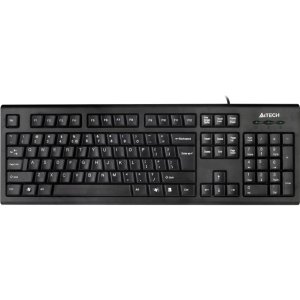
Figure 1: A4tech Natural A Ergonomic Keyboard (KRS-85). This image displays the full layout of the black wired keyboard, highlighting its ergonomic design with A-Shape keys and round keycaps.
2. Орнотуу
2.1 Системалык талаптар
- IBM or Compatible Systems
- Windows 2000 / XP (X64) / 2003 (X64) / Vista
2.2 Баскычтопту туташтыруу
- Компьютериңизден жеткиликтүү USB портун табыңыз.
- Insert the USB connector of the A4tech KRS-85 keyboard firmly into the USB port.
- Сиздин иштөө тутумуңуз керектүү драйверлерди автоматтык түрдө таап, орнотууга тийиш. Бул процесс бир нече мүнөткө созулушу мүмкүн.
- Орнотуу аяктагандан кийин, клавиатура колдонууга даяр.
3. Иштөө нускамалары
The A4tech Natural A Keyboard is designed for comfortable and efficient typing. Its unique features are intended to enhance your typing experience and reduce strain.
3.1 Негизги өзгөчөлүктөрү
- Patented A-Shape Keys: The layout of the keys is designed to align with the natural position of your hands and wrists, promoting a more relaxed posture.
- Round Edged Keycaps: These keycaps provide a smooth and comfortable typing surface.
- Стандарттык макет: The keyboard features a full-size layout including a numeric keypad, function keys (F1-F12), and navigation keys.
3.2 Негизги колдонуу
Use the keyboard as you would any standard computer keyboard for typing, navigating, and executing commands. The ergonomic design is intended to provide comfort during extended use.
4. Техникалык тейлөө
Туура тейлөө клавиатураңыздын узак мөөнөттүү жана оптималдуу иштешин камсыз кылат.
4.1 Тазалоо
- Тазалоодон мурун клавиатураны компьютерден ажыратыңыз.
- Бир аз жумшак, түксүз кездемени колдонуңуз dampклавиатуранын бетин сүртүү үчүн суу же жумшак тазалоо эритмеси менен иштетиңиз.
- Катуу химиялык заттарды, абразивдүү тазалагычтарды же ашыкча нымдуулукту колдонуудан алыс болуңуз.
- Ачкычтардын арасын тазалоо үчүн чаңды жана калдыктарды тазалоо үчүн кысылган абаны колдонуңуз.
5. Кыйынчылыктарды
If you encounter issues with your A4tech Natural A Keyboard, please refer to the following common solutions.
5.1 Баскычтоп жооп бербейт
- Ensure the USB cable is securely connected to a working USB port on your computer. Try a different USB port.
- Компьютериңизди өчүрүп күйгүзүңүз.
- Check your computer's Device Manager (Windows) to see if the keyboard is recognized and if there are any driver issues.
5.2 Specific Key Combinations Not Working (e.g., Ctrl-Alt-Del)
- Some users have reported that certain key combinations, such as Ctrl-Alt-Del, may not function as expected on this keyboard with Windows operating systems. This is a known compatibility limitation for some configurations.
- If this issue persists, consider using alternative methods for these functions within your operating system, or consult A4tech support for potential workarounds or driver updates if available.
6. Техникалык шарттар
| Өзгөчөлүк | Деталь |
|---|---|
| Продукт аты | Natural_A Rounded Edge Keyboard |
| Модель номери | KRS-85 |
| Байланыш технологиясы | Кабель (USB) |
| Keyboard Description | Эргономикалык |
| Ачкычтардын саны | 85 |
| Продукциянын өлчөмдөрү | 19.69 x 7.87 x 1.97 дюйм |
| Элемент Салмагы | 2.2 фунт |
| Өндүрүүчү | ERGOGUYS (A4tech Co., Ltd) |
| Дата биринчи жеткиликтүү | 31-октябрь, 2013-жыл |
7. Кепилдик маалыматы
The A4tech Natural A Ergonomic Keyboard (KRS-85) comes with a 1 жылдык Чектелген Кепилдик өндүрүүчүдөн. Бул кепилдик нормалдуу колдонуудагы материалдардагы жана жасалгадагы кемчиликтерди камтыйт.
Please retain your proof of purchase for warranty claims. For detailed terms and conditions, refer to the warranty documentation provided with your product or contact the manufacturer directly.
8. Колдоо
For further assistance, technical support, or warranty inquiries, please contact the manufacturer or your point of purchase. Ensure you have your product model number (KRS-85) and proof of purchase ready when contacting support.


