1. Киришүү
The Gembird UVG-002 Audio/Video Grabber is designed to facilitate the digitization and editing of analog video and audio content on your personal computer. This device allows you to connect various analog video sources, such as VCRs, camcorders, and digital receivers, to your computer via a USB connection, enabling you to preserve your media in a digital format.
2. Продукт бүтүп калдыview
2.1 Пакеттин мазмуну
Пакетте бардык буюмдар бар экенин текшериңиз:
- Gembird UVG-002 Audio/Video Grabber (USB device)
- Software CD (for drivers and recording application)
- Stereo RCA Audio Cable
- Video RCA Cable
- S-Video кабели
- SCART to Cinch (RCA) and S-Video Adapter
- USB кеңейтүү кабели
2.2 Негизги өзгөчөлүктөрү
- Direct USB connection, no external power supply required.
- Supports various analog input sources: Composite Video, Stereo RCA, S-Video.
- Includes software for video conversion and editing.
- Compatible with a wide range of devices including VCRs, digital receivers, and camcorders.

Figure 1: Gembird UVG-002 Audio/Video Grabber with all included accessories, including the main grabber unit, USB extension, RCA cables, S-Video cable, and SCART adapter.
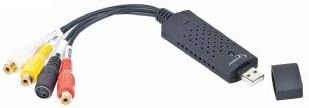
Сүрөт 2: Жакын пландан view of the Gembird UVG-002 Audio/Video Grabber unit, showing the USB connector and input ports.
3. Орнотуу
3.1 Системалык талаптар
To ensure proper functionality, your computer should meet the following minimum requirements:
- Operating System: Windows (specific versions may vary, refer to software documentation)
- Available USB port (USB 2.0 or 3.0 recommended)
- Sufficient hard drive space for recorded video files
- CD-ROM drive for software installation (if not downloading drivers online)
3.2 Аппараттык туташуу
- Connect the Gembird UVG-002 grabber to an available USB port on your computer. You may use the included USB extension cable if needed.
- Identify the output ports on your analog video source (e.g., VCR, camcorder). These are typically Composite Video (yellow RCA), Stereo Audio (red and white RCA), or S-Video.
- Using the appropriate cables (RCA or S-Video) provided, connect the output of your analog source to the corresponding input ports on the Gembird UVG-002 grabber.
- If your source device only has a SCART output, use the included SCART adapter. Connect the SCART adapter to your source device, then connect the RCA or S-Video cables from the adapter to the grabber. Ensure the adapter's switch is set to 'Output' if applicable.
3.3 Программалык камсыздоону орнотуу
- Insert the included software CD into your computer's CD-ROM drive.
- Follow the on-screen instructions to install the drivers and the video capture/editing software.
- If the auto-run does not start, navigate to the CD drive in 'My Computer' or 'This PC' and run the setup file кол менен.
- For Windows 10/11 users, it may be necessary to manually download the latest drivers from the Gembird website if the included CD drivers are outdated. Additionally, ensure that camera/microphone permissions are granted to the capture software in your operating system's privacy settings for the device to be recognized.
- Орнотуудан кийин компьютериңизди өчүрүп күйгүзүңүз.
4. Иштөө нускамалары
4.1 Видеону жаздыруу
- Ensure all hardware connections are secure and the grabber is connected to your PC.
- Turn on your analog video source device (e.g., VCR, camcorder) and insert the media you wish to digitize.
- Launch the video capture software installed from the CD or downloaded from the Gembird webсайт.
- Within the software, select the Gembird UVG-002 as your video and audio input device.
- Start playback on your analog video source. You should see the video feed appear in the capture software window.
- Adjust video and audio settings within the software as needed (e.g., resolution, quality, volume).
- Click the 'Record' button in the software to begin capturing the video.
- Once recording is complete, click 'Stop'. The captured video will be saved to your computer in the format and location specified in the software settings.
- Refer to the specific software's help documentation for detailed instructions on editing and exporting your digitized videos.
5. Техникалык тейлөө
The Gembird UVG-002 Audio/Video Grabber requires minimal maintenance. Follow these guidelines to ensure its longevity:
- Keep the device and cables clean and free from dust. Use a soft, dry cloth for cleaning.
- Аппаратты экстремалдык температурага, нымдуулукка же тике күн нуруна тийгизүүдөн сактаңыз.
- Do not attempt to disassemble the device, as this will void any warranty and may cause damage.
- Store the device and cables in a cool, dry place when not in use.
6. Кыйынчылыктарды
If you encounter issues with your Gembird UVG-002, refer to the following common problems and solutions:
- No video signal in software:
- Ensure all cables are securely connected to both the source device and the grabber.
- Verify that the source device is powered on and playing media.
- Check if the correct input source (Composite or S-Video) is selected in the capture software.
- For SCART adapters, ensure the switch is set to 'Output'.
- No audio signal:
- Confirm the red and white RCA audio cables are correctly connected.
- Check audio settings in the capture software and your computer's sound settings.
- Ensure the source device's volume is not muted or too low.
- Түзмөк компьютер тарабынан таанылган жок:
- Reinstall the drivers from the included CD or download the latest drivers from the Gembird webсайт.
- Try connecting the grabber to a different USB port on your computer.
- For Windows 10/11, ensure camera/microphone privacy settings allow the capture software to access the device.
- Компьютериңизди өчүрүп күйгүзүңүз.
- Poor video quality or dropped frames:
- Компьютериңиз минималдуу система талаптарына жооп берерин текшериңиз.
- Фондо иштеп жаткан башка талаптуу тиркемелерди жабыңыз.
- Try reducing the recording resolution or quality settings in the capture software.
- Ensure you are using a USB 2.0 or 3.0 port.
7. Техникалык шарттар
| Өзгөчөлүк | Description |
|---|---|
| Бренд | Gembird |
| Модел | UVG-002 |
| Аппараттык интерфейс | USB |
| Шайкеш түзмөктөр | PC, Video Recorder, Digital Receiver, Digital Camcorder, TV, DVD Player, VHS Recorder, MP4 Player, MP3 Player, Camera, Cell Phone, TV Box, Projector, Amplifier, Speaker, Microphone, Printer |
| Туташтыргыч түрү | USB түрү B |
| Киргизүү порттору | Composite Video (RCA), Stereo Audio (RCA), S-Video |
| Электр камсыздоо | USB Powered (no external power required) |
| Продукциянын өлчөмдөрү (L x W x Y) | 27 x 90 x 14 мм (2.7 x 9 x 1.4 см) |
| Элемент Салмагы | 1 г |
| Түс | Кара |
| Дата биринчи жеткиликтүү | 15-жылдын 2013-ноябры |
8. Кепилдик жана колдоо
Warranty information for the Gembird UVG-002 Audio/Video Grabber is typically provided with the product packaging or can be found on the official Gembird website. For technical support, driver updates, or further assistance, please visit the Gembird support portal or contact their customer service department directly. Keep your purchase receipt as proof of purchase for warranty claims.


