Introduction
This manual provides essential information for the safe and efficient operation of your InFocus IN124a XGA Wireless-Ready Projector. Please read this manual thoroughly before using the projector and retain it for future reference. This projector is designed for displaying content with XGA (1024 x 768) native resolution, offering 3500 lumens of brightness and a 15000:1 contrast ratio.
Коопсуздук маалыматы
- Электр коопсуздугу: Проекторду ар дайым жерге туташтырылган розеткага туташтырыңыз. Бузулган электр шнурларын колдонбоңуз. Тазалоодон же тейлөөдөн мурун электр кубатынан ажыратыңыз.
- Жылуулук жана желдетүү: Проектордун айланасында жетиштүү желдетүүнү камсыз кылыңыз. Вентиляция тешиктерин жаппаңыз. Проекторду жылуулук булактарына жакын койбоңуз.
- Lamp Коопсуздук: Проектор лamp operates at high temperatures and pressures. Allow the projector to cool down before moving or replacing the lamp. Do not look directly into the lens when the lamp күйүк.
- Колдонуу: Проекторду этияттык менен колдонуңуз. Аны түшүрүүдөн же катуу таасирлерге дуушар кылуудан алыс болуңуз.
- Нымдуулук: Проекторду жамгырдын, нымдуулуктун же ашыкча нымдуулуктун таасирине дуушар кылбаңыз.
Пакеттин мазмуну
Пакетте бардык буюмдар бар экенин текшериңиз:
- InFocus IN124a Projector
- HDMI кабели
- VGA кабели
- Электр кабели
- Remote Control (not explicitly listed but standard)
- Optional USB adapter for wireless connectivity (if purchased separately)
Продукт бүттүview
Familiarize yourself with the physical components and connections of your InFocus IN124a projector.

This image displays the rear panel of the InFocus IN124a projector, highlighting various connectivity options including HDMI, VGA (Computer 1 and 2), Monitor Out, S-Video, Video, Audio In (1 and 2), Audio Out, RS-232, USB-B, USB Mini-B, and USB-A ports. The power input is located on the lower left.

The top panel of the InFocus IN124a projector is shown, featuring the control buttons for power, menu navigation (up, down, left, right, enter), source selection, blank screen function, and indicators for temperature and lamp status. The focus and zoom adjustment rings are also visible.

А фронт view of the InFocus IN124a projector, showing the main projection lens and the power indicator light. The focus and zoom rings are visible near the lens.

Бул сүрөт бир тарабын көрсөтөт view of the InFocus IN124a projector, emphasizing the ventilation grilles designed for heat dissipation, crucial for maintaining optimal operating temperature.
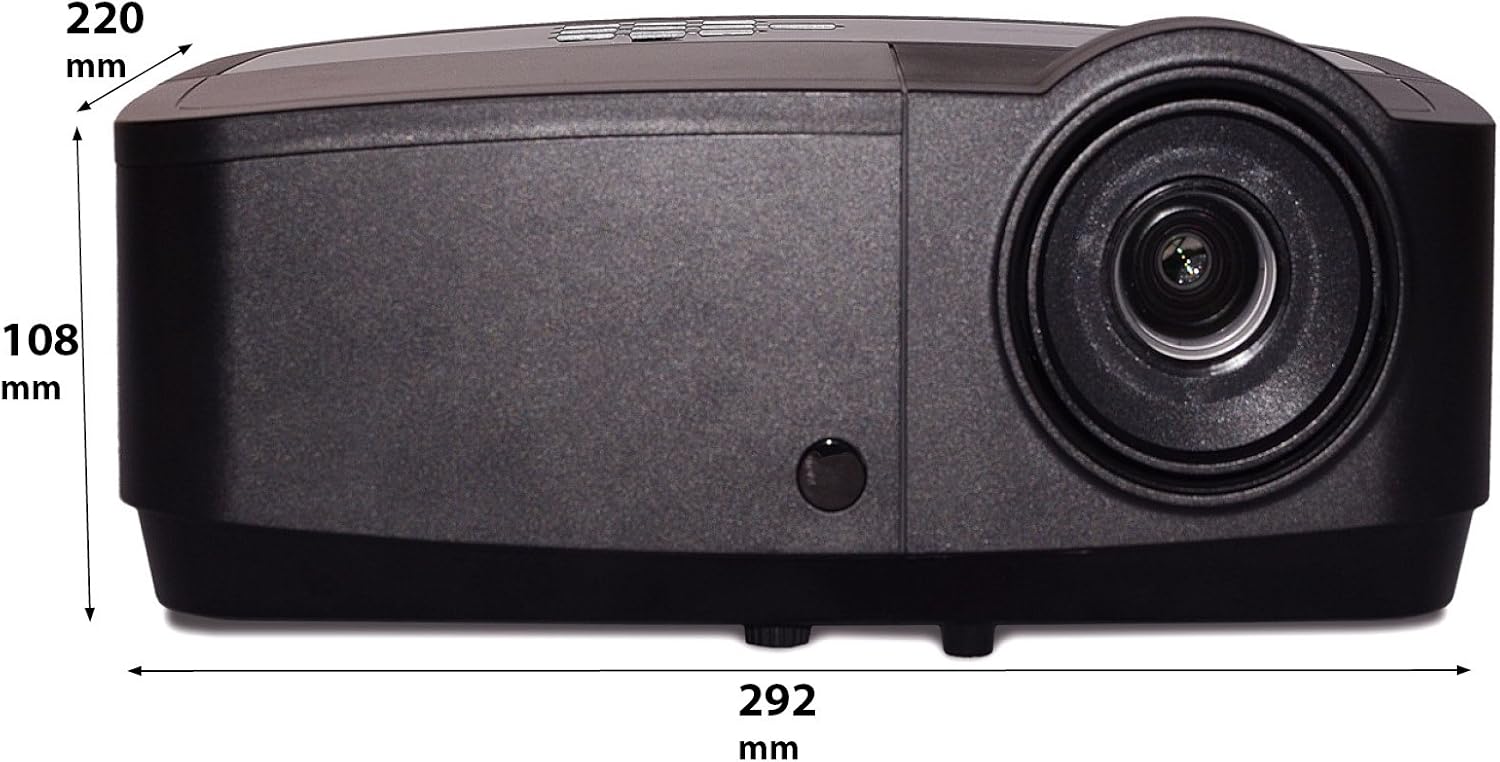
Бул сүрөттө кошумча адис көрсөтүлгөнfile of the InFocus IN124a projector, illustrating its physical dimensions: approximately 292 mm in length, 108 mm in height, and 220 mm in width.
Жайгашуу
1. Жайгаштыруу
Position the projector on a stable, flat surface or mount it securely. Ensure the projector is at an appropriate distance from the screen to achieve the desired image size. Avoid direct sunlight or strong ambient light on the screen for optimal viewing.
2. Кубатты туташтыруу
- Кубат шнурунун проектордун кубат розеткасына туташтырыңыз.
- Электр шнурунун экинчи учун жерге туташтырылган электр розеткасына сайыңыз.
3. Видео булактарын туташтыруу
The IN124a offers multiple connectivity options:
- HDMI: Баштапкы түзмөгүңүздөн (мисалы, ноутбук, Blu-ray ойноткуч) HDMI кабелин проектордогу HDMI портуна туташтырыңыз.
- VGA (Компьютер 1/2): Use a VGA cable to connect your computer to either the 'COMPUTER 1' or 'COMPUTER 2' port.
- S-Видео/Видео: For older devices, connect S-Video or composite video cables to the respective ports.
- USB: The USB-A port can be used for displaying content directly from a USB drive. The USB-B port supports USB display functionality.
- Аудио: Connect external audio sources to 'AUDIO 1' or 'AUDIO 2' inputs, and use 'AUDIO OUT' for external speakers if needed.
4. Wireless Setup (Optional)
For wireless connectivity, an optional USB adapter is required. Insert the wireless USB adapter into the designated USB port on the projector. Refer to the adapter's specific instructions for software installation and connection procedures on your source device.
Иштеп жатат
1. Күйгүзүү / Өчүрүү
- Күйгүзүү: Press the 'Power' button on the projector's control panel or remote control. The power indicator light will turn steady blue.
- Өчүрүү: Press the 'Power' button again. A confirmation message may appear. Press 'Power' a second time to confirm shutdown. The fan will continue to run briefly to cool the lamp before shutting down completely.
2. Сүрөттү тууралоо
- Фокус: Rotate the focus ring around the lens until the image appears sharp and clear.
- Чоңойтуу: Rotate the zoom ring around the lens to adjust the image size without moving the projector.
- Негизги ташты оңдоо: Эгерде сүрөт трапеция формасында көрүнсө, анда сүрөттү квадраттап тууралоо үчүн проектордун менюсундагы Keystone коррекция функциясын колдонуңуз.
3. Булак тандоо
Press the 'Source' button on the control panel or remote control repeatedly to cycle through available input sources (HDMI, Computer 1, Computer 2, S-Video, Video, USB). The projector will automatically detect an active signal.
4. Меню навигациясы
Press the 'Menu' button to access the On-Screen Display (OSD) menu. Use the arrow buttons to navigate through options and 'Enter' to select. Press 'Menu' or 'Exit' to close the OSD.
5. 3D режими
The InFocus IN124a is 3D-Ready. To utilize 3D functionality, you will need compatible 3D content, a 3D-capable source device, and active 3D glasses. Refer to your 3D source device's manual for specific setup instructions. The projector will automatically detect a 3D signal when available.
Техникалык тейлөө
1. Лamp Алмаштыруу
Проектор лamp 10 000 саатка чейин иштөө мөөнөтү бар.amp жашоо акырына жакындап калды, эскертүүчү билдирүү пайда болушу мүмкүн, жеamp indicator light will illuminate. Only replace the lamp with an authorized InFocus replacement lamp. Always allow the projector to cool completely before attempting lamp алмаштыруу.
2. Тазалоо
- Проектор Casing: Жумшак, түксүз кездемени колдонуңуз dampened with a mild, non-abrasive cleaner. Do not use harsh chemicals.
- Объектив: Gently wipe the lens with a lens cleaning cloth or lens tissue. Avoid touching the lens surface with your fingers.
- Аба желдеткичтери: Periodically check and clean the air vents to prevent dust buildup, which can lead to overheating. Use a soft brush or compressed air to clear obstructions.
Проблемаларды чечүү
Проекторуңузда көйгөйлөргө туш болсоңуз, төмөнкү жалпы көйгөйлөрдү жана чечимдерди караңыз:
| Көйгөй | Мүмкүн себеп | Чечим |
|---|---|---|
| Сүрөт көрсөтүлгөн жок | Power not connected; Incorrect input source; Source device not active. | Check power connection; Select correct input source; Ensure source device is on and outputting signal. |
| Сүрөт бүдөмүк же фокуста эмес | Lens focus not adjusted; Projector too close/far from screen. | Adjust the focus ring on the lens; Adjust projector distance or use zoom ring. |
| Пульт иштебей жатат | Батареялар түгөнгөн; Пульт менен проектордун ортосундагы тоскоолдук; Пульт сенсору бөгөттөлгөн. | Replace batteries; Remove obstructions; Ensure remote sensor on projector is clear. |
| Проектор ысып, өчүп калат | Blocked ventilation; Dusty air filter. | Ensure vents are clear; Clean air filter (if applicable) and vents. |
Техникалык шарттар
| Өзгөчөлүк | Спецификация |
|---|---|
| Native Resolution | XGA (1024 x 768) |
| Жарыктык | 3500 Lumens |
| Контраст катышы | 15000:1 |
| Lamp Жашоо | 7,000 XNUMX саатка чейин (Эко режими) |
| Байланыш технологиясы | Wireless (with optional adapter), HDMI, USB video |
| Өзгөчө өзгөчөлүк | 3D даяр |
| Продукциянын өлчөмдөрү | 14.25 x 12 x 7.75 дюйм (36.2 x 30.5 x 19.7 см) |
| Элемент Салмагы | 5.4 фунт (2.45 кг) |
| Сунушталган Колдонуулар | Ички/тышкы |
Кепилдик жана колдоо
Кепилдик жөнүндө маалымат жана техникалык колдоо алуу үчүн, өнүмүңүз менен кошо берилген кепилдик картасын караңыз же расмий InFocus сайтына кириңиз. webсайт. Сатып алуу квитанциясын кепилдик дооматтары үчүн сатып алуунун далили катары сактаңыз.


