1. Киришүү
This manual provides essential information for the safe and efficient operation of your InFocus IN2126a WXGA Network Projector. Please read this manual thoroughly before using the projector and retain it for future reference. The InFocus IN2126a is designed for versatile use in various environments, offering high brightness and network capabilities.
2. Коопсуздук маалыматы
Проекторго зыян келтирбөө жана колдонуучунун коопсуздугун камсыз кылуу үчүн төмөнкү коопсуздук чараларын сактаңыз:
- Вентиляция тешиктерин жаап албаңыз. Проектордун айланасында адекваттуу аба агымын камсыз кылыңыз.
- l болгондо проектордун объективине тике карабаamp күйүк. Жарык жарык көзгө зыян келтириши мүмкүн.
- Avoid placing the projector in direct sunlight, near heat sources, or in environments with high humidity or excessive dust.
- Проектор менен берилген кубат шнурын гана колдонуңуз.
- Бардык тейлөөлөрдү квалификациялуу тейлөө кызматкерлерине тапшырыңыз. Проекторду өзүңүз ачууга же оңдоого аракет кылбаңыз.
3. Продукт бүтүп калдыview
Familiarize yourself with the components and features of your InFocus IN2126a projector.
3.1 Проектордун компоненттери
1-сүрөт: алдыңкы жагы view of the InFocus IN2126a projector, showing the lens and ventilation.

2-сүрөт: Каптал view of the InFocus IN2126a projector, highlighting the ventilation grilles.
3.2 Арткы панелдин туташуулары
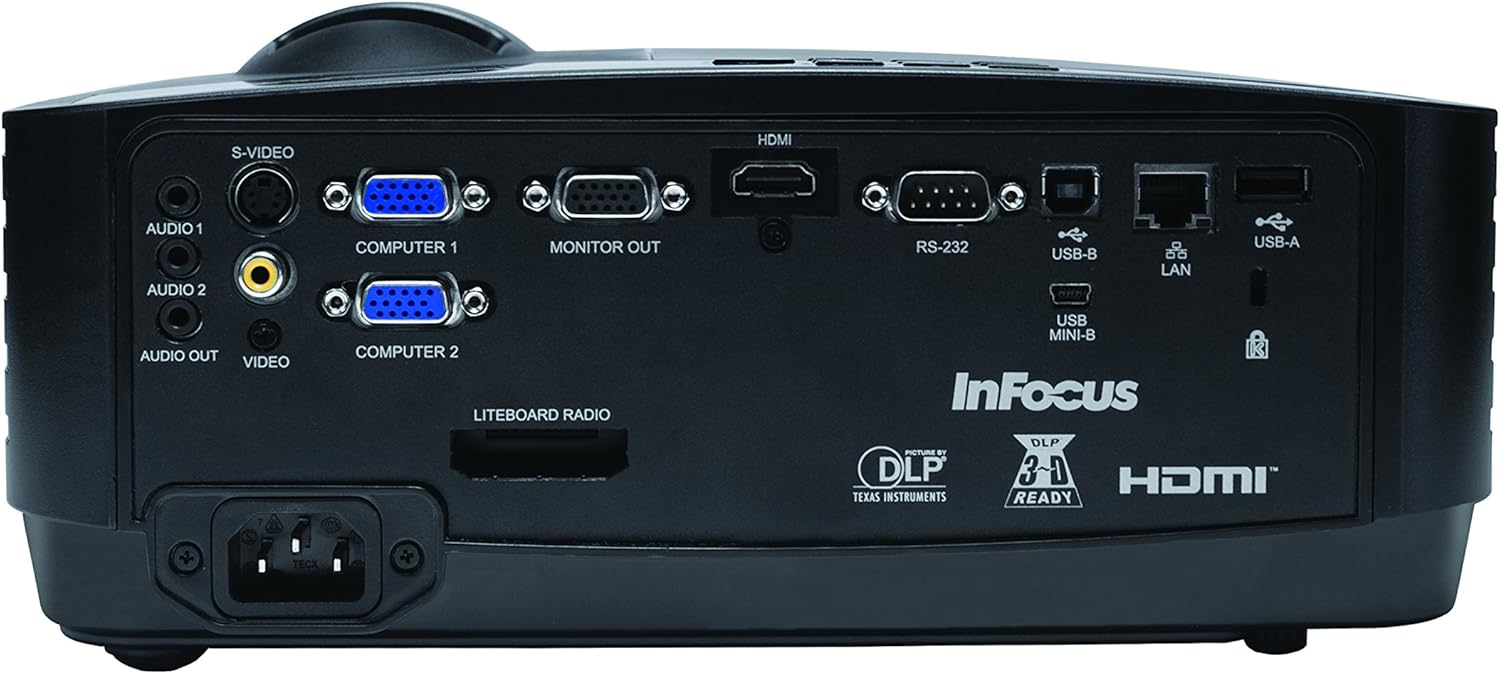
Арткы панелде тышкы түзмөктөрдү туташтыруу үчүн ар кандай киргизүү жана чыгаруу порттору бар.
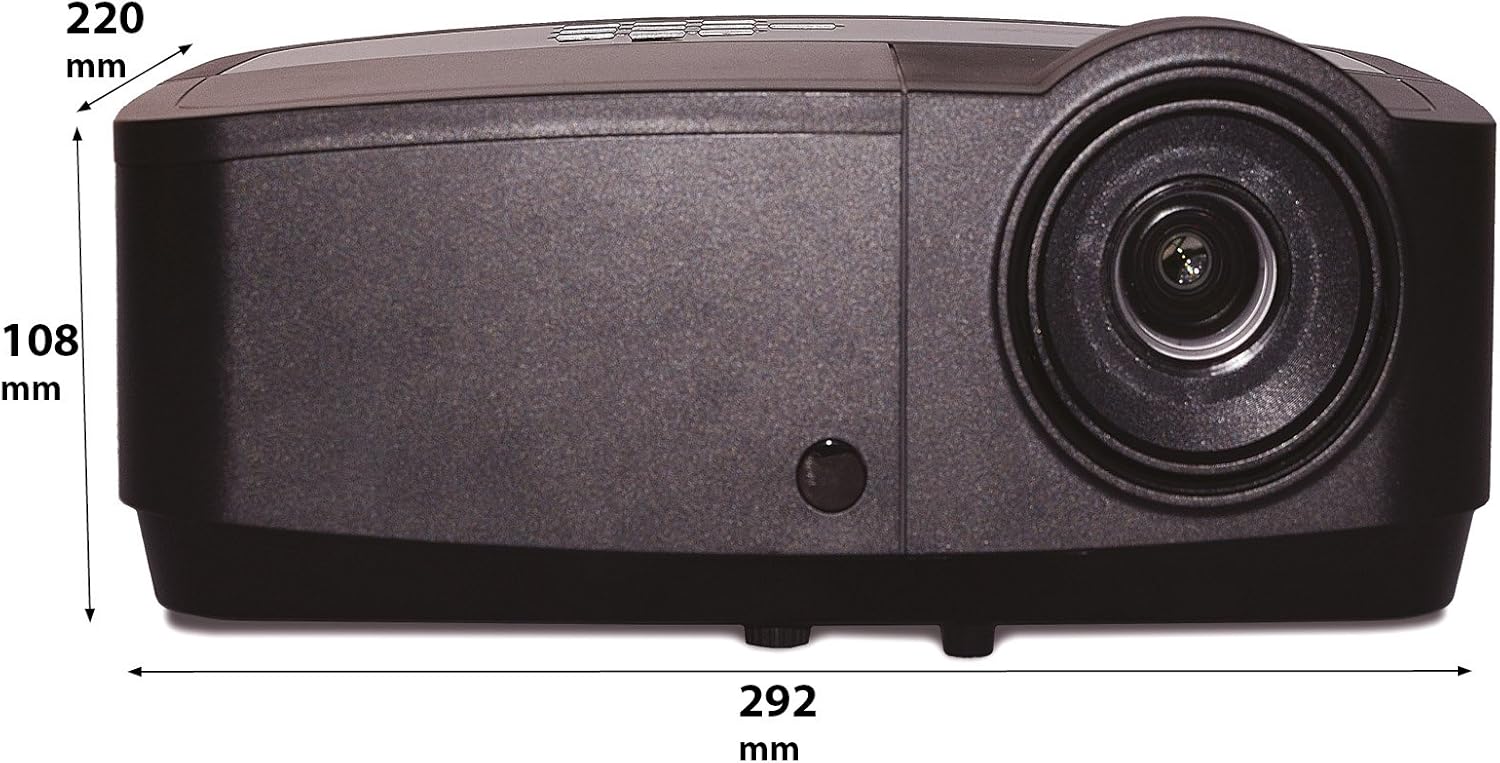
Figure 3: Rear panel of the InFocus IN2126a projector, displaying various connectivity ports including HDMI, VGA, USB, and LAN.
- HDMI: For digital video and audio input.
- COMPUTER 1 / COMPUTER 2 (VGA): Компьютерлерден аналогдук видео киргизүү үчүн.
- MONITOR OUT (VGA): For connecting an external monitor.
- USB-B / USB Mini-B: For service or specific USB functions.
- USB-A: For connecting USB devices, such as a wireless adapter.
- LAN (RJ45): Тармак байланышы үчүн.
- RS-232: Сериялык башкаруу үчүн.
- AUDIO 1 / AUDIO 2 (RCA): Аудио киргизүү үчүн.
- АУДИО ЧЫГЫШ: Тышкы аудио системаларды туташтыруу үчүн.
- VIDEO (RCA): Композиттик видео киргизүү үчүн.
- S-VIDEO: For S-Video input.
- Power Inlet: Электр шнурын туташтыруу үчүн.
3.3 Жогорку панелдин башкаруу элементтери
The top panel features controls for basic projector functions and image adjustments.

Figure 4: Top panel of the InFocus IN2126a projector, showing the control buttons and focus/zoom rings.
- Кубат баскычы: Проекторду күйгүзөт же өчүрөт.
- Menu/Exit Button: Accesses or exits the on-screen display (OSD) menu.
- Чабыттоо баскычтары (өйдө, ылдый, солго, оңго): Меню параметрлери боюнча чабыттайт.
- Кирүү баскычы: Менюдагы тандоолорду ырастайт.
- Булак баскычы: Киргизүү булактарын тандайт.
- Blank Button: Экранды убактылуу бошотот.
- Авто баскычы: Сүрөт жөндөөлөрүн автоматтык түрдө тууралайт.
- Фокус шакеги: Сүрөттүн тактыгын тууралайт.
- Масштабдуу шакек: Сүрөттүн өлчөмүн тууралайт.
3.4 Өлчөмдөр
Understanding the physical dimensions is important for installation and placement.

Figure 5: Diagram illustrating the dimensions of the InFocus IN2126a projector (292mm length, 220mm width, 108mm height).
4. Орнотуу
4.1 Проекторду жайгаштыруу
Place the projector on a stable, flat surface or mount it securely. Ensure the projector is positioned at an appropriate distance from the screen to achieve the desired image size. Maintain sufficient space around the projector for proper ventilation.
4.2 Түзмөктөрдү туташтыруу
- Кубат туташуу: Connect the power cord to the projector's power inlet and then to a grounded electrical outlet.
- Видео булагы:
- For digital sources (e.g., Blu-ray player, laptop), use an HDMI cable to connect to the HDMI port.
- For analog computer sources, use a VGA cable to connect to the COMPUTER 1 or COMPUTER 2 port.
- For other video sources, use the appropriate S-VIDEO or VIDEO (RCA) connections.
- Аудио булагы: If your video source does not transmit audio via HDMI, connect audio cables to the AUDIO 1 or AUDIO 2 ports.
- Тармак туташуусу: For wired network access, connect an Ethernet cable to the LAN port.
- Зымсыз туташуу: If using a compatible wireless adapter (sold separately), insert it into the USB-A port.
4.3 Күйгүзүү/өчүрүү
- Күйгүзүү үчүн: Press the Power button on the projector's top panel or the remote control. The power indicator light will illuminate.
- Өчүрүү үчүн: Press the Power button again. The projector will enter a cooling cycle before shutting down completely. Do not unplug the projector during the cooling cycle.
5. Проекторду иштетүү
5.1 Булакты тандоо
After powering on, the projector may automatically detect an active input source. If not, or to switch sources:
- басыңыз Булак проектордогу же алыстан башкаруудагы баскыч.
- Use the navigation buttons to highlight the desired input source (e.g., HDMI, Computer 1, Video).
- Басыңыз Кириңиз булагын тандоо үчүн.
5.2 Сүрөттү тууралоо
- Фокус: айлантыңыз Фокус сүрөт даана жана ачык көрүнгөнгө чейин проектордун линзасында шыңгыраңыз.
- Чоңойтуу: айлантыңыз Чоңойтуу ring on the projector lens to adjust the image size to fit your screen.
- Негизги ташты оңдоо: If the image appears trapezoidal, use the keystone correction feature in the OSD menu to square the image.
5.3 Экрандагы дисплей (OSD) менюсу
The OSD menu allows you to configure various projector settings.
- басыңыз Меню OSD менюсун ачуу үчүн баскычты басыңыз.
- колдонуу Өйдө/Төмөн navigation buttons to select a menu category.
- колдонуу Сол оң navigation buttons to adjust settings or enter sub-menus.
- Басыңыз Кириңиз өзгөртүүлөрдү ырастоо үчүн.
- Басыңыз Чыгыңыз OSD менюсун жабуу үчүн.
5.4 Зымсыз байланыш
The IN2126a is wireless-ready. To enable wireless display, a compatible InFocus wireless adapter (sold separately) must be connected to the USB-A port. Refer to the wireless adapter's specific instructions for setup and connection procedures.
5.5 3D функциясы
The projector supports 3D content. To view 3D content, you will need a compatible 3D source, 3D glasses, and appropriate 3D content. Refer to the projector's OSD menu for 3D settings and ensure your source device is configured for 3D output.
6. Техникалык тейлөө
Үзгүлтүксүз техникалык тейлөө проектордун оптималдуу иштешин камсыздайт жана анын иштөө мөөнөтүн узартат.
6.1 Лamp Алмаштыруу
Проектор лamp has a limited lifespan (approximately 4000 hours). When the lamp индикатор күйөт же сүрөттүн жарыктыгы бир топ төмөндөйт, lamp needs replacement. Always use an authorized InFocus replacement lampКененирээк маалымат алуу үчүн толук тейлөө колдонмосун караңыз.amp replacement instructions or contact customer support.
6.2 Фильтрди тазалоо
Dust accumulation on the air filter can impede airflow and cause overheating. Regularly clean the air filter to maintain proper ventilation. Turn off and unplug the projector before cleaning. Use a soft brush or vacuum cleaner to remove dust from the filter cover.
6.3 Жалпы тазалоо
- Проектор Casing: Жумшак, түксүз кездемени колдонуңуз dampened with a mild, non-abrasive cleaner. Do not use harsh chemicals.
- Объектив: Use a lens cleaning cloth and specialized lens cleaning solution. Avoid touching the lens surface with your fingers.
7. Кыйынчылыктарды
Проекторуңузда көйгөйлөргө туш болсоңуз, төмөнкү жалпы көйгөйлөрдү жана чечимдерди караңыз:
| Көйгөй | Мүмкүн себеп | Чечим |
|---|---|---|
| Экранда сүрөт жок | Туура эмес киргизүү булагы тандалды; Кабелдин бош байланышы; Проектор күтүү режиминде. | Verify input source; Check all cable connections; Press power button to wake from standby. |
| Сүрөт бүдөмүк | Фокус туураланган эмес; проектор экранга өтө жакын/алыс. | Adjust the focus ring; Reposition the projector and adjust zoom. |
| Сүрөт трапеция түрүндө | Проектор экранга перпендикуляр эмес. | OSD менюсунда Keystone Correction функциясын колдонуңуз. |
| Аудио жок | Audio cables not connected; Volume too low; Muted. | Check audio cable connections; Adjust volume; Unmute projector. |
| Проектор ысып, өчүп калат | Бөгөттөлгөн желдетүү; Кир аба чыпкасы. | Ensure clear airflow around projector; Clean the air filter. |
For more detailed troubleshooting, consult the complete user manual or contact InFocus customer support.
8. Техникалык шарттар
Key technical specifications for the InFocus IN2126a WXGA Network Projector:
- Модель аты: IN2126a
- Дисплей түрү: DLP
- Түпкү резолюция: 1280 x 800 (WXGA)
- Жарыктык: 3500 Lumens
- Контраст катышы: 15000:1
- Түстүү кайра чыгаруу: 1.07 миллиард түс (30-бит)
- Жарык булагы иштөө мөөнөтү: 4000 саат
- Байланыш технологиясы: Wireless-ready, HDMI 1.4, VGA (x2), USB (Type-A, Mini-B, Type-B), LAN (RJ45), RS-232, Audio In (x2), Audio Out, Video (RCA), S-Video
- Өзгөчөлүктөр: 3D-Ready, Network Projector
- Форма фактору: Portable
- Монтаж түрү: Столдун үстү
- Элемент Салмагы: 7.1 фунт
9. Кепилдик жана колдоо
For information regarding your product's warranty, please refer to the warranty card included with your purchase or visit the official InFocus website. For technical support, service, or to purchase accessories, please contact InFocus customer service through their official channels.


