1. Киришүү
This manual provides detailed instructions for the setup, operation, and maintenance of your Avaya B189 IP HD Conference Phone Station. The Avaya B189 is designed to deliver high-definition audio conferencing with its advanced OmniSound technology, ensuring clear communication for all participants. It features an intuitive five-inch color touch screen display for easy navigation and access to various functions. Please read this manual thoroughly to ensure proper use and to maximize the performance of your device.
2. Продукт бүтүп калдыview
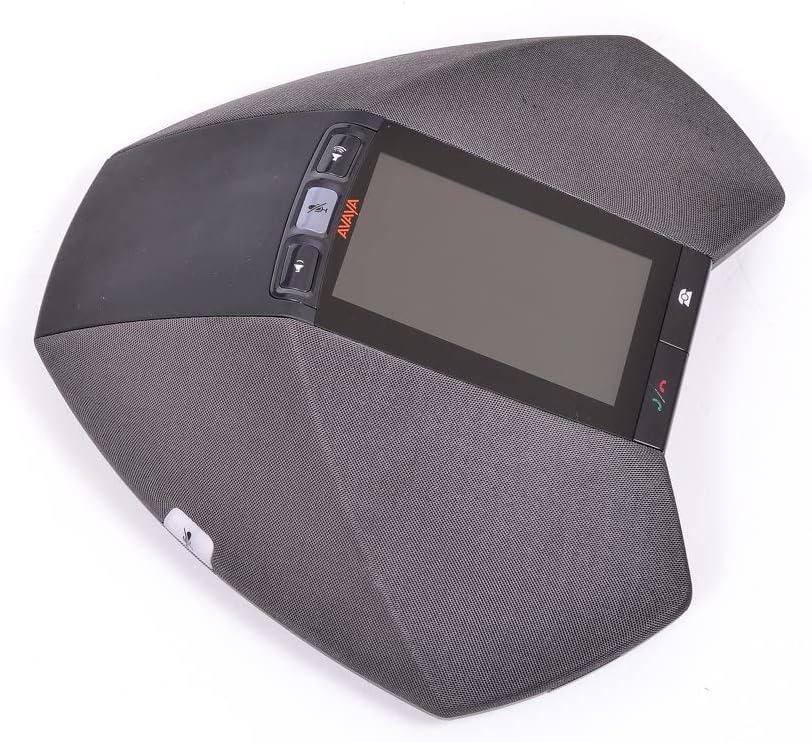
Сүрөт 2.1: Avaya B189 IP HD Conference Phone Station. This image displays the top-down view of the conference phone, highlighting its central five-inch color touch screen, the volume and mute control buttons on the left, and call management buttons on the right. The device's integrated speaker grilles are visible around the perimeter.
The Avaya B189 conference phone is engineered for executive boardrooms and large conference environments. Its sleek design integrates a 5-inch color touch screen display for user interaction. Key physical components include:
- Сенсордук экран дисплей: A 5-inch (13 cm) color display for menu navigation and call information.
- Башкаруу баскычтары: Dedicated buttons for volume adjustment, microphone mute, and call handling (answer/end call).
- Интегралдык микрофондор: Multiple microphones for 360-degree audio pickup.
- Интегралдык баяндамачылар: High-quality speakers for clear audio output.
- Тармак порту: For connecting to your IP network.
- Кубат киргизүү: Кубат адаптерин туташтыруу үчүн.
3. Орнотуу
Follow these steps to set up your Avaya B189 conference phone:
- Жайгашкан жери: Position the conference phone in the center of your meeting table to ensure optimal microphone pickup and speaker distribution.
- Кубат туташуу: Connect the power adapter to the power input port on the conference phone, then plug the adapter into a suitable electrical outlet. The device is powered via a corded electric source.
- Тармак туташуусу: Connect an Ethernet cable from your network switch or router to the network port on the conference phone. This device operates as an IP phone and requires a stable network connection.
- Системанын шайкештиги: Ensure your network infrastructure is compatible with Avaya Communication Manager. This device is NOT COMPATIBLE with Avaya IP Office systems.
- Баштапкы жүктөө: Once powered and connected to the network, the phone will begin its boot-up sequence. Follow any on-screen prompts for initial configuration, which may include network settings or registration with your Avaya Communication Manager.
4. Иштөө нускамалары
The Avaya B189 features a user-friendly interface primarily controlled via its 5-inch touch screen and dedicated physical buttons.
4.1. Негизги чалуу функциялары
- Чакыруу: Use the touch screen to navigate to the dial pad or contact list. Enter the desired number and press the Чалуу баскычы (жашыл телефон сөлөкөтү).
- Чалууга жооп берүү: Кирүүчү чалуу шыңгыраганда, баскычын басыңыз Жооп button (green phone icon) on the touch screen or the physical button.
- Чалууну аяктоо: басыңыз Чакырууну аяктоо button (red phone icon) on the touch screen or the physical button.
- Микрофондун үнүн өчүрүү: басыңыз Үнсүз button (microphone icon) to mute or unmute the microphones during a call. The button will typically illuminate when muted.
- Үндү тууралоо: колдонуу Үндү көтөрүү жана Үндү төмөндөтүү buttons to adjust the speaker volume during a call or for ringtones.
4.2. Conference Features
The Avaya B189 is designed for multi-party conferencing:
- Катышуучуларды кошуу: During an active call, use the touch screen to find options like 'Add Participant' or 'Conference'. Follow the on-screen prompts to dial another number and merge the calls.
- Башкаруучу катышуучулар: The touch screen interface provides options to manage individual participants in a conference, such as muting or disconnecting them, depending on your system's configuration.
4.3. Сенсордук экран навигациясы
The 5-inch color touch screen allows access to various menus and settings:
- Башкы экран: Displays current status, time, and quick access icons.
- Менюлар: Tap on icons or menu options to access features like Call History, Contacts, Settings, and Voicemail.
- Орнотуулар: Аудио адисин ыңгайлаштырыңызfiles, display brightness, network settings, and other preferences through the 'Settings' menu.
5. Техникалык тейлөө
Proper care and maintenance will extend the life of your Avaya B189 conference phone.
- Тазалоо: Use a soft, dry, lint-free cloth to clean the exterior surfaces and the touch screen. For stubborn marks, slightly dampen the cloth with water. Avoid using harsh chemicals, abrasive cleaners, or solvents, as these can damage the device.
- Курчап турган чөйрө: Keep the device in a dry environment, away from direct sunlight, excessive heat, and moisture. Ensure proper ventilation around the unit.
- Кабелдик башкаруу: Ensure all cables are securely connected and not under strain. Avoid bending or crimping cables sharply.
6. Кыйынчылыктарды
This section addresses common issues you might encounter with your Avaya B189.
| Көйгөй | Мүмкүн себеп | Чечим |
|---|---|---|
| Күч жок | Кубат адаптери туташкан эмес же туура эмес розетка. | Verify power adapter is securely plugged into the phone and a working electrical outlet. Try a different outlet. |
| No Dial Tone / Network Connection Error | Ethernet кабели үзүлүп калды же тармакта көйгөй бар. | Check that the Ethernet cable is securely connected to both the phone and the network port. Verify network connectivity for other devices. Contact your IT administrator if the issue persists. |
| No Audio During Call | Үнү өтө төмөн же микрофон үнсүз. | Increase speaker volume using the volume buttons. Ensure the microphone is not muted (check the mute button indicator). |
| Сенсордук экран жооп бербейт | Убактылуу программалык ката. | Restart the device by unplugging and replugging the power adapter. If the issue persists, contact support. |
| Incompatible System | Attempting to use with Avaya IP Office. | The Avaya B189 is only compatible with Avaya Communication Manager. It will not function with Avaya IP Office. |
7. Техникалык шарттар
Detailed technical specifications for the Avaya B189 IP HD Conference Phone Station:
- Модель номери: 700503700
- Продукциянын өлчөмдөрү (L x W x Y): 10 x 10 x 6 дюйм (25.4 x 25.4 x 15.24 см)
- Элемент Салмагы: 4 фунт (1.81 кг)
- Көрүнүүчү экран диагоналы: 5 дюйм (13 см)
- Түсү: Кара
- Материал: Пластик
- Телефон түрү: жоон
- Кубат булагы: Электр зымдары
- Терүүчү түрү: Single Keypad (via touch screen)
- Жооп берүү системасынын түрү: Санарип
- Системанын шайкештиги: Avaya Communication Manager (Not compatible with Avaya IP Office)
8. Кепилдик жана колдоо
For warranty information, please refer to the documentation provided at the time of purchase or contact your vendor. Avaya provides support for its products through authorized service partners and its official support channels. For technical assistance or service inquiries, please visit the official Avaya support website or contact your system administrator.


