1. Продукт бүтүп калдыview
The SilverStone DS380B is a premium Mini-ITX/DTX small form factor computer case designed specifically for Network Attached Storage (NAS) applications. It offers exceptional storage capacity and versatility within a compact 21-liter chassis, making it ideal for users with large media libraries or those building powerful SFF systems.
This case supports standard components including Mini-ITX motherboards, standard-length dual-slot expansion cards, and entry-level liquid CPU cooling systems. It features an advanced cooling system with two 120mm intake fans and one 120mm exhaust fan, all equipped with externally removable filters to maintain a cool and dust-free internal environment.
A signature feature of the DS380B is its modular eight hot-swappable drive cage, supporting both 3.5-inch and 2.5-inch SATA/SAS drives. Additionally, it includes four fixed 2.5-inch drive bays, allowing for a total of 12 drives. The front door is made of brushed aluminum and includes a lockable power button for enhanced security.

Сүрөт 1.1: Алдыңкы view of the SilverStone DS380B NAS Computer Case.

1.2-сүрөт: Бурчтуу view of the SilverStone DS380B, showcasing its compact design and brushed aluminum front panel.
Негизги өзгөчөлүктөрү:
- Support for 12 total drives: 8 hot-swappable 3.5" or 2.5" SAS/SATA drives and 4 fixed 2.5" drives.
- Compact small form factor design with extensive storage capabilities.
- Premium brushed aluminum front door for a sleek appearance.
- Accommodates graphics cards up to 11 inches in length.
- Lockable power button and adjustable LED brightness for security and user preference.
- Three pre-installed 120mm fans with filtered intake vents for efficient cooling and dust prevention.
2. Орнотуу жана Компонентти орнотуу
This section provides general guidelines for installing components into your SilverStone DS380B case. For detailed instructions specific to your motherboard, power supply, and other components, please refer to their respective manuals.
2.1 Ишти ачуу
To access the interior of the case, remove the screws securing the side panels. Carefully slide the panels backward and lift them off. The front door can be opened to reveal the hot-swappable drive bays and front I/O ports.

Figure 2.1: Front of the DS380B with the door open, showing the hot-swappable drive bays and front panel connectors.
2.2 Motherboard орнотуу
The DS380B supports Mini-ITX motherboards. Install the necessary standoffs in the motherboard tray. Carefully align your motherboard with the standoffs and I/O shield, then secure it with screws. Due to the compact nature of the case, it may be necessary to temporarily loosen or remove the front drive cage to facilitate motherboard installation and cable routing.

2.2-сүрөт: Ички view of the DS380B, highlighting the motherboard mounting area and internal structure.
2.3 Дискти орнотуу
The case features eight hot-swappable bays for 3.5" or 2.5" drives and four fixed 2.5" drive bays. For the hot-swappable bays, attach the provided plastic rails to your drives and slide them into the bays until they click into place. Ensure proper connection to the backplane for SATA/SAS and power.

Сүрөт 2.3: Жакын пландан view of the hot-swappable drive bays, designed for easy installation and removal of drives.
The four fixed 2.5" drive bays are located internally and require screws for installation. Refer to the case diagram for their exact locations.

Figure 2.4: Included accessories such as drive rails for hot-swap bays and keys for the front door lock.
2.4 Power Supply and Cable Management
Install your SFX or SFX-L power supply in the designated area. Carefully route all power and data cables to their respective components. Due to the small form factor, efficient cable management is crucial for optimal airflow and ease of access. Utilize cable ties to bundle and secure cables away from fan blades and airflow paths.

2.5-сүрөт: Арткы view of the DS380B, showing the I/O shield cutout, expansion slots, and exhaust fan.
3. Иштөө нускамалары
3.1 Күйгүзүү/өчүрүү
To power on your system, press the power button located on the front panel. To power off, press and hold the power button, or use the shutdown option within your operating system.
3.2 Lockable Power Button
The DS380B features a lockable front door and power button for added security. Use the provided keys to lock the front door, which prevents accidental power-offs or unauthorized access to the hot-swappable drives and power button.
Figure 3.1: The lock mechanism on the front door, which secures the power button and hot-swap bays.
3.3 Ыкчам алмаштыруучу дисктер
The eight front drive bays support hot-swapping. Ensure your operating system and motherboard support hot-swapping before attempting to remove or insert drives while the system is running. Always safely eject or unmount drives through your operating system before physically removing them to prevent data loss.
4. Техникалык тейлөө
Regular maintenance helps ensure optimal performance and longevity of your computer case and its components.
4.1 Чаң чыпкасын тазалоо
The DS380B is equipped with externally removable dust filters on its top and side panels. These filters prevent dust from entering the case and should be cleaned regularly, depending on your environment. Gently slide out the filters, clean them with water and mild soap, or use a vacuum cleaner, then ensure they are completely dry before reinserting.

4.1-сүрөт: Каптал view of the DS380B, illustrating the location of the removable dust filter for easy maintenance.
4.2 Вентиляторду тазалоо
Periodically inspect the internal 120mm fans for dust buildup. If necessary, use compressed air to gently clean the fan blades and grilles. Ensure the system is powered off and unplugged before performing any internal cleaning.

Figure 4.2: Close-up of one of the internal 120mm fans, responsible for maintaining airflow within the case.

4.3-сүрөт: View of two 120mm fans, part of the case's cooling system, ensuring efficient heat dissipation.
5. Кыйынчылыктарды
This section addresses common issues you might encounter with your DS380B case. For more complex problems, please refer to the official SilverStone support resources.
5.1 Айдоо учурундагы жогорку температуралар
If your hard drives are running hotter than expected, consider the following:
- Аба агымынын тоскоолдуктары: Ensure that internal cables are neatly managed and do not obstruct airflow from the intake fans to the drive bays.
- Чаңдын пайда болушу: Clean the dust filters and internal fans regularly as described in the Maintenance section.
- желдеткич ылдамдыгы: Check your motherboard's BIOS/UEFI settings or fan control software to ensure case fans are operating at appropriate speeds.
- Drive Density: While the case supports many drives, populating all bays with high-RPM mechanical drives can generate significant heat. Ensure adequate cooling for your specific drive configuration.
5.2 Ашыкча желдеткичтин ызы-чуусу
If the case fans are producing excessive noise:
- Чаңдын пайда болушу: Clean the fan blades. Dust can cause imbalance and increase noise.
- Бошогон бурамалар: Ensure all fan mounting screws are tightened.
- желдеткич ылдамдыгы: Adjust fan speeds through your motherboard's BIOS/UEFI or fan control software to find a balance between cooling performance and noise level.
- Дирилдөө: Check if any cables are touching the fan blades or if the case is on an uneven surface, causing vibrations.
5.3 Система күйбөй жатат
If your system fails to power on:
- Кубат туташуулары: Verify all power supply cables are securely connected to the motherboard, CPU, and other components.
- Алдыңкы панелдин туташтыргычтары: Ensure the power button cable from the front panel is correctly connected to the motherboard's front panel header.
- Кубат баскычы кулпусу: Check if the front door is locked, which can disable the power button. Unlock the door using the provided key.
- Power Outlet/PSU: Confirm the power supply unit (PSU) is switched on and the power cable is securely plugged into a working wall outlet.
6. Техникалык шарттар
Below are the key specifications for the SilverStone DS380B computer case:
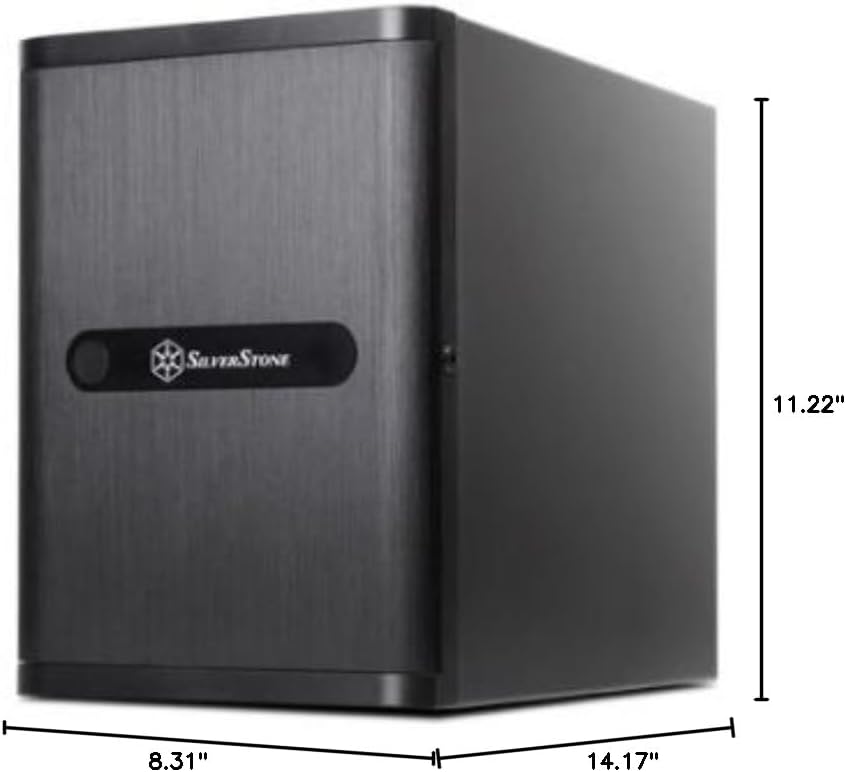
Figure 6.1: Dimensional drawing of the SilverStone DS380B case.
| Өзгөчөлүк | Деталь |
|---|---|
| Модель номери | DS380B |
| Иштин түрү | Mini-Tower (Small Form Factor) |
| Motherboard шайкештиги | Mini-ITX, Mini-DTX |
| Материал | Алюминий алдыңкы эшик, SECC корпусу |
| Өлчөмдөрү (LxWxH) | 8.3 x 14.2 x 11.2 дюйм (211 x 360 x 285 мм) |
| Салмагы | 1 pounds (approx. 4.5 kg actual shipping weight) |
| Drive Bays | 8 x Hot-swappable 3.5"/2.5" SAS/SATA, 4 x Fixed 2.5" |
| Муздатуу системасы | 2 x 120mm intake fans, 1 x 120mm exhaust fan |
| Алдыңкы I / O порттору | 2 x USB 3.0, 1 x Audio-out |
| Кеңейтүү уячалары | 2 (supports graphics cards up to 11 inches) |
| Power Supply Support | SFX, SFX-L (top mount) |
7. Кепилдик маалыматы
For detailed warranty terms and conditions for your SilverStone DS380B computer case, please refer to the official documentation provided by SilverStone Technology. Warranty information is typically included with the product packaging or available on the manufacturer's official webсайт.
An official User Manual (PDF) for this product is available for download, which may contain specific warranty details. You can access it via this link: SilverStone DS380B User Manual PDF.
8. Кардарларды колдоо кызматы
If you require further assistance, technical support, or have questions regarding your SilverStone DS380B computer case, please contact SilverStone Technology customer support. You can typically find contact information on their official webсайт.
For more information about SilverStone products, you can visit the official SilverStone Store: Amazon'догу SilverStone дүкөнү.
9. Продукт видеолору
No official product videos from the seller were found for this item that meet the criteria for inclusion in this manual.


