1. Киришүү
Welcome to the user manual for your new Salora SM508 mobile phone. This guide provides essential information to help you set up, operate, maintain, and troubleshoot your device. Please read this manual carefully to ensure proper use and to maximize the performance and longevity of your phone.
2. Продукт бүтүп калдыview
The Salora SM508 is a compact and reliable basic mobile phone designed for essential communication. It features a color display, a comfortable keypad, and dual SIM support.
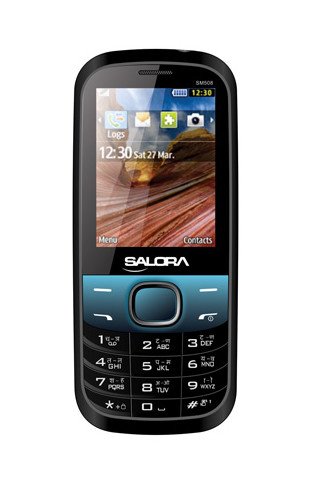
Бул сүрөт алдыңкы жагын көрсөтөт view of the Salora SM508 mobile phone. It features a color display at the top, a central navigation button, and a standard alphanumeric keypad below. The phone has a black body with blue accents around the navigation cluster.
3. Орнотуу
3.1 SIM карта(лар)ды салуу
- Turn off the phone and remove the back cover.
- Батареяны кылдаттык менен чыгарып алыңыз.
- Locate the SIM card slots. The Salora SM508 supports dual SIM cards.
- Insert your SIM card(s) into the designated slot(s) with the gold contacts facing down. Ensure they are securely seated.
3.2 Inserting Battery
- Align the battery contacts with the contacts in the phone's battery compartment.
- Gently press the 1800 mAh Li-Ion battery into place until it clicks.
- Арткы капкакты ордуна коюңуз, анын бекем бекитилишин текшериңиз.
3.3 Inserting Memory Card (Optional)
- Арткы капкак жана батарейка алынып салынгандан кийин, эс тутум картасынын уячасын табыңыз.
- Insert a microSD card (up to 8GB) into the slot with the gold contacts facing down.
- Батареяны жана арткы капкакты алмаштырыңыз.
3.4 Аппаратты заряддоо
- Connect the charger to the charging port on your phone.
- Заряддоо түзүлүштү розеткага сайыңыз.
- The battery indicator on the screen will show the charging status. Charge the phone fully before first use.
3.5 Баштапкы күйгүзүү/өчүрүү
- Күйгүзүү үчүн: Экран күйгөнгө чейин Күйгүзүү/Чалууну бүтүрүү баскычын басып, кармап туруңуз.
- Өчүрүү үчүн: Өчүрүү параметрлери пайда болгонго чейин Күйгүзүү/Чалууну аяктоо баскычын басып туруңуз, андан кийин "Өчүрүү" дегенди тандаңыз.
4. Иштөө нускамалары
4.1 Негизги навигация
- Use the navigation keys (up, down, left, right) to move through menus and options.
- Press the central 'OK' or 'Select' button to confirm a selection.
- Use the 'Back' or 'Clear' button to return to the previous screen or delete characters.
4.2 Чалууларды кабыл алуу жана кабыл алуу
- Чалуу үчүн: Баскычтопту колдонуп телефон номерин терип, жашыл чалуу баскычын басыңыз.
- Чакырууну кабыл алуу үчүн: When the phone rings, press the Green Call button to answer.
- Чалууну аяктоо үчүн: Press the Red End Call button.
4.3 SMS жөнөтүү жана алуу
- "Билдирүүлөр" менюсуна өтүңүз.
- "Билдирүү жазуу" же "Жаңы SMS" тандаңыз.
- Ариптакта аркылуу билдирүүңүздү киргизиңиз.
- Алуучунун номерин кошуңуз же байланыштардан тандаңыз.
- "Жөнөтүү" баскычын басыңыз.
4.4 Камераны колдонуу
- Камера тиркемесине негизги менюдан кириңиз.
- The phone features a 1.3 MP primary (rear) camera.
- Дисплейди колдонуп кадрыңызды тартыңыз.
- Press the 'OK' or 'Capture' button to take a photo.
4.5 Мультимедиа жана байланыш
- Аудио Jack: The phone includes a 3.5 mm audio jack for connecting headphones or external speakers.
- Bluetooth: Enable Bluetooth from the settings menu to connect to compatible devices for file transfer or hands-free communication.
- GPRS: The phone supports GPRS for basic internet connectivity. Consult your network provider for data plan details.
5. Техникалык тейлөө
5.1 Аппаратыңызды тазалоо
- Телефондун экранын жана корпусун тазалоо үчүн жумшак, кургак, түксүз чүпүрөктү колдонуңуз.
- Катуу химиялык заттарды, тазалоочу эриткичтерди же күчтүү жуучу каражаттарды колдонуудан алыс болуңуз.
- Do not allow water or liquids to enter the phone.
5.2 Батареяга кам көрүү
- Батареяны өтө жогорку температурага (ысык же суук) дуушар кылбаңыз.
- Батареяны тешип, ажыратпаңыз же кыска туташууларга жол бербеңиз.
- If the battery is damaged or swollen, discontinue use immediately and replace it with an authorized Salora battery.
5.3 Сактоо
- Телефонду салкын, кургак жерде, күн нуру түз тийбеген жана нымдуулуктан алыс сактаңыз.
- If storing for an extended period, ensure the battery is partially charged (around 50%) to preserve its lifespan.
6. Кыйынчылыктарды
If you encounter issues with your Salora SM508, please refer to the following common solutions:
- Телефон күйбөй жатат:
Ensure the battery is charged. Connect the charger and wait a few minutes before attempting to power on. Check if the battery is properly inserted. - Тармак сигналы жок:
Check if your SIM card is correctly inserted. Ensure you are in an area with network coverage. Try restarting the phone. - Чалууларды кабыл алуу/кабыл алуу мүмкүн эмес:
Verify that your SIM card is active and has sufficient balance/plan. Check network signal strength. Ensure call barring or flight mode is not enabled. - Заряддоо маселелери:
Ensure the charger is properly connected to both the phone and the power outlet. Try using a different compatible charger. Check the charging port for any debris. - Баскычтоп жооп бербей жатат:
Restart the phone. If the issue persists, ensure no physical damage to the keypad.
If the problem persists after trying these steps, please contact Salora customer support.
7. Техникалык шарттар
Below are the detailed technical specifications for the Salora SM508 mobile phone:
| Өзгөчөлүк | Спецификация |
|---|---|
| Бренд | Салора |
| Модел | SM508 |
| Операция системасы | Android 5.1, Android v5 1 OS (Note: This specification appears to be an error in the source data for a basic phone with a keypad interface. The phone operates on a proprietary feature phone OS.) |
| Screen Size | 6.1 Centimetres (2.4" TFT Screen) |
| Резолюция | 320 x 240 пиксель |
| Негизги камера | 1.3 MP (Rear) |
| Батарея | 1800 мАч, Li-Ion |
| Эстутум сактоо сыйымдуулугу | 8 ГБ чейин кеңейтилет |
| SIM колдоо | Кош SIM |
| Connectivity Technologies | Bluetooth, GPRS |
| Аудио Jack | 3.5 мм |
| Түзмөктүн интерфейси - Негизги | Баскычтоп |
| Форма фактору | Бар |
| Түс | Кара, Көк |
| Элемент Салмагы | 140 г |
| Пакеттин өлчөмдөрү | 14 x 9.4 x 6.2 см |
| Дата биринчи жеткиликтүү | 18 февраль 2014 |
8. Кепилдик жана колдоо
8.1 Кепилдик маалыматы
The Salora SM508 comes with a 1 жылдык өндүрүүчү кепилдик сатып алынган күндөн тартып аппарат үчүн. Кутудагы аксессуарлар, анын ичинде батарейкалар а менен жабылат 6 ай өндүрүүчү кепилдик сатып алынган күндөн тартып. Бул кепилдик өндүрүш кемчиликтерин жана нормалдуу колдонуудан келип чыккан маселелерди камтыйт.
Кепилдик дооматтары үчүн сатып алуунун далили катары сатып алуу дүмүрчөгүңүздү сактап коюңуз.
8.2 Кардарларды колдоо
For any technical assistance, warranty claims, or further inquiries regarding your Salora SM508 mobile phone, please contact Salora customer support directly. Refer to the packaging or the official Salora webакыркы байланыш маалыматы үчүн сайт.


