1. Киришүү
The Attop YD-719 Quad-Copter is an 8-inch remote-controlled aerial vehicle designed for recreational flight. It features a 4-channel remote control system, 3-axis flight control for stable operation, and a built-in camera capable of recording video and capturing still images. The quad-copter utilizes 2.4 GHz wireless technology for reliable communication and is powered by a rechargeable battery.
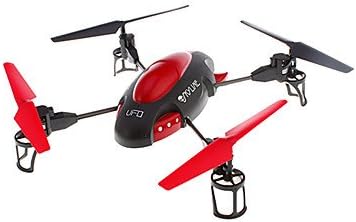
Image 1.1: The Attop YD-719 Quad-Copter, showcasing its red and black design with four propellers.
2. Коопсуздук чаралары
- Always operate the quad-copter in open areas, away from people, animals, buildings, and power lines.
- Катуу шамалда же жагымсыз аба ырайында учпаңыз.
- Ар бир учуунун алдында батарейканын толук заряддалганын текшериңиз.
- Манжаларды жана кенен кийимдерди айлануучу пропеллерлерден алыс кармаңыз.
- Жаш колдонуучулар үчүн чоңдордун көзөмөлү сунушталат.
- Do not attempt to modify the quad-copter or its components.
- Avoid flying near airports or restricted airspace.
3. Пакеттин мазмуну
Пакетте бардык буюмдар бар экенин текшериңиз:
- Attop YD-719 Quad-Copter
- Алыстан башкаруу
- Rechargeable Battery (for quad-copter)
- Four (4) Extra Rotor Blades
- Two (2) USB Charging Cables
- Колдонуучунун колдонмосу (бул документ)
4. Components Overview
4.1 Quad-Copter
The quad-copter features four rotors, a central body housing the electronics and camera, and landing gear. The built-in camera is located on the underside of the main body.

Сүрөт 4.1: Каптал view of the YD-719 Quad-Copter, showing the sleek body and propeller arms.
4.2 Алыстан башкаруу
The remote control is a 4-channel device operating on 2.4 GHz frequency, providing precise control over the quad-copter's movements. It typically includes two joysticks for flight control and various buttons for functions like trim adjustments, photo/video capture, and power.
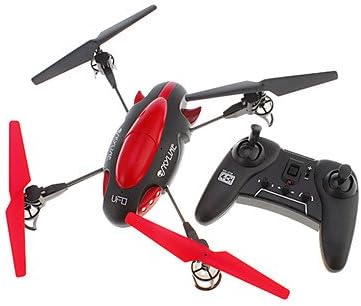
Image 4.2: The Attop YD-719 Quad-Copter alongside its remote control, illustrating their relative sizes.
5. Орнотуу
5.1 Quad-Copter Battery Charging
- Locate the rechargeable battery within the quad-copter's compartment.
- Connect one end of the provided USB charging cable to the battery and the other end to a USB power source (e.g., computer USB port, USB wall adapter).
- The charging indicator light will illuminate during charging and typically turn off or change color when fully charged. Refer to the specific indicator behavior in the product documentation if available.
- Charging time is approximately 60-90 minutes. Do not overcharge.

Сүрөт 5.1: Астыңкы бети view of the YD-719 Quad-Copter, showing the battery compartment and wiring.
5.2 Алыстан башкаруунун батареясын орнотуу
- Пульттун артындагы батарея бөлүкчөсүн ачыңыз.
- Туура полярдуулукту (+/-) камсыз кылуу менен үч (3) AAA батарейкасын салыңыз.
- Батарея отсегин бекем жабыңыз.
5.3 Propeller Installation/Replacement
The quad-copter comes with four extra rotor blades. If replacement is necessary:
- Carefully remove the damaged propeller by gently pulling it upwards from the motor shaft.
- Note the direction of rotation for each propeller. Propellers are typically marked (e.g., A or B) and must be installed on the correct motor.
- Press the new propeller firmly onto the motor shaft until it is seated securely.

Image 5.2: Close-up of a propeller and motor assembly on the YD-719 Quad-Copter.
6. Иштөө нускамалары
6.1 Алыстан башкарууну жупташтыруу
- Place the quad-copter on a flat, level surface.
- Turn on the quad-copter's power switch. The LED lights will flash.
- Алыстан башкарууну күйгүзүңүз.
- Push the left joystick (throttle) all the way up, then all the way down. The quad-copter's LED lights will stop flashing and remain solid, indicating successful pairing.
6.2 Учуп-конуу
- Учуп чыгуу: After pairing, slowly push the left joystick (throttle) upwards to increase motor speed and lift the quad-copter off the ground.
- Конуу: Slowly pull the left joystick (throttle) downwards to decrease motor speed and gently land the quad-copter. Once landed, pull the throttle all the way down to stop the motors.
6.3 Учууну башкаруунун негизги каражаттары
- Өтүү/Төмөн: Left joystick (throttle) up/down.
- Алдыга артка: Right joystick up/down.
- Солго/Оңго бурулуңуз (жөө): Left joystick left/right.
- Солго/Оңго учуу (айлануу): Right joystick left/right.
6.4 Видео жаздыруу жана сүрөткө тартуу
The YD-719 is equipped with a built-in camera. Refer to the remote control diagram (if provided in a physical manual) for specific buttons to activate video recording or still photo capture. Typically, a short press activates photo mode, and a long press activates video recording.
7. Техникалык тейлөө
7.1 Тазалоо
Use a soft, dry cloth to wipe down the quad-copter after use. Avoid using water or cleaning solvents, as they may damage electronic components.
7.2 Пропеллерге кам көрүү
Regularly inspect propellers for damage (bends, cracks, chips). Replace any damaged propellers immediately to ensure stable flight and prevent further damage to the quad-copter.
7.3 Батареяны сактоо
When not in use for extended periods, store the quad-copter battery at approximately 50% charge in a cool, dry place. Remove batteries from the remote control if it will not be used for a long time.
8. Кыйынчылыктарды
- Quad-Copter not responding: Ensure both quad-copter and remote control are powered on and successfully paired. Check remote control batteries.
- Туруксуз учуу: Check for damaged propellers and replace if necessary. Ensure the quad-copter is placed on a level surface before pairing. Perform trim adjustments on the remote control if the quad-copter drifts.
- Кыска учуу убактысы: Ensure the quad-copter battery is fully charged. Battery performance may degrade over time.
- Камера жаздырбай жатат: Ensure the quad-copter is powered on and the camera function is correctly activated via the remote control. Check if the memory card (if applicable) is inserted and has sufficient space.
9. Техникалык шарттар
| Өзгөчөлүк | Спецификация |
|---|---|
| Модель номери | YD-719 |
| Өндүрүүчү | Жогорку |
| Өлчөмдөрү (болжол менен) | 36.83 x 34.93 x 11.43 см (14.5 x 13.75 x 4.5 дюйм) |
| Салмагы (болжол менен) | 680.39 г (1.5 фунт) |
| Башкаруу каналдары | 4-канал |
| Учууну башкаруу | 3-огу |
| Зымсыз технология | 2.4 ГГц |
| Квадрокоптердин батареясы | 600 mAh Rechargeable |
| Алыстан башкаруунун батареясы | 3 x AAA (киргизилген эмес) |
| Өзгөчө өзгөчөлүк | Built-in Camera (Video/Photo) |
10. Кепилдик жана колдоо
For warranty information or technical support, please refer to the contact details provided with your purchase documentation or visit the manufacturer's official webсайт. Кепилдик дооматтар үчүн сатып алганыңыздын далилин сактаңыз.