Introduction
This manual provides comprehensive instructions for the setup, operation, and maintenance of your InFocus IN126x WXGA Network Projector. Designed for both business presentations and home cinema, this projector delivers 4200 lumens and excellent image quality with high contrast and BrilliantColor technology. Its compact and lightweight design ensures portability while maintaining powerful performance.

Figure 1: InFocus IN126x Projector Front View
This image displays the InFocus IN126x projector from a front-right angle, highlighting its main lens and the sleek black casing. The top panel features control buttons and the InFocus logo.
Маанилүү коопсуздук маалыматы
Please read all safety instructions carefully before operating the projector. Failure to follow these instructions may result in fire, electric shock, or other injuries.
- Кубат булагы: Use only the power adapter supplied with the projector. Ensure the power outlet matches the voltagд талаптар.
- Вентиляция: Желдетүүчү тешиктерди жаппаңыз. Ашыкча ысып кетүүнүн алдын алуу үчүн жетиштүү аба агымы маанилүү.
- Жылуулук: Проектор лamp and surrounding areas can become very hot during operation. Avoid touching these areas.
- Lamp Эскертүү: лamp contains mercury. Dispose of lamps according to local regulations. Do not open the lamp compartment until the projector has cooled down.
- Суюктук таасири: Проекторду жамгырдын, нымдуулуктун же башка суюктуктардын таасирине дуушар кылбаңыз.
- Тейлөө: Бул продуктту өзүңүз тейлөөгө аракет кылбаңыз. Бардык тейлөөнү квалификациялуу тейлөө кызматкерлерине тапшырыңыз.

Figure 2: Projector Bottom Panel with Warning Labels
This image shows the underside of the InFocus IN126x projector, displaying various regulatory and safety labels. Notable warnings include information about mercury in the lamp and instructions for lamp replacement, emphasizing the need to allow the unit to cool down before servicing.
Орнотуу колдонмосу
1. Пакеттен чыгаруу жана жайгаштыруу
Carefully remove the projector and all accessories from the packaging. Place the projector on a stable, flat surface or mount it securely. Ensure there is adequate space around the projector for proper ventilation.

3-сүрөт: Проектордун өлчөмдөрү
This image illustrates the physical dimensions of the InFocus IN126x projector. The measurements are approximately 29.2 cm (length), 22.1 cm (width), and 9.8 cm (height), providing a clear understanding of its compact size for placement considerations.
2. Кубатты туташтыруу
Connect the power cord to the projector's power inlet and then plug the other end into a grounded electrical outlet.
3. Киргизүү булактарын туташтыруу
The InFocus IN126x projector supports various input sources. Connect your device (e.g., laptop, Blu-ray player) to the appropriate port on the projector's rear panel.
- HDMI: Жогорку сапаттагы санариптик видео жана аудио үчүн.
- VGA (Компьютер 1/2): For analog computer video input.
- S-Video/Video: Стандарттык сапаттагы видео үчүн.
- Audio In (Audio 1/2): Аналогдук аудио киргизүү үчүн.
- USB-A/USB-B: For service or specific data transfer.
- LAN: Тармак байланышы үчүн.
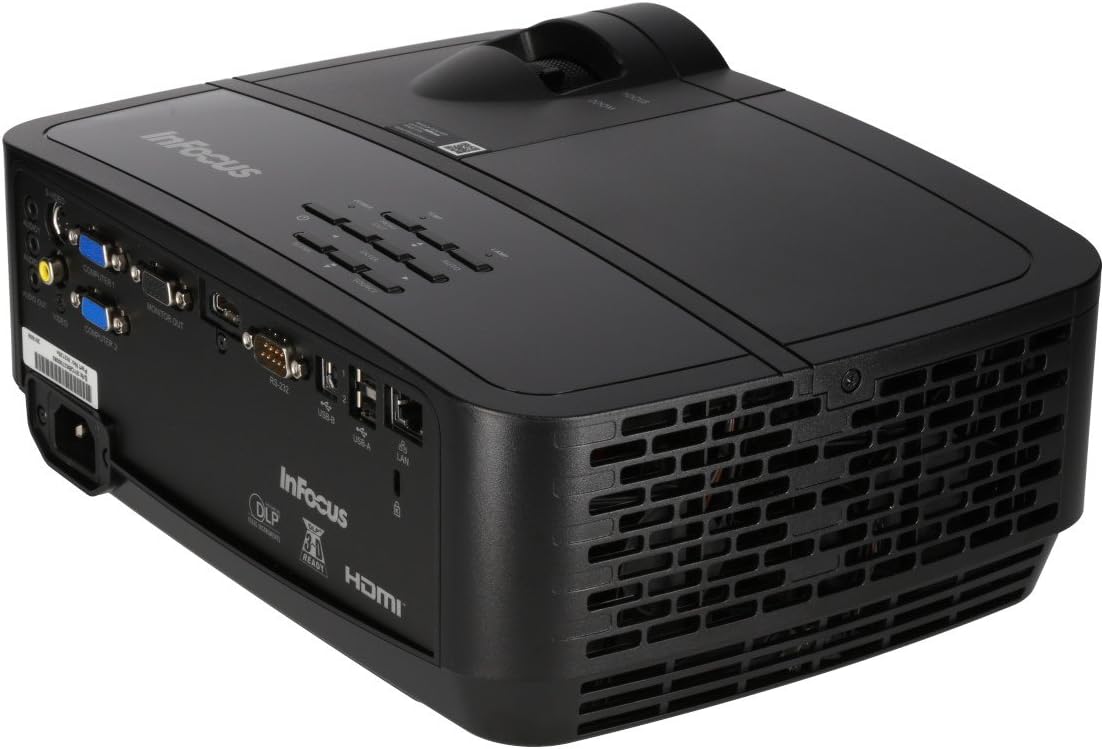
Figure 4: Projector Rear Panel Connectivity
Бул сүрөт майда-чүйдөсүнө чейин камсыз кылат view of the rear panel of the InFocus IN126x projector, clearly showing all available input and output ports. These include HDMI, VGA (Computer 1 and 2), S-Video, Video, Audio In (Audio 1 and 2), Monitor Out, RS-232, USB-B, USB-A, and LAN ports, facilitating diverse connectivity options.
4. Баштапкы күйгүзүү жана жөндөө
Press the power button on the projector or remote control. The projector will power on and display the input source. Use the focus and zoom rings on the lens to adjust the image clarity and size to your desired projection area.

Figure 5: Projector Top Panel Controls
This image shows the top surface of the InFocus IN126x projector, highlighting the control panel with various buttons for navigation and settings adjustment. The focus and zoom rings on the lens are also visible, used for fine-tuning the projected image.
Иштөө нускамалары
Негизги башкаруу элементтери
The projector can be operated using the control panel on the top of the unit or the included remote control.
- Кубат баскычы: Проекторду күйгүзөт же өчүрөт.
- Булак баскычы: Cycles through available input sources (HDMI, VGA, etc.).
- Меню баскычы: Экрандагы дисплей (OSD) менюну ачат.
- Чабыттоо баскычтары: Меню параметрлери аркылуу багыттоо жана жөндөөлөрдү тууралоо үчүн колдонулат.
- Кирүү баскычы: Менюдагы тандоолорду ырастайт.
Меню Багыттоо жана Орнотуулар
Press the Menu button to access the OSD. Use the navigation buttons to select categories such as Picture, Display, Setup, and Advanced. Within each category, you can adjust settings like:
- Жарыктык жана контраст: Optimize image visibility.
- Color & Tint: Түстөрдүн тактыгын так жөндөө.
- Аспект катышы: Select between 4:3, 16:9, or other ratios to match your content.
- Негизги ташты оңдоо: Adjust image shape if the projector is not perfectly perpendicular to the screen.
- BrilliantColor Technology: Enhance color vibrancy and detail.
Advanced Features
The IN126x supports a superior viewing experience, including 3D home cinema (3D Glasses sold separately). For enhanced connectivity, the projector can easily connect to your phone or iPad with a LightCast Key (sold separately).
Техникалык тейлөө
Lamp Алмаштыруу
Проектор лamp has a lifespan of over 5,000 hours. When the lamp reaches the end of its life, a warning message may appear, or the lamp indicator light may illuminate. Always allow the projector to cool down completely (at least 60 minutes) before attempting to replace the lamp. Refer to the safety information on the bottom of the projector for specific warnings regarding mercury content and replacement procedures.
Тазалоо
- Объектив: Оптикалык линзалар үчүн атайын жасалган жумшак, түксүз кездемени колдонуңуз. Абразивдүү тазалагычтарды колдонбоңуз.
- Проектор Casing: жумшак менен сүртүп, гamp кездеме. Катуу химиялык заттардан алыс болуңуз.
- Аба желдеткичтери: Regularly check and clean the air vents to ensure proper airflow and prevent overheating. Use a soft brush or compressed air to remove dust.

Figure 6: Projector Side Ventilation
This image displays the side of the InFocus IN126x projector, prominently featuring the ventilation grilles. These grilles are crucial for dissipating heat generated during operation, and keeping them clear of obstructions is vital for the projector's longevity and performance.
Проблемаларды чечүү
| Көйгөй | Мүмкүн себеп | Чечим |
|---|---|---|
| Экранда сүрөт жок |
|
|
| Image is dim or poor quality |
|
|
| Үн жок |
|
|
Техникалык шарттар
| Өзгөчөлүк | Деталь |
|---|---|
| Бренд | InFocus |
| Модель номери | F321717 (IN126x) |
| Продукциянын өлчөмдөрү | 18.58 x 20.67 x 7.44 дюйм |
| Элемент Салмагы | 5.5 фунт |
| Display Resolution | 1280 x 800 (WXGA) |
| Байланыш технологиясы | HDMI, VGA, S-Video, USB, LAN |
| Lamp Жашоо | 5,000 XNUMX сааттан ашык |
| Өзгөчө өзгөчөлүк | Portable |
| Биринчи жеткиликтүү күн | 7-август, 2016-жыл |
Кепилдик маалымат
The InFocus IN126x Projector comes with a 2 жылдык кепилдик. InFocus stands behind its products and provides customer service for any issues you may encounter. Please retain your proof of purchase for warranty claims.
Кардарларды колдоо
For technical assistance, troubleshooting beyond this manual, or warranty inquiries, please contact InFocus customer support. Visit the official InFocus webтелефон номерлери жана онлайн колдоо булактары, анын ичинде акыркы байланыш маалыматы үчүн сайт.
You can also refer to the official InFocus webкошумча ресурстар жана көп берилүүчү суроолор үчүн сайт: www.infocus.com


