1. Киришүү
This manual provides detailed instructions for the safe and effective operation of your Monoprice Par-64 Stage Light, Model 612720. This stage light features an aluminum shell and 177 RGB LEDs, designed for various stage and event lighting applications. It supports independent dimming, fading, and mixing of each color, along with built-in programs for dimming and strobe effects. The unit is compatible with standard DMX-512 control signals and supports Master/Slave mode for synchronized operation with multiple units.
2. Коопсуздук маалыматы
Please read and understand all safety instructions before installing or operating this device. Retain this manual for future reference.
- Электр коопсуздугу: Always connect the device to a grounded power outlet. Ensure the power supply voltage matches the device's requirements (AC90V-240V, 50-60Hz). Disconnect power before cleaning or servicing.
- Жылуулук: The device generates heat during operation. Ensure adequate ventilation and do not block cooling vents. Maintain a safe distance from flammable materials.
- Монтаждоо: Securely mount the device using appropriate hardware. Ensure the mounting surface or structure can support the weight of the fixture.
- Көздүн коопсуздугу: Do not stare directly into the light source, as it can cause eye damage.
- Нымдуулук: Do not expose the device to rain or moisture. Operate only in dry locations.
- Тейлөө: Refer all servicing to qualified personnel. Do not attempt to repair the device yourself.
3. Пакеттин мазмуну
Please ensure all items are present and in good condition upon unpacking.
- 1x Monoprice Par-64 Stage Light (Model 612720)
- 1x Кубат кабели
- 1x Колдонуучунун колдонмосу (бул документ)
4. Продукт бүтүп калдыview
Familiarize yourself with the components and controls of your Par-64 Stage Жарык.
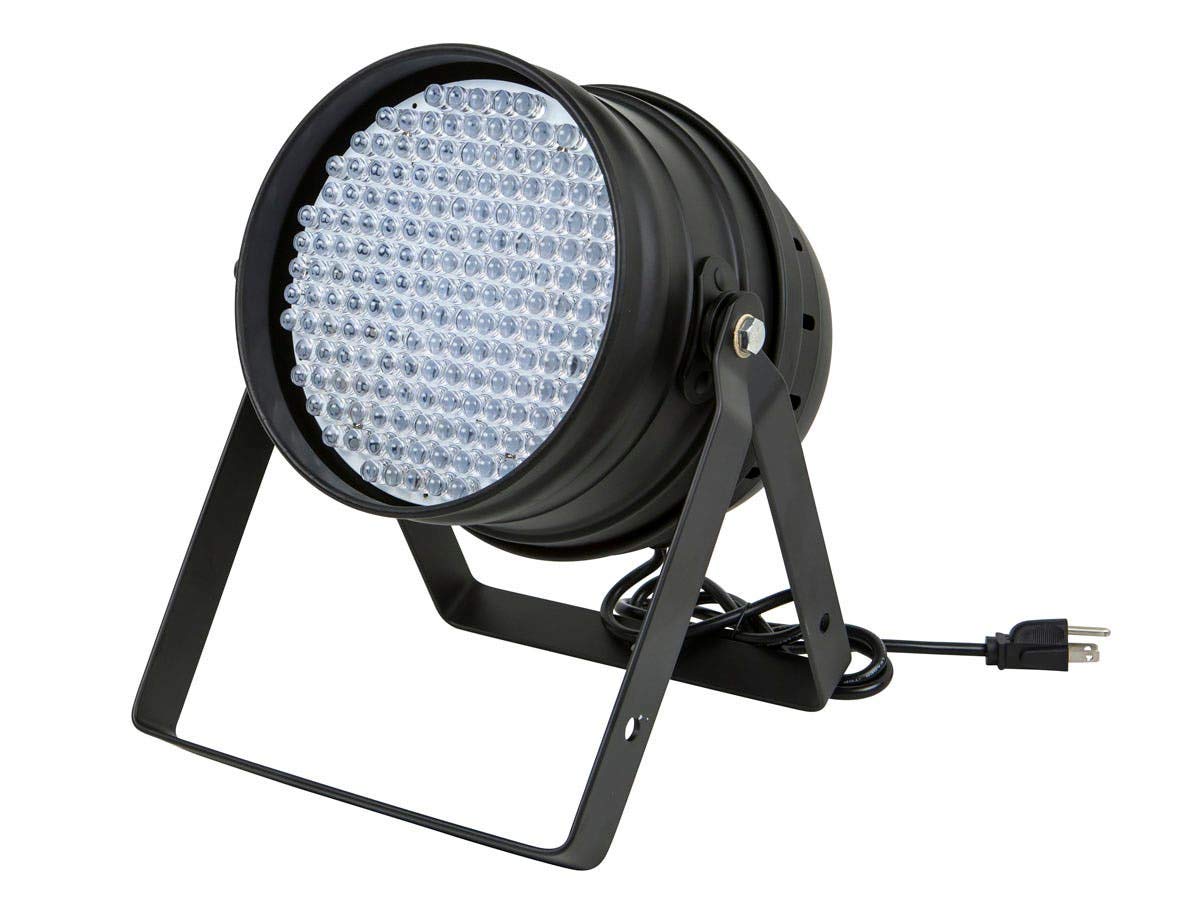
1-сүрөт: Алдыңкы жагы view of the Monoprice Par-64 Stage Light, showing the main body, mounting bracket, and power cable connection.

2-сүрөт: Арткы view of the control panel, featuring the 4-digit LED display, MENU, UP, DOWN, ENTER buttons, DMX IN/OUT ports, and power input.
Башкаруу панелинин функциялары:
- LED дисплей: Shows current mode, DMX address, or parameter values.
- MENU баскычы: Негизги меню параметрлери аркылуу циклдик режимде иштейт.
- UP баскычы: Маанилерди көбөйтөт же меню параметрлери боюнча өйдө карай багыт алат.
- ТӨМӨН баскычы: Маанилерди азайтат же меню параметрлери боюнча ылдый жылдырат.
- ENTER баскычы: Тандоолорду ырастайт же кошумча менюга кирет.
- DMX IN/OUT: 3-pin XLR connectors for DMX-512 signal input and output.
- Кубат киргизүү: AC кубат булагына туташат.
5. Орнотуу
5.1 Монтаждоо
The Monoprice Par-64 Stage Light is designed for floor mount applications. The adjustable bracket allows for precise positioning.
- Place the light on a stable, flat surface.
- Adjust the angle of the light using the side knobs on the mounting bracket. Tighten the knobs securely once the desired angle is achieved.
- Ensure the light is positioned away from any obstructions that could block ventilation or pose a fire hazard.
5.2 Кубат туташтыруу
Connect the provided power cable to the power input on the rear of the unit and then to a suitable grounded AC power outlet (AC90V-240V, 50-60Hz).
5.3 DMX туташуу (кошумча)
For DMX control, connect a DMX controller to the DMX IN port using a 3-pin XLR cable. To daisy-chain multiple units, connect the DMX OUT of the first unit to the DMX IN of the next unit, and so on. Ensure the last unit in the chain has a DMX terminator connected to its DMX OUT port (not included).
6. Иштөө нускамалары
The Monoprice Par-64 Stage Light offers several operating modes:
6.1 Өзүнчө режимдер
These modes allow the light to operate without an external DMX controller.
- Color Mixing Mode: Use the MENU button to navigate to color adjustment settings. Use UP/DOWN to select Red, Green, or Blue, then ENTER to adjust the intensity (0-255) for each color. This allows for custom color creation.
- Камтылган программалар: The light features pre-programmed effects for dimming and strobe. Use the MENU button to cycle through these programs. Use UP/DOWN to select different programs or adjust their speed/intensity if applicable.
- Үн активдүү режими: (If available, check specific model features) The light may react to sound via a built-in microphone. Select this mode via the MENU button.
6.2 Master/Slave режими
In Master/Slave mode, multiple identical lights can perform the same operation using a single control signal or source. One unit acts as the Master, and others as Slaves.
- Connect the DMX OUT of the Master unit to the DMX IN of the first Slave unit. Continue daisy-chaining DMX OUT to DMX IN for all subsequent Slave units.
- Set the Master unit to its desired operating mode (e.g., Color Mixing, Built-in Program).
- Set all Slave units to "Slave" mode via their MENU options. Refer to the LED display for confirmation.
- The Slave units will now mirror the actions of the Master unit.
6.3 DMX-512 Control Mode
This mode allows external control via a DMX controller.
- Connect the DMX controller to the DMX IN port of the first light in the chain.
- Set a unique DMX address for each light using the MENU, UP, DOWN, and ENTER buttons. The LED display will show the current DMX address. Ensure no two lights have the same address if they are to be controlled independently.
- Consult your DMX controller's manual for specific programming instructions. The Monoprice Par-64 Stage Light typically uses a standard DMX channel assignment for RGB control, dimming, and strobe.
7. Техникалык тейлөө
Proper maintenance ensures the longevity and optimal performance of your stagд жарык.
- Тазалоо: Тазалоодон мурун электр кубатынан сууруп алыңыз. Сыртын сүртүү үчүн жумшак, түксүз чүпүрөктү колдонуңуз. Өтө кир болсо, бир аз сүртүңүз.amp кездеме колдонсо болот. Абразивдүү тазалагычтарды же эриткичтерди колдонбоңуз.
- Линзаны тазалоо: Зарыл болсо, LED линзаларын жумшак чүпүрөк жана жумшак айнек тазалагыч менен акырын тазалаңыз.
- Вентиляция: Periodically check that the cooling vents are free from dust and debris. Use compressed air to clear any blockages.
- Сактагыч: When not in use for extended periods, store the light in a dry, dust-free environment, preferably in its original packaging or a protective case.
8. Кыйынчылыктарды
Эгер көйгөйлөргө туш болсоңуз, төмөнкү жалпы көйгөйлөрдү жана аларды чечүү жолдорун караңыз.
| Көйгөй | Мүмкүн себеп | Чечим |
|---|---|---|
| Жарык күйбөйт. | Электр менен камсыздоо жок; кабелдин бузук болушу; түзмөктүн иштебей калышы. | Check power cable connection. Ensure outlet has power. Try a different power cable. If problem persists, contact support. |
| DMX башкаруусу жок. | Incorrect DMX address; faulty DMX cable; DMX controller issue; incorrect mode. | Verify DMX address matches controller setting. Check DMX cable connections. Ensure light is in DMX mode. Test with a different DMX cable or controller. |
| Lights are not synchronized in Master/Slave mode. | Incorrect Master/Slave settings; faulty DMX cable. | Ensure one unit is set as Master and all others as Slave. Check DMX daisy-chain connections. |
| Жарык бүлбүлдөп же өзүн туура эмес алып жүрөт. | Poor power connection; DMX signal interference; overheating. | Check power connections. Ensure DMX cables are good quality and properly terminated. Ensure adequate ventilation. |
9. Техникалык шарттар
Detailed technical specifications for the Monoprice Par-64 Stage Light (Model 612720).
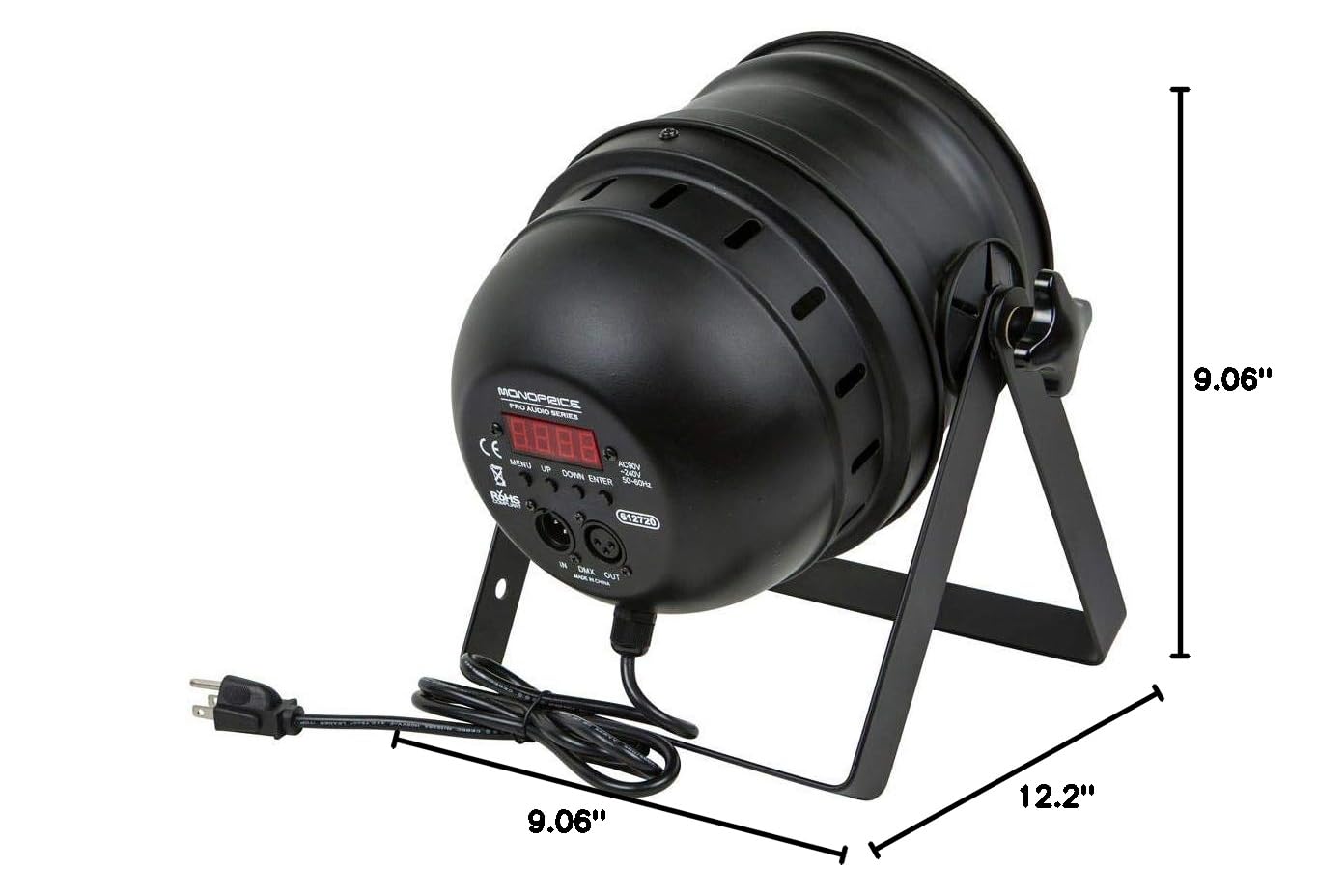
3-сүрөт: Dimensional drawing of the Monoprice Par-64 Stage Light, showing its length, width, and height.
| Өзгөчөлүк | Деталь |
|---|---|
| Модель номери | 612720 |
| Жарык булагы | 177 RGB LED |
| Түс | RGB (Кызыл, Жашыл, Көк) |
| Материал | Алюминий кабык |
| Power Source | Электр зымдары |
| Тtage | AC90V-240V |
| Жыштык | 50-60 Гц |
| Ватtage | 18 ватт |
| Монтаж түрү | Floor Mount |
| Продукциянын өлчөмдөрү (L x W x Y) | 12.2" x 9.06" x 9.06" (30.99 см x 23.01 см x 23.01 см) |
| Элемент Салмагы | 4.87 фунт (2.21 кг) |
| Башкаруу режимдери | DMX-512, Master/Slave, Standalone (Color Mixing, Built-in Programs) |
10. Кепилдик жана колдоо
Monoprice өз продукциясынын артында турат. Кепилдик маалыматы, техникалык колдоо же кардарларды тейлөө боюнча суроо үчүн расмий Monopriceке кайрылыңыз webсайтка же кардарларды колдоо тобуна түздөн-түз кайрылыңыз.
Monoprice расмий Webсайт: www.monoprice.com
Колдоо кызматына кайрылганда продуктуңуздун моделинин номери (612720) жана сатып алуу маалыматы даяр болсун.


