Introduction
This manual provides essential instructions for the setup, operation, maintenance, and troubleshooting of the IMPINJ Speedway Revolution R420 UHF RFID Reader. Please read this document thoroughly before using the device to ensure proper functionality and safety.
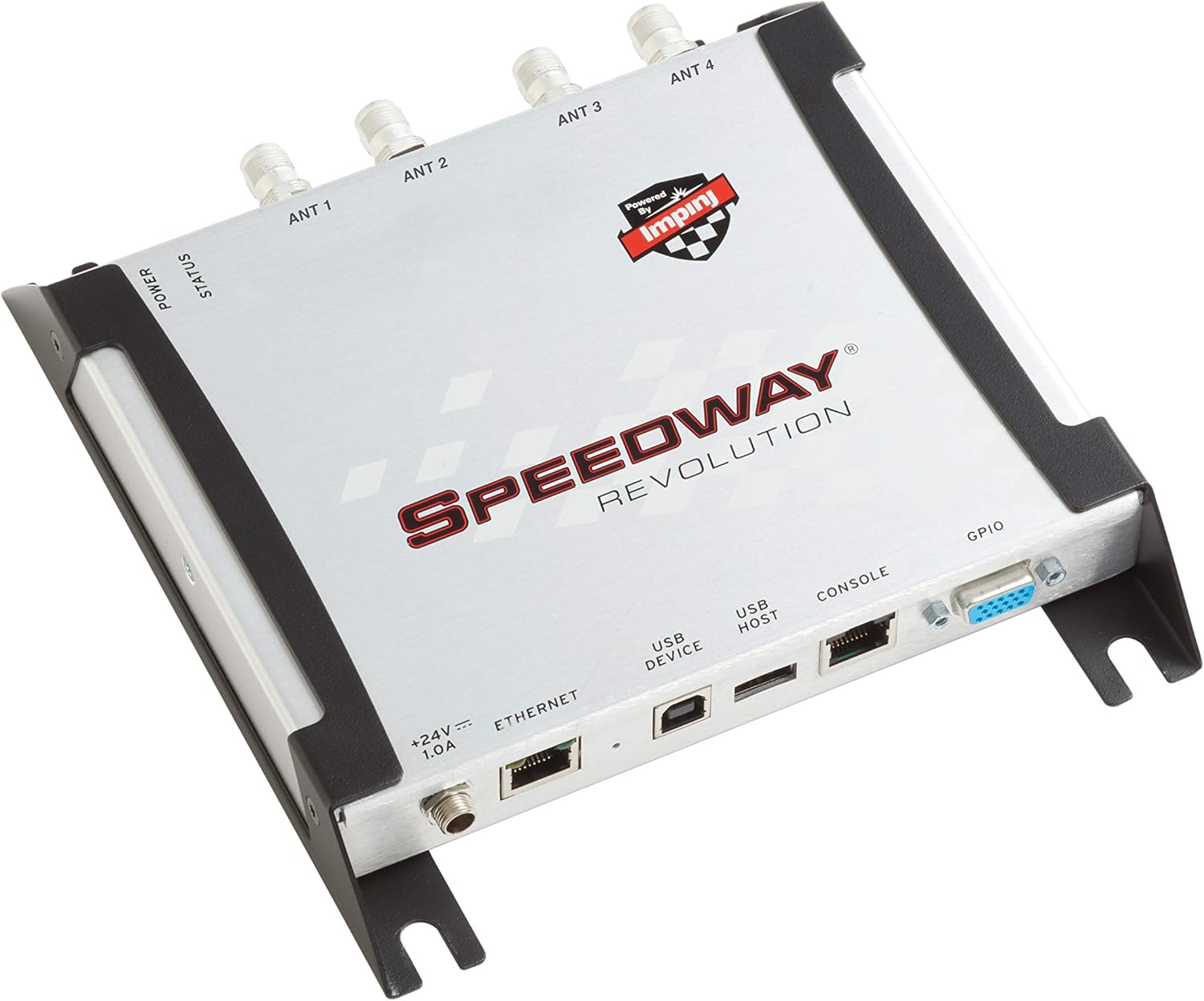
1-сүрөт: IMPINJ Speedway Revolution R420 UHF RFID Reader. This image displays the top-down view of the RFID reader, highlighting its compact design and various ports.
Орнотуу нускамалары
Follow these steps to properly set up your Speedway Revolution R420 RFID Reader.
1. Power Connection
The R420 reader supports Power over Ethernet (PoE) or an external 24V, 1.0A power supply. Ensure you use the appropriate power source.
- PoE: Connect an Ethernet cable from a PoE-enabled switch or injector to the Ethernet port on the reader.
- Тышкы күч: If PoE is not used, connect a compatible 24V, 1.0A power adapter to the '+24V === 1.0A' power input port.
2. Тармакка кошулуу
Connect the reader to your network using a standard Ethernet cable. The Ethernet port is an RJ45 type.
3. Антенна туташтыруу
The R420 features four antenna ports (ANT 1, ANT 2, ANT 3, ANT 4). Connect your UHF RFID antennas to these ports. Ensure secure connections for optimal performance.
4. Перифериялык байланыштар
- USB хост: For connecting USB peripherals.
- USB түзмөк: For connecting the reader to a host computer.
- Консол: For serial communication and configuration.
- GPIO: General Purpose Input/Output for external device control and sensing.

2-сүрөт: Labeled diagram of the IMPINJ Speedway Revolution R420 ports. This image clearly indicates the location of the Power LED, Status LED, Antenna ports (ANT 1-4), Power Supply input, Ethernet port, USB Device port, USB Host port, Console port, and GPIO port.

3-сүрөт: Арткы view of the IMPINJ Speedway Revolution R420 showing the power input, Ethernet, USB, Console, and GPIO ports. This image provides a detailed look at the connectivity options on one side of the reader.

4-сүрөт: Фронт view of the IMPINJ Speedway Revolution R420 displaying the four antenna ports. This image highlights the antenna connectivity side of the device.
Иштөө нускамалары
The IMPINJ Speedway Revolution R420 is a high-performance UHF RFID reader designed for various applications.
1. Күйгүзүү
Once all connections are secure, apply power to the reader. The КҮЧ LED indicator will illuminate, and the АБАЛЫ LED will indicate the operational state.
2. Программанын конфигурациясы
The reader requires software configuration for specific RFID tag reading operations. This typically involves using Impinj's reader management software or integrating with custom applications via its API. An easy-to-use API is available for C# applications, allowing for custom business logic implementation.
3. Тиркемелер
The R420 is suitable for a wide range of applications, including:
- Инвентаризацияны башкаруу
- Asset Tracking
- Supply Chain Management
- Retail Operations
- Manufacturing Processes
- Healthcare Systems
- Логистика
With proper antenna configuration, the reader can detect standard UHF tags at ranges of 30-50 feet.
Техникалык тейлөө
To ensure the longevity and optimal performance of your IMPINJ Speedway Revolution R420 reader, follow these general maintenance guidelines:
- Тазалоо: Keep the device clean and free from dust and debris. Use a soft, dry cloth for cleaning. Avoid liquid cleaners that could damage internal components.
- Экологиялык шарттар: Operate the reader within its specified environmental conditions (temperature, humidity) to prevent damage.
- Туташуу текшерүүлөрү: Periodically inspect all cable connections (power, Ethernet, antennas, USB, console, GPIO) to ensure they are secure and free from damage.
- Программалык камсыздоонун жаңыртуулары: Өндүрүүчүнү текшериңиз website for any available firmware updates. Keeping the firmware up-to-date can improve performance and add new features.
Проблемаларды чечүү
If you encounter issues with your Speedway Revolution R420, consider the following troubleshooting steps:
- Кубат жок: Verify that the power supply is correctly connected and providing the specified voltage (24V, 1.0A) or that the PoE source is active. Check the КҮЧ LED көрсөткүч.
- Тармакка туташуу жок: Ensure the Ethernet cable is securely connected to both the reader and the network switch/router. Check network settings and IP configuration.
- Окуй албай жатам Tags:
- Confirm antennas are properly connected to all four ports.
- Verify antenna cables are not damaged.
- Check software configuration for antenna power levels and read settings.
- камсыз кылуу tags are within the read range and orientation.
- Status LED Issues: Refer to the Impinj documentation for specific АБАЛЫ LED patterns and their meanings to diagnose operational issues.
- Software Communication Problems: Ensure the correct drivers are installed for USB or console connections. Verify network settings for Ethernet communication.
For advanced troubleshooting or persistent issues, consult the official Impinj documentation or contact technical support.
Техникалык шарттар
| Өзгөчөлүк | Деталь |
|---|---|
| Бренд | IMPINJ |
| Модель номери | R420 (LYSB00KHR41CY-ELECTRNCS) |
| Туташтыргыч түрү | RJ45 (Ethernet) |
| Кабель түрү | Ethernet |
| Шайкеш түзмөктөр | Network Device, Personal Computer, Router, Server |
| Өзгөчө өзгөчөлүк | PoE (Power over Ethernet) |
| Сунушталган Колдонуулар | Inventory management, asset tracking, supply chain management, retail, manufacturing, healthcare, logistics |
| Connector Gender | Аялдан аялга |
| Pins саны | 8 (for RJ45) |
| Бирдик саны | 1 Сан |
| Specification Met | FCC |
| Элемент Салмагы | 2.29 фунт |
| Пакеттин өлчөмдөрү | 12.3 x 9.5 x 2.9 дюйм |
| UPC | 754235664055, 633131662788 |
| Дата биринчи жеткиликтүү | 20-март, 2013-жыл |
Кепилдик маалымат
The IMPINJ Speedway Revolution R420 RFID Reader is sold as a brand new unit and comes with a full manufacturer's warranty. For specific terms and conditions of the warranty, please refer to the official Impinj warranty documentation or contact Impinj directly.
Колдоо жана Байланыш
For technical assistance, product inquiries, or to explore the full line of Impinj products, please contact your authorized Impinj reseller or visit the official Impinj website. If you purchased this product from a reseller and require support, please reach out to them directly for assistance.


