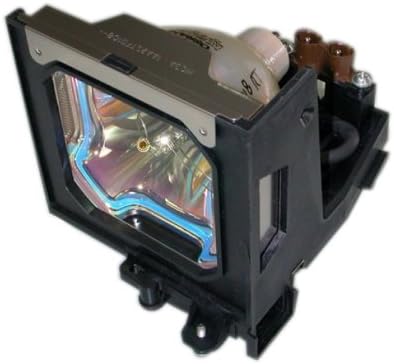
Boxlight ACTG042

Boxlight Replacement Lamp Модуль колдонуучу колдонмосу

Models: LC-XG110, LC-XG210, LX32 (Part Number: ACTG042)

Introduction

This manual provides essential information for the safe and effective installation, operation, and maintenance of your Boxlight replacement lamp module. This module is designed for use with Boxlight LC-XG110, LC-XG210, and LX32 projector models. Please read these instructions carefully before proceeding with installation.

Boxlight Replacement Lamp Модуль

Image: Boxlight replacement lamp module, showing the bulb encased in its housing with electrical connectors.

The Boxlight replacement lamp module (Part Number: ACTG042) includes an original bulb and housing, ensuring compatibility and optimal performance with your projector. It features a 250-watt bulb with an average lamp life of 2000 hours under normal operating conditions.

Маанилүү коопсуздук маалыматы

Бул жердеги лампа лamp contains Mercury (Hg). Please dispose of in accordance with local, state, or federal laws. Do not dispose of with regular household waste.

Орнотуу нускамалары

  1. Өчүрүү жана өчүрүү: Ensure your Boxlight projector is turned off and completely unplugged from the power source.
  2. Муздатуу: Allow the projector to cool down for at least 30 minutes. The lamp operates at high temperatures and can cause burns if handled while hot.
  3. Лamp Мукаба: Refer to your projector's user manual to locate the lamp compartment cover. This is typically secured by one or more screws.
  4. L. алып салууamp Мукаба: Using a suitable screwdriver, carefully remove the screw(s) securing the lamp cover and then remove the cover.
  5. Unscrew Old Lamp: эски лamp module will be secured by one or more screws. Unscrew these fasteners.
  6. Эски Лamp: Gently pull the handle on the old lamp module to slide it out of the projector. Be careful not to drop it.
  7. Жаңы L. киргизүүamp: Carefully insert the new Boxlight replacement lamp module into the projector, ensuring it slides smoothly into place. Do not force it.
  8. Secure New Lamp: Fasten the new lamp module with the screw(s) you removed earlier. Ensure it is securely seated.
  9. Л алмаштырыңызamp Мукаба: Lamp compartment cover and secure it with its screw(s).
  10. Кубатты кайра туташтыруу: Plug the projector back into the power outlet.
  11. Калыбына келтирүү Lamp Таймер: Consult your projector's user manual for instructions on how to reset the lamp timer. This is crucial for accurate lamp life tracking.

Иштөө көрсөтмөлөрү

Техникалык тейлөө

Проблемаларды чечүү

If you encounter issues after installing the new lamp, төмөнкүлөрдү карап көрөлү:

For further assistance, refer to your projector's original user manual or contact Boxlight customer support.

Продукт спецификациялары

БрендBoxlight
Модель номериACTG042
Шайкеш келген проектор моделдериLC-XG110, LC-XG210, LX32
Lamp Part Numbers03-000712-01P; 610 305 5602; MP56T-930; POA-LMP59
Ватtage250 ватт
Lamp Life (Normal)2000 саат
Жарык түрүКсенон
Lamp ТехнологияLCD
Элемент Салмагы13.3 унция (0.83 фунт)
Продукциянын өлчөмдөрү5.32 x 4.53 x 4.13 дюйм
UPC840398106805

Кепилдик маалымат

This Boxlight replacement lamp module is covered by a 180-Day Кепилдик сатып алынган күндөн тартып. Бул кепилдик нормалдуу колдонуудагы материалдардагы жана жасалгадагы кемчиликтерди камтыйт. Кепилдик дооматтары үчүн сатып алганыңыздын далилин сактап коюңуз.

For warranty service or inquiries, please contact the seller or manufacturer directly.

Кардарларды колдоо

If you require further assistance, have questions about installation, or need to report an issue, please contact the retailer where you purchased this product or the manufacturer, Arclyte Tech. (Boxlight's manufacturer).

When contacting support, please have your product model number (ACTG042) and proof of purchase readily available.

Тектеш документтер - ACTG042

Preview Микро Portable LCD проектор Колдонуучунун колдонмосу
Микро портативдик LCD проектор үчүн комплекстүү колдонуучу нускама, функцияларды, орнотууларды, туташууларды, экрандык менюнун операцияларын, техникалык тейлөөнү жана көйгөйлөрдү аныктоону камтыйт.
Preview BOXLIGHT Boston Сериялар Проектор Колдонуучу Колдонмо - Орнотуу, Функциялар жана Иштетүү колдонмосу
BOXLIGHT Boston Series проектору үчүн комплекстүү колдонуучу колдонмо. Функциялар, коопсуздук эрежелери, орнотуу процедуралары, иштетүү, тейлөө жана бузулууларды жоюу жөнүндө билип алыңыз. Колдоо үчүн BOXLIGHT.com дарегине кириңиз.
Preview Boxlight MimioPro G Interactive Flat Panel Display: кутудан чыгаруу жана орнотуу боюнча колдонмо
Boxlight MimioPro G Interactive Flat Panel дисплейин кутудан чыгаруу жана орнотуу боюнча комплекстүү колдонмо. Аппараттык камсыздоону орнотуу, Wi-Fi модулу, микропрограмма жаңыртуулары жана баштапкы Google конфигурациясын камтыйт.
Preview BOXLIGHT ProjectoWrite5|6 Колдонуучунун колдонмосу
BOXLIGHT ProjectoWrite5 жана ProjectoWrite6 проекторлору үчүн комплекстүү колдонуучу колдонмосу, өркүндөтүлгөн презентациялар үчүн орнотууларды, функцияларды, иштетүүнү, тейлөөнү жана көйгөйлөрдү чечүүнүн чоо-жайы.
Preview MimioPro G Interactive Display User Manual | Boxlight
Boxlight MimioPro G Interactive Display үчүн комплекстүү колдонуучу колдонмосу коопсуздукту, орнотууну, иштетүүнү, тейлөөнү жана көйгөйлөрдү оңдоону камтыйт. Түзмөктөрдү кантип туташтыруу, пультту колдонуу жана жалпы маселелерди чечүү жолдорун үйрөнүңүз.
Preview Boxlight ProColor Сериялар эки IFPD микропрограммасын жаңыртуу боюнча колдонмо
Бул колдонмо жаңы функцияларды, ишке ашыруу кадамдарын жана керектүү куралдарды камтыган Boxlight ProColor Series Two Interactive Flat Panel Displays (IFPD) үчүн микропрограмманы жаңыртуу процессин деталдаштырат. Ал Unplug'd жана Chrome сыяктуу колдонмолор, NDMS сыяктуу утилиталар жана кол менен жаңыртуу процедурасы тууралуу маалыматты камтыйт.