1. Киришүү
This manual provides comprehensive instructions for the Supereyes Y002 7mm 200X Waterproof Handheld Digital Microscope. This device utilizes optoelectronic technology to inspect hard-to-reach areas, offering a magnification range of 1X to 200X. Its compact design and waterproof capabilities make it suitable for various inspection tasks.
Негизги өзгөчөлүктөр төмөнкүлөрдү камтыйт:
- Unique IP67 waterproof rating.
- Powered via USB 2.0.
- 2 Megapixel CMOS sensor for clear imaging.
- Automatic white balance and brightness adjustment.
- Continuous zoom capability (combined optical and digital).
- Snapshot and video recording functions.
- Compact 7mm camera diameter and durable aluminum alloy body.
2. Коопсуздук маалыматы
Please read and understand all safety instructions before using the device.
- Суу өткөрбөйт өзгөчөлүгү: The device is IP67 waterproof, allowing for use in wet environments and underwater. It can be rinsed with water or wiped with damp clothes for cleaning. Ensure the USB connection port is dry before connecting to a computer.
- Температура: The LED light may generate heat during prolonged use. Avoid direct contact with sensitive skin for extended periods.
- Кубат булагы: Use only standard USB 2.0 ports for power. Do not attempt to power the device with non-standard or damaged power sources.
- Колдонуу: Аппаратты этияттык менен колдонуңуз. Аны түшүрүүдөн же катуу таасирлерге дуушар кылуудан алыс болуңуз.
3. Пакеттин мазмуну
Пакетте бардык буюмдар бар экенин текшериңиз:
- Supereyes Y002 USB Microscope (x1)
- Software CD (x1)
- Ruler for calibration (x1)
Note: If your computer lacks a CD-ROM drive, please visit the official Supereyes website to download the necessary software.
4. Продукт бүтүп калдыview
Familiarize yourself with the components of your Supereyes Y002 microscope:

Сүрөт 4.1: Structure Diagram of the Supereyes Y002 Digital Microscope. This image illustrates the main components including the focus knob, LED light waterproof camera, tripod attachment point, light adjustable button, camera button, and optional 60-degree and 45-degree side mirrors.
- Фокус баскычы: Таза сүрөттөр үчүн фокусту тууралоо үчүн колдонулат.
- LED Light Waterproof Camera: The main camera unit with integrated LED illumination.
- Трипод: A small stand for stable positioning (may be an optional accessory or included depending on package).
- Light Adjustable Button: Controls the brightness of the LED lights.
- Камера баскычы: Triggers snapshot capture or video recording.
- Side Mirrors (60° and 45°): Optional attachments for viewing at an angle.
5. Орнотуу
5.1 Программалык камсыздоону орнотуу
Windows колдонуучулары үчүн:
- Берилген программалык камсыздоонун CDсин компьютериңиздин CD-ROM уячасына салыңыз.
- Follow the on-screen instructions to install the Supereyes software.
- For full compatibility with Windows 8 (32/64 bit) and newer operating systems, it is recommended to download the latest Supereyes V3.5 software from the official Supereyes webсайт.
For Mac OS Users:
- No specific driver or additional software is required.
- Simply connect the device, and use built-in applications like Photo Booth or FaceTime to access the microscope's camera feed.
Linux колдонуучулары үчүн:
- The device is compatible with Linux. Specific software or drivers may vary depending on your distribution.
5.2 Аппаратты туташтыруу
- Ensure the software is installed (for Windows) or your Mac/Linux system is ready to recognize a USB camera.
- Connect the USB cable of the Supereyes Y002 microscope to an available USB 2.0 port on your computer.
- The system should automatically detect the device.
6. Иштөө нускамалары
6.1 Негизги операция
- Launch the Supereyes software (Windows) or Photo Booth/FaceTime (Mac).
- Position the microscope over the object you wish to inspect.
- тууралаңыз Фокус баскычы on the microscope body until the image on your screen is clear.
- колдонуу Light Adjustable Button on the cable to control the brightness of the LED illumination for optimal viewing.
6.2 Чоңойтуу
The Supereyes Y002 offers a continuous magnification range from 1X to 200X. This is achieved through a combination of optical and digital zoom. The 200X magnification is calculated based on a 21-inch display.
6.3 Сүрөттөрдү жана видеолорду тартуу
- Сүрөт: басыңыз Камера баскычы on the cable to take a still image. Alternatively, use the snapshot function within the software. Photo format is JPEG. Photo Capture Resolution: 640 x 480, 320 x 240.
- Видео жаздыруу: Use the software's video recording function. Video format is WMV for Windows systems and AVI for Mac OS. Video Capture Resolution: 320 x 240. Maximum display speed is 30 frames per second (f/s).
6.4 Software Functions (Windows Only)
The Supereyes software provides advanced functionalities:
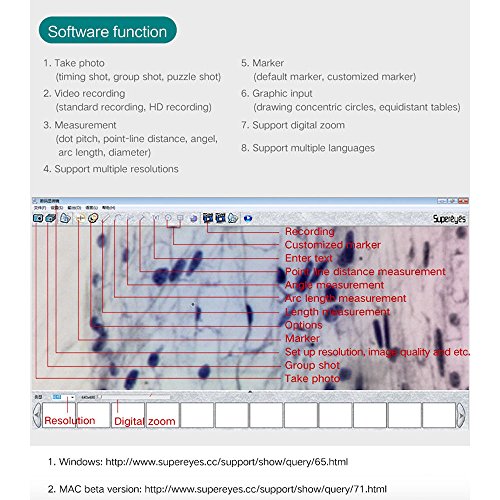
Сүрөт 6.1: Screenshot of the Supereyes software interface, showing various functions such as recording, customized markers, measurement tools (point-line distance, angle, arc length, length), options, resolution settings, and digital zoom.
- Сүрөткө тартуу: Includes timing shot, group shot, and puzzle shot options.
- Видео жаздыруу: Standard and HD recording capabilities.
- Өлчөө: Perform measurements such as dot pitch, point-line distance, angle, arc length, and diameter. This function is exclusive to Windows systems.
- Support Multiple Resolutions: Adjust the display and capture resolution.
- Белги: Utilize default or customized markers on the image.
- Graphic Input: Tools for drawing concentric circles, equidistant tables, etc.
- Support Digital Zoom: Further magnify the image digitally.
- Бир нече тилдерди колдоо: Change the software interface language.
6.5 Типтүү колдонмолор
The Y002 microscope is versatile and can be used for inspecting various areas:

Сүрөт 6.2: Examples of actual photos taken by the Y002 endoscope, demonstrating its capability to capture detailed images of an ear canal, oral cavity, and skin surface.
- Ear Inspection: The 7mm diameter allows for inspection of ear canals.
- Oral Inspection: Suitable for examining the inner mouth, tongue, and teeth.
- Skin Observation: Useful for observing various skin conditions.
- Industrial Inspection: Ideal for quality control, PCB inspection, and examining hard-to-reach areas in machinery.
7. Техникалык тейлөө
Туура тейлөө аппаратыңыздын узак мөөнөттүү жана оптималдуу иштешин камсыз кылат.
- Тазалоо: Due to its waterproof design, the camera head can be rinsed under water or wiped with a damp cloth. Ensure the lens is clean and free of debris for clear images. Do not use harsh chemicals or abrasive materials.
- Сактагыч: Store the microscope in a dry, cool place away from direct sunlight and extreme temperatures.
- Кабельге кам көрүү: Avoid bending or kinking the USB cable excessively, as this can damage internal wires.
8. Кыйынчылыктарды
- Экранда сүрөт жок:
- USB кабелинин микроскопко да, компьютерге да бекем туташтырылганын текшериңиз.
- Verify that the correct software or application (e.g., Photo Booth) is open and selected the microscope as the input device.
- Restart the software or computer.
- Түшүнүксүз сүрөт:
- тууралаңыз Фокус баскычы on the microscope body.
- Линзанын таза жана чаңдан же тактардан таза экенине ынаныңыз.
- Adjust the LED light brightness using the Light Adjustable Button.
- Software Compatibility Issues (Windows):
- If experiencing issues with the provided CD software, download the latest Supereyes V3.5 software from the official Supereyes website for improved compatibility with Windows 8/10.
- Measurement Function Not Working (Mac/Linux):
- The measurement function is only available on Windows operating systems with the Supereyes software.
9. Техникалык шарттар
| Өзгөчөлүк | Спецификация |
|---|---|
| Модель аты | Y002 |
| Максималдуу чоңойтуу | 200X |
| Жарык булагы түрү | LED |
| Суу өткөрбөйт рейтинги | IP67 |
| Камеранын диаметри | 7 мм |
| Продукциянын өлчөмдөрү | 6.89"L x 0.28"W x 6.89"H |
| Материал | Алюминий эритмеси |
| Тtage | 5 Volts (USB Powered) |
| Сүрөт тартуу токтому | 640 x 480, 320 x 240 |
| Видео тартуунун резолюциясы | 320 x 240 |
| Maximum Display Speed | 30 f/s |
| Операциялык системанын шайкештиги | Windows 10/8/7/Vista/XP SP2/2000 (32/64 bit), Mac OS X 10.5 or above, Linux |
10. Кепилдик жана колдоо
This product is manufactured by Supereyes. For specific warranty information, technical support, or to download the latest software and drivers, please visit the official Supereyes webсайт. Кардарларды тейлөө үчүн байланыш маалыматы, адатта, өндүрүүчүдөн тапса болот webсайт же продукт таңгак.


