1. Киришүү
This manual provides comprehensive instructions for the installation, operation, and maintenance of the Juniper Networks EX4200-48PX Ethernet Switch. The EX4200-48PX is a high-performance, managed, stackable switch designed for enterprise access and aggregation deployments. It features 48 Gigabit Ethernet ports with Power over Ethernet Plus (PoE+) capabilities, ensuring reliable connectivity and power delivery for various network devices.
Key features include Layer 2 and Layer 3 switching, support for various data transfer protocols, and advanced security and management capabilities. Please read this manual thoroughly before operating the device to ensure proper setup and safe usage.
2. Коопсуздук маалыматы
Жабдуулардын бузулушун жана жаракат алуусун алдын алуу үчүн төмөнкү коопсуздук чараларын сактаңыз:
- Электр коопсуздугу: Кубат булагынын үн деңгээли өчүргүчтүн үнүндөй экенин текшериңизtage requirements (100-240V~50-60 Hz 12A). Use only the provided power cord or an approved replacement.
- Негиздөө: Always ensure the switch is properly grounded to prevent electrical shock.
- Вентиляция: Желдетүүчү тешиктерди жаппаңыз. Ашыкча ысып кетүүнүн алдын алуу үчүн түзмөктүн айланасында жетиштүү аба айланышын камсыз кылыңыз.
- Курчап турган чөйрө: Operate the switch in a clean, dry environment within specified temperature and humidity ranges. Avoid exposure to moisture or extreme temperatures.
- Колдонуу: The switch is heavy (approximately 25 pounds). Use proper lifting techniques or assistance when moving it.
3. Пакеттин мазмуну
Carefully unpack the box and verify that all items are present and in good condition. If any item is missing or damaged, contact your vendor immediately.

3.1-сүрөт: Juniper EX4200-48PX switch as received in its packaging, including the switch unit, a power cable, and a network cable.
- Juniper EX4200-48PX Switch Unit
- Электр кабели
- Ethernet кабели
- Rack-mount Kit (typically includes brackets and screws)
- Документтер (Ыкчам баштоо колдонмосу, коопсуздук маалыматы)
4. Физикалык мүнөздөмө
4.1. Алдыңкы панель
The front panel of the EX4200-48PX switch features 48 Gigabit Ethernet ports, status indicators, and a small LCD display for local management and status monitoring.

4.1-сүрөт: Фронт view of the Juniper EX4200-48PX switch, highlighting the 48 Gigabit Ethernet ports.

4.2-сүрөт: Detail of the front panel showing the LCD display and status indicators: ALM (Alarm), SYS (System), and MST (Master). These LEDs provide quick visual status of the device's operational state.
4.2. Продукт этикеткасы
The product label, typically located on the chassis, provides essential identification details for the switch.
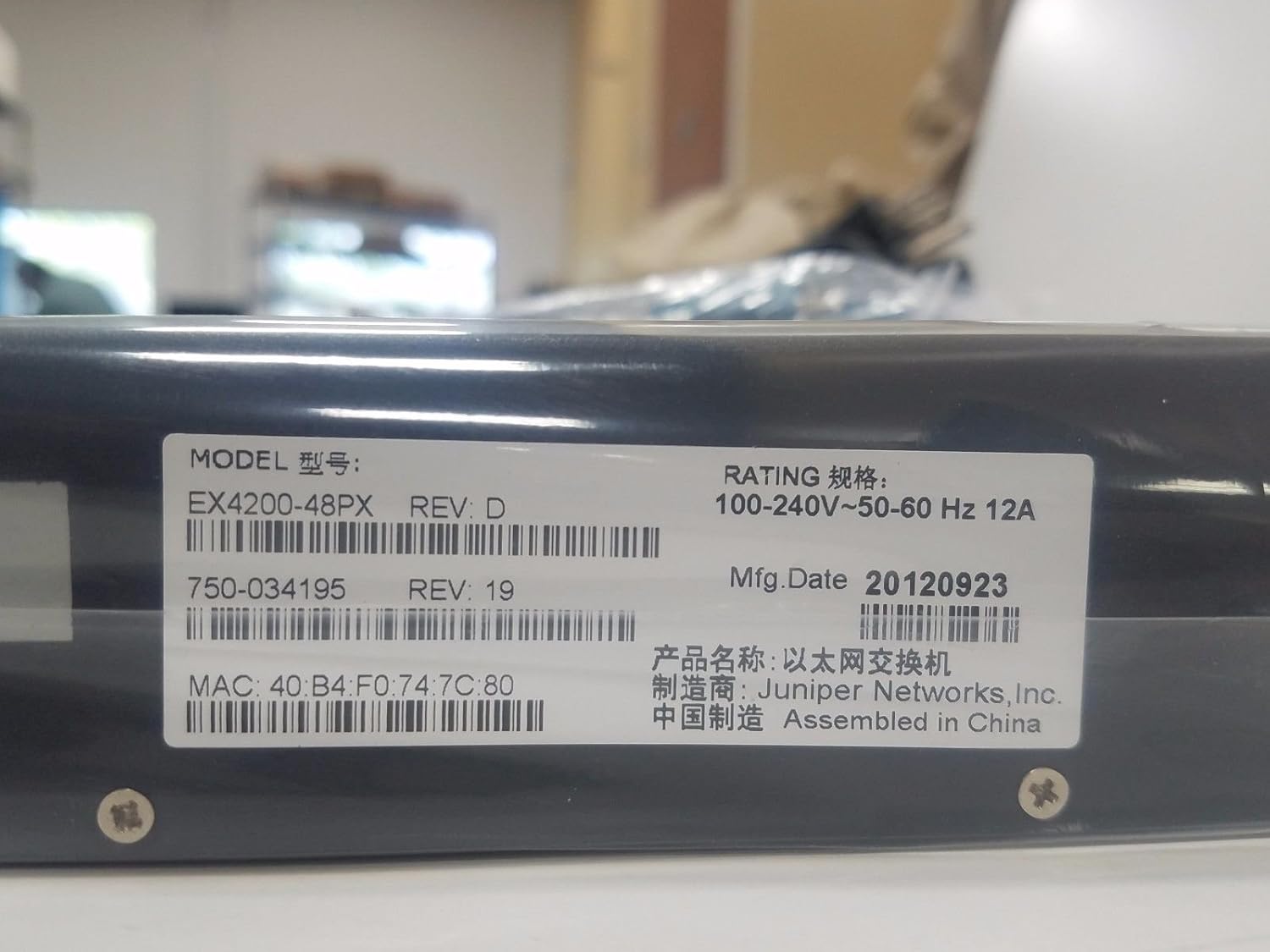
4.3-сүрөт: Product label displaying the Model: EX4200-48PX REV: D, Rating: 100-240V~50-60 Hz 12A. Key identifiers include the MAC address: 40:B4:F0:74:7C:80, Part Number: 750-034195 REV: 19, and Manufacturing Date: 20120923. The device is manufactured by Juniper Networks, Inc. and assembled in China.
4.3. Rack Mounting Brackets
The switch is designed for rack installation, utilizing standard rack-mount ears.

4.4-сүрөт: Жакын план view of a rack mount ear, demonstrating the attachment point for securing the switch within a standard equipment rack.
5. Орнотуу
5.1. Рак орнотуу
- Attach the provided rack-mount brackets to the sides of the switch using the screws supplied in the rack-mount kit.
- Align the switch with the rack posts and secure it using appropriate rack screws. Ensure the switch is level and firmly seated.
5.2. Кубатты туташтыруу
- Кубат шнурунун бир учун өчүргүчтүн арткы панелиндеги AC кубат киргизүү розеткасына туташтырыңыз.
- Кубат шнурунун экинчи учун жерге туташтырылган AC розеткасына туташтырыңыз.
- The switch features a redundant internal power supply for enhanced reliability.
5.3. Тармак түзмөктөрүн туташтыруу
- Connect Ethernet cables from your network devices (computers, IP phones, wireless access points) to the 48 Gigabit Ethernet ports on the front panel.
- For devices requiring Power over Ethernet (PoE+), ensure they are compatible and connect them to any of the 48 ports. The switch will automatically detect and provide power.
- For uplink connections to other switches or routers, use appropriate Ethernet cables.
5.4. Баштапкы конфигурация (милдеттүү эмес)
For initial configuration or advanced management, connect a console cable (not typically included) to the console port (usually RJ-45) on the front or rear panel and connect it to a computer. Use a terminal emulation program to access the command-line interface (CLI).
6. Которгучту иштетүү
6.1. Күйгүзүү / Өчүрүү
- Күйгүзүү: Once the power cord is connected, the switch will typically power on automatically. Observe the system LEDs.
- Өчүрүү: To power off, disconnect the power cord from the AC outlet. For controlled shutdown, it is recommended to gracefully shut down the operating system via the CLI if possible, before disconnecting power.
6.2. LED индикаторлорун түшүнүү
The front panel LEDs provide critical status information:
- ALM (Сигнализация): Indicates system alarms or critical errors. Refer to the CLI or system logs for details.
- SYS (Система): Системанын жалпы абалын көрсөтөт. Кадимки иштеши үчүн, адатта, жашыл түстө болот.
- MST (Мастер): Indicates if the switch is operating as the master in a Virtual Chassis configuration.
- Порт диоддору: Ар бир Ethernet портунда байланыштын абалын жана активдүүлүгүн көрсөткөн LED индикаторлору бар.
7. Техникалык тейлөө
- Тазалоо: Periodically clean the exterior of the switch with a soft, dry cloth. Do not use liquid or aerosol cleaners. Ensure ventilation openings are free of dust and debris.
- Программалык камсыздоонун жаңыртуулары: Juniper Networks колдоо кызматын үзгүлтүксүз текшерип туруңуз website for firmware updates. Applying updates can improve performance, add features, and address security vulnerabilities. Follow the manufacturer's instructions for firmware upgrade procedures.
- Экологиялык мониторинг: Түзмөктүн иштөө мөөнөтүн узартуу үчүн иштөө чөйрөсү көрсөтүлгөн температура жана нымдуулук диапазондорунда болушун камсыз кылыңыз.
8. Кыйынчылыктарды
Бул бөлүмдө жалпы көйгөйлөр үчүн негизги көйгөйлөрдү чечүү кадамдары камтылган.
8.1. Күч жок
- Кубат шнурунун өчүргүчкө да, AC розеткасына да бекем туташтырылганын текшериңиз.
- Check if the AC outlet is functional by plugging in another device.
- Ensure the power supply is receiving power (check for any power supply LEDs if available).
8.2. Портто шилтеме жок
- Ethernet кабелинин бузулганын текшерип, анын эки учунда тең туура орнотулганын текшериңиз.
- Туташкан түзмөктүн күйгүзүлгөнүн жана туура иштеп жатканын текшериңиз.
- Check the port configuration on the switch (e.g., speed, duplex settings) via the CLI.
8.3. Тармакка туташуу маселелери
- Check the SYS LED for any alarm indications.
- Verify IP addressing and subnet mask configurations on connected devices and the switch.
- Эгерде түзмөктөр ар кандай ички тармактарда болсо, маршруттоо туура конфигурацияланганын текшериңиз.
- Consult the Juniper Networks documentation for advanced troubleshooting or contact technical support.
9. Техникалык шарттар
The following table outlines the key specifications for the Juniper EX4200-48PX switch:
| Өзгөчөлүк | Description |
|---|---|
| Модел | EX4200-48PX |
| Бренд | Juniper Networks |
| Порттардын саны | 48 |
| Interface Type | PoE+ (Power over Ethernet Plus) |
| Маалыматтарды өткөрүү ылдамдыгы | 1000 Мегабит/секунда (Гигабит Ethernet) |
| Switching Capacity | Layer 2, Layer 3 |
| Электр камсыздоо | Redundant - Internal |
| Өзгөчөлүктөрү | 256-bit encryption, ARP support, Auto-uplink (auto MDI/MDI-X), DHCP proxy/server/snooping/support, DoS attack prevention, Dynamic ARP Inspection (DAI), Graceful Route Engine Switchover (GRES), High Availability, Hot swap module replacement, IGMP snooping, IPv6 support, Jumbo Frames support, MPLS support, Non-Stop Bridging (NSB), Non-Stop Routing (NSR), Quality of Service (QoS), RADIUS support, Redundant trunk group (RTG), Routing, Store and forward, Syslog support, Temperature sensor, Time Domain Reflectometry (TDR), Virtual Chassis technology, VLAN support. |
| Материал | Металл |
| Элемент Салмагы | 25 фунт |
| UPC | 695087049426 |
| Өндүрүүчү | Арча |
| Биринчи жеткиликтүү күн | 10-апрель, 2017-жыл |
10. Кепилдик жана колдоо
The Juniper EX4200-48PX switch is covered by a manufacturer's warranty. For specific warranty terms and conditions, please refer to the documentation provided with your purchase or visit the official Juniper Networks webсайт.
For technical support, product documentation, and software downloads, please visit the Juniper Networks support portal. Ensure you have your product model and serial number available when contacting support.