1. Киришүү
This manual provides detailed instructions for the installation, operation, and maintenance of your JL Audio M800/8 V2 8-Channel Marine Ampкөтөргүч. Бул amplifier is designed to deliver high-quality audio performance in marine environments, powering component speakers and subwoofers.
Please read this manual thoroughly before attempting installation or operation to ensure proper use and to prevent damage to the unit or your vessel's electrical system.
2. Коопсуздук маалыматы
Ар дайым төмөнкү коопсуздук чараларын сактаңыз:
- Кубат булагы: туташтыруу amplifier only to a 12-volt DC negative-ground electrical system.
- Зымдар: Ensure all wiring is properly routed and secured to prevent pinching or abrasion. Use appropriate gauge wire for power and ground connections as specified in the installation section.
- Эритүү: Install an appropriate fuse or circuit breaker on the main power wire within 18 inches (45 cm) of the battery.
- Вентиляция: айланасында жетиштүү желдетүүнү камсыз кылуу ampАшыкча ысып кетүүнүн алдын алуу үчүн көтөргүч. Аба айлануусу жок жабык жайларга орнотпоңуз.
- Суу таасири: While designed for marine use, avoid direct exposure to high-pressure water sprays or submersion.
- Кесиптик орнотуу: If you are unsure about any aspect of the installation, consult a qualified marine audio professional.
3. Пакеттин мазмуну
Пакетте бардык буюмдар бар экенин текшериңиз:
- JL Audio M800/8 V2 Marine Ampөмүрлүү
- Монтаждоочу жабдуулар (бурамалар, шайбалар)
- Колдонуучунун колдонмосу (бул документ)
- Connector Plugs for Power/Speaker Terminals
4. Орнотуу жана орнотуу
Туура орнотуу сиздин оптималдуу иштешиңиз жана узак мөөнөттүү иштешиңиз үчүн абдан маанилүү ampкөтөргүч. Бул кадамдарды кылдаттык менен аткарыңыз:
4.1 Монтаждалуучу жер
Choose a mounting location that is dry, well-ventilated, and protected from direct sunlight and excessive heat. Ensure there is sufficient space around the amplifier for air circulation and access to connections.

4.1-сүрөт: Бурчтуу view of the JL Audio M800/8 V2 marine ampөмүрлүү.
4.2 Power and Ground Connections
туташтыруу amplifier to the vessel's electrical system as follows:
- +12V (кубат): Connect a heavy-gauge power wire (refer to specifications for recommended gauge) from the positive terminal of the battery to the +12V input on the amplifier. Install an appropriate fuse or circuit breaker near the battery.
- GND (жер): Connect a heavy-gauge ground wire from the GND input on the amplifier to a clean, solid metal point on the vessel's chassis or a dedicated ground bus bar. Ensure a low-resistance connection.
- REM (Алыстан күйгүзүү): Connect a remote turn-on wire from your head unit's remote output to the REM input on the ampкөтөргүч. Бул зым сигнал берет ampбаш бирдиги активдүү болгондо күйгүзүү үчүн көтөргүч.

Figure 4.2: Rear panel connections for power, ground, remote, and audio inputs/outputs.
4.3 Аудио киргизүү байланыштары
Connect your audio source (e.g., marine head unit) to the amplifier's RCA input jacks. The M800/8 V2 features 8 channels, allowing for flexible input configurations.
- RCA киргизүүлөр: Connect RCA cables from your head unit's pre-outs to the corresponding input channels (CH. 1&2, CH. 3&4, CH. 5&6, CH. 7&8) on the ampөмүрлүү.
- Киргизүү режими: Use the Input Mode switches on the control panel to select between 2-channel, 4-channel, or 8-channel input configurations, depending on your source unit's outputs.
4.4 Динамиктин чыгыш туташуулары
Connect your marine speakers and subwoofers to the amplifier's speaker output terminals. The M800/8 V2 supports both stereo and bridged configurations.
- Динамик терминалдары: Connect speaker wires to the appropriate channel outputs (CH. 1-8). Observe correct polarity (+ to + and - to -).
- Көпүрө режими: For higher power output to subwoofers, channels can be bridged. Refer to the markings on the amplifier for correct bridged wiring (e.g., CH. 1&2 Bridged).
4.5 Control Panel Settings
The amplifier's control panel allows for fine-tuning of audio settings:
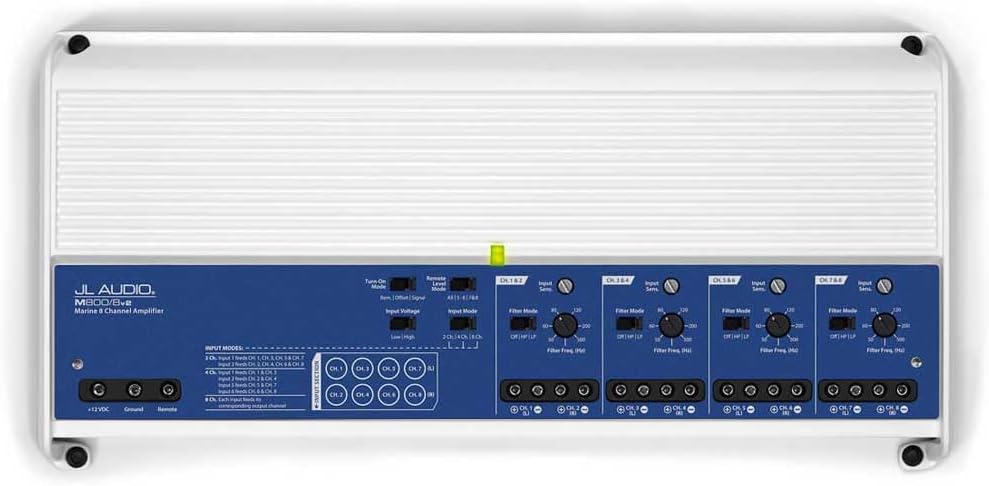
4.3-сүрөт: Amplifier control panel with various settings.

4.4-сүрөт: Детальдуу view of the control panel settings.
- Input Sens (Input Sensitivity/Gain): Бул башкарууну чыгаруу көлөмүнө дал келтирүү үчүн тууралаңызtage of your source unit. Start with the control at minimum and slowly increase until desired volume is achieved without distortion.
- Чыпкалоо режими: Select between OFF (full range), HP (High-Pass), or LP (Low-Pass) for each channel pair.
- HP (High-Pass): Allows frequencies above the set point to pass, typically used for component speakers.
- LP (Low-Pass): Allows frequencies below the set point to pass, typically used for subwoofers.
- Filter Freq (Filter Frequency): Adjust this dial to set the cutoff frequency for the selected filter mode.
- Деңгээлди алыстан башкаруу: An optional wired remote level control can be connected to the RJ45 port for convenient bass level adjustment from the listening position.
5. Иштөө нускамалары
Once properly installed, operating the M800/8 V2 amplifier is straightforward:
- Күйгүзүү/өчүрүү: The amplifier will automatically turn on when your head unit is powered on (via the remote turn-on wire) and turn off when the head unit is off.
- Аудио ойнотуу: Play audio through your head unit. Adjust the volume on your head unit and fine-tune the amplifier's gain settings for optimal sound quality without distortion.
- Индикатор жарыктары: Observe the status indicator light on the amplifier. A solid green light indicates normal operation. Refer to the troubleshooting section if the light indicates an issue.
6. Техникалык тейлөө
The JL Audio M800/8 V2 is designed for durability in marine environments, but regular maintenance can extend its lifespan:
- Тазалоо: Мезгил-мезгили менен сүртүп туруңуз ampжумшак, d менен көтөргүчтүн сырткы бөлүгүamp cloth to remove dust and salt residue. Do not use harsh chemicals or abrasive cleaners.
- Байланыштары: Annually inspect all power, ground, and speaker connections for corrosion or looseness. Clean and re-tighten as necessary.
- Вентиляция: Ensure that the cooling fins are free from obstructions to allow proper heat dissipation.
7. Кыйынчылыктарды
Эгер сиз менен көйгөйлөр пайда болсо amplifier, төмөнкү жалпы көйгөйлөрдү жана чечимдерди карагыла:
| Көйгөй | Мүмкүн себеп | Чечим |
|---|---|---|
| Кубат жок / Ampкөтөргүч күйбөйт | Күйгүзүүчү күйгүзүү, бош кубат/жер/алыскы зым, туура эмес алыстан күйгүзүү сигналы. | Check fuse near battery. Verify all power, ground, and remote connections are secure and have proper voltage. Башкы блок күйүп турганда, алыстан башкаруу зымынын 12V чыңалуусун текшериңиз. |
| Аудио чыгышы жок | Киргизүү сигналы жок, күчөтүү туура эмес жөндөлгөн, динамиктин зымдары ажыратылган, ampкоргоо режиминде көтөргүч. | Check RCA input connections. Adjust input sensitivity. Verify speaker wire connections. Check amplifier status light for protect mode indication. |
| Distorted Sound | Gain set too high, incorrect filter settings, poor ground connection, damaged speakers. | Reduce input sensitivity (gain). Adjust filter settings (HP/LP) appropriately for speakers/subwoofers. Inspect ground connection. Test speakers with another ampмүмкүн болсо, көтөргүч. |
| Ampliifier Overheating | Жетишсиз желдетүү, импеданс өтө төмөн, көпкө чейин көп көлөмдө колдонуу. | айланасында адекваттуу аба агымын камсыз кылуу amplifier. Check speaker impedance to ensure it meets amplifier specifications. Reduce volume or allow ampмуздатуу үчүн көтөргүч. |
If the problem persists after attempting these solutions, contact JL Audio customer support or a qualified service technician.
8. Техникалык шарттар
Key specifications for the JL Audio M800/8 V2 Marine Ampөмүр берүүчү:
- Модел: M800/8v2
- Каналдар: 8-канал
- RMS кубаттуулугу: 800 W RMS (Total)
- Колдонмо: Marine Audio (Component Speakers, Subwoofers)
- Өзгөчөлүктөрү: Waterproof design, Car Audio marine audio compatibility
- Киргизүү Түрү: RCA
- Чыпка түрлөрү: High-Pass (HP), Low-Pass (LP)
- Өлчөмдөрү: (Refer to product images for visual scale, specific dimensions not provided in source data)

8.1-сүрөт: Жогорку view of the JL Audio M800/8 V2 ampөмүрлүү.
9. Кепилдик жана колдоо
JL Audio products are designed and manufactured to the highest quality standards. For specific warranty information, please refer to the warranty card included with your product or visit the official JL Audio webсайт.
For technical support, troubleshooting assistance, or service inquiries, please contact JL Audio customer service through their official website or authorized dealer network. Keep your purchase receipt as proof of purchase for warranty claims.
Официалдуу Webсайт: www.jlaudio.com