Introduction
This manual provides comprehensive instructions for the setup, operation, and maintenance of your Lowell JM Oval Alarm Clock, model JA7020. Please read this manual carefully before using the product to ensure proper function and longevity.
Продукт бүттүview
The Lowell JM Oval Alarm Clock is a compact and functional device designed to display time and provide an alarm function. Its simple design makes it suitable for various settings.
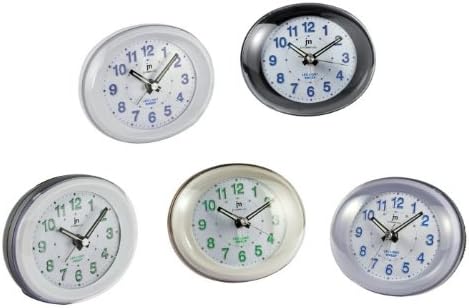
Сүрөт 1: Фронт view of the Lowell JM Oval Alarm Clock, showcasing its oval shape and analog display. The image displays multiple color variations of the clock, including white, black, silver, and cream, each with a clear face, hour, minute, and second hands, and numerical hour markers.
Пакеттин мазмуну
- Lowell JM Oval Alarm Clock (Model JA7020)
- Көрсөтмө (бул документ)
Эскертүү: Батареялар камтылган эмес жана өзүнчө сатып алынышы керек.
Жайгашуу
- Пакеттен чыгаруу: Carefully remove the alarm clock from its packaging. Retain packaging for future storage or transport if needed.
- Батарея орнотуу:
Locate the battery compartment on the back of the clock. Open the compartment cover. Insert the required batteries (typically 1x AA battery, not included) according to the polarity indicators (+/-). Close the battery compartment cover securely.
- Жайгашкан жери: Place the alarm clock on a stable, flat surface away from direct sunlight, extreme temperatures, and high humidity.
Иштөө нускамалары
Убакытты коюу
- Сааттын артындагы убакытты орнотуу баскычын табыңыз.
- Rotate the knob clockwise or counter-clockwise until the hour and minute hands display the correct current time.
Ойготкучту орнотуу
- Сааттын артындагы ойготкуч орнотуу баскычын табыңыз.
- Ойготкучтун колун каалаган ойготкуч убактысына жылдыруу үчүн ойготкуч орнотуу баскычын айлантыңыз.
- Locate the alarm ON/OFF switch (usually a small slider or button) on the back or side of the clock. Slide or press it to the "ON" position to activate the alarm.
Ойготкучту токтотуу
- When the alarm sounds, slide or press the alarm ON/OFF switch to the "OFF" position to silence it.
- To reactivate the alarm for the next day, ensure the alarm ON/OFF switch is set to the "ON" position after silencing it.
Техникалык тейлөө
- Тазалоо: Wipe the clock with a soft, dry cloth. Do not use abrasive cleaners, solvents, or chemical sprays, as these can damage the finish and internal components.
- Батареяны алмаштыруу: Replace batteries when the clock starts losing time or the alarm function weakens. Always use fresh batteries of the specified type. Remove old batteries promptly to prevent leakage.
- Сактагыч: If storing the clock for an extended period, remove the batteries to prevent leakage and potential damage.
Проблемаларды чечүү
| Көйгөй | Мүмкүн себеп | Чечим |
|---|---|---|
| Саат иштебейт / Колдор кыймылдабайт | Өлүк же туура эмес орнотулган батарейкалар. | Батареянын полярдуулугун текшериңиз. Жаңы батареялар менен алмаштырыңыз. |
| Сигнал чыкпай жатат | Alarm switch is OFF; alarm time not set correctly; weak batteries. | Ensure alarm switch is ON. Verify alarm hand is set to desired time. Replace batteries. |
| Саат убакытты жоготуу | Алсыз батарейкалар. | Жаңы батареялар менен алмаштырыңыз. |
Техникалык шарттар
- Бренд: LoWell
- Модел: JA7020
- Түрү: Аналогдук ойготкуч саат
- Өлчөмдөрү (L x W x Y): Болжол менен 22 x 3.81 x 21 см (8.66 x 1.5 x 8.27 дюйм)
- Салмагы: Болжол менен 160 г (0.35 фунт)
- Кубат булагы: Батарея (киргизилген эмес)
- Өзгөчөлүктөрү: Time display, Alarm function
Кепилдик жана колдоо
For warranty information or technical support, please refer to the retailer where the product was purchased or visit the official LoWell website. Please have your model number (JA7020) and purchase details ready when contacting support.


