Продукт бүттүview
The QSC TouchMix-8 compact digital mixer is engineered for musicians, production professionals, and live performance venues requiring the power and capabilities of a large concert mixing console in a compact, affordable, and user-friendly format. This mixer provides the functionality to meet the demands of experienced professionals while offering features and functions that assist less experienced users in achieving high-quality results. The QSC TouchMix Series represents a significant advancement in digital mixer design, redefining the user experience for both professionals and novices.
Негизги өзгөчөлүктөрү
- 12 Full Function Inputs: Includes 4 Mic, 4 Mic/Line (XLR/TRS Combo), 2 Stereo line (TRS), and USB 2-track inputs.
- Чыгуулары: Features 4 Aux (XLR), 1 Stereo (TRS), Main R/L (XLR), and Cue/Monitor (TRS) outputs.
- IEM Support: TRS Aux outs are designed to directly drive wired In Ear Monitors (IEM). The TouchMix personal monitor app requires iOS 8 or higher for remote control.
- Өркүндөтүлгөн эквалайзер: Equipped with 4-band full parametric EQ on all input channels, along with variable high-pass and low-pass filters.
- Динамикалык иштетүү: Gate and compressor functions are available on all input channels for precise audio control.
Орнотуу колдонмосу
Follow these steps to set up your QSC TouchMix-8 Digital Mixer for optimal performance.
- Пакеттен чыгаруу: Carefully remove the mixer and all accessories from the packaging. Inspect for any signs of damage.
- Кубат туташуу: Connect the provided power adapter to the mixer's power input and then to a suitable AC power outlet. Ensure the power switch is in the OFF position before connecting.
- Киргизүү байланыштары: Connect your microphones, instruments, and other audio sources to the appropriate XLR/TRS Combo or TRS line inputs on the mixer.
- Чыгуу туташуулары: Connect the Main R/L XLR outputs to your main PA system or powered speakers. Use the Aux outputs for monitor mixes or external effects.
- USB туташуу (кошумча): For multi-track recording or playback, connect a USB drive to the designated USB port.
- Баштапкы күйгүзүү: Once all connections are secure, switch the mixer ON. The display will illuminate, and the system will initialize.

1-сүрөт: Бурчтуу view of the QSC TouchMix-8 Digital Mixer, showing its compact design and primary controls.
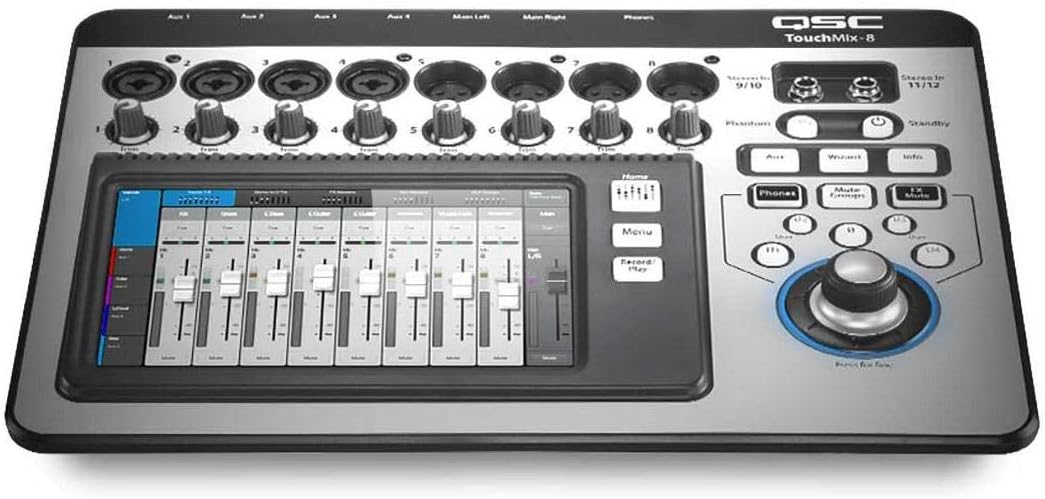
Сүрөт 2: Алдыңкы view of the QSC TouchMix-8, highlighting the touch screen interface and channel faders.
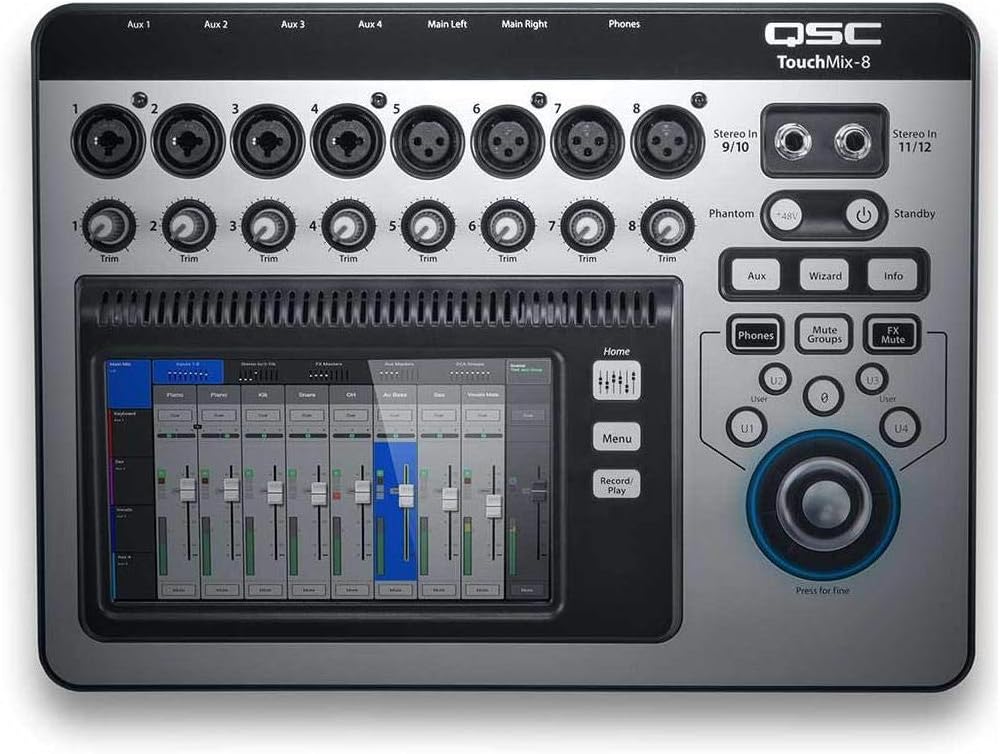
3-сүрөт: жогорудан ылдыйга view of the QSC TouchMix-8, illustrating the various input and output jacks, along with control knobs.

4-сүрөт: Арткы view of the QSC TouchMix-8, showing the USB ports and additional connectivity options.
Иштөө нускамалары
The TouchMix-8 features an intuitive touchscreen interface for controlling all mixer functions. Here are some basic operating guidelines:
- Каналды башкаруу: Select a channel on the touchscreen to access its individual settings, including gain, EQ, dynamics (gate and compressor), and auxiliary sends.
- Теңдөө (EQ): Utilize the 4-band parametric EQ on each input channel to shape the tone of your audio. Adjust frequency, gain, and Q for precise sound sculpting.
- Динамика: Apply the gate to reduce unwanted noise and the compressor to control dynamic range, ensuring a consistent and polished sound.
- Көмөкчү жөнөтүүлөр: Use the auxiliary sends to create separate monitor mixes for performers or to send signals to external effects processors.
- Эффекттери: The TouchMix-8 includes built-in effects. Navigate to the effects section on the touchscreen to select and apply reverbs, delays, and other effects to your channels or mixes.
- Жаздыруу/ойнотуу: Connect a USB storage device to record your live performance or playback pre-recorded tracks directly through the mixer.
- Алыстан башкаруу: Download the QSC TouchMix Control app for iOS devices to remotely control the mixer, providing flexibility for sound engineers and musicians on stage.
Техникалык тейлөө жана кам көрүү
Proper maintenance ensures the longevity and reliable performance of your TouchMix-8 Digital Mixer.
- Тазалоо: Use a soft, dry cloth to clean the exterior of the mixer. For the touchscreen, use a microfiber cloth specifically designed for electronic displays. Avoid abrasive cleaners or solvents.
- Сактагыч: When not in use, store the mixer in a cool, dry place, away from direct sunlight and extreme temperatures. Using a protective bag or case is recommended.
- Вентиляция: Ensure that the mixer's ventilation openings are not blocked during operation to prevent overheating.
- Кабелдик башкаруу: Organize cables neatly to prevent tripping hazards and reduce strain on connectors.
- Программалык камсыздоонун жаңыртуулары: Periodically check the QSC website for firmware updates to ensure your mixer has the latest features and bug fixes.
Проблемаларды чечүү
If you encounter issues with your TouchMix-8, refer to the following common troubleshooting tips:
| Көйгөй | Мүмкүн болгон себеп / Чечим |
|---|---|
| Аудио чыгышы жок | Check all cable connections (inputs, outputs, power). Ensure master fader and channel faders are up. Verify input sources are active. Check mute groups and individual channel mutes. |
| Touchscreen unresponsive or laggy | Ensure the screen is clean and free of debris. Try restarting the mixer. If using an iOS device for remote control, ensure a stable Wi-Fi connection. Consider updating firmware if available. |
| Бузулган аудио | Check input gain levels to prevent clipping. Reduce output levels if the PA system is overdriven. Inspect cables for damage. |
| Mixer freezes or crashes | Perform a power cycle (turn off, wait 10 seconds, turn on). Ensure the latest firmware is installed. Avoid extreme temperatures. |
For more detailed troubleshooting, please refer to the official QSC support resources.
Техникалык мүнөздөмөлөр
| Спецификация | Деталь |
|---|---|
| Элемент Салмагы | 4.3 фунт (1950 грамм) |
| Продукциянын өлчөмдөрү | 20 x 5 x 17 дюйм |
| Модель номери | QSC TOUCHMIX8 |
| Аппараттык интерфейс | USB |
| Power Source | Электр зымдары |
| Тtage | 100 вольт (AC) |
| Каналдардын саны | 8 |
| Биринчи жеткиликтүү күн | 10-апрель, 2014-жыл |
Кепилдик жана колдоо
QSC products are designed for reliability and performance. For detailed warranty information, please refer to the warranty card included with your product or visit the official QSC webсайт.
For additional support, including the full user manual in PDF format, please visit the following link:
Колдонуучунун толук нускасын жүктөп алыңыз (PDF)
Сиз да зыярат кылсаңыз болот Amazon'догу QSC дүкөнү көбүрөөк продукт маалымат жана аксессуарлар үчүн.


