1. Киришүү
The Humanscale Element Disk Task Light is an advanced lighting solution designed for optimal workspace illumination and energy efficiency. Featuring innovative Thin Film LED Technology, it provides a consistent, ultra-wide light footprint, reducing eye strain. Its sleek design and intelligent features make it an ideal addition to any modern office or home environment.
This manual provides detailed instructions for the setup, operation, maintenance, and troubleshooting of your Element Disk Task Light.
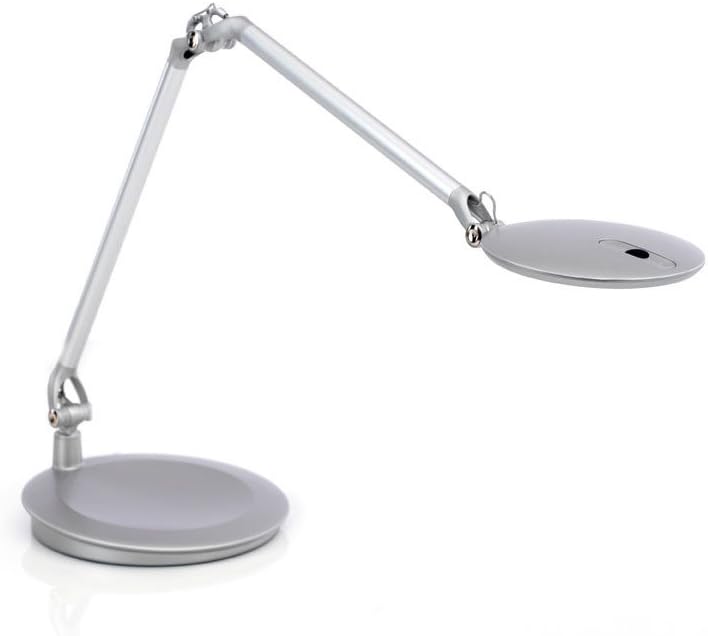
Figure 1: Humanscale Element Disk Task Light with desktop base.
2. Кутуда эмне бар
- Element Disk Task Light unit
- Иш тактасынын базасы
3. Орнотуу
The Humanscale Element Disk Task Light with Desktop Base requires minimal assembly. Follow these steps to set up your light:
- Таңылганын ачуу: Таңгактан бардык компоненттерди кылдаттык менен алып салыңыз. "Кутунун ичинде эмне бар" деген жерде көрсөтүлгөн бардык тетиктердин бар экенин текшериңиз.
- Базаны жайгаштыруу: Place the desktop base on a stable, flat surface where you intend to use the task light.
- Туташуу кубаты: Plug the power cord from the light into a standard 120V AC electrical outlet.
- Позицияны тууралоо: L ны акырындык менен тууралаңызamp arm and head to your desired position. The internal counterbalance system allows for effortless, one-touch positioning.

Figure 2: Element Disk Task Light in use on a desk.
4. Иштөө нускамалары
Күйгүзүү/өчүрүү жана Караңгылык
- Кубат баскычы: l баскычындагы кубат баскычын табыңызamp head. Press once to turn the light on or off.
- Dimmer Switch: The dimmer switch provides seven adjustable illumination levels. Press the dimmer button repeatedly to cycle through the brightness settings.
- Smart Dimming Memory: The light features smart dimming memory, which saves the last selected lighting level even after the light has been shut off.
Бош калуу сенсору
The Element Disk Task Light is equipped with a built-in PIR occupancy sensor. This sensor automatically turns the unit off when the user is not in the area and turns it back on when the user returns, promoting energy efficiency.
- The sensor detects presence within its range. If no presence is detected for a period, the light will automatically turn off.
- Upon detecting presence again, the light will automatically turn back on to the last remembered brightness setting.
Adjustability and Positioning
лamp's internal counterbalance system allows for effortless, one-touch positioning. You can easily adjust the height, angle, and reach of the light head to direct illumination precisely where needed. When not in use, the Element Disk folds into a compact nesting position for easy storage and a clean desk appearance.
Integrated Power Ports
The desktop base includes convenient power ports for charging your devices:
- Эки USB порту: Use these ports to charge smartphones, tablets, and other USB-powered devices.
- One Power Outlet (120VAC 8AMPS MAX): Provides a standard electrical outlet for powering other small electronic devices.
5. Техникалык тейлөө
To ensure the longevity and optimal performance of your Humanscale Element Disk Task Light, follow these simple maintenance guidelines:
- Тазалоо: л аарчып салуу үчүн жумшак, кургак чүпүрөктү колдонуңузampбеттери. Өжөр тактар үчүн бир азamp жумшак самын кошулган чүпүрөктү колдонсо болот, андан кийин жакшылап кургатыңыз. Абразивдүү тазалоочу каражаттардан же эриткичтерден алыс болуңуз, анткени алар каптамага зыян келтириши мүмкүн.
- LED кам көрүү: The LED light source is designed for long life and does not require replacement. Do not attempt to open the lamp башын күйгүзүңүз же светодиоддорду алмаштырыңыз.
- Кабелдик башкаруу: Ensure the power cord is not kinked or placed under heavy objects to prevent damage.
6. Кыйынчылыктарды
If you encounter any issues with your Element Disk Task Light, please refer to the following common troubleshooting steps:
| Көйгөй | Мүмкүн себеп | Чечим |
|---|---|---|
| Жарык күйбөйт. | No power, loose connection, or sensor issue. |
|
| Жарык күтүлбөгөн жерден бүлбүлдөп же өчүп калат. | Unstable power supply or sensor interference. |
|
| Dimming function is not working. | Button malfunction or internal issue. |
|
| USB or power ports are not working. | Device compatibility, power issue, or port malfunction. |
|
If these steps do not resolve the issue, please contact Humanscale Customer Support for further assistance.
7. Техникалык шарттар
| Өзгөчөлүк | Деталь |
|---|---|
| Бренд | Адамдык масштаб |
| Модел | ECEB (Element Disc) |
| Аяктоо түрү | Silver |
| Негизги материал | Алюминий |
| Продукциянын өлчөмдөрү | 28"D x 8"W x 25"H |
| Элемент Салмагы | 5.6 фунт |
| Lamp Type | Үстөл Л.amp |
| Жарык булагы түрү | LED (Thin Film LED Technology) |
| Түс температурасы | 3000 Келвин |
| Жарыктык | 315 Lumen |
| Ватtage | 7.00 Ватт |
| Тtage | 120 вольт |
| Которуу түрү | Өңүл, тийүү |
| Өзгөчөлүктөр | Energy Efficient, Dimmable, PIR Occupancy Sensor, Integrated USB & Power Ports |
| Power Source | Электр зымдары |
| Ассамблея талап кылынат | Жок |
8. Кепилдик жана колдоо
For warranty information, product support, or to purchase additional protection plans, please visit the official Humanscale webсайтка же кардарларды тейлөө бөлүмүнө кайрылыңыз. Сатып алганыңыздын далили катары сатып алуу дүмүрчөгүңүздү сактаңыз.
Humanscale Customer Support: Refer to the contact information provided with your product packaging or on the Humanscale official webсайт.
Онлайн ресурстар: www.humanscale.com


