Introduction
This manual provides comprehensive instructions for the safe and effective operation of your Flysky FS-GT2 2.4GHz 2-Channel Digital Radio Controller and FS-GR3E Receiver. This system is designed for use with RC cars and boats, offering reliable control and advanced features. Please read this manual thoroughly before use to ensure proper setup and to maximize the performance and longevity of your equipment.

Image: The Flysky FS-GT2 RC Transmitter and FS-GR3E Receiver, showcasing the complete radio system.
Коопсуздук маалыматы
- Always operate your RC vehicle in a safe and responsible manner.
- Ensure batteries are correctly installed and charged before each use.
- Do not operate the system near other radio equipment or in areas with strong electromagnetic interference.
- Keep the transmitter and receiver away from water, moisture, and extreme temperatures.
- Бул продукт 14 жаштан жогорку колдонуучулар үчүн сунушталат. Жаш колдонуучулар чоңдордун көзөмөлүндө болушу керек.
- Disconnect batteries from both transmitter and receiver when not in use.
Продукт бүттүview жана компоненттер
FS-GT2 Transmitter
The FS-GT2 is a 2-channel pistol-grip transmitter designed for intuitive control of RC vehicles. Below are the key components and their functions.

Сүрөт: алдыңкы view diagram of the FS-GT2 transmitter, labeling the Control Box, 2.4G Antenna, Steering Wheel, Throttle Trigger, and Battery Box.
- 1. Control Box: Houses internal electronics and adjustment dials.
- 2. 2.4G Antenna: Transmits the radio signal to the receiver.
- 3. Steering Wheel: Controls the steering of the RC vehicle.
- 4. Throttle Trigger: Controls the forward/reverse and braking of the RC vehicle.
- 5. Battery Box: Compartment for the transmitter's power source.

Сүрөт: Каптал жана арткы view diagram of the FS-GT2 transmitter, labeling various controls and ports.
- 6. ST REV (Steering Reverse): Reverses the steering channel direction.
- 7. POWER LED: Кубаттын абалын көрсөтөт.
- 8. ST TRIM (Steering Trim): Adjusts the neutral position of the steering.
- 9. POWER SW (Power Switch): Өткөргүчтү күйгүзөт/өчүрөт.
- A. TH REV (Throttle Reverse): Reverses the throttle channel direction.
- B. POWER CHECK: Button to check battery level.
- C. BIND: Button used for binding the transmitter to the receiver.
- D. D/R (Dual Rate): Максималдуу руль бурчун жөнгө салат.
- E. TH TRIM (Throttle Trim): Adjusts the neutral position of the throttle.
- F. CHARGER: Port for connecting a charger (if using rechargeable batteries).
- G. DSC FOR SIMULATE: Port for connecting to a simulator.
FS-GR3E Receiver
The FS-GR3E is a 3-channel receiver that pairs with the FS-GT2 transmitter, providing reliable signal reception for your RC vehicle.

Image: The Flysky FS-GR3E 3-channel receiver, showing its compact size and port layout.
The receiver features multiple ports for connecting servos (steering, throttle) and other accessories, along with a bind port for pairing with the transmitter.
Жайгашуу
1. Өткөргүчтүн батареясын орнотуу
The FS-GT2 transmitter requires 8 AA batteries (not included) for operation. Ensure you use fresh, high-quality batteries.
- Өткөргүчтүн астыңкы жагында батарея бөлүмүн табыңыз.
- Батареянын капкагын жылдырыңыз.
- Insert 8 AA batteries, paying close attention to the correct polarity (+/-) as indicated inside the compartment.
- Батареянын капкагын бекем жабыңыз.

Image: The open battery compartment of the FS-GT2 transmitter, showing where to insert the 8 AA batteries.
2. Receiver Connection
Connect the receiver to your RC vehicle's electronic speed controller (ESC) and steering servo.
- Connect the ESC's throttle cable to Channel 2 (CH2) on the receiver.
- Connect the steering servo's cable to Channel 1 (CH1) on the receiver.
- If your ESC does not provide power to the receiver, connect a separate battery pack to the B/C port (Battery/Bind) on the receiver. Ensure correct polarity.
3. Өткөргүчтү жана кабыл алгычты байланыштыруу
Байланыштыруу - бул өткөргүч менен кабыл алгычты бири-бири менен гана байланыштыруу процесси.
- Өткөргүчтүн бурулганын текшериңиз ӨЧҮРҮҮ and the receiver is connected to power (via ESC or separate battery).
- Insert the bind plug (included with the receiver) into the B/C (Battery/Bind) port on the receiver. The receiver's LED should start flashing rapidly.
- басып кармап турганда BIND button on the transmitter (located under the protective cover), turn the transmitter ON.
- The receiver's LED should turn solid, indicating a successful bind.
- Өткөргүчтөгү BIND баскычын коё бериңиз.
- Кабылдагычты да, өткөргүчтү да өчүрүңүз.
- Remove the bind plug from the receiver. Store it safely for future use.
- Turn on the transmitter first, then the receiver. The receiver's LED should be solid, confirming the connection.
Эскертүү: If the binding process fails, repeat the steps carefully. Ensure no other 2.4GHz devices are interfering during binding.
Иштөө нускамалары
Негизги операция
- Күйгүзүү: Ар дайым алгач өткөргүчтү, андан кийин кабыл алгычты күйгүзүңүз.
- Башкаруу: Rotate the steering wheel left or right to control the direction of your vehicle.
- Муунткуч: Pull the throttle trigger towards you for forward movement. Push it away from you for reverse and braking.
- Өчүрүү: Ар дайым алгач кабыл алгычты, андан кийин өткөргүчтү өчүрүңүз.
Түзөтүүлөр
- ST TRIM (Steering Trim): Use this dial to fine-tune the steering neutral position. If your vehicle pulls to one side when the steering wheel is centered, adjust the ST TRIM until it drives straight.
- TH TRIM (Throttle Trim): Adjust this dial to set the throttle neutral position. If your vehicle creeps forward or backward when the throttle trigger is released, adjust the TH TRIM until it remains stationary.
- ST REV (Steering Reverse): This switch reverses the direction of the steering channel. If your vehicle steers right when you turn the wheel left, flip this switch.
- TH REV (Throttle Reverse): This switch reverses the direction of the throttle channel. If your vehicle goes reverse when you pull the trigger for forward, flip this switch.
- D/R (Кош ставка): This dial adjusts the maximum steering angle. Turning it down will reduce the sensitivity and maximum turning radius, which can be useful for beginners or for driving in tight spaces. Turning it up increases the steering throw.
Техникалык тейлөө
- Тазалоо: Өткөргүчтү жана кабыл алгычты тазалоо үчүн жумшак, кургак чүпүрөктү колдонуңуз. Эриткичтерди же катуу химиялык заттарды колдонуудан алыс болуңуз.
- Сактагыч: Системаны салкын, кургак жерде, күндүн түз нурунан жана өтө жогорку температурадан алыс сактаңыз. Узак убакытка сактасаңыз, өткөргүчтөн батареяларды алып салыңыз.
- Батареяга кам көрүү: Replace AA batteries in the transmitter when the low voltage warning activates (under 9V). If using rechargeable batteries, ensure they are charged with a compatible charger connected to the transmitter's charge port.
- Антеннага кам көрүү: Do not bend or excessively stress the transmitter's antenna. Ensure the receiver's antenna is properly routed and protected within the vehicle.
Проблемаларды чечүү
| Көйгөй | Мүмкүн себеп | Чечим |
|---|---|---|
| Өткөргүчкө кубат жок | Өлүк же туура эмес орнотулган батарейкалар | Батареянын полярдуулугун текшериңиз; жаңы AA батарейкалары менен алмаштырыңыз. |
| No control of vehicle | Not bound; receiver not powered; loose connections | Perform binding procedure; check receiver power supply; ensure all cables are securely connected. |
| Vehicle steers in wrong direction | Steering channel reversed | Flip the ST REV switch on the transmitter. |
| Vehicle moves in wrong direction (throttle) | Throttle channel reversed | Flip the TH REV switch on the transmitter. |
| Vehicle drifts or doesn't stop at neutral | Trim settings incorrect | Adjust ST TRIM or TH TRIM dials until the vehicle remains straight/stationary. |
| Short range or intermittent signal | Low transmitter battery; interference; damaged antenna | Replace transmitter batteries; avoid operating near other radio sources; check transmitter and receiver antennas for damage. |
Техникалык шарттар
FS-GT2 Transmitter Specifications
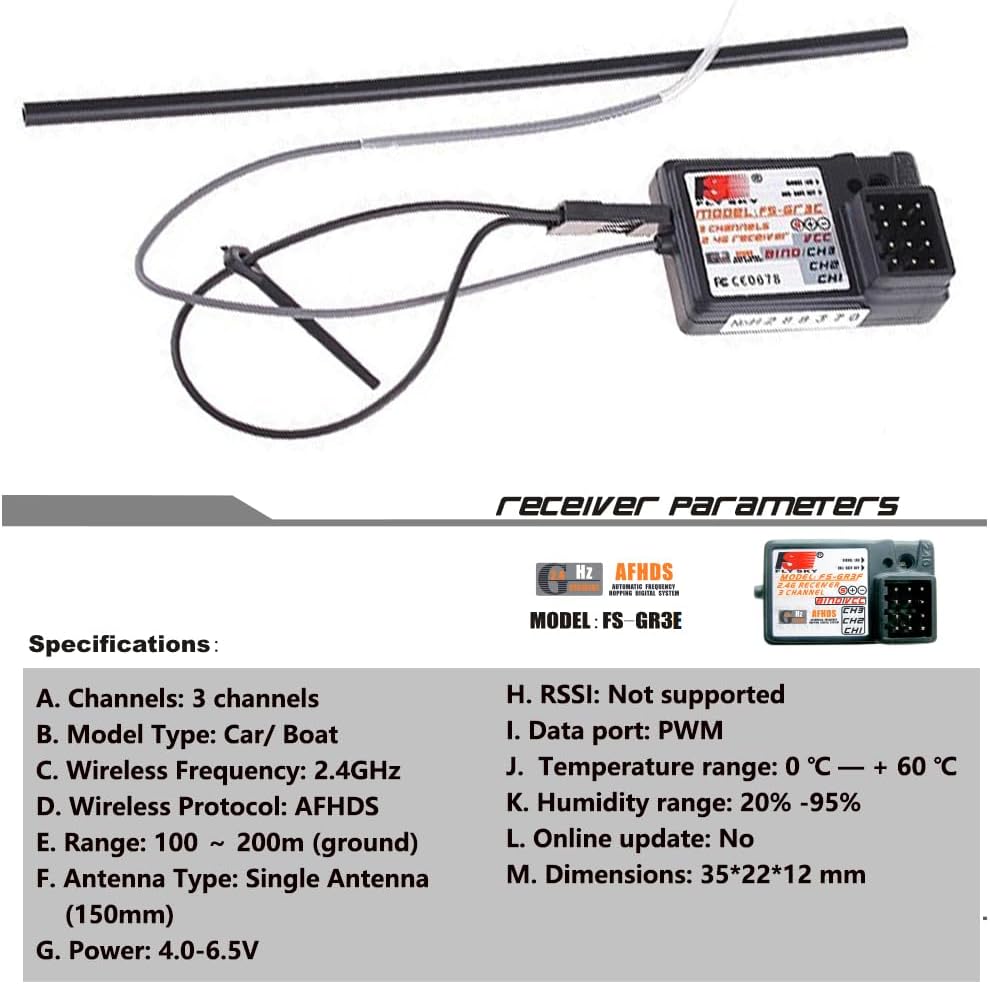
Image: Diagram detailing the technical specifications of the Flysky FS-GT2 transmitter.
| Өзгөчөлүк | Деталь |
|---|---|
| Каналдар | 2 канал |
| Модель түрү | Машина / Кайык |
| RF күчү | Less than 20dbm |
| Модуляция | GFSK |
| Code Type | Санарип |
| Сезимталдуулук | 1024 |
| Low Voltage Эскертүү | Yes (under 9V) |
| DSC порту | 3.5мм |
| Кубаттагыч порт | Ооба |
| Күч | 12V DC (8 AA batteries) |
| Салмагы | 328г |
| Антеннанын узундугу | 26мм |
| Өлчөмдөрү (L x W x Y) | 159мм x 99мм x 315мм |
| Түс | Кара + Кызгылт сары |
| Сертификат | CE FCC |
FS-GR3E Receiver Specifications

Image: Diagram detailing the technical specifications of the Flysky FS-GR3E receiver.
| Өзгөчөлүк | Деталь |
|---|---|
| Каналдар | 3 канал |
| Модель түрү | Машина / Кайык |
| Зымсыз жыштык | 2.4 ГГц |
| Wireless протоколу | AFHDS |
| Диапазон | 100 ~ 200m (ground) |
| Антенна түрү | Single Antenna (150mm) |
| Күч | 4.0-6.5V |
| RSSI | Колдоого алынбайт |
| Маалымат порту | PWM |
| Температура диапазону | 0°C ~ +60°C |
| нымдуулук колому | 20% - 95% |
| Онлайн жаңыртуу | Жок |
| Өлчөмдөр | 35мм x 22мм x 12мм |
Кепилдик жана колдоо
For warranty information and technical support, please refer to the official Flysky webсайтка кайрылыңыз же жергиликтүү дистрибьютериңиз менен байланышыңыз. Сатып алуу квитанциясын кепилдик дооматтары үчүн сатып алуунун далили катары сактаңыз.
Кошумча жардам же суроо үчүн, дарегине кайрылыңыз Flysky Store on Amazon.