Introduction
This user manual provides comprehensive instructions for the operation and maintenance of your NEC Air Conditioner Remote Control, model NER-Z28A(K). Please read this manual thoroughly before using the remote control to ensure proper function and longevity of the device. Keep this manual for future reference.
Коопсуздук маалыматы
- Пультту түз күн нуруна, жогорку температурага же жогорку нымдуулукка дуушар кылбаңыз.
- Алыстан башкаруу пультун түшүрүп алуудан же катуу соккуга кабылтуудан алыс болуңуз.
- Do not attempt to disassemble or modify the remote control. This may cause malfunction and void the warranty.
- Батареяларды балдар жетпеген жерде сактаңыз. Эгер жутуп алса, дароо медициналык жардамга кайрылыңыз.
- Колдонулган батарейкаларды жергиликтүү эрежелерге ылайык жок кылыңыз.
Бөлүктөрдү аныктоо
Familiarize yourself with the various parts and buttons of your remote control.
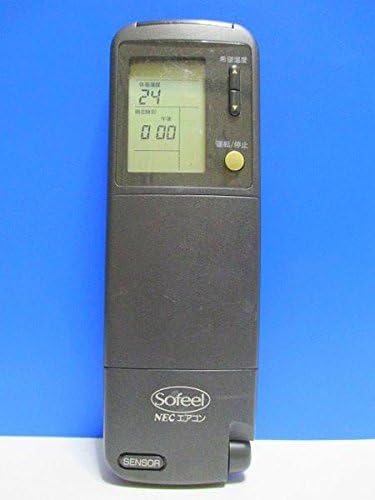
Сүрөт 1: Алдыңкы View
This image displays the front of the remote control, featuring the LCD screen at the top which shows temperature and time, and a yellow power button below it. The brand "Sofeel NEC エアコン" is visible at the bottom.

Figure 2: Hidden Buttons
This image shows the remote control with its lower cover slid open, exposing a panel of additional buttons. These buttons control functions such as automatic operation, heating, cooling, dry mode, fan speed adjustment (strong, medium, weak), and various timer settings (on-timer, off-timer, combination timer, sleep timer).

3-сүрөт: Артка View
The back of the remote control is shown, highlighting the battery compartment cover. Text on the back provides instructions regarding battery installation, replacement, and the location of the ACL button for resetting the remote after battery changes.
Баскыч функциялары:
- Power Button (Yellow): Turns the air conditioner ON/OFF.
- Температураны жөндөө баскычтары: Каалаган температураны тууралайт.
- Mode Selection (under cover): Selects operation modes (Auto, Heat, Cool, Dry).
- Fan Speed (under cover): Adjusts fan speed (Auto, Strong, Medium, Weak).
- Timer Buttons (under cover): Sets On/Off timers, Combination timer, and Sleep timer.
- Clock/Time Adjustment (under cover): Sets the current time and timer settings.
- Sleep Mode (under cover): Activates sleep operation.
- System Button (under cover): For system-specific functions.
Жайгашуу
Батарея орнотуу:
- Slide open the battery compartment cover on the back of the remote control (refer to Figure 3).
- Бөлүмдүн ичинде көрсөтүлгөндөй, туура полярдуулукту (+/-) камсыз кылып, эки AAA щелочтуу батарейканы салыңыз.
- Батарея уясынын капкагын бекем жабыңыз.
- After installing new batteries, press the ACL button (usually a small recessed button requiring a pointed object like a pen tip) to reset the remote control. This ensures proper function.
Иштөө нускамалары
Негизги операция:
- Күйгүзүү/өчүрүү: Point the remote control towards the air conditioner unit and press the yellow Power button.
- Температураны жөндөө: Use the temperature adjustment buttons (usually up/down arrows) to set your desired temperature. The current setting will be displayed on the LCD screen.
Advanced Functions (under cover):
Slide down the front cover to access additional function buttons.
- Режим тандоо: Press the "冷暖切換" (Cool/Heat Switch) button or individual mode buttons (自動運転 - Auto, 暖房 - Heating, ドライ - Dry, 冷房 - Cooling) to select the desired operating mode.
- Желдетүүчү ылдамдыкты жөндөө: Press the "風速切換" (Fan Speed Switch) button to cycle through fan speeds (自動 - Auto, 強 - Strong, 中 - Medium, 弱 - Weak).
- Таймердин жөндөөлөрү:
- 入時刻 (On-Timer): Sets the time for the air conditioner to turn on.
- 切時刻 (Off-Timer): Sets the time for the air conditioner to turn off.
- 組合せ (Combination Timer): Combines On and Off timers.
- スリープタイマー (Sleep Timer): Activates sleep mode, which adjusts temperature gradually for comfortable sleep.
- Саатты тууралоо: Use the "時計" (Clock) and "時刻調整" (Time Adjustment) buttons to set the current time on the remote's display.
Техникалык тейлөө
Батареяны алмаштыруу:
Replace batteries when the display becomes dim or the remote control's range decreases. Always replace both batteries at the same time with new ones of the same type (AAA alkaline).
- Батарея уясынын капкагын ачыңыз.
- Эски батарейкаларды алып салыңыз.
- Insert new AAA alkaline batteries, observing correct polarity.
- Капкакты жабыңыз.
- Press the ACL button to reset the remote control.
Тазалоо:
Пультту жумшак, кургак чүпүрөк менен сүртүңүз. Суюк тазалагычтарды же абразивдүү материалдарды колдонбоңуз.
Проблемаларды чечүү
| Көйгөй | Мүмкүн себеп | Чечим |
|---|---|---|
| Алыстан башкаруу пульту кондиционерди иштетпейт. | Batteries are dead or inserted incorrectly. Obstruction between remote and AC unit. Remote control is out of range. | Replace batteries, ensuring correct polarity. Remove any obstructions. Move closer to the air conditioner unit. |
| ЖК дисплей күңүрт же бош. | Батареянын кубаттуулугу төмөн. | Эки батарейканы жаңысына алмаштырыңыз. |
| Remote control functions are erratic after battery replacement. | Remote control needs to be reset. | Press the ACL button on the back of the remote control. |
Техникалык шарттар
- Бренд: NEC
- Модел: NER-Z28A(K)
- Байланыш технологиясы: Инфракызыл
- Контроллердин түрү: Control Button
- Батарея түрү: AAA щелочтуу (кошулбайт)
- Продукт Салмагы: Болжол менен 100 г
Кепилдик жана колдоо
For warranty information or technical support, please refer to the documentation provided with your air conditioner unit or contact NEC customer service directly. Keep your purchase receipt as proof of purchase.
Эскертүү: This remote control is designed specifically for compatible NEC air conditioner models. Compatibility with other brands or models is not guaranteed.


