1. Киришүү
Thank you for choosing the Mastech MS2115B True RMS Digital Clamp Meter. This instrument is designed for safe and accurate measurement of various electrical parameters. This manual provides essential information for the proper and safe operation, maintenance, and troubleshooting of your device. Please read this manual thoroughly before use and retain it for future reference.
2. Коопсуздук маалыматы
Эсептегичтин коопсуз иштешин жана тейлөөсүн камсыз кылуу үчүн төмөнкү коопсуздук чараларын аткарыңыз:
- Ар дайым жергиликтүү жана улуттук коопсуздук эрежелерин сактаңыз.
- Эгерде ал бузулуп калса же сыноо өткөргүчтөрүнүн изоляциясы бузулса, эсептегичти колдонбоңуз.
- Эч качан баалангандан ашык колдонбоңузtage, эсептегичте белгиленгендей, терминалдардын ортосунда же каалаган терминал менен жердин ортосунда.
- Том менен иштөөдө өтө этият болуңузtages above 60V DC or 30V AC RMS. These voltagшок коркунучун жаратат.
- Keep your fingers behind the probe barriers when making measurements.
- Disconnect the test leads from the circuit before changing functions.
- Батареянын капкагын ачардан мурун эсептегичтен сыноо өткөргүчтөрүн алып салыңыз.
- Туура эмес көрсөткүчтөрдү болтурбоо үчүн, батареянын заряды аз экенин көрсөткөн индикатор пайда болору менен батареяны алмаштырыңыз.
- Эсептегичти жарылуучу газ, буу же чаңдуу чөйрөдө иштетпеңиз.
- cl камсыз кылууamp jaw is fully closed when taking current measurements.
3. Продукт бүтүп калдыview
The Mastech MS2115B is a True RMS digital clamp meter designed for professional and home use. It offers a wide range of measurement capabilities and features for electrical testing.
3.1 Негизги өзгөчөлүктөрү
- Dual Display with 6000 counts for clear readings.
- Jaw size up to Ø40mm (1.6 inch) for various conductor sizes.
- Auto Ranging and Manual Ranging capabilities.
- DC/AC current measurement up to 1000A.
- Tests AC/DC voltage and current, resistance, capacitance, frequency, and duty cycle.
- True RMS (Root Mean Square) measurement for accurate readings on non-sinusoidal waveforms.
- NCV (контактсыз томtage Detector) for identifying live wires without direct contact.
- Inrush current measurement for motor startup analysis.
- Data Hold, MAX/MIN Value Measurement, and Relative Measurement functions.
- Diode test and Continuity Buzzer (<50 ohm).
- Display Backlight and Work Light for use in dimly lit areas.
- Low Battery Display and Auto Power Off for extended battery life.
- USB interface for data communication with Windows OS.
3.2 Компоненттер
Familiarize yourself with the main components of the MS2115B clamp метр:


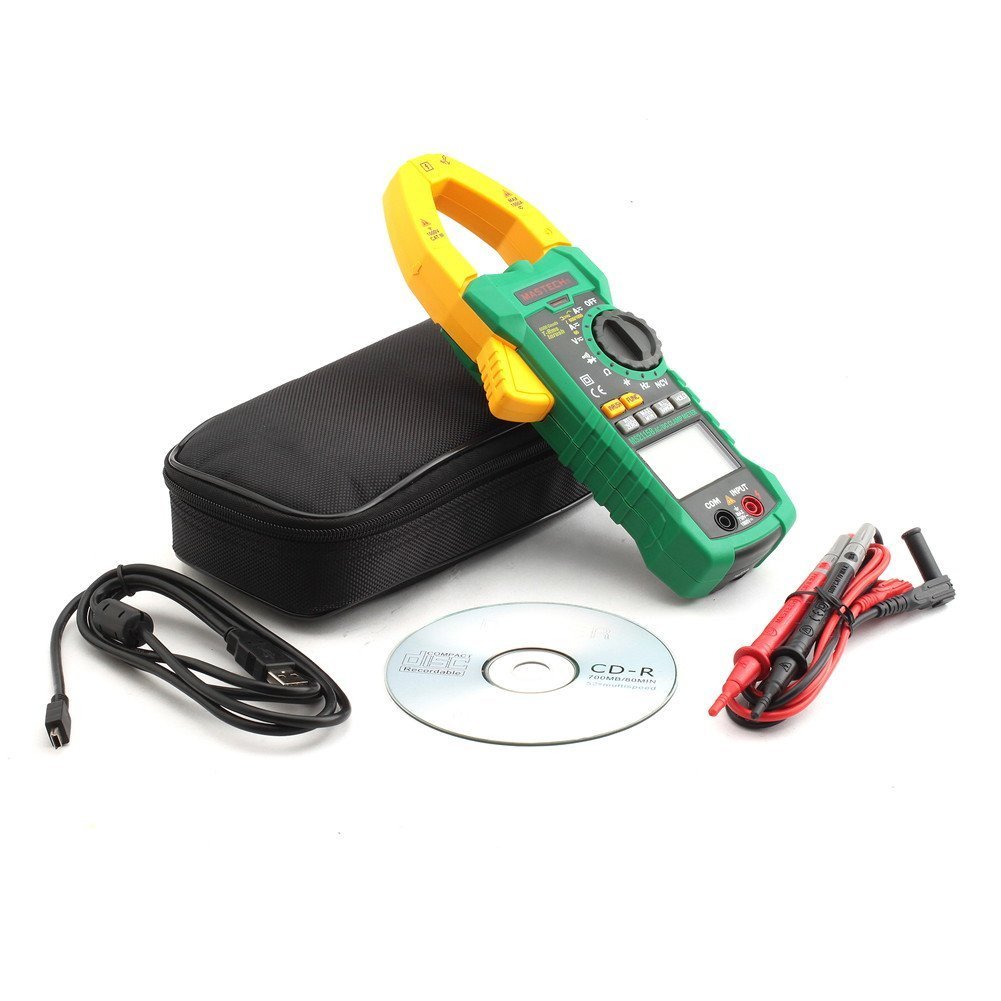
4. Орнотуу
4.1 Батареяны орнотуу
The Mastech MS2115B requires batteries for operation. Please note that batteries are not included in the package.
- Ensure the meter is turned OFF and disconnect all test leads.
- Батарея уясынын капкагын эсептегичтин арткы жагында табыңыз.
- Батареянын капкагын бекиткен буроону бошотуш үчүн бурагычты колдонуңуз.
- Батарейканын капкагын кылдаттык менен алып салыңыз.
- Керектүү батареяларды туура полярдуулукту (+ жана -) сактап, салыңыз.
- Батареянын капкагын ордуна коюп, аны бурама менен бекитиңиз.

4.2 Сыноо өткөргүчтөрүн туташтыруу
Том үчүнtage, каршылыкты, сыйымдуулукту, жыштыкты, диодду жана үзгүлтүксүздүктү өлчөө, сыноо өткөргүчтөрүн туташтыруу:
- Insert the red test lead into the "INPUT" terminal.
- Insert the black test lead into the "COM" (common) terminal.
4.3 USB Interface Setup (for Windows OS)
The MS2115B features a USB interface for data logging and analysis on a computer running Windows OS.
- Install the provided communication software from the included CD onto your Windows computer.
- Connect the USB communication cable to the meter's USB port and to an available USB port on your computer.
- Follow the software instructions to establish communication and begin data transfer.
5. Иштөө нускамалары
5.1 Power On/Off and Auto Power Off
- To power on, rotate the rotary switch from "OFF" to any desired measurement function.
- To power off, rotate the rotary switch back to "OFF".
- The meter features an Auto Power Off function to conserve battery life. It will automatically turn off after approximately 15 minutes of inactivity. To disable this feature temporarily, refer to the full user manual for specific button combinations during power-on.
5.2 Функция баскычтары
- FUNC: Selects between different measurement modes within a single rotary switch position (e.g., AC/DC voltage, Диод/Үзгүлтүксүздүк).
- RANGE: Toggles between auto-ranging and manual ranging. In manual ranging, press repeatedly to cycle through ranges.
- КОЛДО: Учурдагы дисплейдеги окууну токтотот. Чыгаруу үчүн кайра басыңыз.
- МАКС/МИН: Displays the maximum or minimum reading recorded since activation. Press repeatedly to cycle through MAX, MIN, and current readings.
- REL/NOL: Activates relative measurement mode, displaying the difference between the current reading and a stored reference value. Also used for zeroing DC current readings.
- INRUSH: Measures the inrush current (startup current) of motors or other inductive loads.
- Backlight/Work Light: Activates the display backlight and work light for improved visibility.
5.3 Өлчөө процедуралары
5.3.1 DC/AC Voltage Өлчөө
- Connect the red test lead to the "INPUT" terminal and the black test lead to the "COM" terminal.
- Rotate the rotary switch to the V (Томtage) position. Press FUNC to select between DC V= же AC V~.
- Touch the test probes to the desired test points in the circuit.
- Томду окуңузtage мааниси дисплейде.
5.3.2 DC/AC Current Measurement (Clamp)
- Rotate the rotary switch to the A (Current) position. Press FUNC to select between DC A= же AC A~.
- cl ачыңызamp jaw and enclose only one conductor of the circuit. Ensure the jaw is fully closed.
- For DC current, press REL/ZERO to zero the display before measurement if needed.
- Дисплейдеги учурдагы маанини окуңуз.
5.3.3 Каршылыкты өлчөө
- Тест өткөргүчтөрүн көлөм боюнча туташтырыңызtage.
- Rotate the rotary switch to the Ω (каршылык көрсөтүү) абалы.
- Текшерилип жаткан чынжырдын токсуз экенин текшериңиз.
- Touch the test probes across the component or circuit to measure resistance.
- Дисплейдеги каршылык маанисин окуп чыгыңыз.
5.3.4 Сыйымдуулукту өлчөө
- Тест өткөргүчтөрүн көлөм боюнча туташтырыңызtage.
- Rotate the rotary switch to the CAP (сыйымдуулук) абалы.
- Өлчөөнүн алдында конденсатордун толук зарядсыздангандыгын текшериңиз.
- Конденсатордун терминалдарынан тестирлөөчү зонддорго тийиңиз.
- Дисплейдеги сыйымдуулуктун маанисин окуңуз.
5.3.5 Жыштык жана кызматтык циклди өлчөө
- Тест өткөргүчтөрүн көлөм боюнча туташтырыңызtage.
- Rotate the rotary switch to the Гц /% (Жыштык/кызматтык цикл) абалы.
- Басыңыз FUNC to toggle between Frequency (Hz) and Duty Cycle (%).
- Сыноо зонддорун сигнал булагына тийгизиңиз.
- Read the frequency or duty cycle value on the display.
5.3.6 Диодду сыноо жана үзгүлтүксүздүк
- Тест өткөргүчтөрүн көлөм боюнча туташтырыңызtage.
- Rotate the rotary switch to the Диод/Үзгүлтүксүздүк позиция.
- Басыңыз FUNC to select between Diode test or Continuity test.
- For Diode Test: Touch the red probe to the anode and the black probe to the cathode. The display shows the forward voltagд тамчы. Ачык чынжырды текшерүү үчүн зонддорду артка буруңуз.
- For Continuity Test: Touch the probes to the circuit. A continuous beep indicates continuity (resistance less than 50 ohms).
5.3.7 NCV (контактсыз томtagд) аныктоо
- Rotate the rotary switch to the NCV позиция.
- Клдин жогору жагын жылдырыңызamp meter near a conductor or outlet.
- The meter will emit an audible beep and the NCV indicator will light up if AC voltagе аныкталат.
5.3.8 Кирип келүүчү токту өлчөө
- Rotate the rotary switch to the A~ (Өзгөрмө ток) абалы.
- басыңыз INRUSH баскычы.
- cl ачыңызamp jaw and enclose only one conductor of the circuit where the inrush current is to be measured.
- Turn on the device or motor. The meter will capture and display the peak inrush current.
6. Техникалык тейлөө
6.1 Тазалоо
- Мезгил-мезгили менен ишти жарнама менен сүртүп туруңузamp кездеме жана жумшак жуугуч. Абразивдерди же эриткичтерди колдонбоңуз.
- Keep the input terminals free of dirt and moisture.
6.2 Батареяны алмаштыруу
When the low battery indicator appears on the display, replace the batteries immediately to ensure accurate readings. Refer to Section 4.1 for battery installation instructions.
6.3 Сактоо
- If the meter is not used for an extended period, remove the batteries to prevent leakage and damage.
- Эсептегичти салкын, кургак жерде, күндүн түз нурунан жана өтө жогорку температурадан алыс сактаңыз.
7. Кыйынчылыктарды
If you encounter issues with your Mastech MS2115B, refer to the following common troubleshooting steps:
| Көйгөй | Мүмкүн себеп | Чечим |
|---|---|---|
| Эсептегич күйбөйт. | Өлүк же туура эмес орнотулган батарейкалар. | Батареянын полярдуулугун текшерүү; батареяларды алмаштыруу. |
| Көрсөтүлгөн көрсөткүчтөр же "OL" көрсөткүчү жок. | Open circuit, out of range, or incorrect function selected. | Check circuit connections, select appropriate range/function, ensure continuity. |
| Туура эмес окуулар. | Low battery, dirty test leads/terminals, external interference. | Replace batteries, clean leads/terminals, move away from strong electromagnetic fields. |
| Auto Power Off activates too quickly. | Normal operation (15 min inactivity). | Press any button or rotate the switch to reset the timer. Refer to the full manual to disable this feature if needed. |
| Clamp current reading is zero or incorrect. | Multiple conductors in jaw, jaw not fully closed, DC current not zeroed. | Ensure only one conductor is in the jaw, close jaw completely, press REL/ZERO for DC current. |
If the problem persists after trying these steps, please contact Mastech customer support or your local distributor for assistance.
8. Техникалык шарттар
The following table outlines the technical specifications for the Mastech MS2115B Digital Clamp Метр:
| Өлчөө функциясы | Диапазон | Тактык |
|---|---|---|
| DC Voltage | 600 мВ / 6 В / 60 В / 600 В / 1000 В | ±(0.5% + 3) for 600mV-600V, ±(0.8% + 2) for 1000V |
| AC Voltage | 600 мВ / 6 В / 60 В / 600 В / 750 В | ±(0.8% + 3) for 600mV-600V, ±(1% + 4) for 750V |
| Туруктуу ток | 60A / 600A / 1000A | ± (3.0% + 3) |
| AC тогу | 60A / 600A / 1000A | ± (2.5% + 3) |
| Каршылык | 600Ω / 6kΩ / 60kΩ / 600kΩ / 6MΩ / 60MΩ | ±(1.0% + 3) for 600Ω-6MΩ, ±(1.5% + 3) for 60MΩ |
| Сыйымдуулук | 6nF / 60nF / 600nF / 6uF / 60uF / 600uF / 6mF / 60mF | ± (4.0% + 3) |
| Frequency (from Clamp) | 0 ~ 10кГц | ± (1.5% + 5) |
| Frequency (AC Voltage) | 0 ~ 10кГц | ± (1.5% + 5) |
| Логикалык жыштык | 0 ~ 60 МГц | ± (0.5% + 3) |
| Милдеттик цикл | 10% ~ 90% | ±3.0% |
| Диод сыноо | 2.7V | Алга томtagд тамчы |
| Үзгүлтүксүз На | <50 Ом | Укулган сигнал |
Жалпы мүнөздөмөлөрү:
- Дисплей: Dual Display, 6000 counts
- Жаак ачуу: Ø40мм (1.6 дюйм)
- Чыныгы RMS: Ооба
- NCV: Ооба
- Катуу: Ооба
- Дайындарды кармоо: Ооба
- МАКС/МИН: Ооба
- Салыштырмалуу өлчөө: Ооба
- Backlight/Work Light: Ооба
- Батареянын төмөн көрсөткүчү: Ооба
- Авто өчүрүү: Ооба
- USB интерфейси: Yes (Windows OS compatible)
- Кубат булагы: Батарея менен иштейт (Батареялар камтылган эмес)
- Өлчөмдөрү: Болжол менен 26 x 14 x 6.6 см
- Салмагы: Болжол менен 720 г
- Өндүрүүчү: МАСТЕХ
- Модель номери: MS2115B
- ASIN: B00LD8IIJS
- UPC: 702382755386, 702382755881, 706551142168
9. Кепилдик жана колдоо
For warranty information, please refer to the documentation provided with your purchase or contact the seller directly. Mastech products typically come with a manufacturer's warranty against defects in materials and workmanship.
For technical support, troubleshooting assistance beyond this manual, or inquiries about replacement parts, please contact Mastech customer service or your authorized Mastech distributor. Contact details can usually be found on the manufacturer's official webсайтында же сатып алуу боюнча эсеп-фактураңызда.


