1. Киришүү
The Mastech MS2115A is a professional-grade digital clamp meter designed for accurate measurement of DC/AC current, DC/AC voltage, resistance, capacitance, frequency, and duty cycle. It features True RMS for AC measurements, a built-in Non-Contact Voltage (NCV) detector, diode check, continuity test, and a reading hold function. This manual provides essential information for safe and effective operation of your MS2115A clamp метр.
2. Коопсуздук маалыматы
Please read and understand all safety information before operating this device. Failure to follow these instructions may result in electric shock, fire, or damage to the meter.
- Өлчөөлөрдү жүргүзүүдөн мурун, эсептегичтин туура иштөө режиминде экенине ар дайым ынаныңыз.
- Колдонбоңуз томtage or current that exceeds the maximum rated limits of the meter.
- Токтогуч чынжырлар менен иштөөдө өтө этият болуңуз. Жогорку вольтtagалар өлүмгө алып келиши мүмкүн.
- Ар бир колдонуудан мурун сыноо өткөргүчтөрүн текшериңиз. Эгерде изоляция бузулса, колдонбоңуз.
- Эгерде эсептегич бузулуп калса же корпусу ачык болсо иштетпеңиз.
- Батарея аз индикатор пайда болгондо, батарейкаларды дароо алмаштырыңыз.
- Жергиликтүү жана улуттук коопсуздук эрежелерин сактаңыз.
3. Продукциянын өзгөчөлүктөрү
The Mastech MS2115A clamp meter offers a range of advanced features for electrical testing:
- LCD with 5999 counts for precise readings.
- Jaw size up to ϕ40mm (1.6 inches) for large conductors.
- DC/AC current measurement up to 1000A.
- Tests AC/DC voltage, current, resistance, capacitance, frequency, and duty cycle.
- In-Contact Voltage (NCV) detector for live wire detection without physical contact.
- True RMS for accurate AC voltage and AC current measurements of non-sinusoidal waveforms.
- Work light for illumination in dimly lit areas.
- Auto power off function to conserve battery life.
- Diode check and continuity test with audible buzzer.
- Reading hold function to freeze the displayed measurement.
4. Продукт бүтүп калдыview
Familiarize yourself with the components of your Mastech MS2115A clamp метр.

Сүрөт 4.1: Алдыңкы View of Mastech MS2115A Clamp Метр. This image displays the front of the Mastech MS2115A Digital Clamp Meter, highlighting its large LCD screen, rotary dial for function selection, clamp jaw, and input terminals. Key buttons such as RANGE, HZ%, MAX/MIN, REL, and HOLD are visible, along with the Mastech branding.
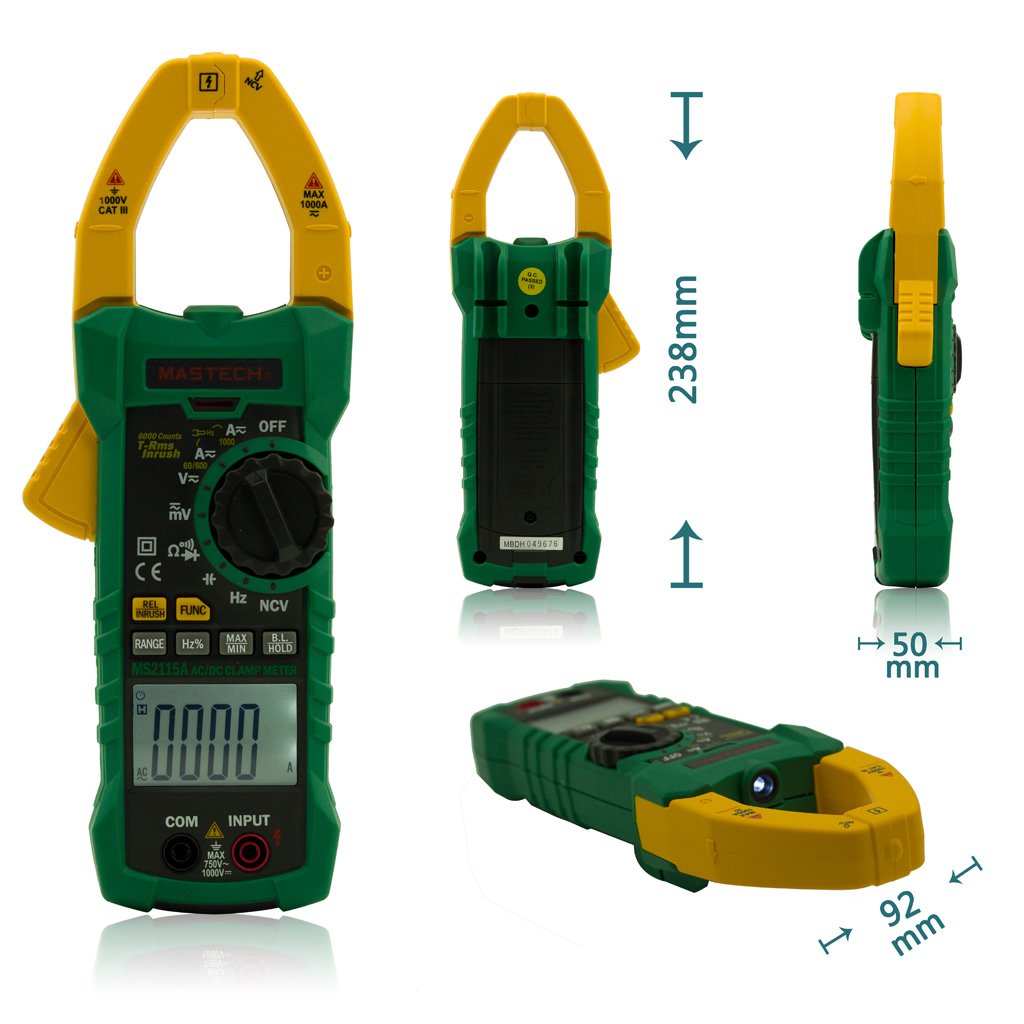
Figure 4.2: Mastech MS2115A Clamp Метр өлчөмдөрү. Бул сүрөт бир нече нерсени сунуштайт views of the Mastech MS2115A, including front, back, side, and bottom angles, with measurements indicating its approximate height (238mm), width (92mm), and thickness (50mm). This helps users understand the physical size and form factor of the device.

Figure 4.3: Mastech MS2115A Clamp Meter Package Contents. This image shows the complete contents included with the Mastech MS2115A clamp meter. It features the clamp meter itself, a pair of red and black test leads, a carrying case, and a user manual. Please note that the 9V battery is typically not included and must be purchased separately.
5. Орнотуу
5.1 Батареяны орнотуу
The Mastech MS2115A requires a 9V battery for operation. Please note that the battery is typically not included in the package and must be purchased separately.
- Эсептегич өчүрүлгөнүн текшериңиз.
- Батарея уясынын капкагын эсептегичтин арткы жагында табыңыз.
- Батареянын капкагын бекиткен бурагычты(ларды) бошотуш үчүн бурагычты колдонуңуз.
- Батареянын капкагын алып салыңыз.
- Connect a new 9V battery to the battery clips, observing correct polarity.
- Батареяны бөлүмгө салыңыз.
- Батареянын капкагын ордуна коюңуз жана аны бурама(лар) менен бекитиңиз.
6. Иштөө нускамалары
6.1 Күйгүзүү/өчүрүү
To power on the meter, rotate the function dial from the OFF position to any desired measurement function. To power off, rotate the dial back to the OFF position. The meter features an auto power-off function to conserve battery life after a period of inactivity.
6.2 Функцияны тандоо
Use the central rotary dial to select the desired measurement function (e.g., V∼, V−, A∼, A−, Ω, Diode/Continuity, CAP, Hz%). Some positions may have multiple functions; press the FUNC баскычын басыңыз.
6.3 Өзгөрмө/Туруктуу токту өлчөө (Cl)amp Жаак)
- Rotate the dial to the A∼ (AC Current) or A− (DC Current) position.
- cl ачуу үчүн жаак триггерди басыңызamp жаак.
- Encircle only one conductor with the clamp жаак. Жаактын толугу менен жабык экенин текшериңиз.
- Read the current value on the LCD. For DC current, observe the polarity indicator.
6.4 Өлчөө AC/DC Voltage
- Кызыл тестирлөө чубалгысына киргизиңиз INPUT terminal and the black test lead into the COM терминал.
- Rotate the dial to the V∼ (AC Voltage) or V− (DC Voltagд) кызмат орду.
- Сыноо өткөргүчтөрүн текшерилип жаткан схемага же компонентке параллелдүү туташтырыңыз.
- Томду окуңузtage value on the LCD. For DC voltage, observe the polarity indicator.
6.5 Каршылык көрсөтүүнү өлчөө (Ω)
- Кызыл тестирлөө чубалгысына киргизиңиз INPUT terminal and the black test lead into the COM терминал.
- Rotate the dial to the Ω (Resistance) position.
- Ensure the circuit or component is de-energized before connecting the test leads.
- Компоненттин каршылыгын өлчөө үчүн сыноо зымдарын туташтырыңыз.
- LCD дисплейдеги каршылыктын маанисин окуңуз.
6.6 Measuring Capacitance (CAP)
- Кызыл тестирлөө чубалгысына киргизиңиз INPUT terminal and the black test lead into the COM терминал.
- Rotate the dial to the CAP (Capacitance) position.
- Сыноочу зымдарды туташтыруудан мурун, конденсатордун толук разряддалганын текшериңиз.
- Конденсатор аркылуу сыноо өткөргүчтөрүн туташтырыңыз.
- ЖКдагы сыйымдуулуктун маанисин окуңуз.
6.7 Diode Check and Continuity Test
- Кызыл тестирлөө чубалгысына киргизиңиз INPUT terminal and the black test lead into the COM терминал.
- Rotate the dial to the Diode/Continuity position. Press FUNC to switch between diode and continuity modes if necessary.
- For Diode Check: Connect the red lead to the anode and the black lead to the cathode of the diode. The forward voltage тамчы көрсөтүлөт. Ачык чынжырды текшерүү үчүн өткөргүчтөрдү тескери буруңуз.
- For Continuity Test: Connect the test leads across the circuit or component. An audible beep indicates continuity (low resistance).
6.8 Контактсыз томtage (NCV) аныктоо
- Тетикти NCV абалына буруңуз.
- Move the top front part of the meter (near the clamp jaw) close to the conductor or outlet you wish to test.
- Эсептегич AC том бар экендигин көрсөтөтtage through an audible beep and/or visual indicator on the LCD.
6.9 Special Functions (RANGE, HZ%, MAX/MIN, REL, HOLD)
- RANGE: Автоматтык жана кол менен өзгөртүүнүн ортосунда которулуу үчүн басыңыз. Кол менен өзгөртүү режиминде, диапазондорду которуштуруу үчүн кайра-кайра басыңыз.
- HZ%: Press to measure frequency (Hz) or duty cycle (%) in relevant voltage/current modes.
- МАКС/МИН: Press to record the maximum and minimum readings during a measurement session.
- REL (Салыштырмалуу өлчөө): Press to store the current reading as a reference value. Subsequent measurements will be displayed as the difference from this reference.
- КОЛДО: Дисплейдеги учурдагы көрсөткүчтү токтотуу үчүн басыңыз. Чыгаруу үчүн кайра басыңыз.
7. Техникалык тейлөө
7.1 Тазалоо
Эсептегичти тазалоо үчүн корпусту жарнама менен сүртүңүзamp cloth and a mild detergent. Do not use abrasives or solvents. Ensure the meter is powered off and disconnected from any circuits before cleaning.
7.2 Батареяны алмаштыруу
When the low battery indicator appears on the LCD, replace the 9V battery as described in Section 5.1. Prompt battery replacement ensures continued accuracy and proper operation.
8. Кыйынчылыктарды
If you encounter issues with your MS2115A, refer to the following common problems and solutions:
- Дисплей жок: Check if the meter is powered on. Ensure the battery is correctly installed and has sufficient charge. Replace the battery if necessary.
- Туура эмес окуулар: Verify that the function dial is set to the correct measurement mode. Ensure test leads are properly connected and not damaged. For current measurements, ensure only one conductor is within the clamp jaw. Check battery level.
- Үзгүлтүксүздүк сигналы жок: Ensure the meter is in continuity mode. Check if the circuit has very high resistance or is open.
- NCV аныкталбай жатат: Ensure the meter is in NCV mode. The NCV function detects AC voltage; it will not detect DC voltage. Ensure the sensor area is close enough to the live conductor.
If problems persist, contact Mastech customer support for further assistance.
9. Техникалык шарттар
The following table outlines the general specifications for the Mastech MS2115A Digital Clamp Метр:
| Спецификация | Нарк |
|---|---|
| Бренд | Мастех |
| Модель номери | MS2115A |
| Өлчөө түрү | Ammeter (Clamp метр) |
| Стиль | Санарип |
| Power Source | Батареядан кубатталган (9V) |
| Дисплей | ЖК, 5999-ж |
| Жаак өлчөмү | Up to ϕ40mm (1.6 inches) |
| AC / DC ток | 1000А чейин |
| Чыныгы RMS | AC Voltage and AC Current |
| Пакеттин өлчөмдөрү | 10.63 x 5.83 x 2.36 дюйм |
| Элемент Салмагы | 1.41 фунт |
10. Кепилдик жана колдоо
The Mastech MS2115A Digital DC/AC Clamp Meter is manufactured by Mastech. For warranty information, technical support, or service inquiries, please refer to the official Mastech webсайтка же кардарларды тейлөө бөлүмүнө кайрылыңыз. Сатып алуу квитанциясын кепилдик дооматтары үчүн сатып алуунун далили катары сактаңыз.


