Introduction
This manual provides comprehensive instructions for the installation, operation, and maintenance of your Humminbird Piranhamax 195c Fishfinder. Please read this manual thoroughly before using the device to ensure proper functionality and to maximize your fishing experience.
The Humminbird Piranhamax 195c features a 256 color 320V x 240H, 3.5-inch display with 1600 watts PTP power output, utilizing Dual Beam Sonar technology. Its design also facilitates a direct replacement for certain competitive in-dash models.
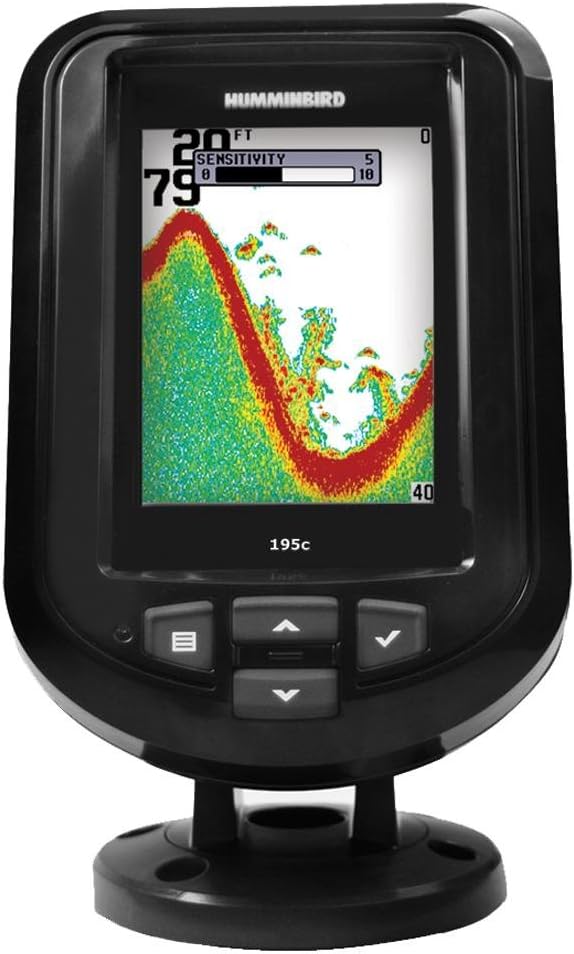
Figure 1: Humminbird Piranhamax 195c Fishfinder. This image shows the front view of the fishfinder unit, featuring its color display with sonar readings, and the control buttons below the screen. The model number "195c" is visible on the unit.
Орнотуу жана орнотуу
Proper installation is crucial for optimal performance of your Piranhamax 195c. This section outlines the general steps for mounting and connecting the unit.
Монтаждоо параметрлери
- Tilt and Swivel Mount: The standard mounting option allows for flexible positioning and angle adjustment of the display unit.
- Optional In-Dash Mounting Kit: For a more integrated look, an optional kit is available for flush-mounting the unit into your boat's dashboard. Refer to the kit's specific instructions for detailed installation.
Power Connection
Connect the power cable to a 12V DC power source. Ensure the connection is secure and protected from water ingress. It is recommended to connect the unit directly to the boat's battery or a dedicated fuse panel.
Өндүрүүчү орнотуу
The transducer is a critical component for sonar operation. Install the transducer in a location that provides a clear, unobstructed view of the water beneath the boat. Common installation methods include transom mount, in-hull mount, or trolling motor mount. Consult the transducer's specific installation guide for detailed instructions and best practices to avoid cavitation and ensure accurate readings.
Иштөө нускамалары
This section covers the basic operation of your Piranhamax 195c Fishfinder.
Күйгүзүү/өчүрүү
басып, кармап туруңуз КҮЧ button (usually the leftmost button with a power symbol or menu symbol) to turn the unit on or off.
Дисплей жана Башкаруу
The 3.5-inch color display shows sonar returns, depth, temperature, and other relevant information. Navigate through menus and adjust settings using the directional arrow buttons and the МЕНЮ or ТАНДОО баскычы.
- Меню баскычы: Жөндөөлөрдү тууралоо үчүн негизги менюга кире.
- Жебе баскычтары (Өйдө/Төмөн/Сол/Оң): Used for navigation within menus and adjusting values.
- Check/Select Button: Тандоолорду ырастайт же кошумча менюга кирет.
Сонар операциясы
The Piranhamax 195c utilizes Dual Beam Sonar with frequencies of 200/455 kHz. The standard sonar coverage is 28 degrees.
- Сезгичтикти жөндөө: Increase sensitivity to detect weaker returns (smaller fish, softer bottom) or decrease it to filter out noise. Access sensitivity settings via the menu.
- Тереңдик диапазону: The unit automatically adjusts the depth range, but you can manually set it for specific fishing conditions.
- Fish ID: The Fish ID feature interprets sonar returns and displays fish icons on the screen. While convenient, it is recommended to learn to interpret raw sonar returns for more accurate information.
Техникалык тейлөө
Үзгүлтүксүз техникалык тейлөө балык кармагычыңыздын узак мөөнөттүү иштешин жана иштешин камсыз кылат.
- Тазалоо: Clean the display and unit housing with a soft, damp кездеме. Абразивдүү тазалагычтарды же эриткичтерди колдонбоңуз.
- Өндүрүүчүгө кам көрүү: Periodically inspect the transducer for marine growth or damage. Clean it gently with water and a soft brush if necessary. Avoid scratching the transducer face.
- Сактагыч: When not in use for extended periods, store the unit in a dry, temperate environment. Disconnect power to prevent battery drain.
Проблемаларды чечүү
Бул бөлүмдө сиз кабылышы мүмкүн болгон жалпы маселелерди чечүү жолдору каралган.
| Көйгөй | Мүмкүн себеп | Чечим |
|---|---|---|
| Күч жок | Электр туташуусу бошоп калган, сактагыч күйүп кеткен, батарея түгөнгөн. | Check all power connections. Inspect and replace fuse if necessary. Charge or replace battery. |
| Сонардык көрсөткүч жок / Туура эмес көрсөткүчтөр | Transducer not submerged, dirty transducer, air bubbles under transducer, incorrect sensitivity setting. | Ensure transducer is fully in water. Clean transducer face. Reposition transducer to avoid air bubbles. Adjust sensitivity. |
| Screen Freezes / Unresponsive | Программалык камсыздоонун иштебей калышы, кубаттуулуктун өзгөрүшү. | Turn the unit off and then on again. Ensure stable power supply. |
If the issue persists, contact Humminbird customer support.
Техникалык шарттар
Key technical specifications for the Humminbird Piranhamax 195c Fishfinder.
- Модел: Piranhamax 195c
- Бөлүмдүн номери: 408700-1
- Дисплей өлчөмү: 3.5 дюйм
- Дисплей түрү: 256 Color TFT
- Чечим: 320V x 240H pixels
- Sonar Standard: Dual Beam
- Standard Sonar Coverage: 28 градус
- Standard Sonar Frequency: 200/455 кГц
- Power Output (PTP): 1600 Ватт
- Кубаттуулукту чыгаруу (RMS): 200 Ватт
- Кубат киргизүү: 10-20 VDC
- Монтаждоо параметрлери: Tilt and Swivel / Optional In-Dash Mounting Kit
- Элементтин өлчөмдөрү (LxWxH): 5.25 x 1.12 x 5.12 дюйм
- Элемент Салмагы: 2 фунт
Кепилдик маалымат
Humminbird products are designed for reliability and performance. For detailed warranty terms and conditions, please refer to the warranty card included with your product or visit the official Humminbird website. Typically, Humminbird offers a limited warranty covering defects in materials and workmanship for a specified period from the date of purchase.
Эскертүү: Кепилдик дооматтар үчүн сатып алганыңыздын далилин сактаңыз.
Кардарларды колдоо
For technical assistance, service, or to purchase accessories, please contact Humminbird Customer Support.
- Онлайн колдоо: Visit the official Humminbird webКөп берилүүчү суроолор, өнүмдөрдү каттоо жана колдоо булактары үчүн сайт. www.humminbird.com/support
- Телефондук колдоо: Refer to the Humminbird website or your product packaging for the most current contact numbers.
When contacting support, please have your product model number (Piranhamax 195c) and serial number ready.


