1. Киришүү
Thank you for choosing the Xpelair C4HTR 4-inch Simply Silent Contour Extractor Fan. This fan is designed for efficient and quiet ventilation in bathrooms, kitchens, and other areas requiring moisture and odor extraction. It features a built-in humidistat and timer for automatic operation based on humidity levels and adjustable run-on time.
The C4HTR model is recognized for its extremely quiet operation, making it one of the quietest intermittent bathroom fans available. Its sleek design allows for versatile installation on walls, ceilings, or panels.

Image 1.1: The Xpelair C4HTR fan, highlighting its silent running at 16dBA at 3m (15 l/s).
2. Коопсуздук маалыматы
Please read all instructions carefully before installation and use. Failure to follow these instructions may result in electric shock, fire, or personal injury.
- Installation must be carried out by a qualified electrician in accordance with current wiring regulations.
- Ensure the power supply is disconnected at the mains before commencing any installation, maintenance, or cleaning.
- Бул шайман физикалык, сезүү же акыл-эс жөндөмү начар же тажрыйбасы жана билими жок адамдар (анын ичинде балдар) үчүн, эгерде алардын коопсуздугуна жооптуу адам тарабынан көзөмөлсүз же шайманды колдонуу боюнча көрсөтмө болбосо, колдонууга арналбайт.
- Балдар шайман менен ойнобошу үчүн аларды көзөмөлгө алуу керек.
- Do not install the fan where it may be exposed to direct water spray.
- Ensure adequate ventilation is provided to prevent the back-flow of gases from open-flued appliances into the room.
- The fan must not be connected to a flexible ducting system that is less than 4 inches (100mm) in diameter.
3. Пакеттин мазмуну
Орнотууну баштоодон мурун бардык компоненттер бар экендигин текшериңиз:
- Xpelair C4HTR Extractor Fan Unit
- Монтаждоо бурамалар жана дубал сайгычтар
- Көрсөтмө (бул документ)
4. Орнотуу
The Xpelair C4HTR fan is suitable for wall, ceiling, or panel mounting. The 'Twist and Click' front cover simplifies installation and maintenance.
4.1 Монтаждоо параметрлери
The fan can be installed in various orientations:

Image 4.1: Visual representation of ceiling and wall mounting applications for the fan.
4.2 Орнотууга даярдануу
- Кубатты өчүрүү: Ensure the electrical supply to the installation area is completely switched off at the consumer unit/fuse box.
- Ачууну даярдоо: Create a circular opening of appropriate diameter (refer to specifications for exact dimensions) in the wall, ceiling, or panel.
- Өзүнчө компоненттер: The fan consists of a main body and a front cover. Gently twist and click to separate the front cover from the main unit for easier mounting.
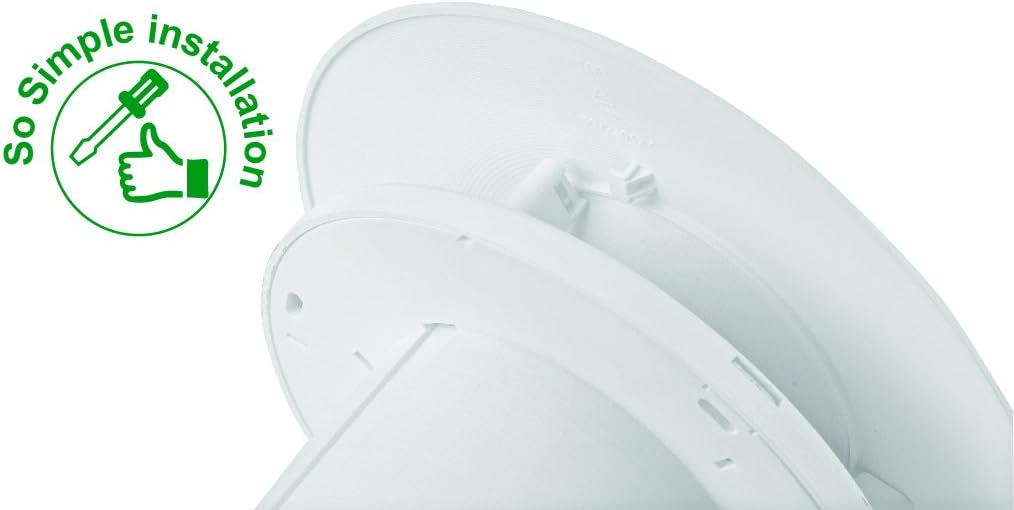
Image 4.2: The 'So Simple installation' feature, indicating ease of assembly with a screwdriver.
4.3 Электрдик туташуу
The C4HTR requires a 240V electrical supply. Wiring should be performed by a qualified electrician.
- Identify the Live (L), Neutral (N), and Switched Live (T) terminals on the fan unit.
- Connect the mains Live (L) to the fan's Live terminal.
- Connect the mains Neutral (N) to the fan's Neutral terminal.
- For timer and humidistat functionality, connect a switched live supply (e.g., from a light switch) to the fan's Switched Live (T) terminal. This allows the fan to activate when the light is switched on, or to override the humidistat.
- Бардык туташуулардын бекем жана туура изоляцияланганын текшериңиз.
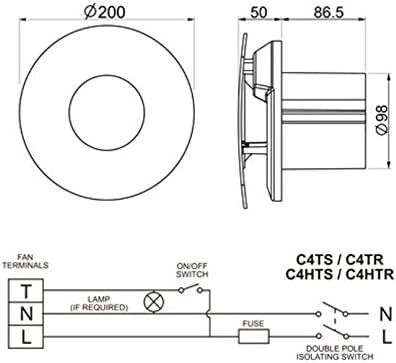
Image 4.3: Wiring diagram for C4HTR models, showing connections for Live, Neutral, and Switched Live, along with fan dimensions.
4.4 Желдеткичти бекитүү
- Position the main fan body into the prepared opening.
- Secure the fan body to the wall/ceiling/panel using the provided screws and wall plugs.
- Once the main body is secure and wired, reattach the front cover by aligning and twisting until it clicks into place.
5. Орнотуу жана тууралоо
The C4HTR fan features an adjustable humidistat and timer. These settings are typically accessed by removing the front cover.
5.1 Humidistat Adjustment
The humidistat controls when the fan activates based on the room's humidity level. It can be adjusted to suit your environment.
- Locate the humidistat adjustment dial or screw on the fan unit (usually behind the front cover).
- Turning the dial towards a higher setting (e.g., 'Max' or a higher percentage) means the fan will only activate at higher humidity levels.
- Turning the dial towards a lower setting (e.g., 'Min' or a lower percentage) means the fan will activate at lower humidity levels, running more frequently.
- Adjust incrementally and observe fan behavior over a few days to find the optimal setting for your needs.
5.2 Таймерди жөндөө
The timer controls how long the fan continues to run after the switched live supply is turned off (e.g., after the light is switched off) or after the humidity drops below the set point.
- Locate the timer adjustment dial or screw (often labeled 'Timer' or with time increments).
- The timer can typically be set from a few minutes up to 30 minutes.
- Turn the dial to increase or decrease the run-on time as desired.
6. Иштөө нускамалары
The Xpelair C4HTR fan operates automatically based on its humidistat and timer settings, or manually via a switched live connection.
6.1 Automatic Operation (Humidistat)
- When the ambient humidity level in the room rises above the set point on the humidistat, the fan will automatically switch on.
- The fan will continue to run until the humidity level drops below the set point, after which it will run for the duration of the set timer.
6.2 Manual Operation (Switched Live)
- If connected to a switched live supply (e.g., room light switch), the fan will activate when the switch is turned on.
- When the switch is turned off, the fan will continue to run for the duration set on the timer.
6.3 Ылдамдык жөндөөлөрү
The fan offers two speed settings for airflow:
- Ылдамдык 1: 15 litres per second (L/s)
- Ылдамдык 2: 21 litres per second (L/s)
Refer to the installation guide or consult a qualified electrician for instructions on how to select the desired speed setting, as this may involve internal wiring adjustments.

Image 6.1: The Xpelair C4HTR fan discreetly installed on a bathroom ceiling.
7. Техникалык тейлөө
Regular cleaning ensures optimal performance and longevity of your Xpelair C4HTR fan.
7.1 Желдеткичти тазалоо
- Кубатты өчүрүү: Always switch off the electrical supply to the fan at the mains before cleaning.
- Алдыңкы капкакты алып салуу: Gently twist and click to remove the front cover.
- Clean Cover and Impeller: Wipe the front cover and the fan impeller blades with a soft, damp cloth. A mild detergent can be used if necessary. Do not use abrasive cleaners or solvents.
- Кылдат кургатуу: Кайра монтаждоодон мурун бардык бөлүктөрү толугу менен кургатылганын текшериңиз.
- Капкакты кайра бекитүү: Align the front cover and twist until it clicks securely into place.
- Күчтү калыбына келтирүү: Switch the electrical supply back on at the mains.

Image 7.1: The Xpelair C4HTR fan, illustrating its easy-clean design with a sponge icon.
8. Кыйынчылыктарды
If your Xpelair C4HTR fan is not operating as expected, refer to the following common issues and solutions:
| Көйгөй | Мүмкүн себеп | Чечим |
|---|---|---|
| Желдеткич күйбөйт. | Электр энергиясы жок. Humidistat set too high. Timer not activated. | Электр тармагынын кубат булагын жана автоматтык өчүргүчтү текшериңиз. Adjust humidistat to a lower setting. Ensure switched live is active or humidity is high enough. |
| Күйөрман тынымсыз иштейт. | Humidistat өтө төмөн коюлган. Timer set too long. Faulty humidistat/timer. | Adjust humidistat to a higher setting. Adjust timer to a shorter duration. Contact qualified electrician or support. |
| Желдетүүчү ызы-чуу. | Жумушчу дөңгөлөктөгү тоскоолдук. Бошоң монтаждоо. Мотор маселеси. | Disconnect power and check for obstructions. Вентилятор бекем орнотулганын текшериңиз. Contact qualified electrician or support. |
| Начар экстракция. | Blocked grille/ducting. Желдетүүчү ылдамдык өтө төмөн коюлду. | Clean grille and check ducting for blockages. Adjust fan to higher speed setting (if applicable). |
If the problem persists after attempting these solutions, please contact Xpelair customer support or a qualified electrician.
9. Техникалык шарттар
| Өзгөчөлүк | Деталь |
|---|---|
| Модель аты | C4HTR |
| Бренд | Xpelair |
| Стиль | with hygrostat and timer |
| Түс | Ак |
| Тtage | 240 вольт |
| Ызы-чуу деңгээли | 16 децибел |
| Ылдамдыктын саны | 2 (15 l/s and 21 l/s) |
| Монтаж түрү | Wall Mount, Ceiling Mount, Panel Mount |
| Башкаруу ыкмасы | Touch (for adjustments) |
| Продукциянын өлчөмдөрү | 0.31 x 0.31 x 0.31 inches (Note: This seems to be a placeholder or incorrect data, actual dimensions are likely larger for a 4-inch fan. Refer to Image 4.3 for diagrammatic dimensions.) |
| Элемент Салмагы | 0.32 ounces (Note: This seems to be a placeholder or incorrect data for a fan.) |
| UPC | 798256208287 |
Note: The provided product dimensions and item weight appear to be generic placeholder values. For accurate physical dimensions, please refer to the technical drawings or contact Xpelair directly.
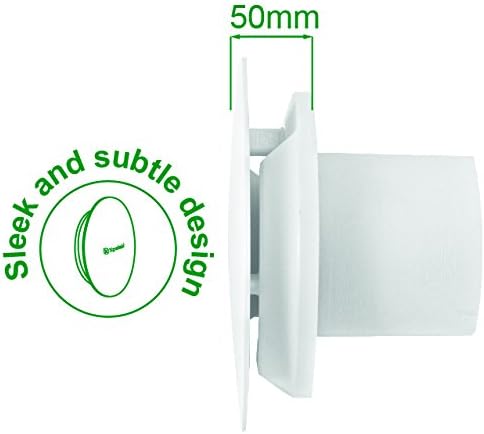
Сүрөт 9.1: Side profile of the fan, highlighting its sleek design and a depth of 50mm.
10. Кепилдик жана колдоо
10.1 Өндүрүүчүнүн кепилдиги
The Xpelair C4HTR fan comes with a 2 жылдык өндүрүүчү кепилдик сатып алынган күндөн тартып. Бул кепилдик нормалдуу колдонуудагы материалдардагы жана жасалгадагы кемчиликтерди камтыйт. Кепилдик дооматтары үчүн сатып алганыңыздын далилин сактап коюңуз.
The warranty does not cover damage caused by improper installation, misuse, neglect, unauthorized repairs, or normal wear and tear.
10.2 Кардарларды колдоо
For technical assistance, troubleshooting beyond this manual, or warranty claims, please contact Xpelair customer support through their official webпродукт сатылып алынган сайт же сатуучу.
When contacting support, please have your product model number (C4HTR) and proof of purchase readily available.


