1. Продукт бүтүп калдыview
The D-Link DGS-1510-28X is a Smart Managed Switch designed for Small to Medium Enterprise (SME/SMB) networks. It features 24 Gigabit Ethernet ports and 4 10-Gigabit SFP+ ports, providing high-speed connectivity and uplink capabilities. This switch integrates advanced management and security functions, offering a balance between a fully managed switch's capabilities and ease of use. It supports physical stacking, virtual stacking, Layer 2 and Layer 3 Lite features, and various security protocols to ensure network reliability and performance.

Сүрөт 1: Алдыңкы view of the D-Link DGS-1510-28X switch.
2. Коопсуздук боюнча көрсөтмөлөр
- Ensure proper grounding for the device to prevent electrical hazards.
- Коммутаторду сууга же ашыкча нымдуулукка дуушар кылбаңыз.
- Operate the device within the specified temperature and humidity ranges (23°F to 122°F).
- Use only the power cord provided with the device or a compatible replacement.
- Ашыкча ысып кетүүнүн алдын алуу үчүн вентиляция тешиктерин жабуудан качыңыз.
- Тазалоодон же тейлөөдөн мурун электр энергиясын өчүрүңүз.
3. Пакеттин мазмуну
Пакетиңизде төмөнкү заттар бар экенин текшериңиз:
- D-Link DGS-1510-28X Switch
- Rackmount Kit
- Электр кабели
- Ыкчам орнотуу көрсөтмөсү (QIG)
4. Техникалык жабдыктар бүттүview
4.1 алдыңкы панели

2-сүрөт: бурчтуу фронт view of the DGS-1510-28X switch, showing all ports and indicators.
- 24 x 10/100/1000BASE-T Ports: Standard Gigabit Ethernet ports for connecting network devices.
- 4 x 10-Gigabit SFP+ Ports: High-speed fiber optic ports for uplinks or stacking.
- Консол порту: RJ-45 port for command-line interface (CLI) access.
- LED көрсөткүчтөрү: Power, Link/Activity, Speed for each port, and Stack ID indicators.
4.2 Арткы панель

3-сүрөт: Арткы view of the DGS-1510-28X switch, showing the power input and grounding screw.
- AC кубаттуулугун киргизүү: Электр шнурунун туташтыргычы.
- Жерге туташтыруу бурагы: Жер кабелин туташтыруу үчүн.
- Kensington Lock Slot: Физикалык коопсуздук үчүн.
4.3 Өлчөмдөр
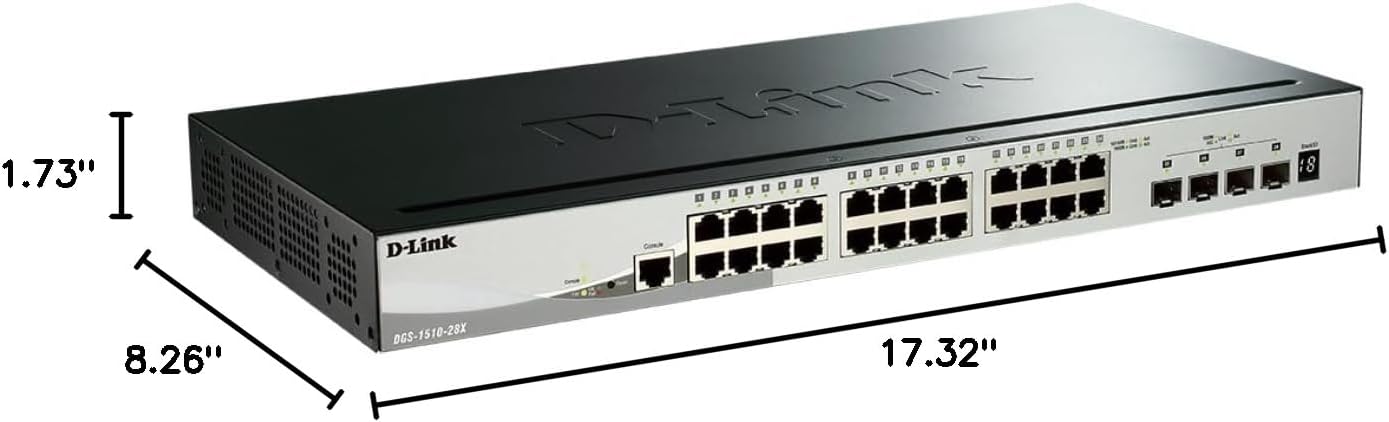
Figure 4: Dimensions of the DGS-1510-28X switch: 17.32"L x 8.26"W x 1.73"H.
5. Орнотуу жана орнотуу
5.1 Стойкага орнотуу
The DGS-1510-28X can be installed in a standard 19-inch equipment rack. Use the provided rackmount kit to secure the switch. Attach the mounting brackets to the sides of the switch using the included screws, then secure the switch into the rack.
5.2 Кубат туташтыруу
- Connect the provided AC power cord to the power input on the rear panel of the switch.
- Электр шнурунун экинчи учун ылайыктуу розеткага сайыңыз.
- Алдыңкы панелдеги кубаттуулук индикатору күйүп турганын текшериңиз, бул которгуч кубат алып жатканын билдирет.
5.3 Тармактык байланыштар
- Connect your network devices (computers, servers, printers, NAS, IP cameras, wireless APs, VoIP phones) to the 10/100/1000BASE-T ports using standard Ethernet cables.
- For high-speed uplinks or connections to other network segments, insert compatible SFP+ transceivers into the 10-Gigabit SFP+ ports and connect appropriate fiber optic cables.
6. Иштетүү жана конфигурациялоо
6.1 Башкаруу интерфейсине кирүү
The DGS-1510-28X can be managed via a web-based graphical user interface (GUI) or a Command Line Interface (CLI).
- Webнегизделген башкаруу: Connect a computer to any Gigabit Ethernet port on the switch. Configure your computer's IP address to be in the same subnet as the switch's default IP address (refer to the Quick Installation Guide for default IP). Open a web browser and enter the switch's IP address to access the login page.
- Буйрук сабынын интерфейси (CLI): Connect a console cable from your computer's serial port to the switch's console port. Use a terminal emulation program (e.g., PuTTY) with appropriate serial settings (e.g., 115200 baud rate, 8 data bits, no parity, 1 stop bit, no flow control) to access the CLI.

5-сүрөт: Мисample of the intuitive web- негизделген башкаруу интерфейси.
6.2 Key Features Configuration
- VLAN'лар: Configure Virtual Local Area Networks to segment network traffic and enhance security and performance. The switch supports various VLAN types, including port-based, tag-based, and protocol-based VLANs.
- чогулуу: The DGS-1510-28X supports physical stacking of up to 6 units using the 10GbE SFP+ ports, creating a single logical unit for simplified management. Virtual stacking via D-Link's Single IP Management (SIM) allows management of up to 32 units.
- 10GbE SFP+ Ports: Utilize these ports for high-bandwidth connections to servers, storage devices, or other core network equipment.
- Surveillance Mode: This feature streamlines IP surveillance network deployment. When enabled in the web UI, it automatically detects ONVIF-compliant devices and segments them into a dedicated Auto Surveillance VLAN, optimizing video traffic.
- Коопсуздук өзгөчөлүктөрү: The switch includes a comprehensive security suite:
- Кирүүнү башкаруу тизмеси (ACL): Filters network traffic based on MAC or IP addresses.
- ARP жасалмалоосунун алдын алуу: Protects against attacks that can redirect network traffic.
- IP-MAC-портун байланыштыруу: Binds specific IP and MAC addresses to switch ports for enhanced security.
- D-Link коопсуздук кыймылдаткычы: Protects the switch's CPU from traffic flooding caused by malicious attacks.
- DoS Attack Prevention: Тейлөөдөн баш тартуу сыяктуу ар кандай чабуулдарды басаңдатат.
- Layer 3 Lite & Static Routing: Supports IPv4/IPv6 routing and IP segmentation to improve network performance and manage traffic across different subnets.

Figure 6: Illustration of 10G SFP+ stacking capabilities.

Figure 7: Screenshot of the Surveillance Mode interface, showing device detection and network topology.
7. Техникалык тейлөө
- Программалык камсыздоонун жаңыртуулары: D-Link колдоосун дайыма текшерип туруңуз website for the latest firmware versions. Updating firmware can provide new features, performance improvements, and security patches. Follow the instructions provided with the firmware update package.
- Тазалоо: Use a soft, dry cloth to clean the exterior of the switch. Do not use liquid or aerosol cleaners. Ensure ventilation openings are free from dust and debris.
- Конфигурациянын камдык көчүрмөсү: Periodically back up your switch configuration to an external device to facilitate quick recovery in case of a reset or failure.
8. Кыйынчылыктарды
- Кубат жок: Ensure the power cord is securely connected to both the switch and a working power outlet. Verify the power LED is illuminated.
- Тармакка туташуу жок: Check the Link/Activity LEDs for the connected ports. Ensure Ethernet cables are properly seated and undamaged. Verify IP address settings on connected devices and the switch.
- Жай аткаруу: Check for network loops (Spanning Tree Protocol should be enabled). Monitor port utilization and ensure connected devices are operating at their expected speeds. Consider upgrading cable types if necessary (e.g., for 10GbE connections).
- Кирүү мүмкүн эмес Web UI: Компьютериңиздин IP дареги коммутатор менен бир тармактын ичинде экенин текшериңиз. Браузериңиздин кэшин тазалаңыз же башка браузерди колдонуп көрүңүз. Эч кандай брандмауэр кирүүнү бөгөттөп койбогонун текшериңиз.
- Console Access Issues: Confirm serial port settings (baud rate, data bits, parity, stop bits, flow control) match the switch's requirements. Ensure the console cable is correctly connected.
9. Техникалык шарттар
| Өзгөчөлүк | Спецификация |
|---|---|
| Модель номери | DGS-1510-28X |
| Продукциянын өлчөмдөрү (LxWxH) | 17.32" x 8.26" x 1.73" |
| Элемент Салмагы | 4.2 фунт |
| Тtage | 240 вольт |
| Иштин материалы | Металл |
| Иштөө температурасы диапазону | 23°F жана 122°F |
| Interface Type | RJ45, SFP+ |
| Маалыматтарды өткөрүү ылдамдыгы | 128 Гигабит/секунда (которуу жөндөмдүүлүгү) |
| Порттардын саны | 28 (24 Gigabit, 4 10GbE SFP+) |
| Аппараттык платформа | PC |
| UPC | 790069406058 |
| Түс | Кара |
| Шайкеш түзмөктөр | Desktop, Printer, Router |
10. Кепилдик жана техникалык колдоо
The D-Link DGS-1510-28X Smart Managed Switch is backed by D-Link's Lifetime Protection, ensuring long-term confidence in the quality and reliability of your network infrastructure. For technical assistance, product documentation, or warranty information, please visit the official D-Link support website or contact your local D-Link representative.
For further information and support, visit: D-Link расмий Webсайт


