Introduction
This manual provides essential instructions for the safe and efficient operation of your Yamaha HTR-2067 5.1 Channel AV Receiver. Please read this manual thoroughly before using the unit to ensure proper setup and performance. Keep this manual in a safe place for future reference.
Коопсуздук маалыматы
- Кубат булагы: Түзмөктү AC розеткасына гана туташтырыңызtage арткы панелде көрсөтүлгөн.
- Вентиляция: Адекваттуу вентиляцияны камсыз кылыңыз. Вентиляция тешиктерин жаап албаңыз.
- Суу жана ным: Агрегатты жамгырга же нымдуулукка дуушар кылбаңыз. Агрегаттын үстүнө суюктуктар толтурулган нерселерди койбоңуз.
- Чет өлкөлүк объекттер: Do not insert foreign objects into the unit's openings.
- Тейлөө: Бул аппаратты өзүңүз тейлөөгө аракет кылбаңыз. Бардык тейлөөлөрдү квалификациялуу тейлөө кызматкерлерине тапшырыңыз.
- Динамик Импеданс: Ensure connected speakers have an impedance of 6 ohms or higher. Refer to the "CAUTION: SEE INSTRUCTION MANUAL FOR CORRECT SETTING" label near the speaker terminals.
Жайгашуу
Арткы панел үстүндөview
The following image illustrates the rear panel of the Yamaha HTR-2067 receiver, highlighting various connection points for audio, video, and speakers.
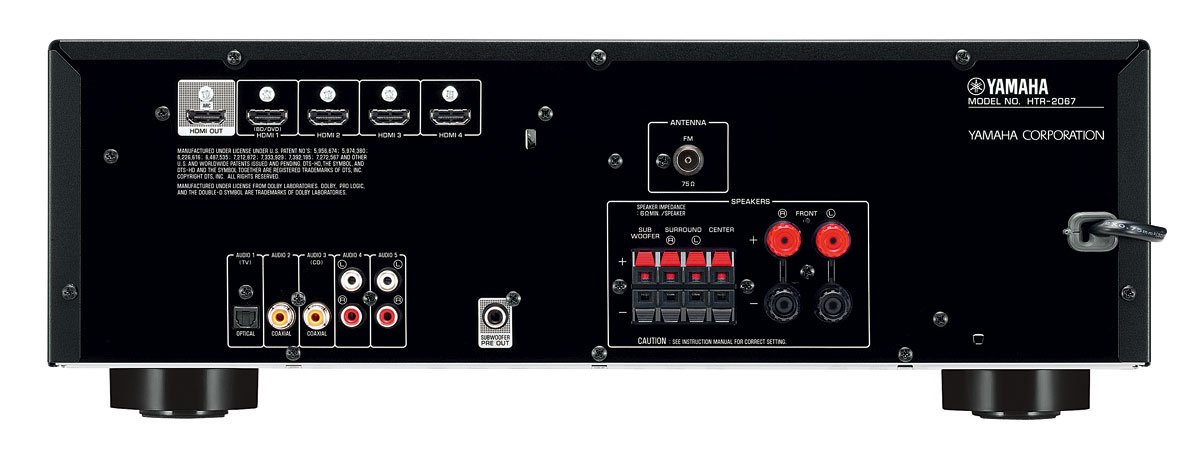
Figure 1: Rear Panel of Yamaha HTR-2067 AV Receiver
1. таңгактан чыгаруу
Carefully remove the receiver and all accessories from the packaging. Retain the packaging materials for future transport or storage.
2. Динамиктерди бириктирүү
Connect your speakers to the corresponding terminals on the rear panel. Ensure correct polarity (+ to + and - to -) for each speaker. The HTR-2067 supports a 5.1 channel setup.
- Алдыңкы динамиктер (сол/оң): Connect to the "FRONT" terminals.
- Борбордук спикер: Connect to the "CENTER" terminal.
- Көлөмдүү динамиктер (сол/оң): Connect to the "SURROUND" terminals.
- ЛГурченко: Connect a powered subwoofer to the "SUBWOOFER PRE OUT" RCA jack.
Refer to the speaker impedance warning on the rear panel, which states "SPEAKER IMPEDANCE 6Ω MIN / SPEAKER".
3. Аудио/видео түзмөктөрүн туташтыруу
Use the appropriate cables to connect your source devices (e.g., Blu-ray player, game console, TV) to the receiver.
- HDMI туташуулары:
- HDMI ЧЫГЫШЫ (ARC): Connect to your TV's HDMI input (preferably one supporting ARC for audio return).
- HDMI 1 (BD/DVD), HDMI 2, HDMI 3, HDMI 4: Connect your video source devices here.
- Санарип аудио байланыштары:
- OPTICAL (AUDIO 1 (TV)): For optical digital audio from a TV or other device.
- COAXIAL (AUDIO 2): For coaxial digital audio from a CD player or other device.
- Аналогдук аудио байланыштары:
- AUDIO 3 (CD), AUDIO 4, AUDIO 5: RCA кабелдерин колдонгон аналогдук аудио түзмөктөр үчүн.
4. Антенналарды туташтыруу
For FM radio reception, connect the supplied FM antenna to the "ANTENNA FM 75Ω" terminal on the rear panel.
5. Power Connection
After all other connections are made, plug the power cord into an AC wall outlet.
Иштөө нускамалары
1. Күйгүзүү/өчүрүү
басыңыз КҮЧ кабыл алгычты күйгүзүү же өчүрүү үчүн алдыңкы панелдеги же пульттагы баскычты басыңыз.
2. Киргизүүнү тандоо
Select the desired input source using the input selector buttons on the front panel or the remote control. For exampле, басыңыз BD / DVD for a Blu-ray player connected to HDMI 1.
The САХНА buttons (BD/DVD, TV, CD, Radio) provide one-touch power-on and input selection, along with pre-set sound programs.
3. Үндү тууралоо
Алдыңкы панелдеги же чоң баскычты колдонуп башкы үнүн тууралаңыз VOLUME +/- алыстан башкаруудагы баскычтар.
4. Sound Modes (CINEMA DSP)
The HTR-2067 features CINEMA DSP with 17 DSP programs. Use the ПРОГРАММА buttons on the remote control to cycle through different sound fields and enhance your listening experience.
5. ЭКО режими
Activate the ECO mode to reduce power consumption by approximately 20%. This setting can be toggled via the remote control or system menu.
Техникалык тейлөө
- Тазалоо: Wipe the unit with a soft, dry cloth. Do not use chemical cleaners or abrasive materials.
- Вентиляция: Желдетүү тешиктери чаң же таштандылар менен жабылып калбагандыгын мезгил-мезгили менен текшерип туруңуз.
- Электр кабели: Электр шнурунда кандайдыр бир бузулуулар бар-жоктугун дайыма текшерип туруңуз.
Проблемаларды чечүү
| Көйгөй | Мүмкүн себеп | Чечим |
|---|---|---|
| Күч жок | Кубат шнуру ажыратылган; түзмөк күтүү режиминде. | Ensure power cord is securely plugged in; press POWER button. |
| Үн жок | Incorrect input selected; speakers not connected; volume too low; mute activated. | Select correct input; check speaker connections; increase volume; deactivate mute. |
| Видео жок | Incorrect input selected; HDMI cable loose or faulty; TV input incorrect. | Select correct input; check HDMI connections; ensure TV is on correct input. |
| Радио кабыл алуу начар | Антенна туташкан эмес же начар жайгашкан. | Connect FM antenna; adjust antenna position for better reception. |
Эгерде көйгөй чечилбесе, квалификациялуу тейлөө адисине кайрылыңыз.
Техникалык шарттар
| Өзгөчөлүк | Деталь |
|---|---|
| Бренд | Yamaha |
| Модел | HTR-2067 |
| Каналдар | 5.1 каналдын көлөмдүү үн |
| 4K Pass-through | Yes (4K 24/30p) |
| DSP Programs | CINEMA DSP (17 programs) |
| ЭКО режими | Yes (approx. 20% less power consumption) |
| Байланыш | HDMI, Optical, Coaxial, Analog RCA, FM Antenna |
| Динамик импедансы | Минималдуу 6 Ом |
| Элемент Салмагы | 8.72 кг |
| Өлчөмдөрү (болжол менен) | 55.7 x 41.4 x 22.4 см (Пакеттин өлчөмдөрү) |
Кепилдик жана колдоо
Кепилдик маалыматы жана кардарларды колдоо үчүн продуктуңузга кошулган кепилдик картасын караңыз же расмий Yamahaга баш багыңыз. webсайт. Сатып алганыңыздын далили катары сатып алуу дүмүрчөгүңүздү сактаңыз.
For technical assistance or service inquiries, contact your authorized Yamaha dealer or service center.


