1. Киришүү
Thank you for choosing the WiMiUS Q1 4K WiFi Waterproof Action Camera. This manual provides essential information for setting up, operating, and maintaining your device. Please read it carefully before use to ensure optimal performance and longevity of your camera.

Image 1.1: WiMiUS Q1 4K WiFi Waterproof Action Camera. This image displays the camera in its retail packaging, highlighting its 4K Full HD capabilities, 40m waterproof rating, WiFi connectivity, 170-degree wide angle, and 2.0-inch LCD screen.
2. Пакеттин мазмуну
Төмөндө тизмеленген нерселердин баары пакетиңизге камтылганын текшериңиз:
- 1 x WiMiUS Q1 4K Action Camera
- 2 x 900mAh кайра заряддалуучу батарейкалар
- 1 x Батареяны заряддоо док
- Various mounting accessories (e.g., waterproof case, helmet mounts, bicycle mount, adhesive mounts, clips, bandages, tethers, USB cable, cleaning cloth)
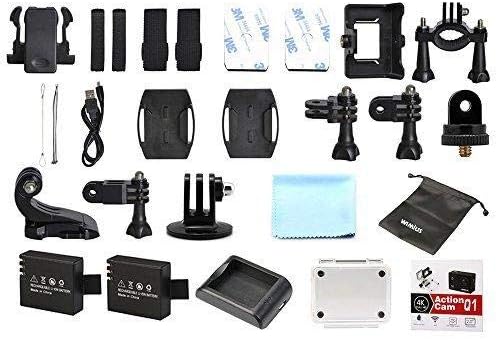
Image 2.1: WiMiUS Q1 Action Camera Accessories. This image shows the comprehensive set of accessories included with the camera, such as various mounts, straps, a charging dock, two batteries, a USB cable, and a cleaning cloth.
3. Камера бүткөнview
Familiarize yourself with the camera's buttons and ports:

Image 3.1: WiMiUS Q1 Camera Labeled Parts. This diagram illustrates the various components of the camera, including the Power/Mode button, OK button, UP/WiFi button, Down button, Speaker, Microphone, Micro SD card slot, USB port, HDMI port, Charging Indicator, Operation Indicator, and WiFi Indicator.
- Кубат / режим баскычы: Күйгүзүү/өчүрүү үчүн басып кармап туруңуз. Режимдерди которуштуруу үчүн кыска басыңыз.
- OK баскычы: Confirm selection, start/stop recording, or take a photo.
- UP/WiFi Button: Navigate up in menus. Press and hold to activate/deactivate WiFi.
- Төмөн баскычы: Navigate down in menus.
- Баяндамачы: Аудио чыгаруу.
- Микрофон: Audio input for recording.
- Micro SD оюгу: Insert Micro SD card (up to 64GB, not included).
- USB порт: Заряддоо жана маалыматтарды өткөрүү үчүн.
- HDMI порту: Тышкы дисплейге туташуу үчүн.
- Заряддоо көрсөткүчү: Заряддоо абалын көрсөтөт.
- Иштөө көрсөткүчү: Shows camera's operational status.
- WiFi көрсөткүчү: WiFi байланышынын абалын көрсөтөт.
4. Орнотуу
4.1. Батареяны орнотуу
- Камеранын ылдый жагындагы батарея уясынын капкагын ачыңыз.
- Insert a fully charged 900mAh battery, ensuring the correct orientation.
- Батарея уясынын капкагын бекем жабыңыз.
4.2. Микро SD картаны орнотуу
A Micro SD card (not included) is required for storing photos and videos. The camera supports cards up to 64GB.
- Камераңыздын капталынан Micro SD карта уячасын табыңыз.
- Insert the Micro SD card with the contacts facing the camera's front until it clicks into place.
- Чыгаруу үчүн картаны акырын чыккыча түртүңүз.
4.3. Батареяны заряддоо
Use the provided charging dock and USB cable to charge the batteries. A full charge takes approximately 3 hours.
- Батареяны заряддоочу жерге кыстарыңыз.
- Connect the charging dock to a USB power source (5V 1A) using the USB cable.
- The charging indicator on the dock will show the charging status.
4.4. Суу өткөрбөй турган корпусту колдонуу
The waterproof case allows the camera to be used underwater up to 40 meters. Ensure the case is properly sealed before submerging.
- Камераны суу өткөрбөй турган корпустун ичине салыңыз.
- Суу өткөрбөй тургандыгын камсыз кылуу үчүн кулпуну бекем жабыңыз.
- Before first use, test the empty waterproof case in water to confirm no leaks.
5. Иштөө нускамалары
5.1. Күйгүзүү/өчүрүү
- Күйгүзүү: басып, кармап туруңуз Кубат/Режим баскычын 3 секунда басыңыз.
- Өчүрүү: басып, кармап туруңуз Кубат/Режим баскычын 3 секунда басыңыз.
5.2. Которуу режими
баскычын кыска басыңыз Кубат/Режим button to cycle through different modes: Video Recording, Photo Shooting, Playback, and Settings.
5.3. Видео жаздыруу
- Видео жаздыруу режимине которулуңуз.
- басыңыз OK button to start recording. The operation indicator will flash.
- басыңыз OK button again to stop recording. The operation indicator will stop flashing.
Видео чечимдери: 4K@30FPS, 2.7K@30FPS, 1080P@60FPS, 720P@120FPS.
Special Video Modes:
- Убакыттын өтүшү: Intervals of 0.5S, 1S, 2S, 5S, 10S, 30S, 60S.
- Цикл жаздыруу: 2min, 3min, 5min segments.
- Жай кыймыл: 1080P@60FPS, 720P@120FPS.
5.4. Сүрөт тартуу
- Switch to Photo Shooting mode.
- басыңыз OK сүрөткө тартуу үчүн баскыч.
Photo Resolutions: 16M, 14M, 12M, 8M, 5M.
Сүрөт режимдери: Single, Self-Timer (3S/5S/10S), Continuous Shot (3P/S, 5P/S, 10P/S, 20P/S).
5.5. Wi-Fi туташуусу
Connect your camera to a smartphone or tablet via Wi-Fi for remote control and file өткөрүп берүү.
- Download the official WiMiUS app from your device's app store.
- On the camera, press and hold the UP/WiFi button to activate Wi-Fi. The Wi-Fi indicator will light up.
- On your smartphone/tablet, go to Wi-Fi settings and connect to the camera's Wi-Fi network (SSID usually starts with 'WiMiUS' or similar).
- Open the WiMiUS app to control the camera remotely.
5.6. Ойнотуу
Кайраview your recorded videos and photos:
- Switch to Playback mode using the Кубат/Режим баскычы.
- колдонуу UP жана Төмөн buttons to navigate through your files.
- басыңыз OK баскычына view тандалган file.
6. Техникалык тейлөө
6.1. Тазалоо
- Use a soft, lint-free cloth to clean the camera lens and LCD screen.
- өжөр тактар үчүн, жеңил гampчүпүрөктү суу менен. Катуу химиялык заттардан алыс болуңуз.
- Портторду же бөлүктөрдү жабуудан мурун камеранын кургак экенин текшериңиз.
6.2. Сактоо
- Камераны салкын, кургак жерде күндүн тике тийген нурунан жана экстремалдык температурадан алыс сактаңыз.
- Камера узак убакыт бою колдонулбаса, батареяларды алып салыңыз.
7. Кыйынчылыктарды
- Камера күйбөй жатат: Батарея толук заряддалганын жана туура салынганын текшериңиз. Экинчи батареяны колдонуп көрүңүз.
- SD карта катасы: Ensure the Micro SD card is correctly inserted and formatted (FAT32 recommended). Try a different compatible Micro SD card.
- Видео/сүрөттүн сапаты начар: Check lens for smudges. Ensure adequate lighting. Verify resolution settings.
- Wi-Fi туташуу көйгөйлөрү: Ensure Wi-Fi is enabled on the camera and your mobile device. Restart both devices. Check for app updates.
- Камеранын тоңуп калышы: Камераны баштапкы абалга келтирүү үчүн батареяны чыгарып, кайра салыңыз.
8. Техникалык шарттар
| Модел | WiMiUS Q1 |
| LCD экран | 2.0'' LTPS |
| Объектив | 170-degree A+ High Resolution Wide Angle |
| Video Resolution | 4K@30FPS, 2.7K@30FPS, 1080P@60FPS, 720P@120FPS |
| Video Format | MOV (H.264) |
| Сүрөттүн резолюциясы | 16M/14M/12M/8M/5M |
| Сактагыч | Micro SD Card, up to 64GB (Class 10 or higher recommended) |
| Батарея | 2 x 900mAh Rechargeable Li-ion |
| Заряддоо убактысы | Болжол менен 3 саат |
| Байланыш | USB 2.0, Wi-Fi |
| Системанын шайкештиги | Windows XP/Vista/Win7 or above, Mac OS |
| Өзгөчөлүктөр | Time Lapse, Loop Recording, Slow Motion, Waterproof (with case) |
| Оптикалык масштаб | 10x |
| Сенсор түрү | CMOS |
9. Кепилдик жана колдоо
For warranty information and technical support, please refer to the documentation provided with your purchase or visit the official WiMiUS webсайт. Кепилдик дооматтар үчүн сатып алганыңыздын далилин сактаңыз.


