Introduction
The CyberPower BRG1000AVRLCD is an Intelligent LCD UPS System designed to provide reliable battery backup and surge protection for your electronic equipment. This mini-tower UPS utilizes line interactive topology and simulated sine wave output to safeguard desktop computers, workstations, networking devices, and home entertainment systems from power fluctuations and outages. It features Automatic Voltage Regulation (AVR) to stabilize incoming power without switching to battery, thereby extending battery life. Additionally, it includes two USB charge ports for portable devices.
Коопсуздук маалыматы
Сураныч, UPSти орнотуудан же иштетүүдөн мурун бардык коопсуздук нускамаларын кылдат окуп чыгып, аткарыңыз. Антпесе, блоктун, туташкан жабдуулардын бузулушу же жеке жаракат алуусу мүмкүн.
- Ensure the UPS is connected to a grounded outlet.
- UPSти ачпаңыз casing. Ичинде колдонуучу тейлей турган тетиктер жок. Тейлөөнү квалификациялуу тейлөө кызматкерлерине тапшырыңыз.
- Avoid installing the UPS in areas with excessive moisture, heat, or direct sunlight.
- Do not block ventilation openings on the UPS.
- In case of fire, use a dry chemical fire extinguisher. Water can cause electrical shock.
Жайгашуу
Follow these steps to set up your CyberPower BRG1000AVRLCD UPS System:
- Алгачкы заряддоо: Before initial use, plug the UPS into a standard wall outlet for at least 8 hours to ensure the battery is fully charged.
- Түзмөктөрдү туташтыруу:
- Connect critical equipment (e.g., computer, monitor, router) to the Батареянын резервдик көчүрмөсү жана толкундан корголгон розеткалар. These outlets provide power during outages and protect against surges.
- Connect non-critical equipment (e.g., printer, scanner) to the Толугу менен корголгон розеткалар. These outlets only provide surge protection.
- Utilize the two USB Charge Ports (2.1 Ampбөлүшүлдү) on the front panel to charge portable devices.
- Data Line Protection: For network and telephone line protection, connect your modem/router or telephone line to the "IN" port and then from the "OUT" port to your device.
- Күйгүзүү: Press the power button on the front panel to turn on the UPS. The LCD display will illuminate.

Сүрөт 1: Арткы панелдик байланыштар - This image displays the rear panel of the UPS, highlighting the NEMA 5-15R outlets for both battery backup/surge protection and surge-only, along with coaxial, network (RJ45), USB, and serial communication ports. A red circuit breaker reset button is also visible.
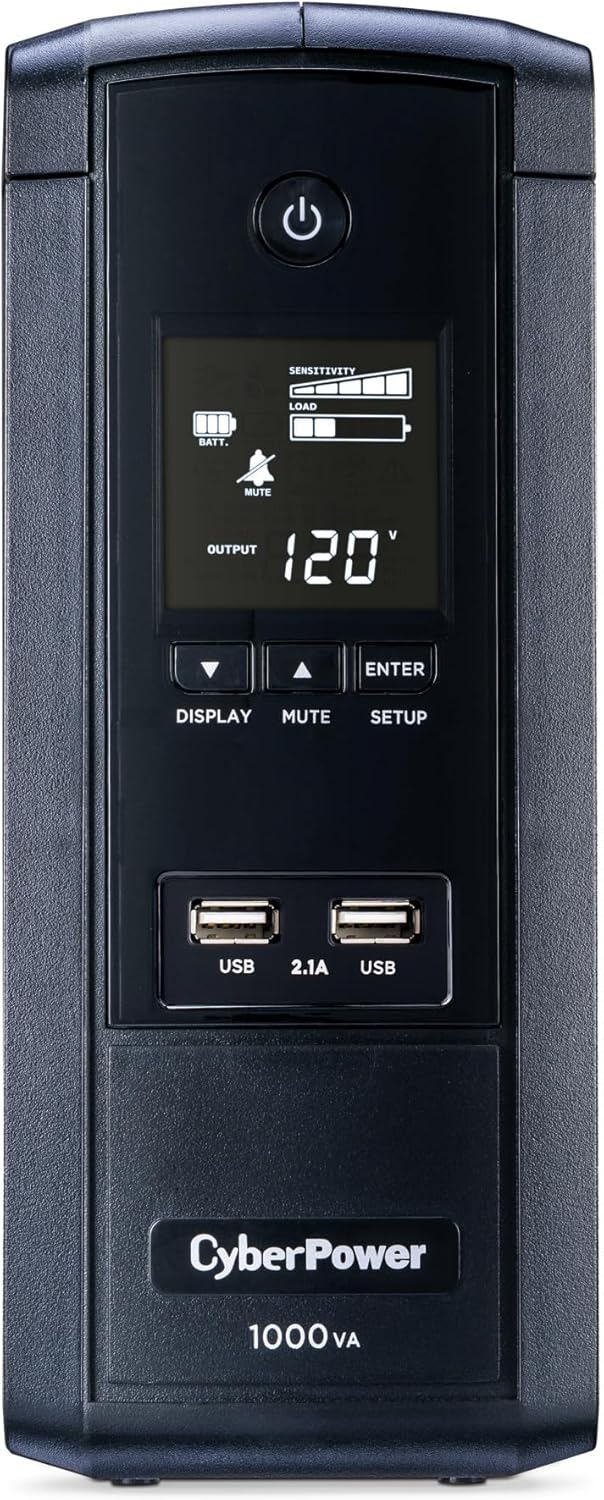
Figure 2: Front Panel and LCD Display - The front panel features the power button, control buttons for the LCD, and two USB charging ports (2.1A shared). The LCD screen shows real-time information about the UPS status.
Иштөө нускамалары
The CyberPower BRG1000AVRLCD is designed for user-friendly operation. Here are key features and how to use them:
- Multifunction LCD Panel: The front LCD panel provides immediate and detailed information on battery and power conditions. Use the "DISPLAY" button to cycle through various parameters such as estimated runtime, battery capacity, load capacity, input/output voltagе, жана жыштыгы.
- Automatic Voltage Регламент (AVR): This feature automatically corrects minor power fluctuations (sags and surges) without switching to battery power. This extends the life of the battery and ensures a stable power supply to connected devices.
- USB заряддоо: The two USB ports (2.1A shared) allow for convenient charging of mobile phones, tablets, and other USB-powered devices, even during a power outage.
- Ойготкучтун үнүн өчүрүү: The UPS features an audible alarm to alert you during power events. You can mute this alarm using the "MUTE" button on the front panel.
Video 1: CyberPower BRG1500AVRLCD UPS Overview - This video provides a general overview of a similar CyberPower UPS model, showcasing its features including outlets, AVR, LCD, and USB ports. While a different model number, the core functionalities and design elements are representative of the BRG1000AVRLCD.
Техникалык тейлөө
- Батареяны алмаштыруу: The internal battery is designed for a specific lifespan. When the battery needs replacement, the UPS will typically indicate this via the LCD display or an audible alarm. Refer to the CyberPower website or contact customer support for specific battery replacement instructions and compatible replacement batteries. Always ensure the UPS is powered off and disconnected from the wall outlet before attempting any battery maintenance.
- Тазалоо: Regularly clean the exterior of the UPS with a soft, dry cloth. Do not use liquid or aerosol cleaners. Ensure ventilation openings are free from dust and debris to prevent overheating.
Проблемаларды чечүү
If you encounter issues with your UPS, consult the following common troubleshooting tips:
- UPS Does Not Turn On:
- Ensure the power cord is securely plugged into a working wall outlet.
- Verify the circuit breaker on the rear of the UPS has not tripped. Press to reset if necessary.
- Confirm the battery is properly connected and charged.
- UPS Beeps Continuously:
- This usually indicates a power outage or low battery. Save your work and shut down connected equipment.
- If the alarm persists after power is restored, the battery may be near the end of its life and require replacement.
- Connected Equipment Loses Power During Outage:
- Ensure critical equipment is plugged into the Батареянын резервдик көчүрмөсү жана толкундан корголгон розеткалар, not just the Surge Protected Outlets.
- The total load connected to the battery backup outlets may exceed the UPS's capacity. Reduce the load or consider a higher capacity UPS.
Техникалык шарттар
| Өзгөчөлүк | Деталь |
|---|---|
| Модель номери | BRG1000AVRLCD |
| Кубаттуулугу | 1000VA / 600W |
| Топология | Line Interactive |
| Output Waveform | Симуляцияланган синус толкуну |
| Соода түйүндөрү | 10 NEMA 5-15R (5 Battery Backup & Surge, 5 Surge Only) |
| USB кубаттоо порттору | 2 (2.1 Ampбөлүшүлдү) |
| Automatic Voltage Регламент (AVR) | Ооба |
| Батарея түрү | Sealed Lead Acid (1 x 12V included) |
| Өлчөмдөр (D x W x H) | 10.2" x 3.9" x 9.7" |
| Элемент Салмагы | 15 фунт |
Кепилдик жана колдоо
The CyberPower BRG1000AVRLCD UPS System comes with a 5 жылдык кепилдик, анын ичинде батареялар үчүн камтуу камтылган. Мындан тышкары, ал ... менен камсыздалган Туташтырылган жабдуулардын 100 000 долларлык кепилдиги, туташкан электроникаңызга жан дүйнө тынчтыгын берет.
For advanced power management and monitoring, FREE PowerPanel Personal Edition Management Software is available for download from the CyberPower website. This software allows you to monitor UPS status, configure settings, and perform controlled shutdowns of connected computers.
For further assistance, technical support, or warranty claims, please refer to the official CyberPower webсайтка же кардарларды тейлөөгө кайрылыңыз.


