1. Киришүү
This manual provides comprehensive instructions for the Monoprice MS-WN513N2 Wireless N300 4-Port Broadband Router. This device is designed to provide a high-speed wireless network connection for your home or small office, offering reliable internet access and advanced security features. Please read this manual thoroughly before operating the device.
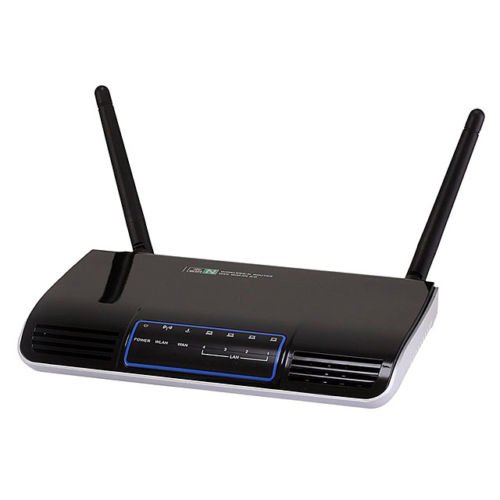
Сүрөт 1.1: Алдыңкы view of the Monoprice MS-WN513N2 Wireless N300 Router. The router is black with indicator lights on the front panel.
2. Өзгөчөлүктөрү
The Monoprice MS-WN513N2 router offers a range of features to enhance your network experience:
- Wireless N300 Performance: Complies with 802.11b/g/n standards, offering wireless transmission speeds up to 300 Mbps.
- 4-Port Broadband Router: Includes four (4) LAN ports for wired connections.
- Өркүндөтүлгөн коопсуздук: Supports 64-bit/128-bit WEP, WPA/WPA2, and WPA-PSK/WPA2-PSK authentication.
- IPv6 колдоосу: Compatible with Internet Protocol Version 6.
- Кызматтын сапаты (QoS): Bandwidth control for prioritizing network traffic.
- WPS (Wi-Fi менен корголгон орнотуу): Simplifies wireless security configuration.
- Бир нече иштөө режимдери: Can be configured as a Gateway, Wireless Bridge, or Wireless ISP (WISP).
- Dynamic DNS (DDNS): Supports dynamic domain name system configuration.
- UPnP Support: Universal Plug and Play for easy device discovery.
- Firewall: Integrated firewall for network protection.
- Автоматтык MDI/MDIX: Automatic cable detection for Ethernet ports.
3. Пакеттин мазмуну
Пакетиңизде бардык буюмдар бар экенин текшериңиз:
- Monoprice MS-WN513N2 Wireless N300 Router
- Кубат адаптери (DC 5V)
- Ethernet кабели
- Тез орнотуу боюнча колдонмо (эгер кошулган болсо)
4. Физикалык бүтүрүүview
4.1 Алдыңкы панелдин көрсөткүчтөрү
Алдыңкы панелде абал жөнүндө маалымат берүүчү LED индикаторлору бар:
- Power LED: Роутер күйгүзүлгөнүн көрсөтөт.
- WAN LED: Интернетке туташуу абалын көрсөтөт.
- LAN диоддору (1-4): Тийиштүү зымдуу LAN портторундагы активдүүлүктү көрсөтүңүз.
- WLAN LED: Зымсыз тармак аракетин көрсөтөт.
4.2 Арткы панелдин порттору жана баскычтары
The rear panel contains all physical connection points:
- DC 5V Power Port: Камтылган кубат адаптерине туташат.
- WAN порт: Connects to your modem or internet service provider's network.
- LAN порттору (1-4): Connect to wired devices such as computers, gaming consoles, or switches.
- WPS баскычы: Жөнөкөй зымсыз туташуу үчүн Wi-Fi корголгон орнотууну баштайт.
- Тешикти баштапкы абалга келтирүү: Used to restore the router to factory default settings. Insert a paperclip and hold for 5-10 seconds.
- Антенна порттору: Two (2) ports for connecting the external antennas.
5. Орнотуу
5.1 Аппараттык туташуу
- Антенналарды туташтыруу: Screw the two external antennas onto the antenna ports on the rear panel.
- Модемди туташтыруу: Connect one end of an Ethernet cable to your modem's LAN port and the other end to the WAN роутердин порту.
- Туташуу кубаты: Кубат адаптерин роутердин розеткасына туташтырыңыз DC 5V Power Порт and plug the adapter into a power outlet.
- Күйгүзүү: Wait for the router to power on. The Power LED should illuminate. Allow a few minutes for the router to boot up and establish a connection.
- Компьютерди туташтыруу (милдеттүү эмес): For initial configuration, it is recommended to connect a computer directly to one of the router's LAN порттор Ethernet кабелин колдонуп туташтырылат.
5.2 Баштапкы конфигурация (Web Интерфейс)
- Кирүү роутери: ачуу а web browser on a connected computer. In the address bar, type the router's default IP address (commonly
192.168.1.1or192.168.0.1) and press Enter. Refer to the label on the bottom of your router for the exact IP address and default login credentials. - Кирүү: Демейки колдонуучу атын жана сырсөздү киргизиңиз (мисалы,
adminэкөө үчүн тең). - Орнотуу устасын иштетүү: Маршрутизатордун web interface will typically present a Quick Setup Wizard. Follow the on-screen prompts to configure your internet connection type (e.g., PPPoE, Dynamic IP, Static IP) and basic wireless settings (SSID, password).
- Демейки эсептик дайындарды өзгөртүү: For security, it is highly recommended to change the default login username and password for the router's web интерфейс.
6. Иштөө
6.1 Зымсыз тармактын конфигурациясы
To configure your wireless network:
- дегенге өтүңүз Зымсыз орнотуулар бөлүмүндө web интерфейс.
- SSID: Change the default Wireless Network Name (SSID) to a unique name.
- Коопсуздук режими: Тандоо WPA2-PSK as the recommended security mode.
- Купуя сөз: Set a strong, unique password (at least 8 characters, including letters, numbers, and symbols).
- Канал: The router can automatically select the best 2.4 GHz channel. You can also manually select a fixed channel (e.g., 1, 6, or 11) to avoid interference.
- Өзгөртүүлөрүңүздү сактаңыз.
6.2 Коопсуздук орнотуулары
The router provides various security features:
- Firewall: The built-in firewall helps protect your network from external threats. Ensure it is enabled.
- MAC чыпкалоо: You can restrict network access to specific devices based on their MAC addresses.
- Ата-энелик көзөмөл: Some routers offer features to block specific websites or limit internet access times for certain devices.
- WPS: Use the WPS button for quick, secure connections with WPS-compatible devices.
6.3 Өркүндөтүлгөн функциялар
Explore the advanced settings in the web interface for more control:
- Кызматтын сапаты (QoS): Prioritize bandwidth for applications like gaming or video streaming.
- Портту багыттоо: Configure specific ports to allow external access to devices on your local network (e.g., for gaming servers).
- Dynamic DNS (DDNS): If you have a dynamic public IP address, DDNS allows you to access your network using a consistent domain name.
- IPv6: Configure IPv6 settings if your ISP supports it.
- Иштөө режими: Change the router's mode to Wireless Bridge or WISP if needed for specific network setups.
7. Техникалык тейлөө
7.1 Микропрограмма жаңыртуулары
Periodically check the Monoprice website for firmware updates. Firmware updates can improve performance, add new features, and fix security vulnerabilities. Follow the instructions provided with the firmware update carefully to avoid damaging the device.
7.2 Роутерди баштапкы абалга келтирүү
If you forget your login password or experience persistent issues, you can restore the router to its factory default settings:
- Роутер күйүп турганда, аны табыңыз Тешикти кайра коюу арткы панелде.
- Use a paperclip or a thin, pointed object to press and hold the reset button inside the hole for approximately 5-10 seconds.
- Роутердин светодиоддору күйүп-өчкөндө же кайра күйгөндө баскычты коё бериңиз.
- The router will reboot with factory default settings. You will need to reconfigure it using the web интерфейс.
8. Кыйынчылыктарды
Бул жерде жалпы маселелерди чечүү жолдору болуп саналат:
- Интернетке кирүү жок:
- WAN LED индикатору күйүп турганын текшериңиз. Эгер күйбөсө, модемден чыккан Ethernet кабели роутердин WAN портуна бекем туташтырылганын текшериңиз.
- Модемди жана роутерди өчүрүп күйгүзүңүз.
- Роутердеги интернетке туташуу жөндөөлөрүн текшериңиз web интерфейс.
- Кирүү мүмкүн эмес Web Интерфейс:
- Компьютериңиз роутерге Ethernet же Wi-Fi аркылуу туташкандыгын текшериңиз.
- Verify the router's IP address. Try
192.168.1.1or192.168.0.1. - Браузериңиздин кэшин тазалаңыз же башка браузерди колдонуп көрүңүз.
- If you forgot the password, perform a factory reset.
- Жай зымсыз ылдамдык:
- Ensure your devices support 802.11n for optimal speeds.
- Check for interference from other 2.4 GHz devices (cordless phones, microwaves). Try changing the wireless channel.
- Роутердин борбордук жайгашканын жана тоскоолдук кылбаганын текшериңиз.
- Түзмөгүңүздүн зымсыз адаптер драйверлерин жаңыртыңыз.
- Зымсыз байланыштын үзүлүшү:
- Check for signal strength and interference.
- Роутердин микропрограммасы жаңыртылганын текшериңиз.
- Verify that the wireless security settings are correctly configured.
9. Техникалык шарттар
| Өзгөчөлүк | Спецификация |
|---|---|
| Модел | MS-WN513N2 |
| Зымсыз стандарттар | IEEE 802.11n (Draft 2.0), IEEE 802.11g, IEEE 802.11b |
| Wireless Signal Rates (802.11n) | Up to 300 Mbps (270, 243, 216, 162, 135, 130, 108, 81, 65, 54, 40.5, 27, 13.5 Mbps) |
| Wireless Signal Rates (802.11g) | 54, 48, 36, 24, 18, 12, 9, 6 Мбит/сек. |
| Wireless Signal Rates (802.11b) | 11, 5.5, 2, 1 Мбит/сек |
| Жыштык диапазону | 2.4 - 2.4835 ГГц |
| Зымсыз өткөрүү кубаты | 20 дБмге чейин |
| Модуляция технологиясы | DBPSK, DQPSK, CCK, OFDM, 16-QAM, 64-QAM |
| Порттар | 4x LAN Ports, 1x WAN Port, 2x Antenna Ports, 1x DC 5V Power Port |
| Buttons | WPS Button, Reset Hole |
| Коопсуздук | 64/128-бит WEP, WPA/WPA2, WPA-PSK/WPA2-PSK |
| Электр камсыздоо | DC 5V |
| Колдоого алынган протоколдор | IPv6, PPPoE |
10. Кепилдик жана колдоо
Кепилдик боюнча маалымат жана техникалык колдоо үчүн расмий Monopriceке кайрылыңыз webсайтына кириңиз же Monoprice кардарларды тейлөө кызматына түз кайрылыңыз. Кепилдик боюнча дооматтар үчүн сатып алуу дүмүрчөгүңүздү сактап коюңуз.
Моноприя Webсайт: www.monoprice.com


