Introduction
This manual provides essential information for the safe and effective operation, maintenance, and troubleshooting of your Hotone Thunder Bass Mini Bass Guitar Amplifier Head. Please read this manual thoroughly before using the product.
The Hotone Thunder Bass amplifier head is designed to deliver a powerful bass tone in a compact and portable form factor. It features a simplified control layout for ease of use, including a 3-band EQ for tone shaping, and various input/output options for versatile connectivity.
Жайгашуу
1. Таңгактан чыгаруу жана текшерүү
Кылдаттык менен алып салуу amplifier from its packaging. Inspect the unit for any signs of damage that may have occurred during shipping. Retain the packaging materials for future transport or storage.
2. Кубатты туташтыруу
Connect the included 18V DC power supply adapter to the 18V DC input jack on the rear panel of the amplifier. Ensure the adapter is securely connected before plugging it into a power outlet. Use only the specified 18V DC center-negative power supply.
3. Аспабыңызды туташтыруу
Plug your bass guitar into the INPUT (1/4" mono jack) on the front panel of the ampстандарттык аспап кабелин колдонуу менен көтөргүч.

Figure 1: Front Panel Controls and Input. (1) INPUT: 1/4" mono jack for bass guitar.
4. Динамик кабинетине туташуу
туташтыруу amplifier to a speaker cabinet using the СПИКЕРДИН ЧЫГЫШЫ (1/4" mono jack) on the rear panel. The amplifier is designed to automatically fit cabinets with impedances ranging from 4-16 ohms.
5. Connecting Headphones or Line Out
For silent practice or direct recording, connect headphones or a line-level device to the PHONES/LINE OUTPUT (1/8" stereo jack) on the rear panel.
6. Using the FX Loop
To integrate external effects pedals, use the FX LOOP ЖӨНӨТҮҮ жана FX LOOP RETURN (1/4" mono jacks) on the rear panel. The FX Loop is positioned between the pre-amp жана бийлик amp бөлүмдөр.
7. Connecting an External Music Player (AUX IN)
Connect an external music player (e.g., smartphone, MP3 player) to the AUX IN (1/8" stereo jack) on the rear panel to play along with backing tracks.

Figure 2: Rear Panel Connections. (1) 18V DC Input, (2) PHONES/LINE OUTPUT, (3) AUX IN, (4) FX LOOP RETURN, (5) SPEAKER OUTPUT, (6) FX LOOP SEND.
Иштөө нускамалары
1. Күйгүзүү/өчүрүү
табыңыз КҮЙГҮЗҮҮ/ӨЧҮРҮҮ toggle switch on the front panel. Flip the switch to the "ON" position to power on the amplifier. The indicator light will illuminate. Flip to "OFF" to power down.
2. Volume and Gain Controls
- УТУШ: Controls the input gain level. Higher settings increase the signal strength and can introduce overdrive.
- Көлөмү: өндүрүштүн жалпы көлөмүн көзөмөлдөйт ampөмүрлүү.
Start with the VOLUME control at a low setting and gradually increase it to a comfortable listening level. Adjust the GAIN to achieve your desired amount of clean tone or overdrive.
3. 3-Band EQ Controls
The Thunder Bass features a responsive 3-band equalizer to shape your tone:
- Бас: Controls the low frequency response.
- ОРТО: Controls the mid frequency response.
- ҮЧТҮҮ: Controls the high frequency response.
Experiment with these controls to find the perfect tone for your bass and playing style. Adjusting the MIDDLE control can significantly impact the presence and clarity of your sound.
4. Продукцияны көрсөтүүчү видео
Watch this video for a demonstration of the Hotone Thunder Bass amplifier's sound characteristics across various musical styles, including funk, world, rock, and blues. It showcases the amplifier's ability to produce strong, classic tones, smooth overdrive, and bright, powerful slap sounds.
Video 1: Hotone Thunder Bass Mini Bass Guitar Amplifier Head Demonstration.
Техникалык тейлөө
- Тазалоо: Сыртын тазалоо үчүн жумшак, кургак чүпүрөктү колдонуңуз ampкөтөргүч. Абразивдүү тазалагычтарды, момдорду же эриткичтерди колдонбоңуз.
- Сактагыч: Узак мөөнөткө колдонулбаганда, сактаңыз ampliifier салкын, кургак жерде, тике күндүн нурунан жана экстремалдык температурадан алыс.
- Вентиляция: камсыз кылуу amplifier has adequate ventilation during operation. Do not block the ventilation slots.
- Кабелдик башкаруу: Avoid kinking or excessive bending of cables. Store cables neatly to prevent damage.
Проблемаларды чечүү
| Көйгөй | Мүмкүн себеп | Чечим |
|---|---|---|
| Үн чыгышы жок |
|
|
| Distorted Sound |
|
|
| Ызы-чуу же ызы-чуу |
|
|
Техникалык шарттар
- Модел: NLA-4 (Thunder Bass)
- Чыгуу Wattage: 5 Ватт
- Кубат булагы: 18V DC (Адаптер камтылган)
- Speaker Output Impedance: 4-16 ohms (auto-fitting)
- Башкаруу каражаттары: Volume, Gain, Bass, Middle, Treble
- Киргизүүлөр: 1/4" Instrument Input, 1/8" AUX IN
- Чыгуулары: 1/4" Speaker Output, 1/8" Phones/Line Output
- Эффекттер цикли: Ооба (Жөнөтүү/Кайтаруу)
- Материал: Металл шасси
- Элемент Салмагы: Болжол менен 1 фунт (0.45 кг)
- Продукциянын өлчөмдөрү (L x W x Y): 4.72 x 2.76 x 2.36 дюйм (120 x 70 x 60 мм)
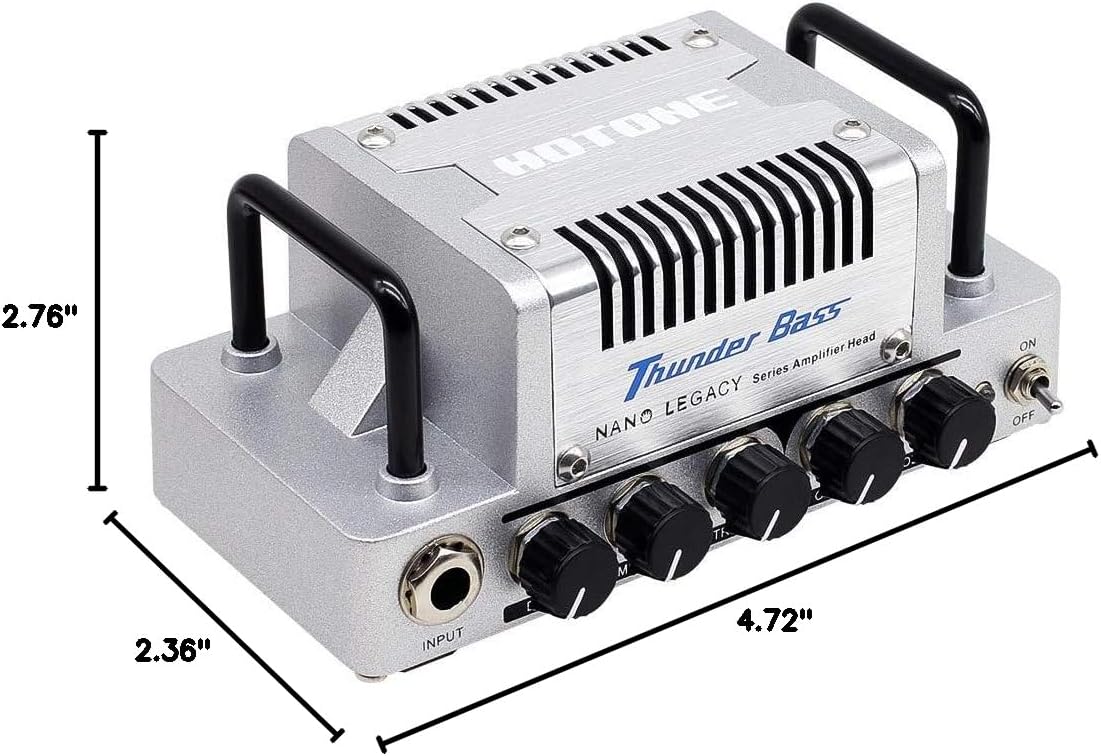
Сүрөт 3: Продукциянын өлчөмдөрү.
Кепилдик жана колдоо
The Hotone Thunder Bass Mini Bass Guitar Amplifier Head is covered by a manufacturer's warranty. For detailed warranty information, technical support, or service inquiries, please refer to the warranty card included with your product or visit the official Hotone webсайт. Сатып алганыңыздын далили катары сатып алуу дүмүрчөгүңүздү сактаңыз.


